

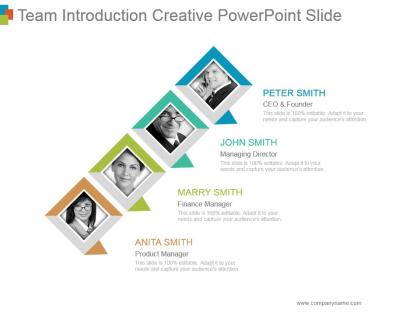
Team introduction creative powerpoint slide




Try Before you Buy Download Free Sample Product
 Impress Your
 Audience
 100%
100% Editable
 Save Hours
 of Time


Give clients cause to believe with our Team Introduction Creative Powerpoint Slide. They help define competencies.
People who downloaded this PowerPoint presentation also viewed the following :
Team introduction creative powerpoint slide with all 5 slides:
Follow the course accurately with our Team Introduction Creative Powerpoint Slide. Display good control at the helm.




FAQs for Team introduction
Effective team introduction slides should include team member names, professional titles, relevant qualifications, key responsibilities, and brief professional backgrounds or expertise areas. These elements work together to establish credibility and showcase diverse skill sets, with many organizations finding that highlighting specific achievements, educational credentials, and industry experience builds stakeholder confidence while demonstrating the team's collective capability to deliver project success.
Visual design enhances team introduction slides through strategic layout, professional photography, consistent color schemes, clear typography, and intuitive information hierarchy. These elements work together by improving readability, establishing credibility, and creating memorable first impressions, with many organizations finding that well-designed team slides significantly boost stakeholder confidence and engagement.
Creative approaches include interactive org charts with clickable role details, visual skill matrices showing competency levels, timeline presentations highlighting career progressions, infographic-style role breakdowns, and responsibility mapping diagrams. These methods enhance team understanding by clearly defining accountability structures, fostering better collaboration across departments, and ultimately delivering improved project coordination and organizational transparency.
Balancing professionalism and approachability involves combining formal credentials with personal elements like brief hobbies, team achievements, and conversational language while maintaining clean design aesthetics. Through strategic use of professional headshots alongside personality highlights, organizations create authentic connections with stakeholders, ultimately fostering trust and engagement while preserving credibility across client presentations and internal communications.
Professional headshots, illustrated avatars, uniform background portraits, candid workplace photos, and consistent visual styling work best for team member representation. These approaches enhance credibility and personal connection by maintaining visual cohesion, showcasing personality while preserving professionalism, and creating memorable impressions, with many organizations finding that consistent image quality and styling ultimately strengthens team authenticity and stakeholder trust.
Storytelling can be integrated through narrative arcs showcasing team formation journeys, individual career progression stories, and collective achievement milestones that demonstrate growth and collaboration. By weaving personal backgrounds with professional accomplishments, organizations create compelling introductions that humanize team members while highlighting expertise, ultimately building stronger stakeholder connections and trust.
Common pitfalls include overcrowding slides with excessive text, using unprofessional photos, focusing solely on credentials without showing personality, and creating inconsistent formatting across team members. These mistakes undermine credibility and audience engagement, with many organizations finding that balanced presentations combining professional achievements with personal insights ultimately deliver stronger connections and enhanced trust-building opportunities.
A team introduction slide establishes credibility, expertise, and professionalism from the outset, immediately building audience confidence and trust in your message. By showcasing relevant qualifications, diverse skills, and track records, it positions your team as authoritative voices while creating personal connections that enhance engagement, ultimately making audiences more receptive to recommendations and proposals throughout the presentation.
Color psychology significantly influences team introduction slides by establishing emotional connections, reinforcing brand identity, conveying professionalism, and enhancing visual hierarchy through strategic color placement. These psychological principles streamline audience engagement by building trust through consistent branding, improving information retention, and creating memorable first impressions, with many organizations finding that thoughtful color choices ultimately deliver stronger team credibility and enhanced presentation impact.
Present diverse teams through strategic organization by functional roles, expertise areas, geographical locations, and project contributions, using visual hierarchies, color coding, or department groupings for clarity. This approach enables viewers to quickly understand team composition while highlighting complementary skills and cross-functional collaboration, ultimately demonstrating comprehensive project coverage and strategic resource allocation.
**INPUT**: What are the best practices for including contact information in a team introduction slide? **OUTPUT**: Best practices include displaying professional email addresses, LinkedIn profiles, direct phone numbers, and relevant social media handles in a clean, scannable format. These contact methods enhance networking opportunities and client accessibility, with many organizations finding that strategically placed contact information streamlines follow-up communications and ultimately delivers stronger professional connections and business development opportunities.
Tailoring team introduction slides involves adjusting member selections, highlighting relevant expertise, emphasizing audience-specific achievements, and customizing role descriptions to match stakeholder interests. For investors, emphasize leadership experience and previous successes, while client presentations focus on project-relevant skills and industry knowledge, ultimately delivering targeted credibility that resonates with each audience's priorities and concerns.
**INPUT**: What tools or software are recommended for designing a visually appealing team introduction slide? **OUTPUT**: Recommended design tools include PowerPoint, Canva, Adobe Creative Suite, Google Slides, and Figma, each offering templates, graphics libraries, and collaboration features. These platforms streamline professional presentation creation by providing drag-and-drop interfaces, brand consistency tools, and responsive templates, with many organizations finding that integrated design systems ultimately enhance team credibility and audience engagement.
Including team achievements and milestones on introduction slides significantly enhances credibility by showcasing proven track records, relevant expertise, and successful project completions that directly relate to current objectives. Strategic milestone inclusion, such as revenue growth figures, successful product launches, or industry recognition, builds stakeholder confidence while demonstrating the team's capability to deliver results, ultimately strengthening presentation impact and audience trust.
Notable companies like Google showcase team members with professional photos, key achievements, and LinkedIn profiles, while companies like Airbnb emphasize diverse backgrounds and unique expertise alongside visual storytelling elements. These approaches enhance credibility by highlighting relevant experience, educational backgrounds, and previous successes, with many organizations finding that combining personal elements with professional accomplishments creates stronger stakeholder confidence and trust.
-
Very well designed and informative templates.
-
Great designs, really helpful.