

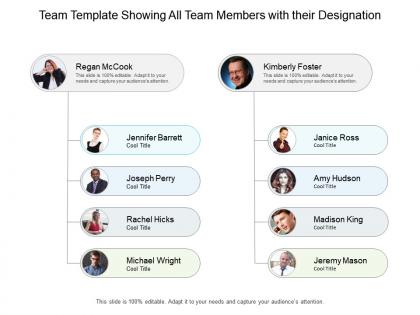
Team template showing all team members with their designation




Try Before you Buy Download Free Sample Product
 Impress Your
 Audience
 100%
100% Editable
 Save Hours
 of Time


Address jarring aspects with our Team Template Showing All Team Members With Their Designation. Increase the acceptability of your ideas.
People who downloaded this PowerPoint presentation also viewed the following :
Team template showing all team members with their designation with all 6 slides:
Increase the acceptability of your ideas with our Team Template Showing All Team Members With Their Designation. Be able to address jarring aspects.


FAQs for Team template showing all team members
Start with the basics - names, titles, contact info, department. Photos are clutch for remembering faces. Location and time zones matter if people work remotely. Quick bios or fun facts help too, though some people get weird about sharing personal stuff. Skills tags are honestly a lifesaver when you're desperately searching for someone who knows Python. Don't skip pronouns either. The real trick is making everything searchable and actually keeping it current - I've seen too many employee directories turn into graveyards of outdated info that nobody bothers using.
Honestly, you should totally set one up. Having everyone's roles, time zones, and contact info in one spot is a game changer when you can't just walk over to someone's desk. No more "wait, who deals with that again?" moments that kill your momentum. Photos help too – I still mix up names sometimes on big teams. You'll stop playing email tag trying to hunt down the right person, and it's way easier to see who has what expertise for projects. Just include their preferred ways to reach them because some people hate being Slacked at random times. Trust me, it saves so much hassle.
Honestly, go with a clean grid layout - makes it super easy to scan through everyone quickly. Keep photo sizes consistent and use plenty of whitespace so it doesn't look cramped. High-quality headshots with matching backgrounds are key, plus you'll want role, department, and contact info visible right away. Search and filters are a must (trust me on this one, scrolling through hundreds of people is painful). Skip any fancy animations - they just make things laggy. Oh, and design for mobile first since that's probably how most people will actually use it.
Quarterly updates are the bare minimum, but monthly is way better if you can manage it. People are constantly switching roles, joining teams, or leaving entirely - happens more often than you'd expect. I've watched directories become completely useless because nobody maintained them. Set up a calendar reminder to check contact info, titles, and team assignments regularly. Oh, and get people to actually tell you when their details change instead of waiting around. Nothing sucks more than desperately needing to reach someone only to discover their phone's been dead for months.
So for the presentation, definitely do a grid with headshots, names, and titles - people are way better at remembering faces than names anyway. Keep it visual, not text-heavy. If your team's huge, maybe group by department so it doesn't look like a yearbook explosion. Oh, and add a quick one-liner about what each person actually does or their expertise. Test the font size beforehand too - you don't want people squinting from the back row. Honestly, the photos do most of the heavy lifting here since that's how people will connect during the actual meeting.
Oh totally! Screen reader support is a must - plus keyboard navigation for people who can't use a mouse. Voice search would be amazing too, like "find Sarah from marketing" instead of endless scrolling. Mobile optimization is obvious since everyone's on their phones constantly. Add photo alt text and department filters while you're at it. Adjustable text sizes help a ton. Honestly though? Just test it with real users who have different needs. They'll spot stuff you'd never notice - I learned that the hard way on my last project.
Oh definitely add photos and bios! Makes such a huge difference. People actually remember who's who instead of just seeing random names in emails. Short bios work best - highlight key skills and maybe a fun fact or hobby. It's way easier to find the right person when you need help with something specific. Honestly, most company directories are so boring and sterile. This makes everyone feel more human and recognized. Your networking across departments will improve too since people can connect faces with expertise. Just don't make the bios too long or nobody reads them.
Honestly, just stick to the basics - name, job title, department, work email/phone. Don't put home addresses or personal stuff unless you absolutely have to. Always ask people before adding them (trust me, they'll appreciate it). Set it up so only current employees can see it, and maybe audit access when people quit or whatever. Oh, and use something secure with decent encryption - treat it like sensitive data because it is. Back everything up properly too. I learned this the hard way at my last job when we had zero security controls and it was a mess.
Oh man, team directories are seriously clutch for onboarding! New people always get that deer-in-headlights look when they need help but don't know who to bug. A solid directory shows everyone's role, contact stuff, and what they're good at. Photos help too - way less weird reaching out to someone when you've seen their face. Though honestly, half the directories I've seen are outdated disasters with people who left months ago still listed. Just make sure yours actually has enough detail so newbies can track down the right person instead of bothering random folks.
Oh definitely! Skip the boring headshots and job titles thing. Ask your team what they actually want to share - like hobbies, pronouns, fun facts, whatever feels right for your vibe. We did pet photos once and honestly everyone loved it way more than expected. You can show off diversity naturally, or highlight how teams work together if that's your thing. The whole point is making it feel authentically like your company, not some corporate template. What matters is that it actually represents who you all are.
Don't overcomplicate it - people just want to find someone's email and job title fast. Mobile compatibility is huge since everyone's searching on their phones between meetings. Oh, and please update those photos regularly... nothing's more awkward than not recognizing a coworker because their headshot is from 2019. Simple search bar works way better than fancy filters nobody uses. Put it somewhere obvious on your intranet, not buried under five menu clicks. The real challenge? Getting people to actually keep their info current, but that's a whole other problem.
Honestly, just ask your team what sucks about the directory right now. Sarah's gonna tell you she can't find anyone's time zones. Jake will complain about confusing project assignments. You'll start seeing patterns in what people actually need vs what you built. Super simple - throw up a Slack thread or whatever and ask for real feedback. Then actually fix the stuff they mention (this part's key because everyone ignores feedback). Way better than guessing what's broken. Your directory will go from being that thing nobody uses to something people actually find helpful.
Yeah definitely do both! Most people search by role first - like "where's our lead dev" - so I'd make that your main setup. Project tags are clutch though, saves you from bugging someone who's already drowning in another project. Short sentences work better than I expected when I set ours up last year. You can tag people with multiple categories in most tools anyway. Set up role as the primary thing, then add project filters so people can sort however they want. Trust me, the combo approach is way more helpful than picking just one.
So definitely cover the basics - names, roles, departments, contact info. Add pronouns and time zones too since that stuff actually matters now. Photos are clutch because it's super weird talking to nameless video squares all day. Languages spoken and working hours help avoid those 6am "quick question" messages. Oh, and preferred communication methods - some people hate Slack, others live on it. Cultural backgrounds or random fun facts are cool for bonding but make those optional. I'd honestly start simple with must-haves then see what your team actually needs.
Honestly, a solid team directory saves you from so many headaches. No more "wait, who's supposed to be doing this?" confusion when everyone's roles and contact info are right there. People actually step up more when their responsibilities are spelled out clearly - funny how that works. You'll also stop overcommitting on deadlines because you can see who's actually available and what they're good at. Makes it way easier to know who needs to sign off on stuff too. I'd start by just writing down what everyone currently does - you'll probably find some weird gaps or people doing the same thing twice.
No Reviews