

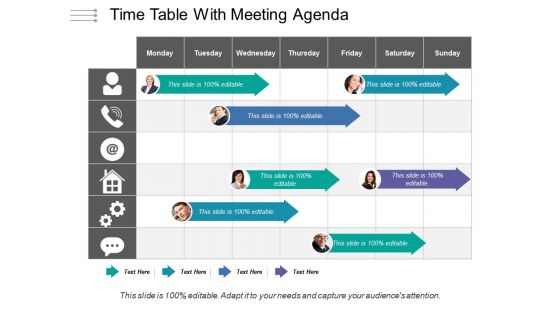
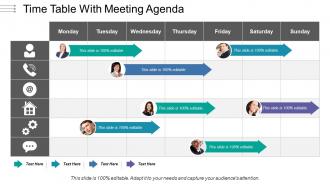
Time table with meeting agenda




Try Before you Buy Download Free Sample Product
 Impress Your
 Audience
 100%
100% Editable
 Save Hours
 of Time


Get folks interested with our Time Table With Meeting Agenda. Declare a host of attractive incentives.
People who downloaded this PowerPoint presentation also viewed the following :
Time table with meeting agenda with all 5 slides:
Decipher the judgement with our Time Table With Meeting Agenda. Explain the intent behind each clause.

FAQs for Time table
Start with the obvious stuff - clear time slots, who's doing what, and make those dates super visible since everyone looks for those first. Buffer time is crucial because literally everything runs late. Color coding helps a ton for quick scanning. Oh, and definitely include contact info for key people plus a notes section for dependencies or weird context stuff. The real test? Someone should get it in 30 seconds max, otherwise you've overcomplicated it.
Dude, color-coding is a game changer for timetables. I'm talking different colors for each subject or time block - your brain picks up patterns instantly instead of drowning in boring text rows. Charts work well too if you want to see how crazy your week actually looks. Icons are clutch for stuff that repeats, like meetings or gym sessions (though I always forget to use them myself). The whole point is making it scannable. Nobody wants to read every single line when they're rushing between classes. Trust me, try some basic color coding next time and you'll wonder why you didn't do it sooner.
Honestly, just stick to 15-30 minute blocks in a simple grid - days across the top, times going down. Bold headers are clutch so people can actually read the thing. I'm obsessed with color coding but don't go overboard and make it look like a kindergarten art project. Give yourself buffer time between stuff because something always runs long. White space is underrated too - cramped schedules stress everyone out. The real test? Show it to a coworker first. If they can't find what they need in like 3 seconds, you've overcomplicated it.
Honestly, color choice can make or break your timetable. I made this disaster schedule once with gray text on white - total nightmare to read. High contrast is everything here. Bright, contrasting colors help people instantly spot different time slots or classes. Without good contrast, it all becomes this blurry mess nobody wants to deal with. Oh, and don't forget about colorblind folks - like 8% of guys can't distinguish red/green properly. Run it through one of those contrast checkers online first. Test it with a couple people before you finalize anything.
Microsoft Project's solid if you want the full dependency tracking thing, but honestly? I just use Google Sheets for most of my scheduling stuff these days - probably more than I should lol. Airtable's nice too since everyone can jump in and edit. Oh, and Notion lets you build custom databases which is pretty cool. Class schedules specifically? Check out FET or Mimosa. Really though, whatever your team already knows how to use is gonna be your best bet. You can always upgrade later if you outgrow it.
Honestly, the worst thing you can do is jam-pack your timetable with every tiny detail. People's eyes just glaze over. Stick to what they actually need to know and leave some breathing room between stuff - trust me, everything runs behind schedule. I learned this the hard way at our last conference. Make your times realistic, not wishful thinking. Include start/end times and locations if people need to move around. Oh, and run it by someone else first because what's obvious to you might be total gibberish to them. Short version: clean and simple wins every time.
So basically, you gotta match your timeline to whoever's looking at it. Executives just want the big picture stuff - key dates, budget hits, major milestones. Project teams need way more detail though, like every little task and how they connect. Students are totally different - they need visual stuff that clearly shows what they're supposed to learn. Clients? They honestly just care about deliverables and when they can give feedback. Oh and format matters too - some people are obsessed with Gantt charts, others hate them and want simple lists instead. Just think about what decisions they need to make, then organize everything around that.
Honestly, time management makes or breaks your whole timetable. First thing - track what you actually do for like a week because we're all terrible at guessing how long stuff takes. I used to think I could write essays in 2 hours... yeah right. Build in extra time for when things go sideways, which they will. Also figure out when you're actually productive vs when your brain's basically mush. Don't schedule hard tasks during your zombie hours. Work with your real patterns, not some perfect version of yourself that doesn't exist.
Try Google Calendar or Toggl Plan - they'll catch scheduling conflicts automatically and send reminders. Way better than wrestling with Excel spreadsheets, trust me. The drag-and-drop stuff alone saves tons of time. Share calendars so everyone sees updates instantly, or set up dashboards that refresh in real-time. I'd honestly start simple with just sharing a Google Calendar between your team. You can always connect it to Slack later for notifications when things change. Once everyone has live access to the same schedule, coordination gets so much easier.
So static timetables are just those old PDF schedules or printed ones you'd see at bus stops - fixed times, no updates. Interactive ones are the apps where you can search routes, see delays in real time, all that good stuff. Honestly, interactive is the way to go for most situations. Your users can filter by their specific needs, get push notifications about delays. Way more convenient. Static ones only really win when the internet craps out, but that's pretty rare these days. I'd say go interactive unless your audience has spotty connectivity or specifically needs offline access for some reason.
Start with fonts that don't make people squint - clean, readable stuff with consistent spacing. Group related info together logically. Color coding? Yeah, it helps distinguish categories or time slots, but honestly don't turn it into a circus poster. Nobody needs that headache. Give everything room to breathe - cramming text together kills even the best design. Here's the thing though: test it with real people first. What makes perfect sense to you might confuse everyone else. Function beats pretty every time, so nail that down, then add the visual touches that actually help instead of just looking cool.
Walk through the timeline visually instead of just rattling off dates - people's eyes glaze over otherwise. Highlight the big milestones and flag any sketchy deadlines right away. Honestly, most people tune out unless you explain how it affects their specific work, so add a "what this means for you" bit. Don't just ask "any questions?" at the end - that's useless. Try "does this delivery date actually work for your team?" Ask real questions throughout. Oh, and send the digital version right after the meeting. You know someone's gonna ask for it later anyway.
Honestly, just build in regular check-ins from the start - weekly or every couple weeks works. Mid-project feedback is gold compared to waiting until everything's already done. Ask people what's actually working and what's driving them crazy. I usually do quick surveys after big milestones too, focusing on timing and workload stuff. Document the complaints you keep hearing - those patterns tell you everything. The trick is making it automatic, not crossing your fingers that someone will randomly speak up when things go sideways. Oh, and keep the surveys short or people won't bother.
Honestly, try a circular layout instead of boring grids - works amazing for weekly stuff. Color-coding your time blocks is clutch for separating subjects or whatever's most important. Don't go overboard with crazy fonts though, I learned that the hard way lol. You could do kanban columns or timeline style too depending on what you're tracking. Oh and gradient backgrounds look pretty sick if you're into that. My take? Just pick ONE cool element and don't overcomplicate the rest. Keep it readable or you'll hate using it later.
Oh man, this is so true! Different cultures handle timing completely differently. Some places expect you to be super precise with schedules, while others are way more chill about general time blocks. You can't just take a US schedule and plop it into the Middle East - that's asking for trouble. Religious stuff, holidays, even when people eat varies tons between regions. Plus work-life balance? Totally different expectations everywhere. My advice: dig into the specific cultural norms first, then build in extra buffer time. Some cultures are punctual to the minute, others... not so much.
-
Great quality product.
-
Very unique, user-friendly presentation interface.