

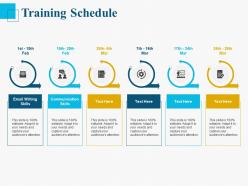
Training schedule ppt powerpoint presentation samples





Try Before you Buy Download Free Sample Product
 Impress Your
 Audience
 100%
100% Editable
 Save Hours
 of Time


Our Training Schedule Ppt Powerpoint Presentation Samples are explicit and effective. They combine clarity and concise expression.
People who downloaded this PowerPoint presentation also viewed the following :
Training schedule ppt powerpoint presentation samples with all 2 slides:
Give your audience a fulfilling experience. They will find our Training Schedule Ppt Powerpoint Presentation Samples elevating.
FAQs for Training schedule ppt
Honestly, it comes down to whether people can actually show up and focus. Don't cram everything into one brutal day - I've seen that backfire so many times. Morning sessions are clutch for harder stuff when everyone's brain still works. Also think about what else they're juggling workwise. Complex topics need breathing room between sessions so people can actually practice. Oh and definitely ask them what timing works first - I used to just pick random times that seemed logical but totally ignored when people were actually free. Survey them about preferences, then build around their real schedules.
Honestly, session length makes a huge difference. I've found 20-30 minute chunks work way better for retention - people actually pay attention instead of zoning out. Had one training where I went almost an hour without a break and could literally see people's eyes glazing over. Awkward. For hands-on stuff though? Longer sessions are fine since people stay engaged when they're doing something. But if you're dumping information on them, break it up. Even 45 minutes is pushing it sometimes. Oh, and always build in breaks - your participants will thank you for it.
Honestly, feedback is like your best friend - it'll tell you when your training sucks before everyone starts complaining behind your back. Ask people regularly through surveys or just casual conversations. Sessions too long? Content totally irrelevant to their actual work? They'll tell you if you bother asking. Quick pulse checks work great too. I swear, half the training programs I've seen crash and burn because nobody thought to ask "hey, is this actually helpful?" Use what they say to fix timing issues, make content easier or harder, whatever. Oh and always do a quick "how'd that go?" after big training sessions.
Honestly, start with just one good app for tracking your workouts - don't go crazy with a million tools at once. Fitness apps are great for logging stuff automatically and sending you those annoying but helpful reminders. Video demos are a game changer too, way better than trying to explain proper form through text. Learning management systems work well if you're doing any educational training since they space out content based on how your brain actually retains info. The trick is matching tools to what you're actually trying to accomplish. I made the mistake of downloading every fitness app ever made when I started. Pick something that fits your goals, get used to it first, then maybe add more later.
Honestly, mix it up as much as you can. Some people need to get their hands dirty with workshops, others are all about visual stuff like charts and diagrams. Don't forget discussion groups too - some folks just learn better by talking it out. I always throw in interactive breakouts between presentations because sitting through endless slides is brutal. Oh, and record sessions if possible! That way self-paced learners can go back and rewatch. The whole point is giving people different ways to absorb the same info so it actually clicks for them.
Honestly, I'd check your training stuff monthly if possible - quarterly at the bare minimum. Things move so fast now that what seemed fresh six months ago is probably already outdated. Also reassess immediately when there's big policy changes or new tech rollouts. Oh, and if people are clearly zoning out during sessions, that's your cue right there. Timing matters too - don't dump heavy training on people right before holidays because nobody's mentally there anyway. Set up some calendar reminders now for those quarterly reviews. Track your engagement numbers so you're not just guessing what's working.
Look, breaking up sessions totally works better for retention. People's brains literally start shutting down after too much info at once. I usually do 15-20 minute breaks every hour or so - maybe longer if the content's really heavy. Your participants will actually engage more instead of just zoning out (which, let's be real, happens way too often in long sessions). The breaks give them time to process stuff and ask questions before you pile on more material. Oh, and nobody wants to sit for 3 hours straight anyway. Schedule breaks right after your densest sections and you'll see the difference.
Don't just squeeze practice stuff in at the end - build it right into your timeline from day one. After covering big concepts, immediately block time for simulations or role-plays. The 70-20-10 thing is kinda helpful as a starting point, though honestly I think it depends on your group. Quick partner exercises work great too. People forget everything if they just sit there listening the whole time (learned that the hard way). Schedule those hands-on sessions like actual appointments. Trust me, your content will actually stick when they're doing the work instead of just nodding along.
Track completion rates and before/after skill tests - that's your baseline. Employee performance reviews matter too, obviously. But honestly? The soft stuff tells you way more than people think. Satisfaction surveys and retention rates are huge red flags if training sucks. I'd also watch how fast people actually use new skills on the job. Sometimes they pass the test but never apply anything, which is basically useless. Oh, and retention - are they remembering this stuff three months later? Set up some kind of monthly tracking so you can bail on programs that aren't working.
Honestly, breakout sessions and team challenges work great - just don't keep the same groups the whole time or you'll get those annoying cliques. Mix people up regularly. Give them actual time to work through complex stuff instead of rushing everything. Oh, and definitely do some kind of group challenge right on day one to set expectations early. The collaborative work has to feel necessary, not like busy work you know? Make sure teams can share what they learned with everyone else too. Longer blocks are way better than cramming activities into short bursts.
Do your first follow-up after 1-2 weeks, then hit them again at 30 days. That timing works really well for keeping stuff fresh in people's heads. I swear, so many companies just do the initial training and call it done - then act surprised when nobody remembers anything! Your third check-in should be around 60-90 days later. Keep these way shorter though, like 30 minutes tops. Skip the slide reviews and focus on actual problems they're running into. Oh, and send out a quick survey first asking what they want to cover. Makes the whole thing way more useful.
Yeah, mixing formats definitely gives you more flexibility but honestly makes coordination a nightmare. Workshop days eat up entire blocks while e-learning gets squeezed into random 30-minute chunks. Some people blaze through online stuff, others need way more hands-on time to actually absorb it. Then you're dealing with room bookings, making sure the tech works, getting instructors lined up - it's a lot. Oh and tech WILL fail at the worst possible moment. I'd say build buffer time between different sections and have backup plans ready. Trust me on that one.
Oh man, scheduling for diverse teams is tricky! First thing - survey everyone about their constraints and preferences. Time zones are obvious, but don't forget religious holidays and prayer times that might clash with your sessions. Some cultures love discussion time while others prefer quick delivery. I learned this the hard way lol. Always record everything for people who can't make it live. Try creating multiple session options if you can swing it. Also, keep your materials simple for non-native speakers - saves everyone headaches later.
Oh man, remote sessions are brutal if you go too long - I learned this the hard way. Keep them around 60-90 minutes tops because staring at screens just hits different than being in a room together. You've gotta throw in way more breaks and interactive stuff or people will zone out completely. In-person training? You can stretch it longer since the energy's better, but lean heavy into group work and hands-on activities. That's honestly the biggest perk of face-to-face. Just stay flexible with your timing and have backup plans ready for when things inevitably go sideways.
Honestly, the worst thing you can do is pack too much into one session. People's brains tap out after 90 minutes - I've watched entire rooms of people zone out. Don't do back-to-back training days either, that's just cruel. Space things out! Give them time to actually practice between concepts. Oh, and here's what really gets me - pulling people during their busiest weeks. They'll hate you for it and learn nothing. Always check their schedules first. Survey them about when they're actually free and design around their reality, not yours.
No Reviews