

Transformation map example powerpoint images




Try Before you Buy Download Free Sample Product
 Impress Your
 Audience
 100%
100% Editable
 Save Hours
 of Time


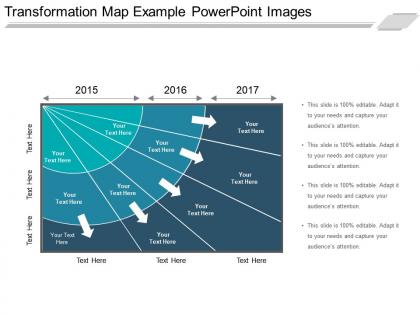
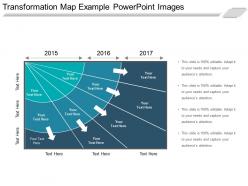
The transformation map slide for PowerPoint has a future planning design for defining the target for five different categories. The 3 year transformation map PPT template helps in determining the time scales and growth. A user can explain that an organization can demonstrate its plan as well as the expected outcome of a given target period by using our transformation map presentation slide. The transformation map design template for presentation consists of diagonal lines, and it also helps in creating a timeline as well as the presentation on that. The diagonal lines of this transformation map model PPT template illustrate the light rays where the information transits from left bottom to the top right and the slide describe that it is the periodic phase conversion of plans. The three year transformation map PowerPoint slide is ideal for training and workshop sessions such as orientation meeting, team briefing and many more. The phases in this map design slide displayed in chronological order whereas the categories assist in brainstorming as well as upgrading options of the strategic plan. The oval icons and arrow chevrons depict this transformation with the help of PowerPoint shapes. The basis in presenting an idea and hoping it gets understood is to present it in a consistent and clear manner. Only Transformation Map Example Powerpoint Images created by professionals can successfully achieve this.
People who downloaded this PowerPoint presentation also viewed the following :
Content of this Powerpoint Presentation
Description:
This PowerPoint slide is titled "Transformation Map Example PowerPoint Images." It features a three-year timeline from 2015 to 2017, laid out in a perspective view, giving an impression of depth. Each year has multiple connection points with space for text, indicating milestones or objectives reached within each year. The slide is designed to illustrate a progression or transformation over time with clear markers for different stages or events. It is 100% editable, as noted by the repeated text "This slide is 100% editable. Adapt it to your needs and capture your audience's attention," which prompts users to customize the slide to fit their specific presentation context.
Use Cases:
Industries where this slide could be effectively used:
1. Technology:
Use: Showcasing product development milestones.
Presenter: Product Manager.
Audience: Stakeholders and Team Members.
2. Consulting:
Use: Outlining phases of business transformation projects.
Presenter: Management Consultant.
Audience: Corporate Clients.
3. Education:
Use: Illustrating curriculum development over academic years.
Presenter: Academic Dean.
Audience: Faculty and Educational Staff.
4. Healthcare:
Use: Tracking the implementation of healthcare initiatives.
Presenter: Healthcare Administrator.
Audience: Medical Professionals and Hospital Staff.
5. Finance:
Use: Demonstrating fiscal growth or investment timelines.
Presenter: Financial Analyst.
Audience: Investors and Financial Advisors.
6. Marketing:
Use: Depicting phases of a marketing campaign.
Presenter: Marketing Director.
Audience: Marketing Team and Brand Managers.
7. Construction:
Use: Displaying project phases in construction management.
Presenter: Construction Project Manager.
Audience: Contractors and Investors.
Transformation map example powerpoint images with all 5 slides:
Consolidate your gains with our Transformation Map Example Powerpoint Images. Gather in the praises your thoughts receive.
-
Awesome use of colors and designs in product templates.
-
Informative presentations that are easily editable.
-
Visually stunning presentation, love the content.
-
Illustrative design with editable content. Exceptional value for money. Highly pleased with the product.