

Instructional Design Powerpoint Template Bundles Ppt Slides





Try Before you Buy Download Free Sample Product
 Impress Your
Audience
 100%
Editable
 Save Hours
of Time


Unlock the full potential of your training programs with our comprehensive Instructional Design PowerPoint PPT. Seamlessly navigate the intricacies of Curriculum Development, Educational Design, Learning Experience Design, and Training Design. This dynamic presentation offers a visually engaging exploration of pedagogical strategies, empowering educators and trainers to craft effective learning experiences. Dive into the nuances of instructional systems design, educational methodology, and e-learning design, ensuring your audience grasps the essence of innovative teaching practices. Elevate your training sessions with this PPT, designed to captivate and educate simultaneously, fostering a culture of continuous learning and development. Harness the power of impactful instructional design effortlessly.
People who downloaded this PowerPoint presentation also viewed the following :
Content of this Powerpoint Presentation
Slide 1: This slide introduces "Instructional Design." State your company name and begin.
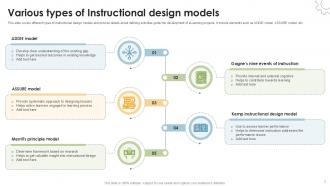
Slide 2: This slide covers different types of instructional design models and provide details about defining activities guide the development of eLearning projects.
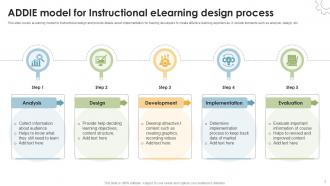
Slide 3: This slide depicts e-Learning model for instructional design and provide details about implementation for training developers to create effective learning experiences.
Slide 4: This slide highlights types of instructional design and provide details helping user integrate these skills into real-world activities.
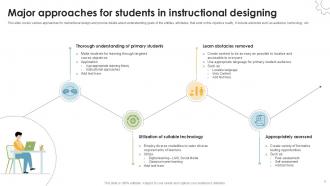
Slide 5: This slide showcases various approaches for instructional design and provide details about understanding goals of the entities, attributes.
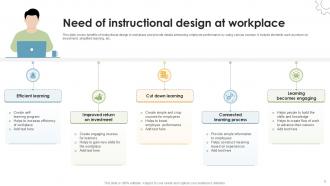
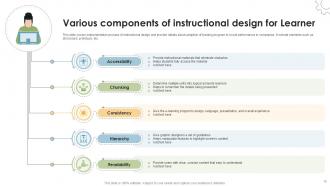
Slide 6: This slide covers benefits of instructional design in workplace and provide details enhancing employee performance by using various courses.
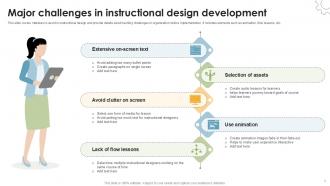
Slide 7: This slide highlights mistakes to avoid in instructional design and provide details about tackling challenges in organization before implementation.
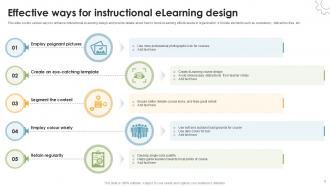
Slide 8: This slide shows various ways to enhance instructional eLearning design and provide details about how to boost eLearning effectiveness in organization.
Slide 9: This slide provides comparison of instructional design applications and provide details about selecting suitable software for organization to boost performance.
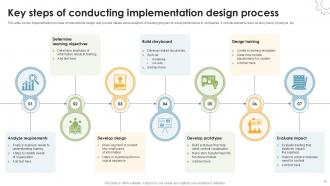
Slide 10: This slide shows implementation process of instructional design and provide details about adoption of training program to boost performance in companies.
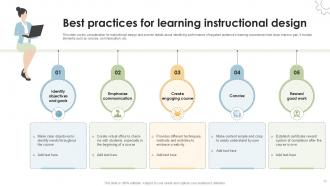
Slide 11: This slide highlights consideration for instructional design and provide details about identifying performance of targeted audience’s learning experiences.
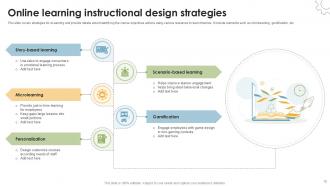
Slide 12: This slide covers strategies for eLearning and provide details about identifying the course objectives actions using various resources to learn theories.
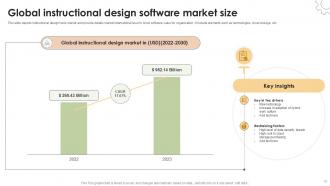
Slide 13: This slide depicts instructional design tools market and provide details market international level to know software value for organization.
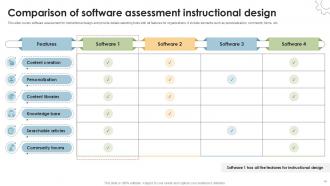
Slide 14: This slide covers software assessment for instructional design and provide details selecting tools with all features for organizations.
Slide 15: This slide exhibits implementation process of instructional design and provide details about adoption of training program to boost performance in companies.
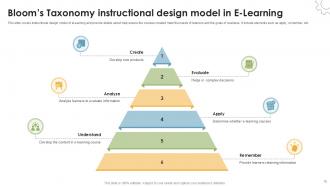
Slide 16: This slide covers instructional design model of e-Learning and provide details about help ensure the courses created meet the needs of learners and the goals of business.
Slide 17: This is Instructional design for eLearning in workplace icon slide.
Slide 18: This is Client presentation instructional design in company icon slide.
Slide 19: This is Creative instructional design using technologies icon slide.
Slide 20: This is a Thank You slide with address, contact numbers and email address.
Instructional Design Powerpoint Template Bundles Ppt Slides with all 28 slides:
Use our Instructional Design Powerpoint Template Bundles Ppt Slides to effectively help you save your valuable time. They are readymade to fit into any presentation structure.











FAQs for Instructional Design Powerpoint Template
Key principles of effective instructional design include clear learning objectives, learner-centered approaches, systematic content organization, active engagement strategies, and continuous assessment methods. These principles work together by aligning educational goals with practical outcomes, incorporating multimedia elements and interactive components, and enabling organizations to deliver consistent training experiences that enhance knowledge retention, accelerate skill development, and ultimately improve performance across diverse learning environments.
Cognitive load theory enhances learning outcomes by managing intrinsic, extraneous, and germane cognitive loads through chunking complex information, eliminating unnecessary elements, and using multimedia principles. Educational institutions and corporate training programs apply these strategies by breaking content into digestible segments, removing distracting visuals, and incorporating interactive elements, ultimately delivering improved retention rates and faster skill acquisition.
Learner analysis serves as the foundation of effective instructional design by identifying target audience characteristics, prior knowledge levels, learning preferences, technological access, and specific skill gaps. This comprehensive assessment enables instructional designers to create tailored content, select appropriate delivery methods, and develop relevant assessments, ultimately ensuring higher engagement rates and improved learning outcomes across diverse organizational training programs.
Technology enhances instructional materials through interactive simulations, multimedia content, adaptive learning platforms, virtual reality experiences, and AI-powered personalization tools. These innovations streamline content delivery, enable real-time assessments, and create immersive learning environments, with educational institutions and corporate training programs finding that technology-enhanced materials significantly improve learner engagement and knowledge retention rates.
Engaging multimedia presentations leverage interactive elements, storytelling techniques, visual consistency, audience participation features, and strategic content pacing. These strategies enhance learning outcomes by combining videos, animations, and interactive polls with clear navigation and responsive design, ultimately delivering improved knowledge retention and participant engagement, with many organizations finding that multimedia approaches significantly reduce training time while increasing comprehension rates.
Formative assessments occur during learning to monitor progress and provide ongoing feedback, while summative assessments evaluate learning outcomes at the end of instruction. Formative methods like quizzes, discussions, and peer reviews enable instructors to adjust teaching strategies in real-time, whereas summative evaluations through final exams or projects measure overall achievement, with many educational institutions finding that strategic combination enhances learning effectiveness.
Aligning learning objectives with assessments ensures that evaluations directly measure what learners are expected to achieve, creating coherent educational experiences that validate skill acquisition and knowledge retention. This strategic alignment enables instructional designers to identify learning gaps more effectively, optimize training programs based on measurable outcomes, and demonstrate clear ROI to stakeholders, ultimately delivering improved performance metrics and competitive advantage.
Instructional designers incorporate diverse learning styles by creating multi-modal content that includes visual presentations, audio narrations, hands-on simulations, interactive assessments, and collaborative group activities. This comprehensive approach enables learners across industries like healthcare training, corporate development, and educational institutions to engage with material effectively, ultimately delivering improved knowledge retention, enhanced skill application, and better learning outcomes for organizations investing in workforce development.
Best practices for creating interactive e-learning modules include clear learning objectives, multimedia integration, scenario-based learning, regular knowledge checks, and mobile-responsive design. These approaches enhance learner engagement by combining visual storytelling, hands-on simulations, and immediate feedback mechanisms, with many training departments finding that interactive elements significantly improve knowledge retention and completion rates.
Storytelling enhances instructional design by creating emotional connections, improving information retention, and making complex concepts more relatable and memorable for learners. Through narrative structures, case studies, and scenario-based learning, organizations can transform abstract training materials into engaging experiences that resonate with employees, ultimately delivering higher completion rates and better knowledge application in real-world situations.
Accessibility considerations include universal design principles, multiple content formats, clear navigation structures, alternative text for visuals, and assistive technology compatibility. These approaches streamline learning by accommodating diverse abilities, reducing barriers, and enhancing comprehension across all learners, with many educational institutions finding that accessible design ultimately delivers broader engagement and improved learning outcomes for everyone.
Current trends shaping instructional design include microlearning, adaptive learning technologies, virtual and augmented reality integration, mobile-first design approaches, and AI-powered personalization. These innovations streamline content delivery, enhance learner engagement, and optimize knowledge retention across diverse industries, with organizations increasingly finding that data-driven, flexible learning solutions deliver measurable performance improvements and competitive workforce advantages.
Feedback loops enhance instructional design by enabling continuous refinement through learner assessments, instructor observations, and performance analytics throughout development cycles. These iterative processes allow designers to identify content gaps, adjust pacing, and optimize engagement strategies, with many educational institutions and corporate training programs finding that systematic feedback integration ultimately delivers more effective learning outcomes and improved knowledge retention.
Metrics for evaluating instructional materials include completion rates, assessment scores, time-to-proficiency, knowledge retention rates, and learner satisfaction surveys. These measurements enable organizations to streamline training programs, reduce onboarding costs, and enhance employee performance, with many companies finding that data-driven instructional design ultimately delivers faster skill development and improved operational efficiency.
Collaborative learning integrates into instructional design frameworks through peer-to-peer activities, group projects, discussion forums, collaborative problem-solving exercises, and team-based assessments. These approaches enhance knowledge retention, critical thinking, and communication skills by enabling learners to share perspectives, challenge assumptions, and build understanding together, ultimately delivering more engaging educational experiences and improved learning outcomes.
-
“Detailed and great to save your time.”
-
I discovered this website through a google search, the services matched my needs perfectly and the pricing was very reasonable. I was thrilled with the product and the customer service. I will definitely use their slides again for my presentations and recommend them to other colleagues.