

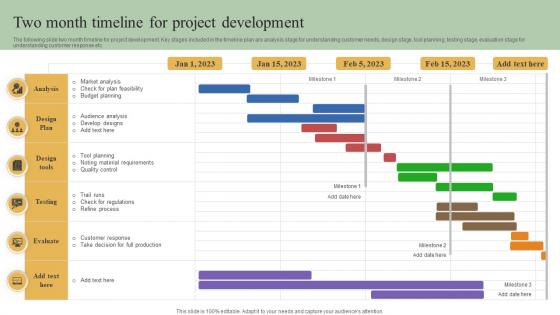
Two Month Timeline For Project Development




Try Before you Buy Download Free Sample Product
 Impress Your
 Audience
 100%
100% Editable
 Save Hours
 of Time


The following slide two month timeline for project development. Key stages included in the timeline plan are analysis stage for understanding customer needs, design stage, tool planning, testing stage, evaluation stage for understanding customer response etc.
People who downloaded this PowerPoint presentation also viewed the following :
Two Month Timeline For Project Development with all 6 slides:
Use our Two Month Timeline For Project Development to effectively help you save your valuable time. They are readymade to fit into any presentation structure.





FAQs for Two Month Timeline
Okay so for your timeline template, definitely include project phases with start/end dates, plus all the key milestones and deliverables. Don't forget dependencies between tasks - that stuff will bite you later if you miss it. Assign owners to everything too. I always add a risks section because honestly, when does anything ever go smoothly? Resource allocation and budget checkpoints are clutch if that's relevant to your project. Oh, and stakeholder review points - trust me on this one. Make it visual with Gantt charts or color coding, whatever works for your team. Just keep it detailed enough to actually help but not so crazy complicated that nobody looks at it.
Dude, your brain literally processes visuals way faster than text - that's why visual timelines work so well. I used to absolutely dread those spreadsheet nightmares too. But throw in some color coding for priorities, progress bars, maybe some icons for different teams? Game changer. You can instantly spot where things are overlapping or getting stuck. Those little milestone markers and dependency arrows make everything click. Plus when you're presenting to stakeholders (ugh, that word), they actually pay attention instead of glazing over. Try different colors for each project phase next time!
Pick colors that actually contrast - blues for planning, greens for execution, oranges for testing. Something logical like that. Milestones need bright colors (red or yellow) that'll jump out against everything else. Don't go nuts with too many colors though - 4-6 max or it looks like a kindergarten art project. Short sentences work better than long ones here. Definitely add a legend somewhere obvious. Oh, and test how it looks in grayscale first since some offices still print everything that way for whatever reason.
Honestly? Just make the Gantt chart your main visual for the whole timeline. Map out your tasks and dependencies first, then throw those onto the horizontal bars - shows duration and when stuff overlaps. Tools like Asana or Monday handle this pretty smoothly now (thank god, because it used to be a nightmare). Here's the thing though - you've gotta keep updating it when things inevitably change. And they will change. Pull up the Gantt view when you're presenting to stakeholders since it looks professional, but stick with simple list view for daily stuff. Way less overwhelming.
Dependencies literally make or break your timeline accuracy. They show what can't start until other stuff wraps up. Ignore them and you'll schedule things at the same time that actually need to happen one after another - total disaster. My first big project was a mess because of this! They also reveal your critical path, which sounds fancy but just means the longest chain of connected tasks. That chain determines how long everything takes minimum. Without mapping these connections first, you're just throwing darts at a calendar. Oh, and start by figuring out what each task actually needs before it can begin.
Dude, seriously start tracking your actual vs planned timelines right now. Even messy notes work. I keep a basic spreadsheet because I can't remember anything, but it's been a lifesaver. You'll start seeing patterns - like how testing always takes way longer than you think, or client feedback drags on forever. When you pitch new projects, you can actually back up your estimates with real data instead of just guessing. "Hey, similar projects usually need 6 weeks for this part" sounds way better than pulling numbers out of thin air. Your past screwups become planning gold, honestly.
Honestly? Just use whatever your team's already comfortable with - getting people to actually use it is way harder than picking the "perfect" tool. Microsoft Project has all the bells and whistles but it's seriously overkill unless you're managing something massive. Asana and Monday.com hit that sweet spot between useful and not overwhelming. For quick visual stuff, Lucidchart works great. Don't laugh, but I've seen people do amazing things with just Google Sheets when they're being resourceful. PowerPoint even has decent timeline templates now. The key is picking one and sticking with it instead of constantly switching around.
Honestly, just make two different timelines for the same project. Stakeholders want the big picture stuff - major milestones, budget checkpoints, key deliverables. They really don't need to know about your daily standups or when Jake's doing code reviews. Your team needs the opposite though. Get granular with specific tasks, dependencies, all the sprint details. Otherwise people won't know what they're supposed to be working on. Most project management tools let you filter by audience anyway, which saves you from awkwardly explaining why someone's PTO is going to push back your launch date. Two views, same project - way easier.
Ugh, the worst thing is when you think something will take 2 hours and it ends up being a whole day. Always check if people are actually free before putting them on your timeline - can't tell you how many times I've been burned assuming someone's available. Dependencies are sneaky too, like when Task B can't start until Task A is done but you forgot to account for that. Oh and holidays! People always forget about holidays. Honestly, just add 20% extra time to literally everything. Figure out your critical path early so you know which stuff can slide and which will totally screw you over.
Honestly, start with a template that's flexible from day one. I always build in buffer time because projects never go exactly as planned - learned that the hard way. Use something like Gantt charts in actual project management software instead of static docs, makes updating way easier. Set up version control so you can see what changed when (super helpful during those "wait, what happened here?" moments). The trick is picking tools that let you adjust dates and dependencies without everything falling apart. Oh, and schedule regular review points where changes are normal, not crisis mode.
Track schedule variance first - basically planned vs actual dates. Milestone completion rates matter too, plus how you're using resources compared to original estimates. Scope creep percentage is brutal, always worse than you think it'll be. I'd definitely compare task duration estimates to reality - that's where you learn the most for next time. Oh, and don't skip measuring stakeholder satisfaction with your delivery dates and how often you communicate. Start collecting this stuff from day one on your next project. Way better than just guessing what went sideways afterward.
Dude, deadlines are everything for project timelines. Without them you're basically showing people a random to-do list that means nothing. They create real accountability and help everyone see where things might go sideways before it's too late. Plus they force you to actually think about what's realistic - I've seen so many teams just throw tasks on a timeline without considering if it's even doable. Make the critical ones pop visually with colors or bold text. Trust me, stakeholders need to see urgency spelled out clearly or they'll just zone out during your presentation.
Color coding is your best friend here - different colors for phases or team members makes everything way clearer. Bold your key milestones or throw some icons on there. Progress bars showing percentage complete are clutch because people love seeing actual movement. Swimlanes work great for separating different workstreams too. Honestly, most Gantt charts look like boring spreadsheets, so don't hold back on making yours visual. Drop in quick status notes or risk flags right on the timeline. Your goal? Anyone should glance at it and instantly get what's happening and what's broken.
Honestly, just bake the collaboration stuff right into your timeline instead of treating it separately. Schedule your sync meetings and review periods like actual deadlines - not just "nice to have" things. Remote teams crash and burn without this structure, trust me. Use Slack for daily check-ins, Miro for brainstorming, shared docs for feedback - but tie everything to your deliverable dates. Block time for different time zones too so people can actually work together in real-time. Oh and map out which tools you'll use for each project phase. Start doing that this week or you'll forget.
Honestly, I'd go with 3-6 months for most projects. Short enough that you're not constantly updating outdated stuff, but long enough to actually show progress. Anything under 3 months gets way too stressful to keep up with. Goes longer than 6? People stop believing it'll happen. Big projects are different though - break those into chunks and timeline each phase separately. I always start with the major deadlines and work backwards. Oh, and base your estimates on what your team can actually handle, not what you wish they could do. That's where most timelines fall apart.
-
The best collection of PPT templates!! Totally worth the money.
-
Easily Editable.