

UI UX Design Mobile Application App developer playbook




Try Before you Buy Download Free Sample Product
 Impress Your
 Audience
 100%
100% Editable
 Save Hours
 of Time


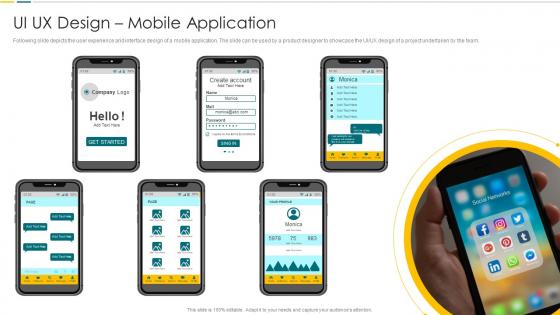
Following slide depicts the user experience and interface design of a mobile application. The slide can be used by a product designer to showcase the UI UX design of a project undertaken by the team.
People who downloaded this PowerPoint presentation also viewed the following :
UI UX Design Mobile Application App developer playbook with all 6 slides:
Use our UI UX Design Mobile Application App developer playbook to effectively help you save your valuable time. They are readymade to fit into any presentation structure.





FAQs for UI UX Design Mobile Application
UI focuses on visual elements like buttons, colors, typography, and layouts that users directly interact with, while UX encompasses the entire user journey, including research, wireframing, user flows, and overall satisfaction. In mobile app development, UI designers create the aesthetic interface components, whereas UX designers optimize navigation patterns, information architecture, and user behavior analysis, with many developers finding that strategic integration of both disciplines ultimately delivers more intuitive apps and higher user retention rates.
User personas influence mobile app UI/UX design by guiding interface layouts, navigation structures, feature prioritization, content strategy, and visual elements to match specific user behaviors and preferences. These research-based profiles enable designers to create targeted experiences across retail, healthcare, and financial apps, ultimately delivering higher user engagement, reduced development costs, and improved conversion rates through strategic user-centered design decisions.
Mobile usability testing plays a crucial role by identifying navigation issues, interface problems, performance bottlenecks, and user experience gaps through real user interactions and feedback. This process enables developers to streamline app functionality, enhance user satisfaction, and reduce abandonment rates, with many companies in retail, banking, and healthcare finding that systematic testing ultimately delivers higher engagement and competitive advantage.
Typography significantly impacts mobile user experience through readability, visual hierarchy, brand consistency, and emotional response. Strategic font choices, sizing, and spacing enhance navigation clarity, reduce cognitive load, and improve accessibility across different screen sizes, with many mobile applications finding that thoughtful typography increases user engagement and reduces abandonment rates while strengthening brand recognition.
Common mobile app UI design pitfalls include cluttered interfaces, inconsistent navigation patterns, poor touch target sizing, inadequate loading feedback, and ignoring platform-specific guidelines. These issues significantly impact user experience by creating confusion, reducing accessibility, and increasing abandonment rates, with many successful apps finding that streamlined design, clear visual hierarchy, and intuitive interactions ultimately deliver higher engagement and better retention rates.
Color schemes significantly influence user engagement and retention by affecting emotional responses, brand recognition, readability, and overall user experience. Strategic color choices enhance usability through improved navigation clarity, reduce eye strain during extended use, and create psychological associations that encourage return visits, with many mobile app developers finding that cohesive color palettes increase session duration and user loyalty.
Recommended mobile app UI/UX design tools include Figma, Sketch, Adobe XD, Principle, and InVision Studio for interface creation and prototyping. These platforms streamline design workflows by enabling real-time collaboration, interactive prototyping, and seamless developer handoffs, with many app development teams finding that integrated design systems ultimately accelerate time-to-market and enhance user experiences.
Designers can ensure accessibility standards by implementing voice commands, screen reader compatibility, high contrast modes, adjustable font sizes, and touch-friendly navigation elements. Through inclusive design principles, mobile applications deliver seamless experiences for users with disabilities while enhancing usability for all users, ultimately expanding market reach and ensuring regulatory compliance across industries.
Responsive design ensures mobile apps function seamlessly across different devices, screen sizes, and orientations by automatically adjusting layouts, content, and interactive elements. This approach enhances user experiences, reduces development costs, and maximizes market reach, with businesses in retail, banking, and healthcare finding that responsive apps deliver higher engagement rates and broader accessibility across diverse user bases.
Animation enhances mobile app user experience by providing visual feedback, guiding user attention, creating smooth transitions, and making interactions feel intuitive and responsive. Through carefully designed micro-interactions and motion design, apps deliver improved usability, reduced cognitive load, and increased user engagement, with many businesses finding that strategic animation ultimately boosts retention rates and customer satisfaction.
Best practices for mobile app navigation include intuitive menu structures, consistent visual cues, clear breadcrumbs, minimized tap depth, and strategic use of gestures like swipe and pinch. These approaches streamline user journeys by reducing cognitive load, maintaining familiar patterns, and ensuring seamless transitions, with many successful apps finding that simplified navigation significantly enhances user retention and engagement rates.
User feedback shapes iterative mobile app UX design by identifying pain points, validating design decisions, and revealing usage patterns through analytics, surveys, and usability testing. These insights enable designers to refine interfaces, streamline user flows, and enhance functionality across development cycles, with many app developers finding that continuous feedback integration ultimately delivers higher user satisfaction and reduced abandonment rates.
Effective onboarding strategies include progressive disclosure, interactive tutorials, contextual guidance, personalized welcome flows, and minimal registration requirements. These approaches streamline user adoption by reducing cognitive load, highlighting core features gradually, and demonstrating immediate value, with many mobile apps finding that simplified onboarding significantly increases user retention and engagement rates.
Design trends significantly influence user expectations by establishing visual standards, interaction patterns, and functional norms that users encounter across multiple applications. When trends like minimalist interfaces, gesture-based navigation, or dark mode become widespread in popular apps, users naturally expect similar experiences elsewhere, with businesses finding that staying current with design trends enhances user satisfaction and competitive positioning.
Key metrics include user engagement rates, session duration, conversion rates, task completion rates, and user retention percentages. Through analytics tools, mobile apps track bounce rates, navigation patterns, and feature adoption across different user segments, with many successful applications finding that combining usability metrics with business KPIs delivers comprehensive insights into both user satisfaction and commercial performance.
-
Extensive range of templates! Highly impressed with the quality of the designs.
-
The way SlideTeam professionals work is exceptional. Thanks for being so helpful!