

UI UX Design Mobile Application Playbook For App Design And Development




Try Before you Buy Download Free Sample Product
 Impress Your
 Audience
 100%
100% Editable
 Save Hours
 of Time


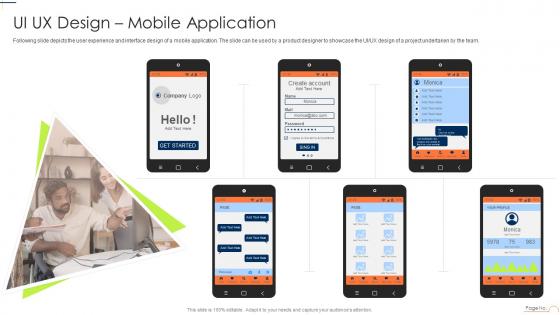
Following slide depicts the user experience and interface design of a mobile application. The slide can be used by a product designer to showcase the UI UX design of a project undertaken by the team.
People who downloaded this PowerPoint presentation also viewed the following :
UI UX Design Mobile Application Playbook For App Design And Development with all 6 slides:
Use our UI UX Design Mobile Application Playbook For App Design And Development to effectively help you save your valuable time. They are readymade to fit into any presentation structure.





FAQs for UI UX Design Mobile Application Playbook For App
UI design focuses on visual elements, layouts, typography, colors, and interactive components, while UX design encompasses user research, information architecture, wireframing, and overall user journey optimization. Both are essential because UI delivers the aesthetic appeal and usability that users interact with directly, while UX ensures the underlying structure meets user needs and business objectives, with successful digital products requiring this strategic combination to achieve competitive advantage and user satisfaction.
User personas influence UI/UX design by guiding interface layouts, navigation structures, content hierarchy, feature prioritization, and visual aesthetics to match specific user needs and behaviors. Through persona-driven design decisions, teams create targeted user journeys, streamline functionality, and optimize experiences for distinct user groups, with many companies finding that persona-based approaches significantly enhance user engagement and reduce development costs.
Color psychology in UI/UX design influences user emotions, decision-making, and brand perception through strategic hue selection, contrast optimization, and cultural color associations. By leveraging psychological triggers, designers enhance user engagement and conversion rates, with e-commerce platforms finding that strategic color choices increase click-through rates and purchase decisions, ultimately delivering improved user experiences and competitive advantage.
Wireframing and prototyping enhance UI/UX design workflow by enabling early concept visualization, facilitating stakeholder feedback, identifying usability issues before development, and reducing costly revisions. These foundational processes streamline design iterations, improve team collaboration, and ensure user-centered solutions, with many design teams finding that strategic prototyping accelerates project timelines while delivering superior user experiences.
Effective user research methods include user interviews, usability testing, surveys, analytics analysis, and persona development. These approaches streamline design decisions by revealing user behaviors, identifying pain points, and validating design concepts, with many design teams finding that combining multiple methods delivers more accurate insights and ultimately enhances user experiences while reducing costly redesigns.
Accessibility guidelines shape UI/UX design by requiring inclusive color contrasts, keyboard navigation support, screen reader compatibility, and flexible text sizing throughout the development process. These standards enable designers to create interfaces that serve users with visual, auditory, or motor impairments, ultimately delivering broader market reach and enhanced user experiences across diverse demographics.
Best practices for intuitive navigation include clear menu hierarchies, consistent placement patterns, descriptive labeling, breadcrumb trails, and prominent search functionality. These approaches streamline user experiences by reducing cognitive load, minimizing clicks to key content, and providing multiple pathways to information, with many e-commerce and service platforms finding that strategic navigation design significantly increases user engagement and conversion rates.
Responsive design significantly enhances user experience by automatically adapting layouts, navigation, and content to different screen sizes and device capabilities. This approach ensures consistent functionality and visual appeal across smartphones, tablets, and desktops, with many businesses finding that responsive interfaces reduce bounce rates, increase engagement, and ultimately deliver seamless customer interactions regardless of device choice.
Popular UI/UX design tools include Figma, Sketch, Adobe XD, InVision, and Axure RP, each offering distinct capabilities for wireframing, prototyping, and collaborative design workflows. These platforms streamline the design process by enabling real-time collaboration, interactive prototyping, and seamless handoffs to development teams, with many design agencies finding that strategic tool selection significantly enhances project efficiency and client satisfaction.
Designers ensure consistency by establishing comprehensive design systems with standardized color palettes, typography, spacing guidelines, component libraries, and interaction patterns. These systems enable teams to maintain unified brand experiences across web, mobile, and desktop platforms, while responsive design frameworks and regular design audits help organizations deliver seamless user experiences that strengthen brand recognition.
Common UI/UX design mistakes include inconsistent navigation patterns, cluttered interfaces, poor mobile responsiveness, inadequate user testing, and ignoring accessibility standards. These oversights significantly impact user adoption and business outcomes, with many companies finding that streamlined interfaces, intuitive workflows, and comprehensive testing ultimately deliver higher conversion rates, reduced support costs, and enhanced competitive advantage.
A/B testing enhances UI/UX design effectiveness by comparing different interface versions with real users, measuring engagement metrics, conversion rates, and user behavior patterns. Through systematic testing of elements like button placement, color schemes, and navigation flows, companies streamline user experiences, reduce bounce rates, and increase conversions, with many organizations finding that data-driven design decisions ultimately deliver significantly higher user satisfaction and business performance.
User feedback can be integrated through surveys, usability testing sessions, A/B testing, user interviews, and analytics tracking throughout development cycles. These methods enable designers to identify pain points, validate design decisions, and refine interfaces continuously, with many organizations finding that regular feedback loops significantly reduce development costs while enhancing user satisfaction and product adoption rates.
UI/UX design trends evolve through technological advances, user behavior shifts, accessibility requirements, and emerging platforms like AR/VR and voice interfaces. Designers should monitor emerging technologies, changing demographics, cross-platform consistency needs, and sustainability considerations, with many design teams finding that staying ahead of micro-interactions, inclusive design principles, and data-driven personalization ultimately delivers competitive advantage in increasingly digital markets.
Collaboration between UI/UX designers and developers ensures seamless translation of design concepts into functional products, minimizing costly revisions and accelerating time-to-market. This strategic partnership enables early technical feasibility discussions, consistent design implementation, and iterative problem-solving, with many organizations finding that integrated teams deliver superior user experiences while reducing development costs by up to 30%.
-
They saved me a lot of time because they had exactly what I was looking for. Couldn’t be happier!
-
If you are looking for satisfactory PowerPoint services, SlideTeam is your go-to place. I am fully contented with their research and development team.