

Unschool Company Profile Powerpoint Presentation Slides





Try Before you Buy Download Free Sample Product
 Impress Your
 Audience
 100%
100% Editable
 Save Hours
 of Time


A company profile is a written introduction to an organization that informs the reader about its business activities, mission, goals, strengths, and future plans. It also includes the timeline of the firms history and details of its founding members. This Unschool Company Profile covers an executive summary illustrating a brief introduction to business operations, annual revenue, upcoming courses, number of industry experts, internship partners, and total active learners. It also provides a company overview highlighting service differentiation provided by the company, total funding, placement rate, course completion rate, website, company size, headquarters, and specialties. Furthermore, the slides include the mission, vision, and motto of Unschool learning. It also highlights a comprehensive business model canvas, historical timeline, and Unschool learning process. Moreover, the module shows top course categories, a list of courses offered, internship programs, internship partners, a coaching community, industry expert companies, and testimonials. Additionally, it covers key statistics, funding and investment, management team, awards and recognition, total subscribers, competitors comparison, future plans, and contact details. Download our 100 percentage editable company profile and get access to our highly researched and skillfully designed products.
People who downloaded this PowerPoint presentation also viewed the following :
Content of this Powerpoint Presentation
Slide 1: This slide introduces Unschool Company Profile. State your company name and begin.
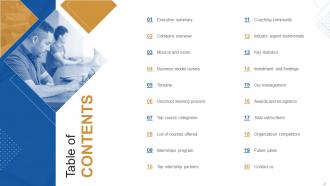
Slide 2: This slide shows Table of Content for the presentation.
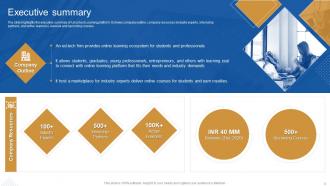
Slide 3: The slide highlights the executive summary of Unschool Learning platform.
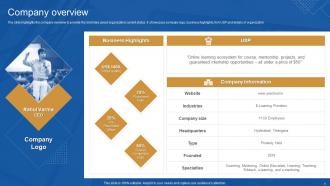
Slide 4: This slide presents company overview to provide the brief idea about organization current status.
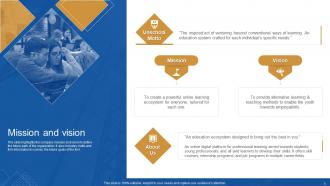
Slide 5: This slide displays company mission and vision to define the future path of the organization.
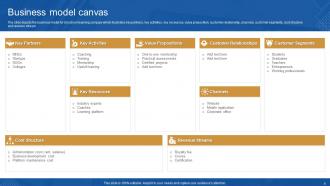
Slide 6: The slide depicts the business model for Unschool learning company.
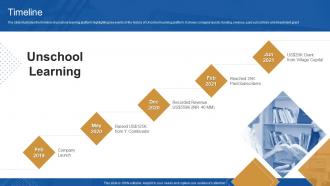
Slide 7: The slide illustrates the timeline of unschool learning platform.
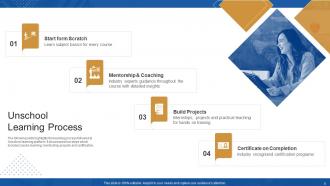
Slide 8: The following slide highlights the learning process followed at Unschool learning platform.
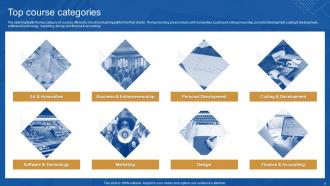
Slide 9: This slide represents top category of courses offered by Unschool learning platform to their clients.
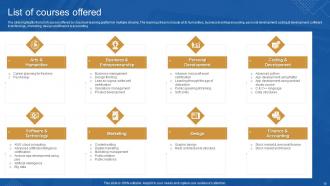
Slide 10: The slide highlights the list of courses offered by Unschool learning platform in multiple streams.
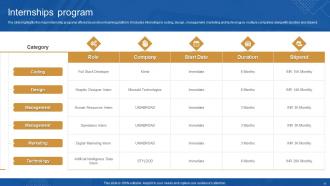
Slide 11: The slide highlights the major internship programs offered by unschool learning platform.
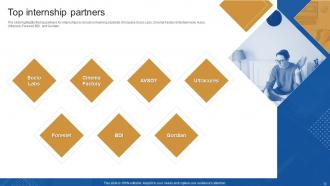
Slide 12: This slide showcases top partners for internships by Unschool learning students.
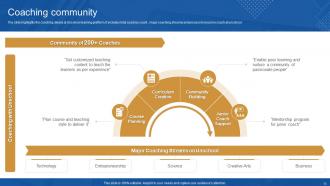
Slide 13: This slide shows Major Coaching Streams on Unschool.
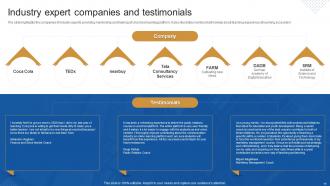
Slide 14: This slide presents Industry expert companies and testimonials.
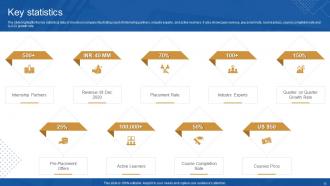
Slide 15: The slide highlights the key statistical data of Unschool company.
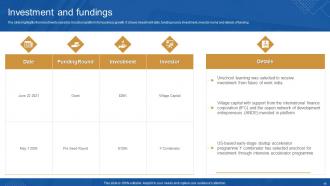
Slide 16: This slide displays investments raised by Unschool platform for business growth.
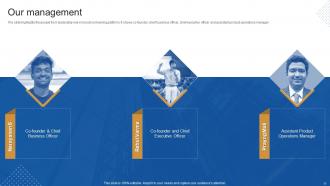
Slide 17: This slide represents people from leadership role in Unschool learning platform.
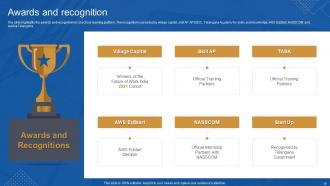
Slide 18: The slide highlights the awards and recognition for Unschool learning platform.
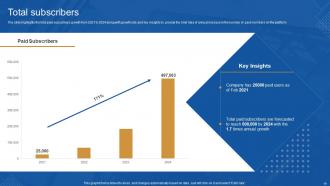
Slide 19: This slide showcases total paid subscribers growth from 2021 to 2024.
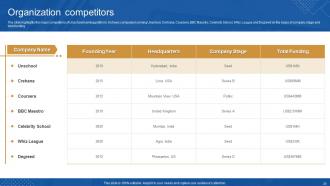
Slide 20: The slide highlights the major competitors of Unschool learning platform.
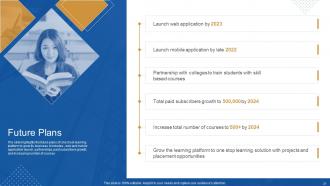
Slide 21: This slide shows future plans of Unschool learning platform to grow its business.
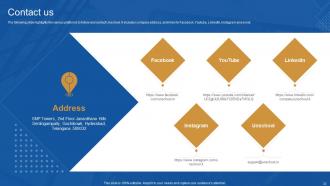
Slide 22: This slide presents various platforms to follow and contact Unschool.
Slide 23: This slide contains all the icons used in this presentation.
Slide 24: This slide is titled as Additional Slides for moving forward.
Slide 25: This is About Us slide to show company specifications etc.
Slide 26: This is Our Mission slide with related imagery and text.
Slide 27: This is Our Team slide with names and designation.
Slide 28: This slide provides 30 60 90 Days Plan with text boxes.
Slide 29: This slide contains Puzzle with related icons and text.
Slide 30: This slide shows Post It Notes. Post your important notes here.
Slide 31: This is Our Target slide. State your targets here.
Slide 32: This is a Thank You slide with address, contact numbers and email address.
Unschool Company Profile Powerpoint Presentation Slides with all 37 slides:
Use our Unschool Company Profile Powerpoint Presentation Slides to effectively help you save your valuable time. They are readymade to fit into any presentation structure.








FAQs for Unschool Company Profile
Honestly, Unschool's templates are pretty solid because they're made for actual teaching, not boring corporate decks. The interactive stuff is what sold me - you get clickable learning paths and quiz tools built right in. Way better than fighting with PowerPoint's clunky layouts that break every time you move something. They work well whether you're teaching in person or online too. I'd definitely browse their template library first though - you can test out the interactive features before buying anything. Might save you some headaches down the road.
So Unschool basically tailors their templates to different industries - like tech, healthcare, finance, whatever you're working in. Pretty smart actually. They've got specific color schemes and layouts that match each sector, plus you can choose the presentation type (pitch deck, training stuff, quarterly reviews). What I really like is their system suggests layouts based on your industry combo and what you're trying to accomplish. The templates come with pre-built slide sequences too, which honestly saves so much time since you're not building everything from nothing. Way better than those boring generic templates everyone uses.
Honestly, people seem to crush it with these templates. Marketing agencies are closing like 30% more deals with the pitch deck ones - that's pretty wild. Teachers grab the course outline formats for their online stuff, and some get super creative with them. Oh, and freelancers are obsessed with the proposal templates since they make client onboarding way smoother. The trick isn't copying everything exactly though. People tweak the frameworks to match their vibe and brand. I'd just scroll through their template gallery and see what clicks for your projects.
So basically we stick to three things: clarity, flexibility, and brand consistency. Clean layouts are huge - cramped slides are the worst. You'll get our standard colors and fonts, but there's room to tweak things for different crowds. The visual hierarchy stuff works pretty well with headers and bullet points. Oh, and definitely start with the simple templates first! I learned that the hard way when I jumped straight into the complex ones and got totally overwhelmed. Once you get the hang of it, you can mess around with the fancier layouts.
We refresh our templates quarterly, so you're getting new stuff four times a year. Our design team is honestly kind of obsessed with tracking industry trends - which works out great for you! Spring and fall usually bring the bigger visual updates, then smaller tweaks happen in between. Your students will always have current templates that actually match what they'd see in real client work. Oh, and check your dashboard notifications since we announce whenever new collections drop. The timing's pretty consistent once you get used to it.
Oh dude, Unschool's pretty solid for multimedia stuff. Videos, audio, interactive graphics - all that works great. YouTube and Vimeo embeds are super easy too. The drag-and-drop thing is honestly way better than I thought it'd be when I first tried it. You can throw in image galleries, infographics, even polls and quizzes without breaking a sweat. Documents and presentations? No problem. Third-party widgets work fine too, though sometimes the positioning takes a sec to get right. I'd start simple - just videos and images first. Once you get the hang of it, you'll be adding everything.
So Unschool actually builds accessibility right into their templates from the get-go. High contrast colors, fonts that don't suck to read, proper headings for screen readers - all that stuff. They've got alt-text placeholders too, which is honestly pretty smart. The whole thing automatically hits WCAG standards, so you don't have to mess around checking contrast ratios yourself. Just throw your content in there and you're done. Way better than most companies who just slap accessibility on later. Everyone on your team will actually be able to use your presentations without you doing extra work.
Yeah, totally! Unschool's got tons of educational templates already loaded in. Course outlines, lesson plans, assessment rubrics, project frameworks - honestly way more variety than I thought it'd have. What I like is they're made for different age groups and learning styles, so you're not forced into some generic template. Everything's customizable too, which is huge since your classroom's probably nothing like mine lol. I'd start browsing their education section first to see what fits your teaching style. Should save you a bunch of time.
So there's actually a bunch of ways to give feedback on templates. The easiest is probably that little feedback button in the editor itself - just click and tell them what's bugging you. Support chat works too, or you can email them directly. They actually do read that stuff, which is kinda rare these days. Oh, and they send out user surveys every few months asking specifically about template features. The product team goes through everything monthly and focuses on whatever people complain about most. Definitely worth speaking up if something's not working right!
Unschool's actually pretty solid for beginners. Start with their "Presentation Design 101" course - it breaks down the basics without being overwhelming. The template library is a lifesaver because honestly, who wants to stare at a blank slide? Their tutorials cover typography and color theory, plus you get interactive exercises for practice. What I really like is the community feedback feature - other students will actually look at your work and give real critiques. Some of the advanced stuff might be overkill at first, but the fundamentals courses are perfect. Work through a few templates to build confidence, then branch out.
Oh, they've got tons of stuff to help you out! Start with their tutorial library - covers all the basics you'll need. The video walkthroughs are super helpful too, they literally show you how to tweak everything step by step. There's this community forum that's pretty active where people share their template hacks (some are honestly genius). If you get really stuck, just email their support team. I'd probably watch a few tutorials first to get the hang of it, then check out what other people are doing in the forums if you want to get creative with yours.
Oh totally, their customization is super easy! You can change colors, fonts, layouts - all that stuff through their drag-and-drop thing. No coding needed which is nice. The visual builder actually doesn't suck like most of them do lol. Just upload your brand stuff, mess with spacing, whatever you need. They have pre-made blocks for headers and testimonials too. Honestly I'd just grab one of their templates first and tweak it from there. Way less of a headache than starting from scratch. Oh and you can make custom components if you're feeling fancy.
UX drives everything we do with templates - it's our main focus when making design choices. First, we dig into how people actually use educational content, then create templates that cut out annoying friction points. Navigation has to feel natural, you know? Honestly we're probably a bit obsessive about testing with real users and tweaking based on what they tell us. Accessibility stays front and center too. Quick tip though - when you're reviewing template feedback, don't get caught up in whether something looks cool. Focus on whether users can actually hit their learning goals without getting frustrated.
Honestly, Unschool's prices aren't bad when you stack them up against Canva Pro or Envato Elements. They do the whole per-template thing or subscription bundles like everyone else. But here's the thing - you're not just getting templates thrown at you. They actually teach you design stuff too, which is kinda rare. Most places just give you the files and peace out. I'd check out their bundle deals vs buying individual templates elsewhere. Usually comes out cheaper that way. Plus the education part is actually useful if you're trying to get better at this stuff.
Honestly, your template choice matters way more than you'd think. People will literally bounce in seconds if your page looks messy or they can't figure out what you're about. I've seen it happen so many times. A clean layout keeps them scrolling and actually reading your stuff. But if it's cluttered? Forget it. You want something that naturally guides their eye through your key points - like a good flow that makes sense. The whole visual setup affects whether people stick around long enough to remember you or just click away immediately.
-
SlideTeam is a great place for PPT templates. They have many templates on a single topic. It has made my life a lot easier.
-
It makes easy work of my work presentations. I’ve never had to be nervous about my presentations for meetings.