


Use Cases Of Post Go Live Support Plan




Try Before you Buy Download Free Sample Product
 Impress Your
Audience
 100%
Editable
 Save Hours
of Time


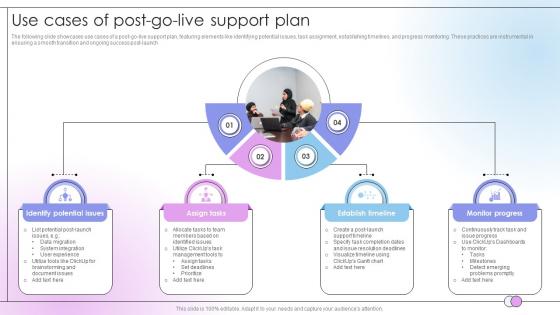
The following slide showcases use cases of a post-go-live support plan, featuring elements like identifying potential issues, task assignment, establishing timelines, and progress monitoring. These practices are instrumental in ensuring a smooth transition and ongoing success post-launch
People who downloaded this PowerPoint presentation also viewed the following :
Use Cases Of Post Go Live Support Plan with all 9 slides:
Use our Use Cases Of Post Go Live Support Plan to effectively help you save your valuable time. They are readymade to fit into any presentation structure.








FAQs for Use Cases Of Post Go
Okay so you need five things sorted for post-launch support. Get your escalation paths mapped out first - like who handles what level of crisis. Monitoring and alerts are huge, trust me on this one. You'll also want dedicated people on standby for those first crazy weeks when everything breaks at once. Documentation is key too, plus make sure users actually know how to use the thing. Oh and create a quick runbook with contacts and common fixes. Nothing fancy, just something people can grab when they're panicking at 2am.
Honestly, focus on the stuff that actually tells you if things are working. Incident resolution times and uptime percentages are your bread and butter - plus user satisfaction scores if you can get decent data there. But seriously, don't fall into the trap of tracking every single metric just because you can. I've watched teams get obsessed with ticket counts when what really matters is whether you're solving problems well. The sweet spot? When you're catching and fixing issues before users even know something's wrong. Post-launch should feel kinda boring if you're doing it right. Just throw together a simple dashboard so you can actually see trends developing.
Dude, don't skip user training - I've watched so many rollouts completely implode because of this. Your support inbox will explode if people don't know what they're doing. Skip the boring generic stuff though. Train them on their actual daily tasks with hands-on practice. Get some champion users lined up to help the stragglers (there's always a few). Quick reference cards are clutch too. Oh, and do this BEFORE launch obviously. The upfront time investment is annoying but you'll thank yourself later when you're not drowning in "how do I..." tickets.
Dude, train your support people BEFORE launch - seriously can't stress this enough. Walk them through actual scenarios they'll deal with, set up test environments for practice. Quick reference guides are lifesavers when angry users start calling. We got absolutely destroyed on day one because nobody knew how to handle the new system questions. Map out who escalates what to whom ahead of time. Also? Grab some extra help for those first couple weeks if you can swing it. Trust me, it's way better to over-prepare than scramble when everything's on fire.
Honestly, the worst stuff that'll bite you is performance crashing when real users hit the system, plus data migration going wonky. Integration problems somehow sneak through testing too - it's wild how that happens. Users are probably your biggest headache though. They never use things how you think they will! Monitor everything super closely those first couple weeks and yeah, definitely have a rollback ready. Set up special support channels so problems don't get lost in the usual ticket mess. Oh, and tell people upfront what might break and where to go for help.
Oh man, communication timing after launch is everything - seriously can't stress this enough. Users are already freaking out when stuff breaks, so they need to hear from you RIGHT away. Even if you're still figuring out the problem, just say "we see it, we're on it." I've watched perfectly good systems tank because people felt ignored during outages. Get back to them in minutes if possible, then update every hour or so. The whole "we'll look into it" thing without follow-up? That's how you lose trust fast. Set up your communication plan before launch day hits.
Start with New Relic or DataDog for monitoring - they'll save your sanity when stuff breaks at weird hours. PagerDuty handles alerts way better than email chains, trust me on that one. Your ticketing system needs to talk to everything else, so Jira Service Desk or Zendesk work well. Slack's pretty much essential for quick communication during outages. Oh, and you'll need something like Splunk or ELK for digging through logs when you're troubleshooting. Focus on monitoring first though - that's where you'll see the biggest impact right away.
So basically, user feedback after launch is gold for figuring out what's broken. I always check support tickets first - the patterns tell you everything. Also dig into your analytics to see where people are actually struggling (not just where you think they are). Quick wins are honestly the best strategy - sort feedback by how easy it is to fix vs. impact. That way you can ship improvements fast while working on bigger stuff. Oh and definitely set up regular review sessions with your team. Create a backlog that flows straight into sprint planning so nothing gets forgotten.
Just be brutally honest about what's broken right after you launch. People hate being ghosted way more than hearing "yeah, that login thing is still busted." Trust me on this one - I've watched teams crash and burn by going silent. Quick updates are everything, even boring ones. Make reporting bugs dead simple (no stupid forms) and have a way to bump urgent stuff to the front of the line. When something's genuinely messed up, just say it and give people a real timeline. Most users are pretty chill about temporary problems if you're not treating them like idiots.
Here's what works best from my experience - create separate triage roles so your top performers aren't jumping back and forth between normal work and launch chaos. Do an 80/20 split at first. Keep 80% of support on regular stuff, dedicate 20% just to post-launch problems. That way nothing falls through the cracks while new issues get proper focus. Set up clear escalation paths too - the launch team can grab specialists when shit hits the fan, but they won't become everyone's dumping ground (trust me, that happens fast). After a few weeks when things calm down, you can merge the teams back together.
Honestly, just write everything down as it happens - the problem, what you tried, and what actually fixed it. I learned this the hard way after spending hours re-solving the same issue twice. Document timestamps and who was affected too. The real trick is explaining WHY your solution worked, not just the steps. That way when Bob from accounting breaks something similar next month, you're not starting from scratch. Oh, and make sure everyone can actually find these notes later - nothing worse than great documentation buried where nobody looks.
Honestly, cross-department collaboration is a lifesaver after go-live. You'll catch problems way faster when IT, business users, and project teams actually talk to each other. Business folks can tell you what's truly broken vs. just "different from the old system" - which happens more than you'd think. They're also better at figuring out which fires need putting out first since everything seems urgent post-launch. Set up quick daily check-ins and group chats so info moves fast. Don't wait for formal processes when people can't do basic stuff.
Honestly, change management after go-live is what makes or breaks everything. Users will either embrace the new system or spend months griping about it - there's rarely middle ground. Keep talking up the wins and tackle resistance head-on. Your change champions need to stay busy supporting people and collecting feedback. Here's the thing though - stress makes everyone revert to old habits, so don't get surprised when that happens. I'd set up regular check-ins with your key user groups. Leadership should be celebrating those early wins too. The work definitely isn't over once you flip the switch.
Set up different help channels for each team - sales, IT, executives, etc. Each group has totally different needs, so don't treat them the same. Sales wants quick fixes, IT needs the technical details. Create separate Slack channels or help desk queues and assign reps who actually understand how each department works. Honestly, executives will expect way faster responses than regular users, so plan for that. Map out what issues each group typically runs into before launch. That way you're not stuck figuring out who needs what level of support while everything's on fire.
Dude, you'll want to watch your performance metrics and error logs religiously - catch problems before your users start complaining. Set up regular maintenance windows for updates and backups. Document everything as you go, because future you will thank present you when stuff inevitably breaks at 2am. Also train your team on basic troubleshooting - saves so much headache later. Oh, and don't wait until you're maxed out to plan for scaling. That's always a disaster. Alerts are your friend here. Having a solid incident response plan isn't glamorous but it's clutch when things go sideways.
-
Thank you for showering me with discounts every time I was reluctant to make the purchase.
-
Mesmerized with the fantastic collection! Super sleek, relevant infographics.