

User persona comparison ppt powerpoint presentation portrait





Try Before you Buy Download Free Sample Product
 Impress Your
 Audience
 100%
100% Editable
 Save Hours
 of Time


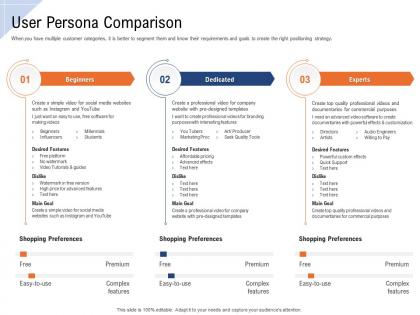
When you have multiple customer categories, it is better to segment them and know their requirements and goals to create the right positioning strategy.
People who downloaded this PowerPoint presentation also viewed the following :
User persona comparison ppt powerpoint presentation portrait with all 2 slides:
Use our User Persona Comparison Ppt Powerpoint Presentation Portrait to effectively help you save your valuable time. They are readymade to fit into any presentation structure.

FAQs for User persona comparison ppt
Honestly, it comes down to what actually makes people buy stuff in each industry. B2B folks care about job titles, company budgets, who has signing authority - that boring corporate stuff. Meanwhile consumer brands are all about demographics and lifestyle choices. Healthcare gets super niche though - they're looking at specific conditions, whether someone's a caregiver, how much they understand medical terms. Tech companies? They want to know if you're an early adopter or still using Internet Explorer (kidding, but you get it). Retail focuses on shopping patterns and brand loyalty. Each industry has different pain points that trigger purchases, so you've got to figure out what buttons to push for your specific audience.
So basically, user personas help you customize your presentation instead of making some boring one-size-fits-all deck. You can tweak the language, examples, and visuals to match what your audience actually cares about. C-suite folks want high-level stuff and metrics, while technical teams need the nitty-gritty implementation details - totally different approaches. Figure out your main persona first, then adjust your template structure around their pain points and what outcomes they're after. Honestly, it's kinda like changing your tone depending on who you're talking to. Way more effective than generic presentations.
Yeah, demographics are like your starting point - age, location, income, education level. Basic stuff that gives you context. But here's the thing: most people just stop there and call it a day, which is honestly kind of lazy. The real magic happens when you dig deeper into behaviors and motivations. Like, a 35-year-old marketing manager in Chicago is whatever. But a 35-year-old marketing manager who's drowning in software tools and just wants something simple? Now you've got a real person to design for. Think of demographics as your skeleton, then you gotta add all the messy human stuff on top.
So basically, when you compare your different audiences side by side, you'll notice they want totally different things. Like executives just want the big picture with clean visuals and bullet points. Meanwhile your tech people? They're gonna want all the detailed data and process stuff. Finance teams are probably the most straightforward - just give them numbers right away, skip the fluff. Your marketing folks might eat up the storytelling angle though. I'd look at things like how long each group pays attention, what formats they actually prefer, and how they make decisions. Then just adjust your slides and pacing for whoever you're presenting to.
Demographics are just the tip of the iceberg honestly. Cultural values matter way more than you'd think - someone in rural India will use your product completely differently than someone in Tokyo, even with identical age/income. Payment methods are a nightmare to navigate too. Internet speeds, local holidays, time zones for when people are actually online... it gets complicated fast. Oh and regulations - don't even get me started on those headaches. My advice? Pick maybe 2-3 markets to focus on first. Trying to go everywhere at once is how you end up with personas that don't actually help anyone.
So basically, user personas are like your cheat sheet for visual choices. Tech millennials? Go wild with bold colors and modern stuff. Conservative executives though - they want clean, traditional vibes with muted colors. It's honestly like picking an outfit for different occasions. Your personas show you what formality level works, which colors hit right, even how much visual chaos people can handle. I always check the persona's industry and role first before diving into templates. Makes such a difference when you actually match their expectations instead of just guessing what looks "good."
Stop getting hung up on basic demographics like age and location - that stuff barely matters. Real people are messy and don't fit into perfect little boxes anyway. Focus on what they actually DO and why they care. Honestly, I see people try to compare like 5 personas at once and it's just chaos. Stick to 2-3 max. Map out their main goals first, then figure out what's frustrating them. Those behavioral differences? That's where the gold is. Don't waste time on tiny details that won't change how you build your product.
Okay so basically, figure out who you're actually talking to before you start writing anything. Are they detail nerds who want all the specs? Or executives who just care about bottom line results? You wouldn't explain AI the same way to your mom versus a programmer, right? Same logic applies here. Engineers want the nitty gritty technical stuff. C-suite people want outcomes and ROI numbers - they don't have time for the weeds. I always pick 2-3 main traits about my audience first. Then I write everything with those specific people in my head. It's honestly like code-switching in real life. Way better than that generic corporate voice that makes everyone's eyes glaze over.
Ok so definitely start with user interviews and surveys - that's where you'll get the best stuff. Google Analytics shows you what people actually do on your site, and Hotjar's great for seeing how they move around. I'd skip social media listening tbh, it's just too much random noise to sort through. One-on-one interviews beat focus groups every time if you can swing it. Oh, and check your support tickets! People complain about the weirdest things that'll totally surprise you. Mix the hard data with real stories, then run your personas by actual users before you call it done.
So when you put your user personas next to each other, you'll see exactly where your design breaks down for different people. Like your millennial user flies through everything while your older user with arthritis can't even click those tiny buttons - it's wild how obvious the problems become. That comparison shows you which parts of your interface actually work for everyone vs. which ones shut people out completely. I always forget how much this matters until I see it mapped out. Use what you find to figure out which accessibility fixes to tackle first, then test everything against your trickiest user scenarios.
Your user research contradicting your personas? That's your cue to update them. Watch for demographic shifts, weird new user behaviors, or different pain points popping up. When content that used to crush suddenly flops, your personas are probably stale. Honestly, I've watched so many teams cling to old personas because updating seems like a pain - but it's totally worth doing. Different channels gaining traction is another dead giveaway. Run some fresh surveys or interviews to see what's actually happening with your audience right now.
So basically you need to dig deeper than just "Sarah is 35 and works in marketing." Figure out what keeps her up at night - maybe she's stressed about missing deadlines or worried her boss thinks she's not cut out for the role. Interview actual users about their feelings, not just what they do all day. Then when you're presenting, speak directly to those fears and dreams. Like, way more effective than just rattling off product features. I mean, nobody cares about features until they see how it'll solve their actual problems. Mix up your examples and tone based on what emotionally drives each persona.
Different user types need totally different approaches to interactive design. Tech-savvy people want advanced filters and shortcuts. Meanwhile, your less technical users need bigger buttons and super clear labels. Think of it like designing remotes - your grandma needs something simple, but your gamer friend wants all the bells and whistles. I'd focus on what matters most to your main personas first. Hide the fancy stuff behind progressive disclosure so it doesn't overwhelm anyone. Oh, and definitely test with real people from each group - you'll be surprised what actually trips them up.
So here's the thing - most companies just copy whatever templates are trending instead of actually listening to their users. Big mistake. You want to dig into what your personas are actually struggling with. Time crunches? Can't figure out design software? Industry-specific headaches? Build templates that solve those exact problems. Map out your top 3 personas and figure out what template features they'd genuinely get excited about. Look at their workflows, what visuals they're drawn to, the content they actually create. When you do this right, your templates feel like they were custom-made instead of some generic garbage everyone else is pushing out.
Track engagement stuff like time spent viewing and click-through rates, but honestly? For B2B audiences, focus on lead quality and meeting requests - that's what actually pays the bills. Measure comprehension with follow-up surveys asking persona-specific questions about your key points. The real win is when people take your desired next step, so watch those conversion actions like a hawk. Oh, and define success differently for each persona first - a CEO cares about different outcomes than a product manager does. Then measure what matters to them.
-
Design layout is very impressive.
-
I discovered this website through a google search, the services matched my needs perfectly and the pricing was very reasonable. I was thrilled with the product and the customer service. I will definitely use their slides again for my presentations and recommend them to other colleagues.
-
The Designed Graphic are very professional and classic.
-
Excellent products for quick understanding.
-
Enough space for editing and adding your own content.