

Utilize Resources With Project Resource Management Plan Powerpoint Presentation Slides





Try Before you Buy Download Free Sample Product
 Impress Your
 Audience
 100%
100% Editable
 Save Hours
 of Time


Project resource management plan is a part of the main project plan that provides guidelines for defining, distributing, handling, and publishing project resources. It can be split into the team management strategy and the available physical management plan. Grab our professionally designed Utilize Resources With Project Resource Management Plan template that will help identify and understand the structure and responsibilities for resource management. At present, the company wants to assess the current situation related to resource management and find out the solutions to increase resource management efficiency. It also shows the companys basic requirements and benefits of resource management. This project resource management plan presentation includes various slides, including resource management process flow, cycle for growth, how a firm can improve its resource management, detailed requirements, associated tasks, etc. This also includes slides related to the allocation of resources, features related to the product, resource availability to the product, efficient scheduling of available resources, centralized time tracking and progress, etc. In the end, this presentation covers the budgeted costs of the product development, etc. Customize this 100 percent editable template now.
People who downloaded this PowerPoint presentation also viewed the following :
Content of this Powerpoint Presentation
Slide 1: This slide displays title i.e.'Utilize Resources with Project Resource Management Plan' and your Company Name.
Slide 2: This slide presents agenda.
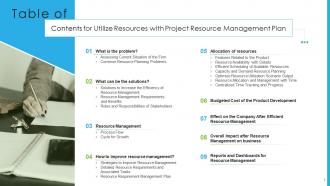
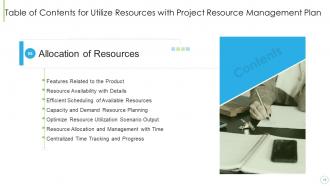
Slide 3: This slide exhibits table of contents.
Slide 4: This slide depicts title for two topics that are to be covered next in the template.
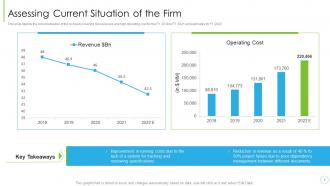
Slide 5: This slide depicts the current situation of the company covering low revenues and high operating cost for the FY 2018 to FY 2021 and estimates for FY 2022.
Slide 6: This slide shows the common resource management planning problems such as manual data entry, stand-alone software systems, etc.
Slide 7: This slide depicts title for three topics that are to be covered next in the template.
Slide 8: This slide shows the solutions to increase the efficiency of resource management which includes better planning, define the responsibilities, etc.
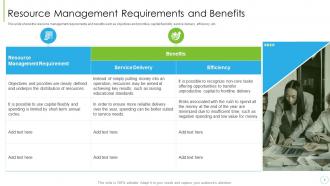
Slide 9: This slide shows the resource management requirements and benefits such as objectives and priorities, capital flexibility, service delivery, efficiency, etc.
Slide 10: This slide covers the roles and responsibilities of the stakeholder’s such as understanding requirement of the clients.
Slide 11: This slide depicts title for two topics that are to be covered next in the template.
Slide 12: This slide shows the resource management process flow which includes project charter, team charter, resource requirements, etc.
Slide 13: This slide shows the resource management cycle for growth which includes estimate, plan, executive analyze and optimize.
Slide 14: This slide depicts title for three topics that are to be covered next in the template.
Slide 15: This slide shows the strategies to improve the resource management which includes collaborate in planning, empower the team to assign resources, etc.
Slide 16: This slide shows the detailed resource requirements and associated tasks such ad software tools, duration required, available time period, unit of cost, etc.
Slide 17: This slide shows the detailed resource requirements and associated tasks such ad software tools, duration required, available time period, unit of cost, etc.
Slide 18: This slide covers the resource requirement management plan communicating with the other primary interrelated software development methodologies' workflow.
Slide 19: This slide depicts title for seven topics that are to be covered next in the template.
Slide 20: This slide covers the product features which company will be adding in new product such as customized workflow, customizable fields, watch unread bugs etc.
Slide 21: This slide shows the resource availability with details such as resource name, available date, overloaded date, booked date, etc.
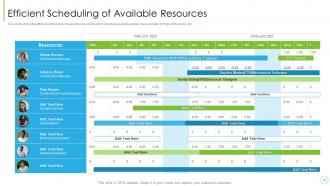
Slide 22: This slide shows the efficient scheduling of available resources which includes resources details, tasks details, timings of the tasks, etc.
Slide 23: This slide shows the capacity and demand resource planning which shows the resource details, allocation details, project status, etc.
Slide 24: This slides shows the optimize resource utilization scenario output which includes key metrics, included projects, excluded projects, optimizing suggestions, etc.
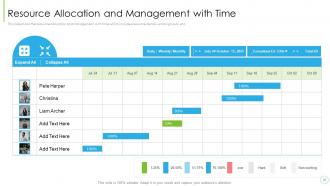
Slide 25: This slide shows the resource allocation and management with time which includes resource details, working hours, etc.
Slide 26: This slide shows the centralized time tracking and progress details such as categories, titles, tasks, role, an other notes.
Slide 27: This slide depicts title for four topics that are to be covered next in the template.
Slide 28: This slide covers the product development cost based on allocation bases, allocation rate, total units produced, etc.
Slide 29: This slide shows the advantages to the business after the efficient resource management which includes measure efficiency, builds transparency, etc.
Slide 30: This slide covers the impact of implementing resource management plan in the organization i.e. project success rate, proper management, etc.
Slide 31: This slide shows the reports and dashboards for resource management which includes resource demand by project type, allocated and actual hours, etc.
Slide 32: This is the icons slide.
Slide 33: This slide presents title for additional slides.
Slide 34: This slide depicts 30-60-90 days plan for projects.
Slide 35: This slide highlights information using dashboard.
Slide 36: This slide shows about your company, target audience and its client's values.
Slide 37: This slide exhibits yearly timeline.
Slide 38: This slide presents your company's vision, mission and goals.
Slide 39: This slide displays Venn.
Slide 40: This slide illustrates goals of the company.
Slide 41: This slide exhibits yearly sales clustered bar charts for different products. The charts are linked to Excel.
Slide 42: This is thank you slide & contains contact details of company like office address, phone no., etc.
Utilize Resources With Project Resource Management Plan Powerpoint Presentation Slides with all 47 slides:
Use our Utilize Resources With Project Resource Management Plan Powerpoint Presentation Slides to effectively help you save your valuable time. They are readymade to fit into any presentation structure.



















FAQs for Utilize Resources With Project Resource Management Plan
So you've got four main things to juggle: planning, allocating, scheduling, and keeping tabs on everything. First, map out what you actually need - people, gear, materials, whatever. Then comes the fun part (sarcasm intended) - figuring out when to deploy everything without creating chaos. Everyone's always fighting over the best team members, which gets messy fast. Track how you're using resources as you go and be ready to pivot. Oh, and watch out for dependencies because one delay can domino effect your whole timeline. Honestly, just build in buffer time from the start. You'll thank yourself later.
Start mapping out what you need during planning phase - then actually get commitments from resource managers upfront instead of hoping it'll work out later. Build a resource calendar with buffer time because stuff always breaks down (learned this the hard way). Weekly check-ins are crucial for catching issues early. Honestly, half the battle is just staying friendly with other PMs so you can swap resources when things get messy. Don't wait until you're scrambling - set up alerts in whatever tool you're using to flag conflicts before they hit. Being proactive here saves so much stress down the road.
Oh man, there's actually a bunch of good stuff out there! Asana and Monday.com are pretty decent for tracking who's doing what. Microsoft Project too if you're feeling fancy. Float has this really clean visual timeline thing going on - I'm kinda obsessed with it honestly. Smartsheet's another solid pick for resource planning specifically. Look, sometimes a simple spreadsheet does the trick if you're not dealing with anything too crazy. Just gotta keep it updated or it becomes useless fast. I'd mess around with the free versions first though. See what your team actually likes before you start paying for anything, you know?
First thing - figure out what you absolutely can't live without vs what would just be nice. Then hunt for people who can do multiple things instead of specialists for everything. Honestly, I've watched so many teams waste money on expensive software when free alternatives work just fine. Contractors are your friend for specialized stuff rather than hiring full-time people. Oh, and always add 10-15% extra to whatever budget you think you need because trust me, random shit will come up. Keep a simple spreadsheet where you track every request against your priority list - sounds boring but it'll save your ass.
Look, talking to stakeholders regularly saves you from those awful "I thought YOU were handling that" moments. Keep everyone updated on what resources you actually have available and what constraints you're dealing with. They'll adjust expectations instead of blindly demanding impossible timelines. Honestly, stakeholders often know about resources you don't - like when Sarah from dev is suddenly free or there's leftover budget floating around. Weekly check-ins work great for this. Just flag problems early instead of crossing your fingers and hoping things work out. Trust me, it's way better than scrambling at the last minute.
Honestly, good resource management is a game changer - it's about matching the right people with the right tasks at the right time. You'll dodge those annoying bottlenecks and prevent your team from burning out. Plus it keeps costs from spiraling. The best part? You catch problems early, like when Sarah's drowning in work while Jake's twiddling his thumbs (happens way too often). Quality goes up because people aren't spread crazy thin doing everything. I'd start by figuring out everyone's strengths and how much they can actually handle - makes assigning work so much easier.
So I'd start with utilization rates - basically how much time your team spends actually working vs doing random admin stuff. Productivity stuff matters too, like how many deliverables they knock out per sprint. Quality metrics are huge - defect rates, how often you're redoing work, stakeholder satisfaction (though honestly, stakeholders are never fully happy lol). Cost performance is key since you need decent ROI. The tricky part? Data overload happens fast. Just pick 3-4 metrics that match your project goals. Don't try measuring everything - you'll go crazy. Focus on stuff you can actually fix when the numbers look bad.
Dude, AI can totally help with resource management. It predicts when you'll need certain skills and auto-schedules people based on who's free. The predictive stuff is honestly wild - way better than trying to plan everything manually. You can automate time tracking and budget monitoring too. Oh, and it matches people to tasks based on their expertise, which is clutch when you're juggling multiple projects. My advice? Don't go crazy right away. Pick something simple like scheduling first and test it out before you commit to overhauling everything.
Honestly, you gotta plan for things to go sideways with your team. Never schedule people at 100% - that's just asking for trouble when someone gets the flu or quits unexpectedly. Cross-training is huge too, so you're not totally stuck if your star developer bounces. I learned this the hard way on my last project lol. Keep some vendors on speed dial as backup. Oh, and do quick resource check-ins regularly instead of waiting for disaster to strike. Way easier to fix small problems than big ones.
Oh man, cultural stuff will absolutely wreck your resource planning if you're not careful. Different teams have totally opposite work styles - some want super direct feedback, others get offended by it. Then you've got hierarchy things where some cultures expect way more approval chains than others. Time zones are the obvious pain, but don't forget about random holidays and religious days that'll catch you off guard. I once scheduled a major deliverable during Diwali... oops. Best thing is to map out all these quirks upfront instead of assuming everyone operates like your home office does.
Start by mapping out what resources you have and where they're actually spending time - I swear this step alone will show you so much wasted effort. Smooth out those crazy busy/dead periods with resource leveling. Cross-train people so they can jump between roles when stuff gets hectic. Instead of hoarding team members on single projects, pool them across initiatives. Actually track utilization rates (not just guess) and reassign based on real capacity. Oh, and definitely audit your current setup first - you'll probably spot some obvious fixes right off the bat. Those quick wins feel pretty good honestly.
Honestly, the worst part is when everyone wants your top performers on their project at once. Resource conflicts will drive you nuts. Time estimates? Good luck - tasks always take way longer than planned. Plus you're constantly deciding whether to blow budget on contractors or just overwork your current team (neither feels great). Communication falls apart between departments too. My advice? Build in extra time upfront and don't sugarcoat timelines when talking to stakeholders. Being realistic from the start saves so much drama later.
Start with a basic matrix - literally just map out who you need where and when. Nothing complicated. Figure out your priorities based on deadlines and business impact, then be brutally honest with your teams about what's actually doable. Here's the thing though - don't spread people too thin trying to please everyone. That never works out well. Have real conversations about realistic timelines instead of promising the world. Sometimes you'll need to push back on deadlines, and that's totally fine. The transparency piece is huge - people handle constraints way better when they understand the why behind decisions.
Look, training your team is honestly one of the smartest investments you can make. Skilled people work faster and screw up way less - which saves you money in the long run. It's like getting more bang for your buck without hiring extra people. Your team becomes way more flexible too. Someone calls in sick? No problem, Sarah can cover that part of the project because she got trained on it last month. The productivity boost usually covers what you spent on training pretty quickly. Oh, and don't treat it like an add-on - build that training time right into your project schedule from day one.
Yeah, definitely do a post-mortem on your resource planning after each project! Document the stuff that went sideways - like when you realize you're screwed on staffing two weeks out from deadline (ugh, the worst). Track which skills you always underestimate needing and how off your time estimates actually were. External curveballs too. Make a simple lessons learned template and use it every project close. Then - and this is key - actually look back at that stuff when planning the next one. You're basically building your own "reality vs. expectations" cheat sheet. Trust me, patterns emerge pretty quick.
-
Awesome presentation, really professional and easy to edit.
-
Excellent Designs.