

Value Vs Non Value Added Activity In Kaizen Training Ppt




Try Before you Buy Download Free Sample Product
 Impress Your
 Audience
 100%
100% Editable
 Save Hours
 of Time


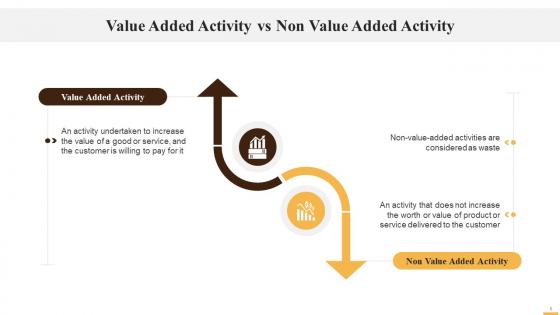
This slide illustrates the comparison between value-added and non-value-added activities. It explains that in an value-added activity, an action is taken to increase the value of a good or service for a customer and the customer should be willing to pay more for it. In a non-value added activity, if the value of a product or service is not increased, then it is considered a waste.
People who downloaded this PowerPoint presentation also viewed the following :
Value Vs Non Value Added Activity In Kaizen Training Ppt with all 20 slides:
Use our Value Vs Non Value Added Activity In Kaizen Training Ppt to effectively help you save your valuable time. They are readymade to fit into any presentation structure.










FAQs for Value Vs Non Value Added Activity In
So you'll want process boxes for each step, plus data boxes showing your cycle and lead times. Inventory triangles go between processes - honestly those are super helpful for spotting bottlenecks. Information flow arrows usually sit at the top of your map. Timeline goes at the bottom and that's really where you see the big picture for total lead time. Customer and supplier icons complete the whole flow from end to end. The main thing is catching where stuff actually gets worked on versus where it just sits there doing nothing. Those wait times are what you're really hunting for - they tell the whole story.
So regular process mapping just shows individual steps, but Value Stream Mapping tracks your entire flow from customer request to delivery. The real difference? You're capturing actual value-added time versus all the waste time - which honestly can be pretty shocking when you first see it. VSM also grabs data that normal mapping misses, like cycle times and inventory levels. Plus it helps you find bottlenecks between departments, not just inside them. I'd start with one product family first and map that whole journey. Way more useful than traditional mapping.
VSM works great in tons of industries beyond just manufacturing. Healthcare uses it for patient flow, software teams map their development cycles, financial services tracks loan approvals - basically anywhere you've got handoffs between people or departments. The sweet spot is processes where you can actually trace inputs to outputs and measure stuff along the way. My advice? Don't go crazy trying to map your entire operation right off the bat. Pick one specific process first - maybe something that's been bugging your team. You'll actually learn way more that way instead of drowning in complexity.
Honestly, the data collection part is brutal - way more time-consuming than you'd think. Getting accurate process times feels impossible sometimes. Plus people get weird when you're mapping their workflows, like you're judging how they work or something. I'd frame it as "we're all figuring this out together" rather than making it feel like an investigation. Oh, and don't try to map everything at once - that's a recipe for burnout. Pick one process first, get some wins under your belt, then expand from there. Trust me on that one.
Dude, VSM is basically like getting a bird's eye view of your whole process - and suddenly all the BS becomes crystal clear. Map everything from start to finish first. You'll spot where stuff just sits around waiting, overproduction, too much inventory, pointless transport. Honestly, most people miss this waste because they're stuck in their own little bubble. The visual part makes it impossible to ignore problem areas. I always tell people to draw the current state before fixing anything - otherwise you're just guessing. It's wild how obvious the bottlenecks become once you see the full picture laid out.
Think of customer value as your compass for Value Stream Mapping. Map everything from their viewpoint first - what would they actually pay for versus what's just internal busywork? Most teams mess this up initially (I see it all the time) because they get caught up in their own internal metrics instead of actual customer outcomes. Those handoffs and delays you're tracking? Your customer doesn't care about them. Focus on steps that directly create what they value. Oh, and define what "value" means for your specific customer before you start mapping anything - saves you from redoing the whole thing later.
Get your frontline people in there - they're the ones who actually see where stuff goes sideways. Have everyone map their own part first, then stick it all up on a wall where people can actually see it and hash things out. You need someone running the show and someone capturing all the chaos on sticky notes. Here's the thing though - people gotta feel safe calling out problems without getting thrown under the bus. Oh, and block out at least half a day. I've seen too many of these rushed sessions that end up being totally pointless.
Here's my take: grab people who actually DO the work, not just the suits who think they know what's happening. Walk through the real process first - like physically go see it. Then map everything out on whiteboards or whatever big paper you can find. Honestly, I'd keep it under 5 hours because people check out after that. Pick one specific product line, don't try to fix the whole world at once. Write down all the stupid stuff that slows things down as you map. After that, just tackle the improvements that'll actually make a difference and won't take forever to implement.
So digital VSM tools are honestly a game changer compared to the old whiteboard method. Software like Lucidchart or Miro pulls real data from your systems automatically - no more guessing where bottlenecks actually are. Your team can collaborate remotely, which is huge these days. The coolest part? You can run what-if scenarios before making changes. I'd probably avoid going overboard at first though - pick something simple and add more data connections as you figure it out. Way better than those sticky notes that always ended up on the floor anyway.
Start with cycle time and lead time - those are your bread and butter metrics. Process cycle efficiency is where the magic happens though, it shows what percentage of time actually adds value vs total lead time. Track defect rates, changeover times, and inventory at each step too. Wait times between processes matter more than people think. Resource utilization is another big one. Oh, and measure your current state first before mapping anything - honestly, I've seen too many people skip this and then wonder why they can't prove their improvements actually worked. You need that baseline.
When you're doing your VSM, hunt for those eight wastes as you map each step - overproduction, waiting, defects, all that stuff. Mark them directly on your current state map. Without lean thinking, you're basically just drawing a pretty flowchart that won't help anyone. Look for bottlenecks where work piles up or sits around doing nothing. Then use actual lean tools like 5S or kanban to build your future state. Oh, and don't be a hero - pick the worst waste first instead of trying to solve everything. That's where you'll see real results.
Pick one product line first - seriously, don't try mapping everything or you'll lose your mind. Actually walk through the process and write down what's really happening, not what your manual says should happen. I always see people skip straight to "how we'll fix it" and totally miss the actual problems. Get your team together, especially the folks doing the work every day. Grab basic stuff like how long things take and where work sits waiting. Just throw it up on a whiteboard to start. You can get fancy later, but honestly the simple version usually tells you everything you need to know anyway.
So Value Stream Mapping is like a roadmap that shows where all the waste is hiding in your processes. Map out your current state first, then spot the bottlenecks and design what you want it to look like. The key is treating it like a living document - don't just make it once and forget about it. Track your cycle times, wait times, all those handoffs that slow everything down. Honestly, most teams skip the regular updates and that's where they mess up. Pick one process to start with and go after the biggest pain points. Trust me, you'll see the problems way clearer once it's all laid out.
Dude, VSM totally changes how teams work together. People finally see the big picture instead of just their little corner. Yeah, it gets awkward when you're mapping out waste together - nobody likes their inefficiencies exposed! But that's where the magic happens. Teams stop pointing fingers and start asking "wait, why do we even do this step?" The whole blame game shifts to actual problem-solving. I'd start small though - grab like 4-5 people from different departments for your first session. Once they see how it works, word spreads fast. Trust me on this one.
Honestly? Every 3-6 months is the sweet spot. I get it - you literally just wrapped up the last one and here I am saying do it again. But here's the thing: your processes are constantly shifting whether you notice or not. If stuff's changing fast or you're rolling out improvements, go quarterly. More stable environment? Twice a year works. The worst thing is when your map shows what you *think* is happening instead of reality. Trust me on this - set those calendar reminders right now or you'll definitely forget.
-
Design layout is very impressive.
-
SlideTeam’s pool of 2Million+ PPTs has really benefited my team, everyone from the IT department to HR. We are lucky to have crossed ways with them.