

Virtual Private Networks Powerpoint Template Bundles Ppt Slides





Try Before you Buy Download Free Sample Product
 Impress Your
 Audience
 100%
100% Editable
 Save Hours
 of Time


Our Virtual Private Networks Powerpoint Template Bundles Ppt Slides are topically designed to provide an attractive backdrop to any subject. Use them to look like a presentation pro.
People who downloaded this PowerPoint presentation also viewed the following :
Content of this Powerpoint Presentation
Slide 1: This slide introduces Virtual Private Networks. State your company name and begin.
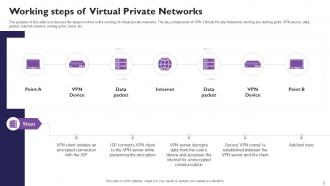
Slide 2: The purpose of this slide is to discuss the steps involved in the working of virtual private networks. The key components of VPN (Virtual Private Networks) working are starting point, VPN device, data packet, internet network, ending point, client, etc.
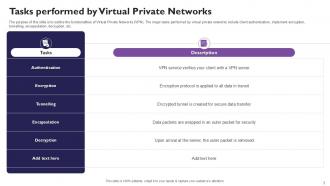
Slide 3: The purpose of this slide is to outline the functionalities of Virtual Private Networks (VPN). The major tasks performed by virtual private networks include client authentication, implement encryption, tunnelling, encapsulation, decryption, etc.
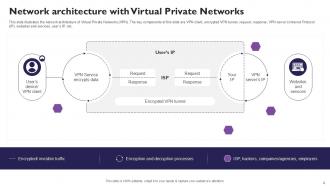
Slide 4: This slide illustrates the network architecture of Virtual Private Networks (VPN). The key components of this slide are VPN client, encrypted VPN tunnel, request, response, VPN server’s Internet Protocol (IP), websites and services, user’s IP, etc.
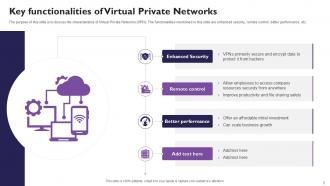
Slide 5: The purpose of this slide is to discuss the characteristics of Virtual Private Networks (VPN). The functionalities mentioned in this slide are enhanced security, remote control, better performance, etc.
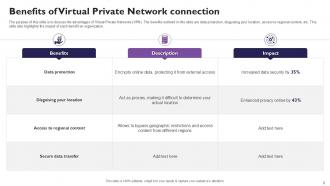
Slide 6: The purpose of this slide is to discuss the advantages of Virtual Private Networks (VPN). The benefits outlined in this slide are data protection, disguising your location, access to regional content, etc. This slide also highlights the impact of each benefit on organization.
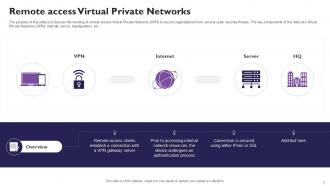
Slide 7: The purpose of this slide is to discuss the working of remote access Virtual Private Networks (VPN) to secure organizations from several cyber security threats. The key components of this slide are Virtual Private Networks (VPN), internet, server, headquarters, etc.
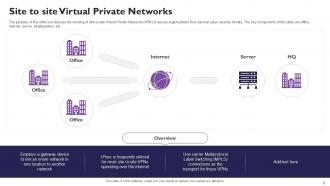
Slide 8: The purpose of this slide is to discuss the working of site-to-site Virtual Private Networks (VPN) to secure organizations from several cyber security threats. The key components of this slide are office, internet, server, headquarters, etc.
Slide 9: The purpose of this slide is to discuss the characteristics of several types of Virtual Private Networks (VPN). These types are mobile VPN, hardware VPN, virtual private network appliance, DMVPN (Dynamic Multipoint VPN), remote access VPN, and site-to-site VPN.
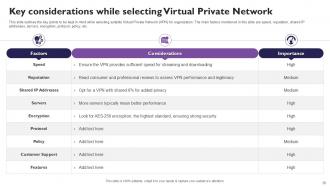
Slide 10: This slide outlines the key points to be kept in mind while selecting suitable Virtual Private Network (VPN) for organization. The main factors mentioned in this slide are speed, reputation, shared IP addresses, servers, encryption, protocol, policy, etc.
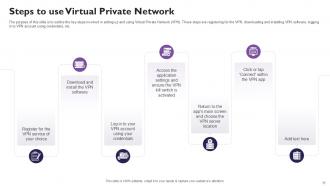
Slide 11: The purpose of this slide is to outline the key steps involved in setting up and using Virtual Private Network (VPN). These steps are registering for the VPN, downloading and installing VPN software, logging in to VPN account using credentials, etc.
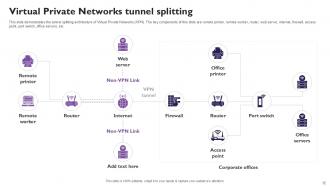
Slide 12: This slide demonstrates the tunnel splitting architecture of Virtual Private Networks (VPN). The key components of this slide are remote printer, remote worker, router, web server, internet, firewall, access point, port switch, office servers, etc.
Slide 13: This slide demonstrates the impact of utilizing Virtual Private Networks (VPN) in an organization. The factors used to analyze the impact are secure remote access, data protection, global connectivity, bypassing geographical restrictions, etc.
Slide 14: The purpose of this slide is to discuss the key features of Virtual Private Network (VPN) vendors available in the market. The features include strong security, large collection of servers, emphasis on customer privacy, simultaneous connections, etc.
Slide 15: This slide outlines the other options available in the market to secure organizational networks. The other VPN alternatives for businesses are Identification and Access Management (IAM), Privileged Access Management (PAM), Vendor Privileged Access Management (VPAM), etc.
Slide 16: This slide shows Icon for Virtual Private Network connection.
Slide 17: This slide presents Icon for Virtual Private Network technology.
Slide 18: This slide displays Virtual Private Networks for web security icon.
Slide 19: This slide contains all the icons used in this presentation.
Slide 20: This slide is titled as Additional Slides for moving forward.
Slide 21: This is Our Mission slide with related imagery and text.
Slide 22: This is a Financial slide. Show your finance related stuff here.
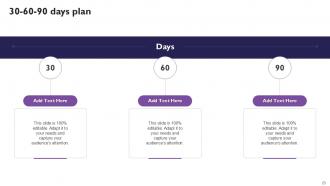
Slide 23: This slide provides 30 60 90 Days Plan with text boxes.
Slide 24: This is a Timeline slide. Show data related to time intervals here.
Slide 25: This slide shows Post It Notes. Post your important notes here.
Slide 26: This slide shows SWOT describing- Strength, Weakness, Opportunity, and Threat.
Slide 27: This slide presents Roadmap with additional textboxes.
Slide 28: This slide contains Puzzle with related icons and text.
Slide 29: This is a Thank You slide with address, contact numbers and email address.
Virtual Private Networks Powerpoint Template Bundles Ppt Slides with all 37 slides:
Use our Virtual Private Networks Powerpoint Template Bundles Ppt Slides to effectively help you save your valuable time. They are readymade to fit into any presentation structure.
















-
Extensive range of templates! Highly impressed with the quality of the designs.
-
This PowerPoint layout is very helpful from a business point of view, and it's visually stunning too! I'm so happy with this product because it has helped me understand and deliver great presentations.