

Website Maintenance Powerpoint Ppt Template Bundles




Try Before you Buy Download Free Sample Product
 Impress Your
 Audience
 100%
100% Editable
 Save Hours
 of Time


Our Website Maintenance Powerpoint Ppt Template Bundles are topically designed to provide an attractive backdrop to any subject. Use them to look like a presentation pro.
People who downloaded this PowerPoint presentation also viewed the following :
Website Maintenance Powerpoint Ppt Template Bundles with all 20 slides:
Use our Website Maintenance Powerpoint Ppt Template Bundles to effectively help you save your valuable time. They are readymade to fit into any presentation structure.







FAQs for Website Maintenance Powerpoint
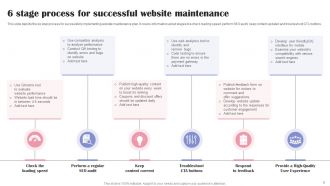
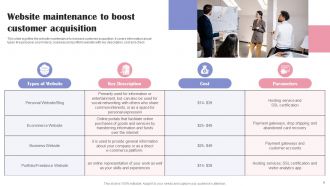
**INPUT**: What are the key components of effective website maintenance for a presentation template site? **OUTPUT**: Effective website maintenance for presentation template sites includes regular security updates, performance optimization, content quality assurance, backup management, and user experience monitoring. These components work together by ensuring fast loading speeds, protecting customer data, and maintaining template functionality, with many presentation platforms finding that consistent maintenance delivers improved search rankings, enhanced user trust, and ultimately higher conversion rates.
**INPUT**: How often should I update my presentation templates to keep my website relevant? **OUTPUT**: You should update presentation templates quarterly or bi-annually, depending on your industry's pace and seasonal campaigns, with technology and healthcare sectors requiring more frequent updates than traditional industries. Regular template refreshes enhance user engagement, maintain visual consistency with current design trends, and support SEO performance, with many organizations finding that systematic updates every 3-6 months deliver improved conversion rates and competitive positioning. [Word count: 60 words]
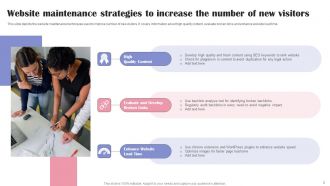
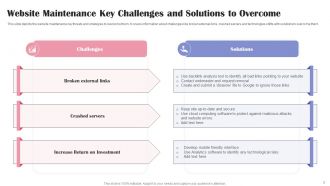
Common technical issues during website maintenance include broken links, plugin conflicts, database corruption, server downtime, and compatibility problems with updates. These challenges can be prevented by creating comprehensive backups before changes, testing updates in staging environments, monitoring site performance regularly, and implementing automated testing protocols, with many organizations finding that proactive maintenance schedules significantly reduce unexpected failures while ensuring seamless user experiences.
Website performance optimization for presentation templates involves compressing images, enabling browser caching, using content delivery networks, minimizing HTTP requests, and optimizing code structure. These techniques streamline loading processes by reducing file sizes, leveraging server efficiency, and enhancing user experiences, with many design agencies finding that faster websites deliver improved client satisfaction and competitive advantage.
SEO in website maintenance for presentation template sites involves optimizing metadata, updating keyword-rich content, maintaining fast loading speeds, and ensuring mobile responsiveness. Regular SEO audits help these platforms rank higher for searches like "business templates" or "PowerPoint designs," while fresh content and technical optimization ultimately drive organic traffic, enhance user discovery, and deliver competitive advantage in the crowded template marketplace.
Website mobile-friendliness requires responsive design, fast loading speeds, touch-friendly navigation, optimized images, and cross-device compatibility testing. These elements streamline user experiences across smartphones, tablets, and desktops by ensuring seamless template browsing, quick downloads, and intuitive interface interactions, ultimately delivering enhanced accessibility and improved engagement rates for presentation seekers.
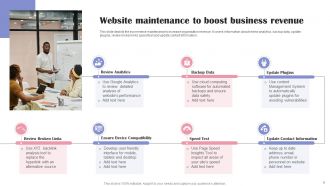
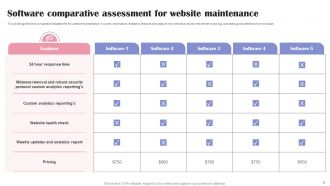
Essential website maintenance tools include content management systems like WordPress, monitoring platforms such as Google Analytics and UptimeRobot, backup solutions like UpdraftPlus, security plugins including Wordfence, and performance optimization tools such as GTmetrix. These technologies streamline operations by automating updates, detecting issues proactively, and securing data integrity, with many organizations finding that integrated toolsets reduce maintenance time by 60% while enhancing site reliability.
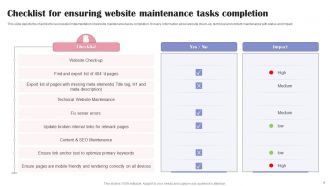
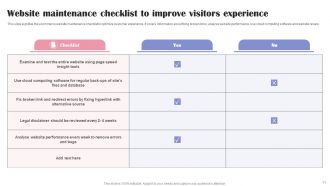
Broken links should be identified through regular audits using tools like Google Search Console, manually checking navigation paths, and monitoring user feedback reports. Outdated content requires systematic reviews of template collections, updating design trends, refreshing industry examples, and removing obsolete formats, with many website managers finding that quarterly maintenance schedules significantly improve user experience and search rankings.
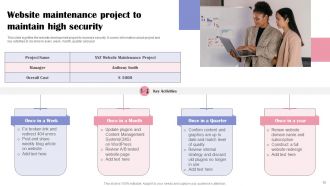
Essential security measures include SSL certificates, regular software updates, strong password policies, two-factor authentication, and automated backups. These protocols protect against data breaches, malware attacks, and unauthorized access by encrypting sensitive information, monitoring suspicious activity, and maintaining secure user authentication, ultimately delivering enhanced customer trust and regulatory compliance.
Regular audits of presentation templates enhance user experience by identifying outdated designs, broken navigation elements, slow-loading components, and mobile responsiveness issues that can frustrate visitors. Through systematic reviews, organizations streamline content delivery, optimize visual consistency, and ensure seamless functionality across devices, with many companies finding that updated templates significantly reduce bounce rates and improve conversion metrics.
A CMS streamlines website maintenance through intuitive content editing, automated updates, user role management, plugin integration, and backup functionality. These systems enable non-technical staff to manage content efficiently while reducing development costs, with many businesses finding that platforms like WordPress or Drupal significantly accelerate updates and enhance operational efficiency.
Website backups involve automated scheduled backups, full database exports, file system copies, cloud storage integration, and version control systems. These methods streamline data protection by creating multiple recovery points, enabling quick restoration, and minimizing downtime risks, with many organizations finding that comprehensive backup strategies ultimately deliver operational continuity and competitive advantage during maintenance periods.
**INPUT**: What strategies can be employed to gather user feedback on presentation templates and improve the website accordingly? **OUTPUT**: User feedback strategies include integrated rating systems, post-download surveys, A/B testing different template layouts, analytics tracking user behavior, and direct customer interviews. These methods streamline template optimization by identifying popular design elements, addressing usability concerns, and enhancing user experience, with many organizations finding that systematic feedback collection ultimately delivers higher conversion rates and improved customer satisfaction. [Word count: 60 words]
Regular website maintenance significantly enhances your presentation template brand by ensuring fast loading speeds, mobile responsiveness, updated content, and seamless user experiences across all touchpoints. Through consistent updates and optimization, businesses demonstrate professionalism and reliability, with many template providers finding that well-maintained sites increase customer trust, reduce bounce rates, and ultimately drive higher conversion rates and brand loyalty.
**INPUT**: What are the best practices for integrating new presentation templates into an existing website without causing downtime? **OUTPUT**: Best practices include staging environment testing, gradual rollout deployment, backup creation, version control systems, and load balancing configuration. These approaches streamline integration by minimizing risk exposure, enabling quick rollbacks, and maintaining seamless user experiences, with many organizations finding that strategic template deployment ultimately delivers enhanced functionality while preserving operational continuity.
-
SlideTeam is the best in the business. Their templates are engaging and customizable. You can rely on them.
-
The quality of PowerPoint templates I found here is unique and unbeatable. Keep up the good work and continue providing us with the best slides!