

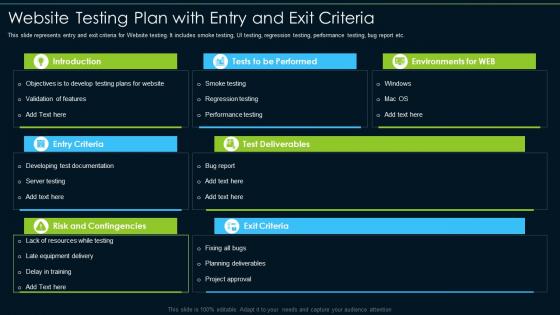
Website Testing Plan With Entry And Exit Criteria




Try Before you Buy Download Free Sample Product
 Impress Your
 Audience
 100%
100% Editable
 Save Hours
 of Time


This slide represents entry and exit criteria for Website testing. It includes smoke testing, UI testing, regression testing, performance testing, bug report etc.
People who downloaded this PowerPoint presentation also viewed the following :
Website Testing Plan With Entry And Exit Criteria with all 6 slides:
Use our Website Testing Plan With Entry And Exit Criteria to effectively help you save your valuable time. They are readymade to fit into any presentation structure.





FAQs for Website Testing Plan With Entry
Honestly, start with functional testing - make sure forms work, links don't break, navigation makes sense. Test performance and load times too. Cross-browser stuff is huge (Chrome users will hate you if it only works in Safari). Mobile responsiveness is obvious but still gets missed somehow. Security testing catches vulnerabilities before hackers do. Get real users involved early - they'll break things in ways you never imagined. Oh, and don't skip accessibility testing if you need compliance. Set up your testing environment first, document as you go. Focus on critical user paths initially, then tackle the smaller features.
Don't save UX testing for the end - that's a recipe for disaster. Jump in early with prototype testing, then move to task-based stuff once pages actually work. Focus on the big moments first (checkout, signup, whatever matters most for your users). Here's the thing though - watch what people DO, not what they say they'll do. Those are totally different things. Quick guerrilla sessions between sprints work great for catching problems before they get expensive to fix. Write down everything and tackle fixes based on what actually breaks user goals.
Functional testing first - make sure your forms and links actually work. Cross-browser stuff is huge too because finding out your site's broken in Safari post-launch is the worst. Page load speeds matter since people bail super quick if things are slow. Oh and mobile testing is non-negotiable now, like 70% of traffic is mobile anyway. Security testing too obviously. Honestly those five will catch most of the stuff that'll ruin your launch. I learned this the hard way lol.
Start with concrete metrics - page load time, response time under load, requests per second. Set hard benchmarks like "homepage loads under 3 seconds with 100 users." Memory and CPU usage matter too, trust me on that one. JMeter or LoadRunner work great for the actual testing. Get your baseline performance first, then hit it with realistic user scenarios. Oh, and document everything in your test plan - sounds obvious but people skip this step all the time. Everyone needs to know what "good" looks like for your specific setup.
Look, cross-browser compatibility is basically making sure your site doesn't fall apart when people use different browsers. Test on Chrome, Firefox, Safari, and Edge - they all handle CSS and JavaScript weirdly different. I've watched gorgeous sites become complete disasters on Safari (ugh). Check your analytics first to see which browsers your users actually have. Desktop and mobile versions both matter. Oh, and don't just look at it - click around and test the actual functionality too. Nothing's worse than a contact form that works on Chrome but breaks everywhere else.
Start building accessibility testing into your workflow early - don't just slap it on later. Automated tools like axe or WAVE are great for catching WCAG violations, but they only find maybe 30% of actual problems. Manual testing is where the real work happens: keyboard navigation, screen readers, color contrast. Test with real users who have disabilities if you can swing it. Someone on your team should actually understand accessibility guidelines (not just me googling stuff last minute lol). Make it part of your regular process instead of that thing you panic about before launch.
Look, you need both but they're totally different beasts. Automated testing crushes the boring repetitive stuff - regression tests, form checks, making sure things work across browsers. Manual testing is where you actually catch the weird UX issues and visual quirks that no script will ever find. I usually go 70/30 split, favoring automation for the routine work. Start with automating your core user flows first, that's where you'll get the biggest bang for your buck. Then do manual exploration on new features - honestly that's where the interesting bugs hide anyway.
Honestly? Run regression tests after every update, even the tiny ones. I learned this the hard way when a simple text change somehow broke our checkout flow last month – still not sure how that happened lol. Minor updates just need testing around what you changed plus the main user flows. Big releases though? You'll want the full test suite. The trick is staying consistent with it. Don't skip testing because deadlines are tight. Automated tests are a lifesaver here if you can swing it.
Hotjar's probably your best bet to start - their free tier gives you heatmaps and session recordings so you can see exactly where people are clicking around. UserTesting.com is amazing but honestly pretty expensive. Google Analytics behavior flow is cluttered but it's free and shows you where people bail out. I've actually gotten great insights just recording my screen with Loom and watching friends navigate my site over Zoom - sounds janky but you'd be surprised how much you catch. FullStory's another solid option if you want something more robust than Hotjar. Start cheap though, you'll spot most of the obvious problems without spending a fortune.
Get some real users to test your site while you watch them struggle through actual tasks. I'd do both moderated sessions where you can ask questions, plus unmoderated ones with tools like UserTesting or Hotjar. The unmoderated stuff is honestly brutal but so much better - people won't sugarcoat things when they're not worried about hurting your feelings! Try beta testing with your actual customers too before you launch. You really only need 5-8 people to start. Trust me, even that tiny group will find issues you never saw coming.
Honestly, the worst thing you can do is wait until the last minute to test stuff. I learned that the hard way on a project last year - total nightmare. Don't just use your own laptop either (guilty as charged). You've gotta check different browsers, screen sizes, all that jazz. Oh, and figure out what "success" actually means before you start, otherwise you'll be guessing if things are working. I usually just make a basic list of scenarios I need to test first. Way less overwhelming that way.
Honestly, just throw everything into one central spot - could be Notion, a Google Sheet, whatever your team won't abandon after two weeks. Document test cases, what you expected vs what actually happened, screenshots of the weird stuff, priority levels. Track browser, device, when you tested it, who caught the bug. Oh and make a template so everyone writes things the same way instead of random chaos. The real trick though? Set up regular check-ins to spot patterns in what's breaking. Don't overthink it at first - consistency beats having some perfect system that nobody uses.
Hit the bad bugs first - anything breaking core stuff or blocking key user actions. Security issues too, even the weird edge cases. After that, think about how many people this actually affects and how often they'll run into it. Real talk though? The bugs your CEO might stumble across will mysteriously jump up the priority list. That's just office politics. Set up some basic scoring system so you're not rehashing the same arguments every sprint. Write down your criteria somewhere and actually stick to it, otherwise you'll be back to arguing about what's "urgent" every week.
Dude, you gotta test on actual phones, not just Chrome's dev tools - they're honestly pretty different. Your analytics will show which devices are most popular, so start there. Touch stuff breaks way more than you'd think, and load times on crappy cell service are brutal. Also test when people flip their phones sideways or jump between apps. Oh, and don't forget older Android phones - tons of people still use them. Battery drain is kind of a pain to track but worth checking if you can. Different screen sizes will surprise you too.
Definitely focus on page load times and bounce rates first - those tell you if people are actually sticking around. Conversion rates and session duration are huge too. Server uptime is non-negotiable though, like seriously, a site that's always crashing will tank your credibility fast. Don't forget mobile metrics since that's where most people are browsing anyway. Heat mapping shows you what users actually click on vs what you think they should. Oh and set up alerts for when stuff drops below normal so you're not finding out about problems from angry customers.
-
Very unique and reliable designs.
-
Professional and unique presentations.