

What where when why how image with question mark




Try Before you Buy Download Free Sample Product
 Impress Your
 Audience
 100%
100% Editable
 Save Hours
 of Time


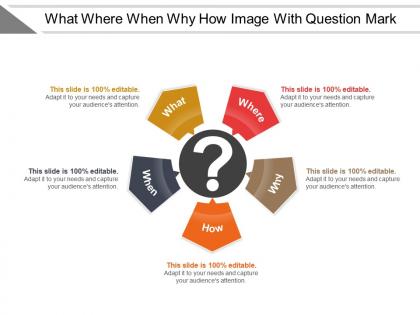
Introducing What Where When Why How Image With Question Mark template. Showcase the methods which you can use to solve business issues with this problem and solutions PPT slideshow. Showcase the business activities carried out by the organization such as budgeting, accounting, and auditing, marketing, sales activities, etc. by using our readily available PPT business strategy infographic. Make your presentation knowledgeable by giving some examples of business opportunities such as E-learning, online referral service, onsite computer service, online gaming, management consulting, etc. Take the assistance of this favorable chances PPT visual and showcase the keys to conducting marketing opportunity analysis. Discuss the factors that need to be considered taking into account a business opportunity such as market size, relationships, ability to manage cash flow, management skillset, etc. Download this ready-to-use assess issue PPT presentation and expand your market reach and develop your products and services.
People who downloaded this PowerPoint presentation also viewed the following :
What where when why how image with question mark with all 5 slides:
Embellish the joke with our What Where When Why How Image With Question Mark. Add a bit of colour to humour.

FAQs for What where when why how image
Key elements of an engaging presentation template include consistent visual hierarchy, compelling color schemes, readable typography, strategic white space, and flexible layout structures. These design components streamline content delivery by enhancing audience focus, reducing cognitive load, and maintaining professional credibility, with many organizations finding that well-structured templates ultimately accelerate presentation development while delivering more impactful messaging.
Visuals in presentation templates enhance audience retention by leveraging visual memory, simplifying complex information through charts and infographics, and creating emotional connections through strategic imagery. These design elements streamline comprehension, minimize cognitive load, and maintain engagement throughout longer presentations, with many organizations finding that visual-heavy templates deliver significantly higher information retention rates and more impactful audience outcomes.
Effective audience tailoring strategies include analyzing demographic data, adjusting content complexity, modifying visual elements, customizing examples and case studies, and adapting communication tone. These approaches enhance engagement by aligning messaging with audience expertise levels, industry backgrounds, and cultural preferences, with many organizations finding that targeted customization significantly improves presentation effectiveness and audience retention.
Storytelling transforms presentations by creating emotional connections, simplifying complex information, enhancing memory retention, and maintaining audience engagement throughout the delivery. Through narrative techniques, presenters build compelling arcs that resonate with audiences, making abstract concepts tangible and memorable, with many organizations finding that story-driven presentations deliver significantly higher persuasion rates and audience buy-in.
Color psychology in presentation templates leverages specific hues to evoke desired emotional responses, with warm colors like red and orange creating energy and urgency, while cool blues and greens promote trust and calm. Strategic color choices enhance audience engagement and message retention, with many organizations finding that consistent, psychology-based color schemes in their templates ultimately deliver stronger emotional connections and more persuasive presentations.
Best practices for structuring content within a presentation template include logical flow sequencing, consistent visual hierarchy, strategic white space utilization, and clear section transitions. These approaches enhance audience comprehension by minimizing cognitive load, maximizing information retention, and streamlining message delivery, with many organizations finding that well-structured templates ultimately deliver more persuasive presentations and improved stakeholder engagement.
Multimedia elements can be effectively integrated through strategic video placement, interactive infographics, embedded audio clips, animated transitions, and synchronized visual-audio storytelling. These technologies enhance audience engagement by simplifying complex concepts, improving information retention, and creating immersive experiences, with many organizations finding that multimedia-rich presentations deliver significantly higher audience participation and message comprehension rates.
Minimalist presentation templates offer enhanced visual clarity, reduced cognitive load, faster audience comprehension, improved focus on key messages, and greater professional credibility. These streamlined designs enable presenters to communicate complex information more effectively, eliminate distracting elements that compete for attention, and create memorable experiences, with many organizations finding that simplified approaches ultimately deliver stronger audience engagement and more persuasive outcomes.
Presenters maintain engagement through interactive elements like polls, Q&A segments, and breakout discussions, while incorporating storytelling, visual variety, and strategic breaks every 15-20 minutes. These techniques work particularly well in corporate training, academic conferences, and sales presentations, with many organizations finding that combining multimedia content, real-world case studies, and audience participation ultimately delivers higher retention rates and more impactful outcomes.
Common presentation template mistakes include overcrowded slides, inconsistent fonts and colors, poor contrast ratios, excessive animations, and misaligned elements. These design flaws significantly reduce audience engagement and message clarity, with many organizations finding that streamlined, consistent templates enhance professional credibility, improve information retention, and ultimately deliver more impactful business communications.
A strong call-to-action incorporates clear, specific language that defines desired outcomes, strategic placement at conclusion and key transition points, and direct connection to audience benefits presented throughout. Through compelling visuals, urgency elements, and simplified next steps, presenters enable immediate audience engagement, streamlined decision-making processes, and measurable conversion rates, ultimately delivering enhanced presentation effectiveness and strategic business outcomes.
Techniques include visual hierarchies, progressive disclosure, chunking information into digestible segments, using analogies and metaphors, and incorporating infographics or flowcharts. These approaches streamline comprehension by breaking down complex concepts systematically, with many organizations finding that strategic combinations of visual storytelling and structured layouts ultimately enhance audience retention and engagement.
Feedback from previous presentations informs template improvement by identifying content gaps, design weaknesses, audience engagement issues, and structural flow problems. Through systematic analysis of presentation outcomes, organizations can refine slide layouts, enhance visual elements, and streamline information delivery, with many companies finding that iterative template optimization significantly improves communication effectiveness and audience retention.
Interactive elements enhance presentation effectiveness by increasing audience engagement, improving information retention, facilitating real-time feedback, encouraging active participation, and creating memorable experiences. These strategies enable presenters to gauge audience understanding, adapt content dynamically, and foster deeper connections, with many organizations finding that interactive presentations deliver significantly higher engagement rates and better learning outcomes than traditional formats.
Presenters can balance text and visuals by using concise bullet points, high-impact graphics, and the 6x6 rule for slide content, while ensuring visuals directly support key messages. This strategic combination enhances audience engagement and comprehension, with many business professionals finding that minimal text paired with compelling charts, infographics, and images ultimately delivers clearer communication and stronger retention.
-
Visually stunning presentation, love the content.
-
Visually stunning presentation, love the content.