

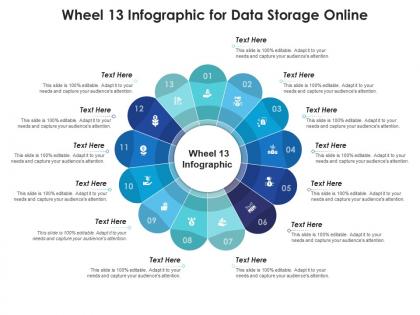
Wheel 13 for data storage online infographic template




Try Before you Buy Download Free Sample Product
 Impress Your
 Audience
 100%
100% Editable
 Save Hours
 of Time


Derive factual results using this Wheel 13 For Data Storage Online Infographic Template. Deploy this PowerPoint template to make and display prospective strategies using impressive graphics that enhance the visual quotient of the presentation. This infographic template also helps in elevating the aesthetic appeal of the presentation, making it useful for every organization. Apart from this, things and projects can be visualized from the onset using this PPT design. As this PowerPoint visual provides an abundance of information in a single layout, it can impress any viewer or higher managerial staff. It also boosts business actions by presenting flawless presentations. The biggest advantage of this slide is that it can be reproduced in various formats, including Google Slides. Therefore, download it now to present a unique presentation every time.
People who downloaded this PowerPoint presentation also viewed the following :
Wheel 13 for data storage online infographic template with all 2 slides:
Use our Wheel 13 For Data Storage Online Infographic Template to effectively help you save your valuable time. They are readymade to fit into any presentation structure.
FAQs for Wheel 13 for data storage
Wheel 13 infographic templates deliver enhanced visual organization, simplified complex data representation, improved audience engagement, streamlined information flow, and professional aesthetic appeal for presentations. These circular design frameworks enable presenters to showcase interconnected concepts, highlight central themes with supporting elements, and create memorable visual narratives, with many organizations finding that structured wheel formats significantly boost comprehension and retention rates.
The Wheel 13 infographic template enhances audience engagement by presenting complex information through visually appealing circular designs, interactive segments, and clear hierarchical structures that guide viewer attention naturally. This format enables presenters to break down multifaceted concepts into digestible components while maintaining visual interest, with many organizations finding that circular infographics increase retention rates and facilitate better audience participation during strategic presentations.
Wheel 13 infographic formats excel at displaying cyclical processes, sequential workflows, interconnected categories, comparative datasets, and multi-step methodologies across various business functions. This circular visualization particularly enhances strategic planning presentations, project management cycles, and departmental workflows, with many organizations finding that the radial structure streamlines complex information delivery while maintaining visual engagement and professional clarity.
Yes, the Wheel 13 infographic template offers comprehensive customization options including color schemes, fonts, text content, visual elements, and brand logo integration. This flexibility enables organizations across sectors like consulting, healthcare, and financial services to maintain brand consistency while presenting complex data relationships, ultimately delivering professional presentations that enhance brand recognition and stakeholder engagement.
Key design elements for a Wheel 13 infographic include balanced segment sizing, consistent color coding, readable typography, clear central focal point, and intuitive visual hierarchy. These elements work together by ensuring information flows logically from center to segments, maintaining visual coherence across all thirteen sections, and ultimately delivering enhanced comprehension and professional presentation quality.
The Wheel 13 infographic template offers a distinctive circular design that enhances data visualization through radial organization, making it particularly effective for displaying cyclical processes, hierarchical relationships, and interconnected concepts compared to linear or grid-based templates. This format delivers superior visual impact for strategic presentations, with many organizations finding that the wheel structure creates more engaging stakeholder communications and clearer process flows.
Professional design software like Adobe Illustrator, Canva Pro, PowerPoint, and Figma are recommended for editing Wheel 13 infographic templates, offering vector editing, customization tools, and collaboration features. These platforms enable organizations to seamlessly modify colors, text, and layouts while maintaining visual consistency, with many businesses finding that PowerPoint delivers the most accessible solution for quick professional customizations.
Wheel 13 infographics are most effective in healthcare, education, project management, strategic planning, and technology sectors where complex multi-step processes require clear visualization. These templates excel in presenting cyclical workflows, annual planning cycles, and comprehensive frameworks, with many organizations finding that the thirteen-segment structure perfectly accommodates detailed quarterly breakdowns, monthly timelines, or comprehensive process maps that enhance stakeholder understanding and strategic alignment.
Effective combination within the Wheel 13 template involves balancing concise, impactful text with complementary visual elements, maintaining consistent font hierarchies, and ensuring adequate white space between segments. Strategic placement enables each wheel section to tell a cohesive story, with many organizations finding that limiting text to key phrases while using icons or charts enhances comprehension and engagement.
Animations and transitions enhance Wheel 13 infographic presentations by creating sequential reveals of each segment, guiding audience attention systematically, and building narrative momentum through controlled pacing. Strategic motion effects enable presenters to emphasize relationships between components, maintain engagement during complex data delivery, and deliver memorable visual storytelling that transforms static information into dynamic business communications.
Common mistakes include overcrowding segments with excessive text, using inconsistent color schemes across sections, poor font size hierarchy, and neglecting visual balance between elements. Many designers find that maintaining clear segment distinctions, ensuring readable text proportions, and aligning content with the wheel's natural flow delivers better audience engagement and comprehension, ultimately enhancing presentation effectiveness.
**INPUT**: What are some examples of successful presentations that utilized a Wheel 13 infographic? **OUTPUT**: Successful Wheel 13 presentations include strategic planning sessions, product launch campaigns, organizational restructuring announcements, annual business reviews, and comprehensive market analysis reports. These presentations streamline complex information by centralizing key themes around a core concept, with many organizations finding that the circular format enhances audience retention and facilitates clearer decision-making processes.
The Wheel 13 infographic template enhances storytelling by organizing complex narratives into digestible visual segments, enabling presenters to guide audiences through interconnected processes, timelines, or decision points systematically. This circular format helps organizations streamline information flow, create memorable visual journeys, and ultimately deliver more engaging presentations, with many finding that segmented storytelling significantly improves audience retention and comprehension.
Best practices for choosing colors and fonts in a Wheel 13 infographic include selecting a cohesive color palette with high contrast, using no more than 3-4 complementary colors, and choosing readable sans-serif fonts. These design elements enhance visual hierarchy and data comprehension by creating clear segment distinctions, maintaining professional aesthetics, and ensuring accessibility across different viewing platforms, ultimately delivering more engaging and effective business presentations.
Audience feedback informs Wheel 13 infographic improvements by revealing comprehension gaps, visual preference patterns, engagement levels, and content relevance concerns through surveys, analytics, and direct responses. Organizations can analyze this data to refine design elements, adjust information hierarchy, and enhance storytelling approaches, ultimately delivering more impactful presentations that resonate with target audiences and drive better business outcomes.
-
Use of icon with content is very relateable, informative and appealing.
-
Wonderful templates design to use in business meetings.
-
Top Quality presentations that are easily editable.
-
Great quality slides in rapid time.
-
Very well designed and informative templates.