

Work Accident Powerpoint Ppt Template Bundles




Try Before you Buy Download Free Sample Product
 Impress Your
 Audience
 100%
100% Editable
 Save Hours
 of Time


Our Work Accident Powerpoint Ppt Template Bundles are topically designed to provide an attractive backdrop to any subject. Use them to look like a presentation pro.
People who downloaded this PowerPoint presentation also viewed the following :
Work Accident Powerpoint Ppt Template Bundles with all 17 slides:
Use our Work Accident Powerpoint Ppt Template Bundles to effectively help you save your valuable time. They are readymade to fit into any presentation structure.






FAQs for Work Accident Powerpoint
Include an incident timeline, root cause analysis, and corrective actions for sure. Visuals work way better than text blocks - show the right way vs wrong way of doing things. Add witness statements and injury details too. Leadership always wants the lessons learned part, so don't skip that. I'd throw in regulatory compliance stuff since that usually comes up anyway. Keep it clean with white space so people aren't overwhelmed during an already crappy situation. Honestly, just make one template you can reuse every time.
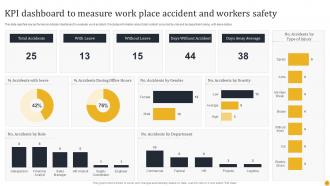
Honestly, visuals are a game changer for accident data - people actually remember charts instead of just zoning out at number tables. Bar charts work great when you're comparing departments, and line graphs show trends over time really clearly. I mean, nobody wants to sit through slides of raw spreadsheet data, right? Infographics can tell the whole story behind your stats in a way that doesn't make people's eyes glaze over. The key is helping people spot patterns quickly - like which months see more incidents or where the real problem areas are. Makes the data way more actionable.
Lead with the timeline - people get lost without context first. Break it into root causes, what you did immediately, and lessons learned. I always add a "wins vs failures" slide because honestly, it keeps everyone awake and shows you're not just doom and gloom about everything. Your corrective actions and prevention stuff? That's the real content people came for. Don't go over 2-3 slides per section or you'll lose them completely. Wrap up with next steps and who's doing what. Oh, and use actual photos from the incident if you can - way more impactful than those generic stock images.
Dude, case studies are absolute gold for safety presentations. You know how everyone zones out when you just read PPE rules? Well, tell them about Jim who skipped his hard hat and ended up in the ER - suddenly they're glued to every word. Stories stick way better than boring bullet points, especially the dramatic ones (honestly, people are kinda morbid like that). Just make sure your examples actually match what your audience does day-to-day. Nobody cares about warehouse accidents if they work in an office. Wrap up each story with super specific steps they can take. Works every time.
Keep it clean with lots of white space - that's honestly the biggest thing. Professional blues or grays work well, and stick with readable fonts like Arial. I always throw in some icons (safety helmets, warning signs, whatever fits) to break things up. Don't go crazy with colors though - your audience needs to actually pay attention to the safety stuff, not get distracted by fancy graphics. Simple bullet points are your friend. High contrast is key so people can read it easily. Maybe add some subtle borders between sections? The whole vibe should scream "trustworthy," so skip anything too flashy.
Figure out who's actually sitting there first. Mixed crowd of safety folks and regular staff? Drop the jargon, then translate right after - like "laceration incident, which is just a fancy way of saying someone got a bad cut." I always have a backup glossary slide because someone will definitely look lost. Analogies work great too, or just show pictures if you can. Honestly, half the battle is making sure people aren't just pretending they get it. You want them walking out actually understanding what went down, not sitting there confused but too embarrassed to ask.
Okay so basically people zone out when you just throw numbers at them, right? But tell them a story about how Jake from maintenance slipped on that wet floor and broke his wrist? Now they're listening. Stories make people actually *feel* something instead of just hearing boring stats. The thing is, you want to keep them short and relevant to your actual workplace - like don't talk about construction accidents if you're in an office. When people can picture themselves in that situation, that's when they'll actually change how they act around safety stuff. Way more effective than charts and graphs, trust me.
Build interactive stuff right into your template from the start. Polling slides work great - ask "What would you do here?" instead of just lecturing at people. I always add discussion prompts after case studies because honestly, specific questions get way better responses than "any questions?" Breakout activities are clutch too. Have teams analyze accident scenarios and report back. Design those pause points into your flow so you don't forget to actually use them. Don't just cram info - give people space to think and talk.
Definitely go with red and yellow - they just hit different when you need people to pay attention. Orange is solid too, I mean there's a reason all those construction cones are orange, right? Skip the blues and greens though. Way too chill for safety stuff (unless you're showing good examples). Black and white contrast works really well for serious topics. Just don't blast people with too much red or you'll give them a headache. Use it for your main warning points and headers, then keep backgrounds neutral. Oh and test from the back of the room - learned that one the hard way when half my audience couldn't read anything!
Honestly, visual stuff is your best friend here. Line charts work great for tracking accidents over time, and bar charts are perfect when you're comparing departments or injury types. Heat maps? Total game-changer for spotting your worst time periods or areas. I always throw in some color coding because it makes everything way easier to read. Maybe add some trend arrows or percentages to show if you're actually improving. The whole point is making it so obvious that your boss can see problems without having to dig through boring spreadsheets.
Dude, definitely keep it anonymous - no names, faces, or anything that could ID people without their permission. Don't accidentally make your company look liable either (legal will freak). Just stick to the facts and educational stuff instead of speculating about what went wrong. OSHA requirements are a given obviously. Honestly though, I'd probably show it to your lawyers first before anyone outside sees it. Not trying to be paranoid but you really don't want some random lawsuit later over a safety presentation, right? Better to be overly cautious on this one.
Just swap out the generic stuff for what actually happens in your industry. Construction? Show scaffolding fails, falls, equipment accidents - you know, the real deal. Manufacturing needs machinery incidents, chemical stuff, repetitive injuries. Replace those boring stock photos with hard hats and safety gear for construction, or actual factory floors for manufacturing. Honestly, the visuals make such a huge difference. Update your stats and examples too so they're not just random workplace numbers. Figure out the top 3-5 accidents that actually happen in your field first. Then build everything around those scenarios. Makes it way more relevant than some cookie-cutter template.
Keep your slides clean - walls of text will put everyone to sleep. Short bullet points work best, maybe highlight a key stat or two. Skip the graphic injury photos (trust me, nobody needs to see that over lunch). Use simple diagrams instead. Make sure you're pulling recent data that actually relates to your workplace, not some random study from forever ago. Oh, and don't go heavy on the blame stuff. Focus on what we can do better moving forward rather than making people feel guilty about past mistakes. You want them engaged, not defensive.
Simple monochromatic icons are your best bet – skip the cartoon clip art stuff. Use them sparingly to back up key points, like a hard hat for safety protocols or warning triangle for hazards. Honestly, I've watched so many presentations crash and burn with those cheesy stock photos of fake construction workers! Keep everything sized properly and aligned with your template colors. Don't go overboard with decoration. Stick to universally recognized safety symbols that people actually understand. Oh, and definitely check how they look on different screens beforehand – learned that one the hard way.
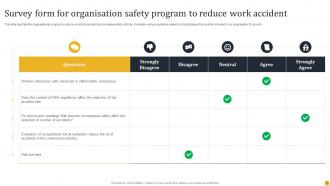
Honestly, anonymous surveys work great - just throw up some QR codes so people can give real feedback without worrying about backlash. Breakout sessions are where the magic happens though. Get teams talking about near-misses they've actually seen, because that's when you'll discover what's really broken in your protocols. Oh, and definitely chat with folks from different departments afterward since they're dealing with totally different hazards. The trick is people need to trust that you'll actually do something with their input. Otherwise they'll just stop bothering to tell you anything useful.
-
Illustrative design with editable content. Exceptional value for money. Highly pleased with the product.
-
Content of slide is easy to understand and edit.