

Work Capacity Management Powerpoint Presentation Slides




Try Before you Buy Download Free Sample Product
 Impress Your
 Audience
 100%
100% Editable
 Save Hours
 of Time


Measure the productivity of your organization by utilizing Work Capacity Management Powerpoint Presentation Slides. Determine if the organization has enough people & resources according to skill sets by using capacity planning PPT slide deck. Strategies of capacity planning like lead strategy, lag strategy, match strategy, adjustment strategy, etc can be described using work capacity management PowerPoint visuals. You can identify and measure the overall capacity of production by incorporating these readily available PPT graphics. Showcase the techniques by which capacity can be increased such as increasing the number of workers or machines, increasing the number of shifts, or acquiring additional production facilities. Monitor the supply and demand adaptation capacity when necessary with the help of production planning PPT graphics. Respond to business requirements speedily and to manage resources efficiently. Present how to calculate capacity with the help of readily available PPT slideshow. Download our ready to use PowerPoint slideshow to manage the capacity and performance of business resources.
People who downloaded this PowerPoint presentation also viewed the following :
Content of this Powerpoint Presentation
Slide 1: This slide introduces the Work Capacity Management. Add your Company Name to begin.
Slide 2: This slide shows the Agenda.
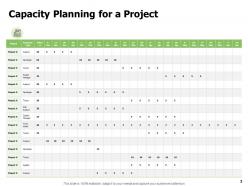
Slide 3: This slide shows the Capacity Planning for a Project.
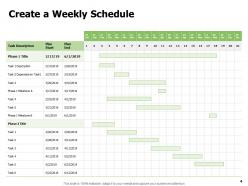
Slide 4: This slide shows how to Create a Weekly Schedule.
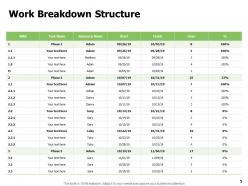
Slide 5: This slide shows the Work Breakdown Structure.
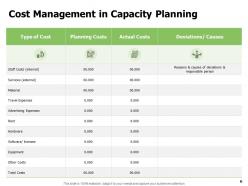
Slide 6: This slide portrays the Cost Management in Capacity Planning.
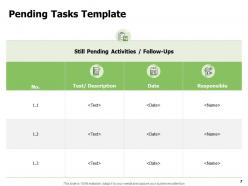
Slide 7: This slide contains the Pending Tasks Template.
Slide 8: This template consists of Work Capacity Management Icons Slide.
Slide 9: This slide is titled as Additional Slides for moving forward.
Slide 10: This slide shows Our Mission.
Slide 11: This slide shows About Us- Target Audiences, Preferred by Many, Value Clients.
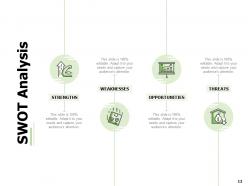
Slide 12: This slide shows the components of SWOT Analysis- STRENGTHS, WEAKNESSES, OPPORTUNITIES, THREATS.
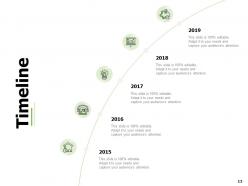
Slide 13: This slide shows the Timeline for various years.
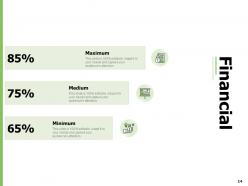
Slide 14: This slide reveals the Financial information.
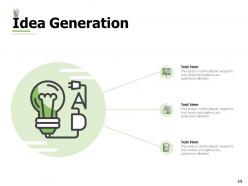
Slide 15: This slide reveals the Idea Generation.
Slide 16: This slide reveals the names and designation of Our Team members.
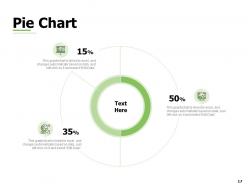
Slide 17: This slide contains an editable Pie Chart that can be used to depict the market share of products.
Slide 18: This slide contains a Quote by Bill Gates.
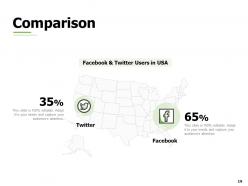
Slide 19: This slide shows a Comparison of Facebook & Twitter Users in USA.
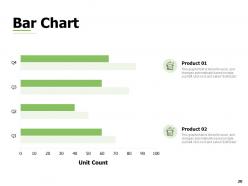
Slide 20: This slide contains an editable Bar Chart depicting the market share of products.
Slide 21: This is a Thank You slide consisting of Address, Contact numbers and email Address.
Work Capacity Management Powerpoint Presentation Slides with all 21 slides:
We are adding hundreds of designs daily. Choose from thousands of the finest Work Capacity Management Powerpoint Presentation Slides to add to your presentation presentations.







FAQs for Work Capacity Management
Honestly, it all comes down to three main things. First, figure out what your team can *actually* handle - not what you hope they can do. Track everyone's current workload so you can spot problems early. Ruthless prioritization is huge too. You can't do everything at once, even though managers love pretending you can. Match the right skills to tasks and always build in extra time because stuff inevitably takes longer than planned. I'd start by just mapping out who's doing what right now. You'll probably find you're already overcommitted somewhere.
Start by tracking how much time your team actually spends on stuff vs what you thought it'd take. Honestly, this is where most people get a rude awakening about their estimates! Survey your people about their workload - they know where the real problems are better than anyone. Map out where work gets stuck and piles up. Check if people are sitting around bored or completely swamped. Look at who's missing what skills and how work flows between teams. Then stack all that against what you're trying to accomplish as a business. You'll spot the gaps pretty quick.
Dude, you've gotta use tech for this stuff. Project management tools show you who's swamped and who's got bandwidth. Resource planning software catches those bottlenecks before they wreck your timeline. Analytics dashboards? They're actually pretty cool - you'll start seeing patterns in how your team works. Look, doing this manually is just painful. Why put yourself through that? The data helps you figure out realistic deadlines and when you actually need more people. My advice? Start with whatever tool you're already using (even if it's basic) and add features as you go. Don't overcomplicate it right off the bat.
So workforce planning is like mapping out what people you'll need down the road - skills, headcount, all that stuff. Capacity management? That's the daily grind of actually putting your current team on the right projects. Planning without good capacity management is honestly pretty useless - like meal prepping but then burning everything when you cook it. You need both working together. I'd start by syncing up your planning meetings with when you review who's doing what. Short bursts work better than these massive quarterly things that nobody remembers anyway.
Start with utilization rates - that's your baseline for productive work vs admin stuff. Track throughput too, like tasks done per sprint and cycle time from start to finish. Most teams go overboard here and drown in spreadsheets, which is honestly worse than tracking nothing. Capacity planning accuracy matters - basically how bad you are at estimating workloads. Oh, and don't ignore the human side. Burnout indicators, overtime patterns, that kind of thing. Get these basics down first, then you can add fancy metrics later if you're feeling ambitious.
Honestly, just pay attention when your team says they're drowning. I'd track stuff like actual hours worked and stress levels, not just how much they're cranking out. Build buffer time into deadlines - we got totally wrecked last quarter because I didn't do this. Rotate who's doing the crazy intense projects so people can actually recover. Oh, and those regular one-on-ones? They're clutch for catching burnout before it hits. Start by looking at your current timelines and see where you can give people some breathing room. Trust me on this one.
Start with your historical data - seasonal trends, project cycles, how demand's changed recently. Track leading indicators too like your sales pipeline or contract renewals since they'll give you warning before work actually lands on your desk. Factor in employee turnover and training time (ugh, always takes longer than expected). Process changes coming up? Those'll slow things down initially. Honestly, I'd rather build in extra buffer time and look overprepared than scramble for resources at the last second. Better safe than sorry with this stuff.
Dude, capacity management is a game changer. Your team won't burn out constantly, and you'll actually hit deadlines for once. No more of that "wait, who's doing what again?" mess that drives everyone crazy. People stop stressing about impossible workloads - which honestly makes such a difference in how they feel about work. Quality improves because nobody's rushing through stuff. Projects just... flow better? And you can actually tell clients realistic timelines instead of making stuff up. Oh, and start by just tracking what your team can handle vs what they're actually cranking out.
Honestly, getting different teams to actually talk to each other makes such a huge difference for workload stuff. You'll start noticing bottlenecks way faster instead of everyone just doing their own thing in isolation. Like, marketing might be slammed while dev has some free time - but nobody knows unless you're checking in regularly. The visibility thing is huge too. Dependencies become obvious, timelines get way more realistic. I'd probably start with just a weekly sync where teams share what's on their plate and what's coming up. Sounds boring but it actually works pretty well once people get used to it.
So here's what I'd do - pull data from your project management tools and time tracking systems to see where bottlenecks actually happen (not where you think they do). Historical workloads show patterns that help predict future needs. You'll probably find useful insights already sitting in your existing tools. Look at both the numbers like task completion rates and the softer stuff - team burnout signs, underused people, skill gaps. Honestly, most companies are sitting on way more data than they realize. Start by auditing what you're already collecting first.
Honestly, most teams bite off way more than they can chew. Poor visibility doesn't help either - you're flying blind on who's actually swamped. Then priorities keep changing every week, which kills any planning you've done. Track your capacity vs what's coming in. Kanban boards are clutch for spotting where things get stuck. Say no to the random "urgent" stuff that isn't really urgent - this one's huge. Always pad your timelines because Murphy's Law is real. Getting leadership to buy into realistic deadlines is probably your biggest battle. They think adding more work = faster results (spoiler: it doesn't). Start by figuring out what's eating up most of your bandwidth right now.
Hey! So manufacturing is all about machines and production lines - stuff you can actually see and measure. Services? Way messier because you're dealing with people's schedules and skills. Like, you can't stockpile a consultant's advice the way you'd store widgets in a warehouse, you know? Everything happens in real-time with services. Manufacturing lets you build inventory when things are slow, but services are more... unpredictable, I guess? First thing - figure out if your main bottleneck is equipment or people. That'll tell you which direction to go with your planning.
Cross-training is honestly a game changer - when your team can switch between different jobs, you won't be stuck scrambling. Look at your demand patterns from last year first though, that'll show you exactly when things get nuts. Temps and contractors work great for those crazy busy periods. Part-time schedules help too, or letting people work remote when possible. Oh and outsourcing the boring stuff nobody wants to do anyway? Total lifesaver when you're swamped. Forecasting sounds boring but it beats panicking every few months.
Your team is basically your crystal ball for spotting capacity problems before they blow up. They're in the trenches daily, so they'll catch bottlenecks you'd never see from your desk. When someone says they're drowning or bored out of their mind, that's gold - listen up. Quick weekly check-ins work great, or try monthly surveys if that's more your speed. Honestly, even random coffee chats reveal tons about who's burning out versus who needs more work. I learned this the hard way after missing obvious red flags. Catch this stuff early and you'll save yourself major headaches later.
Look, badly managed workloads will absolutely wreck your team's morale. People burn out when they're constantly swamped, then they bail for better jobs. Your best performers? They're usually the first ones out the door, which sucks because they take all that knowledge with them. Productivity tanks, everyone calls in sick more often, and this awful "just survive today" vibe takes over. I've seen it happen - teams get stuck in permanent crisis mode. Plus you'll be hiring and training people nonstop, which honestly becomes its own nightmare. Track what everyone's actually handling and talk to them about realistic capacity before you lose the good ones.
No Reviews