

Workflow Automation Implementation Dashboard For Monthly Procurement Process




Try Before you Buy Download Free Sample Product
 Impress Your
 Audience
 100%
100% Editable
 Save Hours
 of Time


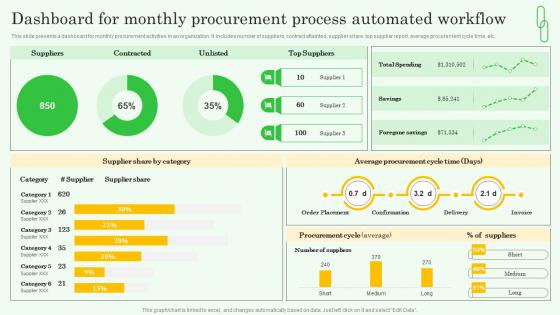
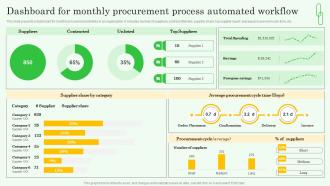
This slide presents a dashboard for monthly procurement activities in an organization. It includes number of suppliers, contract attainted, supplier share, top supplier report, average procurement cycle time, etc.
People who downloaded this PowerPoint presentation also viewed the following :
Workflow Automation Implementation Dashboard For Monthly Procurement Process with all 7 slides:
Use our Workflow Automation Implementation Dashboard For Monthly Procurement Process to effectively help you save your valuable time. They are readymade to fit into any presentation structure.





FAQs for Workflow Automation Implementation Dashboard For
Honestly, it's a game changer for time management. No more doing the same boring tasks over and over – automation handles follow-ups, invoicing, all that stuff automatically. Your team can actually focus on growing instead of drowning in paperwork (which I swear multiplies when you're not looking). Customers get faster responses too since everything happens on schedule. The tracking part is huge – you'll finally see what's actually working for your business instead of just guessing. I'd pick one process that's currently driving you crazy and start there. Much easier than trying to automate everything at once.
Honestly, it's a game-changer for cutting out those "did you do the thing yet?" Slack messages. When someone finishes their part, everyone gets updated automatically - no more wondering where stuff stands. The handoffs between teammates actually work instead of tasks getting lost in the void. Those weekly status meetings? Half of them become unnecessary (thank god). Your team stops playing phone tag about updates and can focus on real work instead. I'd say pick one annoying process that involves like 3+ people and automate that first. You'll be shocked how much less chaotic everything feels.
Honestly, the biggest pain is usually your team pushing back - nobody likes change, even when it'll help them. Tool selection trips people up too; you'll think something looks perfect then realize it doesn't mesh with your existing systems at all. Most companies also totally underestimate how messy their current processes actually are. Like, you think it's simple until you start mapping it out and find 12 random exceptions nobody mentioned. My advice? Pick one boring, straightforward process first. Get a few key people excited about it before rolling anything out. Don't go big right away.
So different industries tackle this stuff in their own ways. Healthcare automates patient scheduling and prescription refills - saves tons of admin headaches. Manufacturing goes crazy with inventory tracking and quality control (they used to do SO much of this by hand, it's honestly ridiculous). Finance focuses on compliance reports and loan approvals. Retail's all about order processing and customer service flows. My advice? Look at whatever your team does over and over that makes everyone groan. That's your starting point right there.
Honestly, map out what you're already doing first - can't automate what you don't understand, right? Pick stuff that plays nice with whatever software you've got. Your team needs to actually want to use it, so skip anything that looks like it was designed in 2003. Oh and don't go nuts buying some fancy enterprise thing immediately. Start with automating just one annoying process, see how it works, then add more. Scalability matters but you'll figure that out as you grow. The integration headache isn't worth it if you're juggling ten different platforms that don't talk to each other.
Honestly, workflow automation is a game changer for customer experience. You know how annoying it is when you're waiting forever for a response or getting inconsistent service? Automation fixes that stuff. Order processing, follow-up emails, support tickets - automate the boring repetitive tasks so customers get faster, more reliable service. Your team can then focus on the complicated issues that actually need human brains. I'd start by listing out your most repetitive customer processes (there's probably more than you think) and pick the easiest ones to automate first. Customers definitely notice when things just work smoothly.
Track your time savings and how many fewer errors you're getting - that's the bread and butter stuff. Cost per transaction will show you the real money impact. User adoption rates are critical too because what's the point if nobody actually uses it? Honestly, don't sleep on employee satisfaction surveys. People get grumpy when automation makes their job harder instead of easier. Throughput is another big one - are you actually processing more tasks than before? My advice? Pick maybe 3-4 metrics max to start. You'll go crazy trying to measure everything at once.
Honestly, automation usually pushes people into better work - less boring repetitive stuff, more strategic thinking and creative problem-solving. Most employees actually end up happier because let's be real, nobody wants to do the same mindless tasks all day. The tricky part is the transition though. People get nervous about their jobs or having to learn new skills. What works best is getting your team involved early - ask them what they'd want automated and give them training for their new responsibilities. Makes them feel like partners in the change instead of victims of it.
Honestly, the biggest headaches are usually over-automating stuff (makes everything way too rigid) and your team freaking out about losing their jobs. System failures can snowball fast too - one thing breaks and suddenly everything's broken. Oh, and security issues since you're basically connecting a bunch of systems that handle sensitive data. Start with small, boring processes first. Get your team involved so they don't hate you for it. Always build manual overrides because tech fails at the worst possible moments. Set up good monitoring and backups now, not later when you're panicking at 2am trying to fix everything.
Don't wait to add security - bake it right into your automation setup. Role-based access is huge so random people can't mess with your workflows. Encrypt everything and make sure you're hitting whatever compliance stuff your industry needs. Audit trails seem boring but trust me, you'll need them when someone asks where data went. I learned that one the hard way. Train your team on handling data properly and review your security regularly. Maybe start with less critical processes first? That way you can work out the kinks before automating anything super important.
So AI and ML basically turn your regular automation into something way smarter. Your system can actually learn patterns from data instead of you having to code every single scenario - which honestly saves so much time. Predictive routing, smart document processing, chatbots that get context... it's pretty wild. The algorithms keep getting better too by analyzing how things perform and tweaking workflows automatically. My advice? Start with one process where you've got solid historical data. That's where ML really shines since it has something good to learn from.
Honestly, skip the boring demos and just let people get their hands dirty with the tools right away. Find a few tech-savvy folks on each team to be your go-to people when stuff inevitably breaks or confuses everyone. Make some visual cheat sheets - nobody reads walls of text anyway. The biggest thing though? Don't let people think they're getting replaced. That's when you get pushback. Give them time to figure it out and make a big deal when someone nails it. Oh, and maybe bring donuts to the training sessions. Food helps.
Honestly, the automation stuff getting really interesting now. AI can actually make complex decisions instead of just doing boring repetitive work. Low-code platforms are everywhere - your marketing team can literally build their own workflows without bugging IT constantly. Hyperautomation is connecting everything so your processes actually talk to each other (finally!). Regular employees are becoming "citizen developers" which sounds fancy but just means they're creating their own automations. Bottom line? This tech is getting way smarter and easier to use. I'd start looking at what processes are driving you crazy and maybe test out one of those low-code tools.
So basically these platforms like Zapier or Power Automate just plug into whatever you're already using - your CRM, email, project stuff. APIs and webhooks handle most of it. Way simpler than it sounds, honestly. First thing I'd do is figure out which tools need to actually talk to each other. Then see if there's already a connector for them (there usually is). If not, you can build custom ones but that's probably overkill at first. Just pick two tools you use every day and automate something simple between them. Test it out before you go crazy with complex workflows.
Dude, some companies have absolutely crushed it with automation. Amazon cut their warehouse processing time by 75% - that's insane. Netflix? Their recommendation engine drives 80% of what people watch. Zappos slashed customer service response times in half, and American Express processes millions of fraud checks instantly now. Honestly, they all started with the boring, repetitive stuff that ate up tons of time. Look at what's draining your day - those manual tasks you hate doing. That's probably where you'll see the biggest impact if you automate it first.
-
Happy to found you SlideTeam. You guys are value for money. Amazing slides.
-
Awesome use of colors and designs in product templates.