

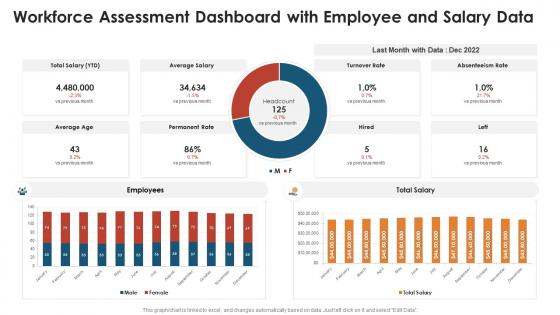
Workforce assessment dashboard with employee and salary data




Try Before you Buy Download Free Sample Product
 Impress Your
 Audience
 100%
100% Editable
 Save Hours
 of Time


Our workforce assessment dashboard with employee and salary data are topically designed to provide an attractive backdrop to any subject. Use them to look like a presentation pro.
People who downloaded this PowerPoint presentation also viewed the following :
Workforce assessment dashboard with employee and salary data with all 10 slides:
Use our workforce assessment dashboard with employee and salary data to effectively help you save your valuable time. They are readymade to fit into any presentation structure.








FAQs for Workforce assessment dashboard with employee
Key metrics for workforce assessment dashboards include productivity rates, goal completion percentages, skill competency scores, employee engagement levels, and performance trend analysis over time. These metrics enable organizations to identify high performers, address skill gaps, and optimize resource allocation, with many companies finding that comprehensive dashboards streamline performance reviews while delivering data-driven insights for strategic workforce planning.
Visual data representation enhances workforce dynamics understanding by transforming complex HR metrics into intuitive charts, graphs, heatmaps, and trend lines that reveal patterns instantly. Through interactive dashboards, organizations streamline talent management decisions, identify skill gaps more effectively, and track employee performance across departments, ultimately delivering faster strategic insights and improved workforce optimization.
Real-time data enables workforce assessment dashboards to provide immediate insights into employee performance, productivity trends, and operational bottlenecks, allowing managers to make informed decisions quickly. This continuous data flow streamlines resource allocation and performance management, with many organizations finding that real-time visibility ultimately delivers enhanced operational efficiency and competitive advantage.
Organizations can customize their workforce assessment dashboard by configuring key performance indicators, selecting relevant metrics for their industry, integrating specific competency frameworks, and establishing personalized benchmarks that reflect strategic priorities. Through configurable widgets, custom reporting filters, and goal-oriented analytics, companies streamline talent evaluation processes, enhance resource allocation decisions, and ultimately deliver targeted workforce development strategies that support competitive advantage.
Best practices for integrating workforce assessment tools with existing HR systems include establishing clear data mapping protocols, ensuring API compatibility, implementing single sign-on authentication, conducting phased rollouts, and maintaining data security standards. These integration strategies streamline talent management by eliminating duplicate data entry, enhancing employee experience through seamless workflows, and enabling real-time analytics, with many organizations finding that strategic integration ultimately delivers improved recruitment efficiency and better workforce insights.
A workforce assessment dashboard identifies skill gaps by analyzing current competencies against role requirements, tracking performance metrics, and mapping skills distribution across departments and teams. Through data visualization and competency matrices, organizations streamline talent development planning, enhance resource allocation, and accelerate targeted training initiatives, ultimately delivering stronger workforce capabilities and competitive advantage in an increasingly skills-driven market.
Critical data sources include employee surveys, performance metrics, attendance records, project completion rates, and collaboration tool analytics. These sources deliver comprehensive workforce insights by tracking engagement levels, identifying productivity patterns, and measuring team dynamics, with many organizations finding that combining quantitative performance data with qualitative feedback enables more strategic talent management and improved employee experiences.
Workforce assessments influence recruitment by identifying skill gaps, performance patterns, and cultural fit indicators, enabling more targeted hiring strategies. Through comprehensive analytics, organizations streamline candidate selection, enhance job descriptions, and improve onboarding processes, with many companies finding that data-driven recruitment reduces hiring costs and accelerates talent acquisition timelines.
Common implementation challenges include data integration from multiple HR systems, ensuring data accuracy and consistency, securing employee buy-in amid privacy concerns, and establishing relevant performance metrics. Organizations often struggle with change management resistance, technical infrastructure limitations, and balancing comprehensive insights with user-friendly interfaces, with many finding that phased rollouts and transparent communication help minimize adoption barriers while maximizing strategic workforce optimization benefits.
Employee feedback enhances workforce assessments by providing real-time insights into job satisfaction, skill gaps, management effectiveness, and workplace culture that traditional metrics often miss. Through anonymous surveys and structured feedback systems, organizations capture authentic employee perspectives on training needs, career development opportunities, and operational challenges, ultimately delivering more comprehensive talent strategies and improved retention rates.
Predictive analytics within workforce assessment dashboards can forecast employee turnover, identify skill gaps, predict performance outcomes, anticipate training needs, and optimize resource allocation. These capabilities enable organizations to proactively address talent challenges, enhance succession planning, and improve retention strategies, with many companies finding that predictive insights ultimately deliver reduced hiring costs and stronger workforce stability.
Workforce data should be updated daily for operational metrics like attendance and productivity, weekly for performance indicators, and monthly for strategic measurements like engagement scores and turnover rates. Many organizations implement automated real-time feeds for critical metrics while scheduling periodic updates for analytical data, ultimately ensuring decision-makers access current insights that drive effective workforce planning and resource allocation.
A well-designed workforce assessment dashboard significantly improves employee retention by identifying at-risk talent, tracking engagement patterns, and enabling proactive intervention strategies. Through real-time analytics and predictive insights, organizations can address retention challenges early, enhance career development opportunities, and create more targeted retention programs, ultimately reducing turnover costs while building stronger, more engaged teams.
Leaders can effectively leverage workforce dashboard insights by identifying skill gaps, monitoring performance trends, tracking employee engagement metrics, and analyzing productivity patterns across departments. These data-driven insights enable strategic workforce planning, targeted training investments, optimized resource allocation, and proactive retention strategies, with many organizations finding that dashboard-guided decisions ultimately enhance operational efficiency and competitive advantage.
HR teams need training in data analytics fundamentals, dashboard navigation, workforce metrics interpretation, and statistical analysis to effectively utilize assessment platforms. Through comprehensive programs covering data visualization, trend analysis, and predictive modeling, organizations streamline talent decisions, enhance strategic workforce planning, and deliver actionable insights, with many companies finding that structured training ultimately accelerates adoption rates.
-
It saves your time and decrease your efforts in half.
-
Innovative and attractive designs.
-
Great designs, really helpful.
-
Enough space for editing and adding your own content.
-
Presentation Design is very nice, good work with the content as well.