

Workplace Communication Human Resource Strategy Powerpoint Presentation Slides




Try Before you Buy Download Free Sample Product
 Impress Your
 Audience
 100%
100% Editable
 Save Hours
 of Time


HR communication plays a significant role in organizational task management. Our Workplace Communication Human Resource Strategy presentation showcases the importance of HR communication which is to embrace two-way dialogue, access corporate information quickly, and increase employee productivity and engagement. The deck exhibits the issues faced by the company due to ineffective HR communication, including decreased employee productivity, increased turnover, low workforce engagement, hiring new employees, workplace stress management, etc. It further includes the gap analysis that depicts the current situation and strategies to achieve the desired goals. This module covers strategies to improve HR and personnel communication, such as engaging content, providing employee feedback, conducting employee empowerment tasks, and scheduling workforce training and development sessions. Also, this Workforce Engagement PPT includes digital, face-to-face, video conferencing, and written communication channels along with upward, downward, diagonal and horizontal communication models. At last, it highlights the tools to improve communication in the workforce, the cost spent on implementing improvement strategies, and the overall impact on the organization. Download our 100 percent editable and customizable deck to know more in detail.
People who downloaded this PowerPoint presentation also viewed the following :
Content of this Powerpoint Presentation
Slide 1: This slide introduces Workplace Communication Human Resource Strategy. State your company name and begin.
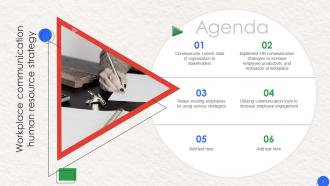
Slide 2: This slide states Agenda of the presentation.
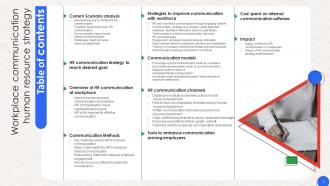
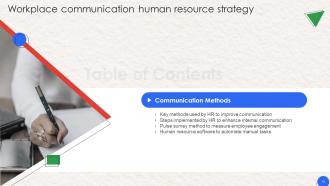
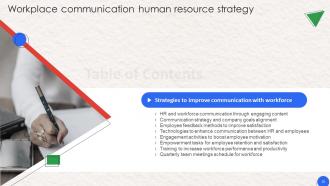
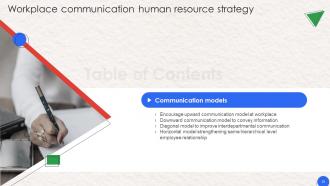
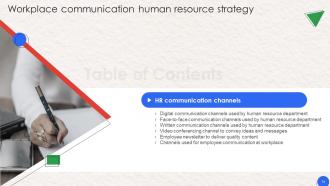
Slide 3: This slide shows Table of Content for the presentation.
Slide 4: This slide highlights title for topics that are to be covered next in the template.
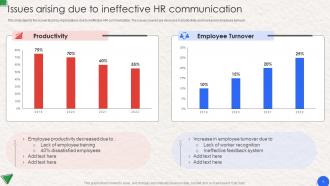
Slide 5: This slide presents Issues arising due to ineffective HR communication.
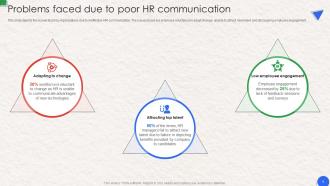
Slide 6: This slide displays Problems faced due to poor HR communication.
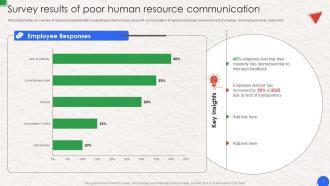
Slide 7: This slide represents Survey results of poor human resource communication.
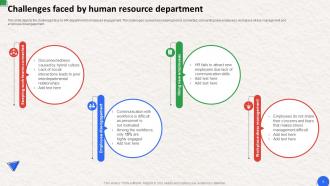
Slide 8: This slide showcases Challenges faced by human resource department.
Slide 9: This slide highlights title for topics that are to be covered next in the template.
Slide 10: This slide shows HR communication strategy to reach desired goal.
Slide 11: This slide highlights title for topics that are to be covered next in the template.
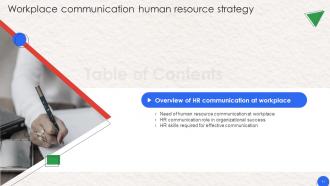
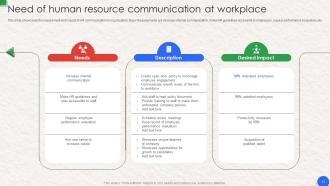
Slide 12: This slide presents Need of human resource communication at workplace.
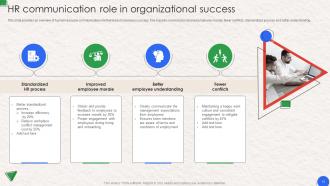
Slide 13: This slide displays HR communication role in organizational success.
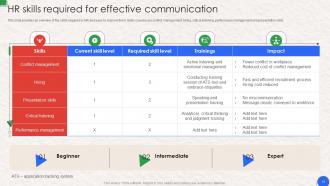
Slide 14: This slide represents HR skills required for effective communication.
Slide 15: This slide highlights title for topics that are to be covered next in the template.
Slide 16: This slide showcases Key methods used by HR to improve communication.
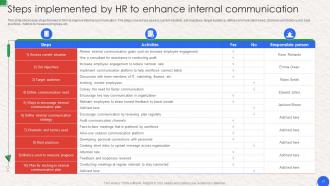
Slide 17: This slide shows Steps implemented by HR to enhance internal communication.
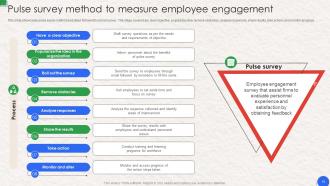
Slide 18: This slide presents Pulse survey method to measure employee engagement.
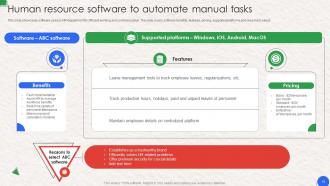
Slide 19: This slide displays Human resource software to automate manual tasks.
Slide 20: This slide highlights title for topics that are to be covered next in the template.
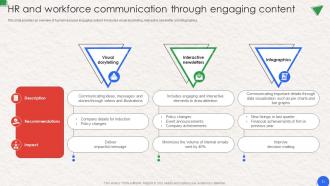
Slide 21: This slide represents HR and workforce communication through engaging content.
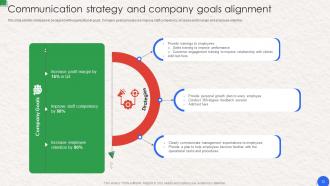
Slide 22: This slide showcases Communication strategy and company goals alignment.
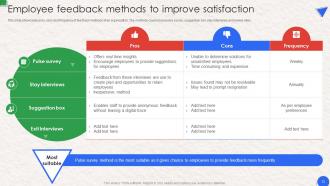
Slide 23: This slide shows Employee feedback methods to improve satisfaction.
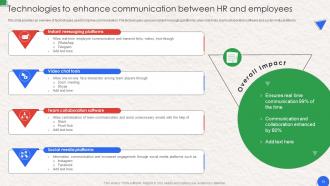
Slide 24: This slide provides an overview of technologies used to improve communication.
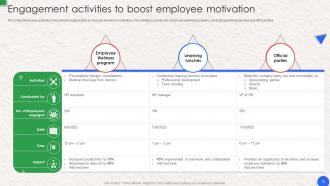
Slide 25: This slide presents Engagement activities to boost employee motivation.
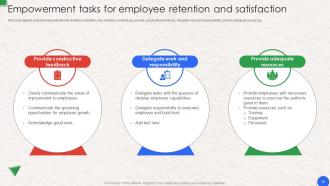
Slide 26: This slide displays Empowerment tasks for employee retention and satisfaction.
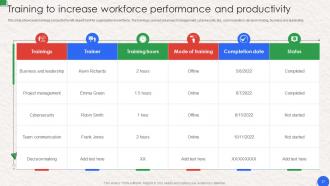
Slide 27: This slide represents Training to increase workforce performance and productivity.
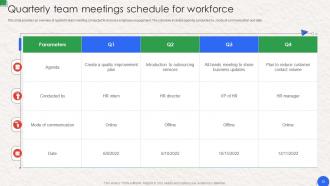
Slide 28: This slide showcases Quarterly team meetings schedule for workforce.
Slide 29: This slide highlights title for topics that are to be covered next in the template.
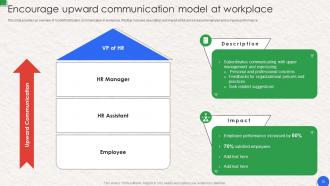
Slide 30: This slide shows Encourage upward communication model at workplace.
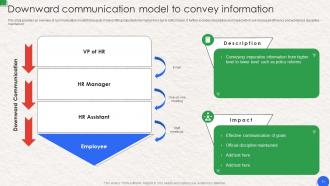
Slide 31: This slide presents Downward communication model to convey information.
Slide 32: This slide displays Diagonal model to improve inter-departmental communication.
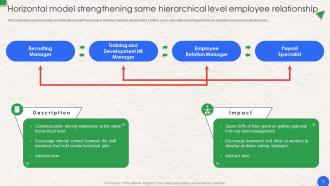
Slide 33: This slide showcases horizontal communication model.
Slide 34: This slide highlights title for topics that are to be covered next in the template.
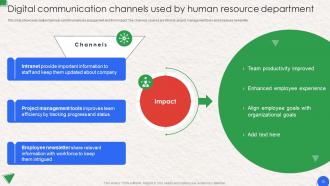
Slide 35: This slide showcases digital channels used for employee engagement and their impact.
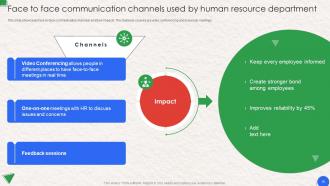
Slide 36: This slide showcases face-to-face communication channels and their impacts.
Slide 37: This slide shows Written communication channels used by human resource department.
Slide 38: This slide presents Video conferencing channel to convey ideas and messages.
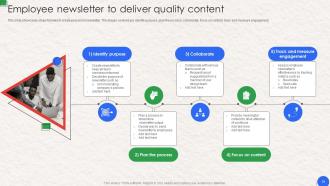
Slide 39: This slide displays Employee newsletter to deliver quality content.
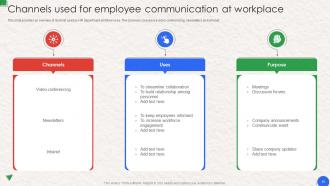
Slide 40: This slide represents Channels used for employee communication at workplace.
Slide 41: This slide highlights title for topics that are to be covered next in the template.
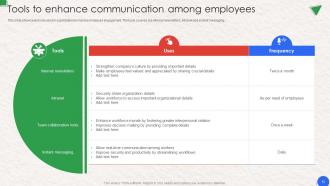
Slide 42: This slide showcases Tools to enhance communication among employees.
Slide 43: This slide highlights title for topics that are to be covered next in the template.
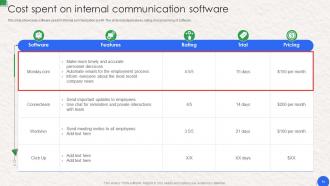
Slide 44: This slide shows Cost spent on internal communication software.
Slide 45: This slide highlights title for topics that are to be covered next in the template.
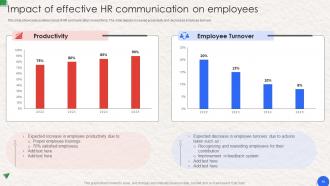
Slide 46: This slide presents Impact of effective HR communication on employees.
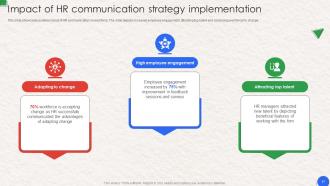
Slide 47: This slide displays Impact of HR communication strategy implementation.
Slide 48: This slide contains all the icons used in this presentation.
Slide 49: This slide is titled as Additional Slides for moving forward.
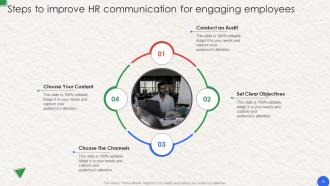
Slide 50: This slide represents Steps to improve HR communication for engaging employees.
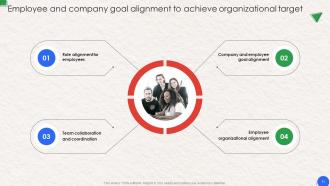
Slide 51: This slide showcases Employee and company goal alignment to achieve organizational target.
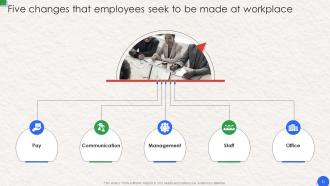
Slide 52: This slide shows Five changes that employees seek to be made at workplace.
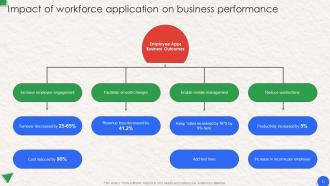
Slide 53: This slide presents Impact of workforce application on business performance.
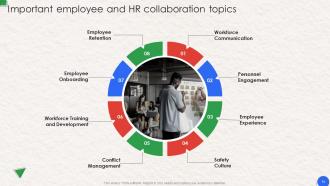
Slide 54: This slide displays Important employee and HR collaboration topics.
Slide 55: This is About Us slide to show company specifications etc.
Slide 56: This is Our Team slide with names and designation.
Slide 57: This is Our Goal slide. State your firm's goals here.
Slide 58: This slide shows Post It Notes. Post your important notes here.
Slide 59: This is a Timeline slide. Show data related to time intervals here.
Slide 60: This slide depicts Venn diagram with text boxes.
Slide 61: This slide contains Puzzle with related icons and text.
Slide 62: This is an Idea Generation slide to state a new idea or highlight information, specifications etc.
Slide 63: This is a Thank You slide with address, contact numbers and email address.
Workplace Communication Human Resource Strategy Powerpoint Presentation Slides with all 68 slides:
Use our Workplace Communication Human Resource Strategy Powerpoint Presentation Slides to effectively help you save your valuable time. They are readymade to fit into any presentation structure.













FAQs for Workplace Communication Human Resource Strategy
Honestly, it comes down to being clear and actually listening when people talk. Don't assume what they mean - just ask if you're confused. Pick the right way to communicate too, like maybe don't send a novel over Slack when a quick call works better. Body language is huge during face-to-face stuff (learned that during some painfully awkward Zoom meetings). Being empathetic helps build trust with your team. Oh, and don't try to fix everything at once - pick whatever you suck at most and work on that first.
Your body language is doing like half the talking for you, whether you realize it or not. Say you're telling someone "nice work" while your arms are crossed and you look annoyed - they'll catch that vibe instantly. It's honestly pretty cringe when people do that. Eye contact shows you're actually listening. Stand up straight if you want to look confident. Oh, and your tone needs to match what you're saying or it just sounds weird. People notice this stuff way more than you'd think, so don't let your body contradict your words.
Dude, active listening totally changes everything with teams. People feel actually heard instead of just... ignored? When you focus on what they're saying rather than planning your comeback, you pick up on stuff you'd miss otherwise. Honestly, half our team drama comes from people being distracted or already thinking about their response. Your teammates notice when you're really tuned in - the nodding, follow-up questions, all that. Then they start doing it back. Oh, and put your phone face-down next meeting. You'll be shocked how much better it goes.
Honestly, workplace tech is a double-edged sword. Slack and Zoom make it super easy to stay connected with your team, especially if people work remotely. File sharing is seamless now too. But man, the constant notifications can be overwhelming - I swear some days I spend more time managing messages than actually working. Text communication kills nuance though. Someone writes "fine" and you're wondering if they're actually mad at you. My advice? Video calls for anything complicated, quick chat messages for updates, and sometimes just walk over to talk in person. Old school still works.
Weekly team meetings are non-negotiable for keeping everyone aligned. But honestly, the casual stuff matters just as much—set up random coffee chat channels where people can just talk about whatever. Video calls over phone calls always, faces make such a difference. For different time zones, async updates work great (we do daily standups in Slack). Oh and this might sound weird, but share when you're struggling with something. People connect way more when you're not trying to be the perfect leader all the time.
Dude, every workplace has its own communication vibe, you know? Some places are super direct, others dance around everything diplomatically. If it's hierarchical, people get weirdly careful around bosses. Collaborative teams? They're all about open dialogue and asking questions. But competitive environments make everyone hoard info like squirrels. Here's what I'd do - just watch how people actually talk in meetings and emails. That tells you way more than whatever's in the employee handbook. Each company basically speaks its own language, and you've gotta crack the code.
Honestly, the biggest pain is how different generations communicate. Boomers want face-to-face meetings or actual phone calls. Gen Z? They're all about instant messaging and quick digital stuff. Millennials and Gen X are somewhere in the middle - basically translating for everyone else lol. Response times are another thing - some expect immediate replies, others don't. Same with how formal you need to be and giving feedback. My advice? Just adapt to whoever you're talking to instead of forcing your style on them. Way easier than fighting it.
Start with those self-awareness workshops - helps everyone figure out what makes them tick communication-wise. Then do role-playing for tough conversations (yeah, it's awkward at first but honestly works). Make sure people feel safe speaking up about concerns without getting shut down. Oh, and try having folks repeat back what they heard before jumping to respond - forces better listening. The biggest thing? Don't make it a one-time training and call it done. I've seen teams do quick "emotional check-ins" at meetings where people share how they're feeling that day. Sounds touchy-feely but actually prevents a lot of miscommunication down the road.
Ugh, miscommunication drama is the worst! First thing - just stop and figure out what everyone actually meant before it gets messier. Ask stuff like "what did you hear me say?" instead of getting all defensive about it. Then repeat back what you think they meant so you're both clear. Honestly, half the time people are agreeing but just saying it weird. Active listening helps tons here. Once you sort out the real message from whatever got twisted, you can usually work it out pretty fast. Oh, and next time maybe double-check that you're both understanding the same thing upfront!
Dude, clear writing is everything at work. Seriously. When people actually get what you're asking for, stuff gets done on time and there's less annoying back-and-forth. I used to send these rambling project updates that confused everyone - learned that lesson fast! Unclear messages just frustrate your teammates and honestly make you look kinda scattered. My rule now? Before sending anything, I ask myself if my mom could understand what I need (she's smart but doesn't know work stuff). If it's confusing, I fix it. Trust me, it'll save you so many headaches.
Ok so here's what works for me - be specific about actual behaviors, not personality stuff. Like "you jumped between topics" vs "you're scattered," you know? Don't wait forever to bring things up either. When someone gives YOU feedback, try not to get all defensive (easier said than done lol). Ask for examples instead. One or two points max or people just shut down. Honestly the whole sandwich method is kinda BS - just be direct but nice about it. Oh and regular check-ins beat those awkward formal review meetings every time.
Honestly, just model what you want to see. Be upfront about decisions, say "I don't know" when you actually don't, and listen instead of just waiting to jump in. I've watched so many managers talk about transparency then clam up the second someone asks a real question - super annoying. Ask follow-ups, give actual feedback (not just "good job"), and don't leave people hanging on messages. Your team's gonna copy whatever you do anyway, so might as well make it something decent. Oh and specific praise hits way different than generic stuff, just saying.
Honestly? Slack or Teams are pretty solid for quick chats and daily stuff. Asana's great for project tracking - though we use way too many apps these days, don't we? Zoom works well when you need to actually hash things out face-to-face. Pick maybe 2-3 tools max and stick with them. Getting everyone on the same page is harder than choosing the "perfect" tool anyway. I'd start by seeing what your team already knows. No point forcing something completely new if they're already comfortable with what they've got.
Honestly, most companies just blast out messages and assume everyone gets it - huge mistake. Start with simple pulse surveys asking if people actually understood recent announcements. Check your email open rates and see if the same questions keep popping up (that's a red flag). Meeting attendance tells you a lot too. I'd track whether your communication goals are working - like, are project launches less chaotic? Fewer confused support tickets? The monthly "communication clarity" survey thing works pretty well as a starting point, then you can add more metrics later.
Dude, communication training is actually worth it. Your people get way more confident in meetings and presentations - like, noticeably better. Teams stop having those awkward miscommunications because everyone learns how to give real feedback instead of dancing around issues. I know it sounds kinda soft skill-ish, but the results are legit. You'll see faster decisions, fewer screw-ups, and clients actually enjoy working with you more. Oh, and if you need to sell leadership on it? Focus on the money stuff - less rework from misunderstandings, better productivity. That's what gets budgets approved.
-
This design is not only aesthetically pleasing but it has many uses making the cost worthwhile. The graphics look stunning, and you can edit them as per your needs.
-
Best Representation of topics, really appreciable.