

3 Legged 5 Whys And Hows Collection Of Quality Control Templates Ppt Sample




Try Before you Buy Download Free Sample Product
 Impress Your
 Audience
 100%
100% Editable
 Save Hours
 of Time


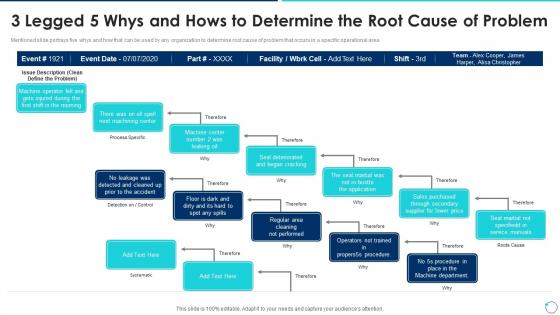
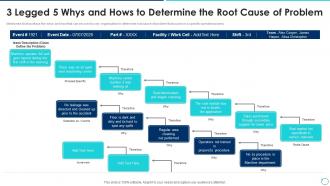
Mentioned slide portrays five whys and how that can be used by any organization to determine root cause of problem that occurs in a specific operational area.
People who downloaded this PowerPoint presentation also viewed the following :
3 Legged 5 Whys And Hows Collection Of Quality Control Templates Ppt Sample with all 6 slides:
Use our 3 Legged 5 Whys And Hows Collection Of Quality Control Templates Ppt Sample to effectively help you save your valuable time. They are readymade to fit into any presentation structure.





FAQs for 3 Legged 5 Whys And Hows Collection Of Quality Control
So you'll need acceptance criteria and clear milestones first. Then map out who does what - saves so much confusion later. Include spots for logging issues, fixes, and approvals because auditors love that stuff (learned this the hard way). Oh, and don't skip timestamps and version tracking. Here's the thing though - make it detailed enough to catch real problems but not so complex that your team ignores it. Honestly, people won't use templates that feel like homework. Start simple and tweak it based on what actually works for your group.
Oh man, templates are a lifesaver for QA teams! They create this consistent framework so nobody's starting from scratch every single time. Your team gets standardized checklists and forms that everyone uses the same way. Fewer things slip through the cracks that way. Honestly, the time savings alone makes it worth it - no more scrambling around trying to remember what comes next. People can actually focus on finding bugs instead of second-guessing their process. I'd start with whatever you're inspecting most often and build from there.
Dude, quality control templates are a game changer - they get everyone on your team doing checks the exact same way. No more random standards or people missing stuff. The handoff points become crystal clear, and you can actually track who handled what without those weird "wasn't that your job?" conversations. Honestly, I've seen teams fall apart over inconsistent processes. When problems come up (and they will), anyone can look at the history and jump right in. My advice? Start small - just pick one thing your team does over and over and template that first.
First thing - figure out what regulations actually apply to your industry. FDA stuff if you're in food, ISO standards for manufacturing, whatever. Map out those critical control points that matter for your specific work. Don't just grab some random template online (I've watched that blow up spectacularly). Customize everything - the checkpoints, how you word things, what counts as "passing." Your team shouldn't need to decode corporate speak just to do their jobs. Oh, and test it on a couple real situations before you make everyone use it. Way easier than fixing a broken system later.
Quarterly's usually good, but honestly depends on your setup. Fast-changing environment? Maybe monthly. I've watched templates sit untouched for ages and become completely pointless - such a waste. Update them whenever you change procedures, get audit feedback, or keep seeing the same quality problems slip through. Short sentences work better than long ones for this stuff. Set that calendar reminder though, or you'll forget like everyone else does. Oh, and definitely grab whoever uses these things daily when you're reviewing. They catch the weird practical stuff you'd never think of.
Dude, visuals totally save your butt with quality control stuff. Like, instead of staring at endless spreadsheet rows (ugh), you can spot problems instantly with the right charts and graphs. Red/yellow/green indicators are your best friend - makes compliance issues pop right out. Heat maps work great too for showing where things keep going wrong. I actually prefer trend lines over bar charts personally, but whatever works for your team. The whole point is making it brain-dead simple so anyone can look and immediately know if something's off. Start with your biggest problem areas and just pick whatever visual format makes those patterns obvious.
Okay so basically these templates keep you compliant by building all the ISO 9001 or FDA stuff right into your workflow. Like, your team literally can't skip the important steps because they're already there - mandatory docs, approvals, all of it. Auditors eat this up too since everything's documented the same way every time. I'd start by looking at what compliance rules you already have to follow, then just build templates around those. Way easier than trying to remember everything manually, trust me. Short sentences work. But you can also flow into longer explanations when needed.
Honestly, the hardest part is dealing with people who hate change. Your team's gonna push back - it's just human nature. Get a few key people involved in designing the templates from the start so they don't feel like you're forcing stuff on them. Try it with a small group first before going company-wide. Training sessions help, but use real examples or people zone out. Oh, and everyone complains about extra documentation at first. That's totally normal. Set up ways for people to give feedback in the first month because you'll definitely need to tweak things that sound good on paper but suck in real life.
Honestly, these tools are lifesavers for cutting out all the boring repetitive work. You can set up standard checklists and workflows that automatically send stuff to whoever needs to approve it. The version control thing is clutch too - no more "wait, which template are we using now?" moments. Reports show you where things get stuck, which makes the higher-ups happy. But here's the real game changer: once you nail a template, you just copy it instead of starting over each time. Oh, and definitely map out what you're doing now before picking a tool - learned that one the hard way!
Definitely start with defect rates, first-pass yield, and customer complaints - those three tell you what's really going down. Cycle time for fixes matters too. Oh and cost of quality, because honestly bosses eat that stuff up when they see actual dollar signs. Customer satisfaction scores are huge since that's what actually matters in the end, right? Track trends over time instead of just random snapshots - way more useful. These basics will get you going, then you can always pile on more specific stuff later depending on what weird quirks your process has.
Yeah, QC templates are totally different depending on what industry you're in. Healthcare ones are all about patient safety, sterilization stuff, and keeping the FDA happy - basically preventing people from dying. Construction templates? They're more focused on safety inspections, materials, and building codes. Honestly, construction paperwork is insane when you first see it. Both prevent disasters, just different kinds - medical errors vs buildings falling down. I'd grab some standard templates from your industry association first, then tweak them for whatever you're actually doing. Way easier than starting from scratch.
Honestly, digital templates blow paper ones out of the water. Real-time data, automatic calculations, instant sharing - none of that clipboard nonsense anymore. When stuff goes out of spec, you get alerts right away instead of catching it hours later during manual checks. The search function is incredible too. Finding old inspection records used to be such a pain, but now it takes seconds. My favorite part? Reports generate instantly instead of me sitting there for hours with a stack of forms. Oh, and start with whatever templates you use most - the time savings hit you immediately.
Just bake the feedback stuff directly into your templates - add spots for tracking what bombed and what actually worked. Your team won't do it if it feels like homework, trust me on this one. Monthly reviews are clutch for going through all that data you collected. Don't forget the follow-up part though - people get annoyed when they give feedback and nothing changes. I'd throw in some quick checkpoints during projects too, not just at the end. Makes the whole thing way less painful and you'll actually get useful info back.
Honestly? Don't overthink it at first. I see people cramming every possible scenario into one template and it just becomes this confusing mess. Keep the jargon to minimum too - half your team probably won't get it anyway. Test it out with a few people before you make everyone use it, trust me on this one. Make sure there's actually enough room to write stuff and that checkboxes make sense. Oh, and definitely do version control because otherwise you'll have people using like 5 different versions. Start basic, then you can always add more later once you see what's missing.
Honestly, just throw your team right into real scenarios with those QC templates. Way better than boring lectures about theory. Have them fill out the checklists together on actual work samples first - builds that muscle memory before they're doing it alone. I always start with the most common situations we deal with. The templates become their go-to safety net, and you'll quickly see where people are struggling based on how they complete them. Make tons of copies though - let them screw up during practice runs so they don't mess up the real stuff later.
-
Excellent work done on template design and graphics.
-
Out of the box and creative design.