

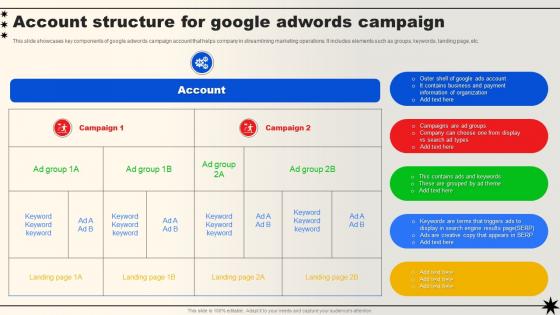
Account Structure For Google Adwords Campaign




Try Before you Buy Download Free Sample Product
 Impress Your
 Audience
 100%
100% Editable
 Save Hours
 of Time


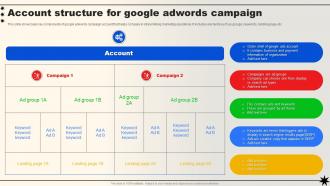
This slide showcases key components of google adwords campaign account that helps company in streamlining marketing operations. It includes elements such as groups, keywords, landing page, etc.
People who downloaded this PowerPoint presentation also viewed the following :
Account Structure For Google Adwords Campaign with all 6 slides:
Use our Account Structure For Google Adwords Campaign to effectively help you save your valuable time. They are readymade to fit into any presentation structure.





FAQs for Account Structure For
You'll want to start with a solid chart of accounts - organize everything into assets, liabilities, equity, revenue, and expenses with subcategories that actually fit your business. Use consistent naming and maybe number your accounts too. Honestly, don't overthink it though. I've watched people create like 47 different expense categories when they really only needed maybe 12-15. That's just making work for yourself. Map out what transactions you're already doing and see what categories come up naturally. Group stuff by department or function if that makes sense. Build in regular reconciliation from the start - trust me on this one, it'll save you headaches later.
Dude, good account structure is a total game changer - no more guessing where stuff goes. Like, is that expense "office supplies" or "admin costs"? With clear codes, everything just lands in the right spot automatically. Month-end becomes so much easier (seriously, you'll thank me later). Instead of digging through random misclassified entries for hours, you can actually look at what the numbers mean. Oh and start with your big categories first - then break those down into subcategories that make sense for your actual business, not some textbook example.
Think of account hierarchy like building blocks for your budget. You set up accounts that roll up from detailed stuff to big picture summaries. Budgets can go at any level - department, division, whatever makes sense. The system does the math automatically which is honestly pretty slick. When you're doing variance analysis later, you can dig down to see exactly where things went sideways. Here's the thing though - get your hierarchy right from day one. Trust me, trying to restructure it mid-year with budgets already loaded? Total nightmare. Just make sure it actually matches how you want to slice and dice your numbers.
You'll want those big categories first - Assets, Liabilities, Equity, Revenue, Expenses. But honestly, don't just copy some template online. Make subcategories that actually fit how your business runs. I made that mistake once and ended up with like 50 random accounts I never used. Keep the naming simple so your team isn't constantly asking where stuff goes. Account codes are super helpful if your software does them - way easier to search later. Oh, and set this up right from day one because going back to fix everything when you've got months of transactions? Total pain in the ass.
Start with mapping your account structure to regulatory stuff - SOX compliance, tax jurisdictions, all that fun paperwork. Document everything because auditors are obsessed with paper trails (learned this the hard way). Separate your business units, regions, or legal entities into different account hierarchies. Makes pulling reports way easier later. Build in compliance checkpoints from the beginning instead of trying to fix things afterward - way less headache. Oh, and set up regular check-ins with finance to spot structural problems early. They'll catch stuff you miss.
Look, your account structure basically controls how useful your data's gonna be. Lump everything into massive campaigns? You'll get these vague metrics that tell you absolutely nothing. But split things up properly - different product lines, audiences, locations - and suddenly you can actually see what's working. It's kinda like... okay this might sound weird, but it's like organizing your music playlist. Everything dumped together is useless, but organize it right and you know exactly what hits. Trust me, set this up correctly from day one or you'll be kicking yourself later trying to figure out what went wrong.
Depends on your industry, really. Retail companies go crazy with inventory tracking - different product lines, seasonal stuff, multiple locations. Manufacturing is where it gets messy though (seriously, those setups are brutal at first). You need separate buckets for raw materials, work-in-progress, finished goods, plus all the production cost centers. Service businesses? Way cleaner. Less inventory headaches but you'll track labor and overhead way more closely. Oh, and grab an industry-specific chart template if you can find one - saves so much hassle upfront.
Honestly, just organize around your main income sources first - way easier than dumping everything together. Different business lines need their own accounts, same with major expenses. And seriously, keep personal stuff separate even though it's annoying at first. I learned that one the hard way! Sub-accounts are your friend for drilling down without going crazy with too many categories. Whatever naming system you pick, stick with it - future you will thank you when you're not staring at "Account 1" wondering what the hell that was for six months later.
Quarterly reviews are what most people should aim for, but honestly? Growing companies need to check monthly. Your business changes constantly - new revenue streams, departments, whatever - and your chart of accounts gets messy fast if you ignore it. I learned this the hard way when I had to spend three days untangling a year's worth of categorization chaos. Not fun. Set a calendar reminder and actually follow through. Small tweaks every few months beat massive overhauls later. Even stable businesses should peek at their structure quarterly since reporting gets weird when accounts don't match reality.
So if you're dealing with complex account structures, Salesforce or HubSpot work great for sales stuff, while QuickBooks Enterprise handles the financial side better. Excel's fine for simple setups but becomes a total mess once you've got multiple subsidiaries - trust me on that one. For ad accounts, Optmyzr or SA360 are solid choices. Here's what I'd do: map out exactly what relationships you need to track first. Then demo maybe 2-3 tools that actually fit your situation instead of just picking whatever's most expensive. Don't overthink it though.
Honestly, having your accounts organized properly is a game changer for seeing where your cash actually goes. You can spot weird spending patterns super fast when everything's categorized right - like keeping your day-to-day costs separate from big equipment purchases. Makes budgeting so much less of a headache! Reports become way more useful too since you're working with clean data instead of a hot mess. I'd start by grouping similar stuff together and just be consistent with how you name things. Trust me, future you will thank you when tax season rolls around and you're not scrambling through random expenses trying to figure out what's what.
Honestly, the worst mistake is overcomplicating your account structure right off the bat. You'll just confuse everyone. Start simple, then build out later. Also - and I can't stress this enough - stick to consistent naming conventions or you'll be digging through campaigns like you're hunting for your keys. Don't go crazy with super granular segments either. Makes reporting absolute hell and budget management way harder than it needs to be. Focus on broader categories that actually match your business goals, not whatever sounds fancy. Once you see what's working, then you can get more specific with the targeting.
Dude, this stuff actually matters way more than you'd think. LLCs do pass-through taxes, so everything flows to your personal return. Corporations? They get hit twice - once at company level, then again when you take money out. S-corps can dodge that double hit though. Different structures let you claim different deductions too. Plus some protect your personal stuff better if things go sideways - which honestly nobody wants to think about but yeah. My cousin switched his setup later and it was a total nightmare. Just talk to a tax person first, trust me.
Dude, standardized account structures are a total lifesaver. Your month-end closes won't make you want to cry anymore - consolidations become actually manageable. Everyone on your team can jump between entities without getting lost, and auditors stop asking a million questions about why Entity A does things differently than Entity B. Honestly, the reporting consistency alone is worth it. You can actually compare performance without doing mental gymnastics with account codes. Start by mapping what you've got now and pick the most common accounts to standardize first. Trust me, future you will thank present you.
So basically when you connect all your systems - like CRM, billing, reports - everything just flows better. No more copying data between platforms or trying to figure out why numbers don't match up. Honestly took our team way too long to realize this, but once everything's talking the same language? Total game changer. You get real-time updates across departments and can actually trust your data. I'd start by figuring out which systems are currently isolated from each other - that's where you'll see the biggest time savings right off the bat.
-
Great product with highly impressive and engaging designs.
-
The content is very helpful from business point of view.