

Steps To Create Successful Google Ads Strategy Plan




Try Before you Buy Download Free Sample Product
 Impress Your
 Audience
 100%
100% Editable
 Save Hours
 of Time


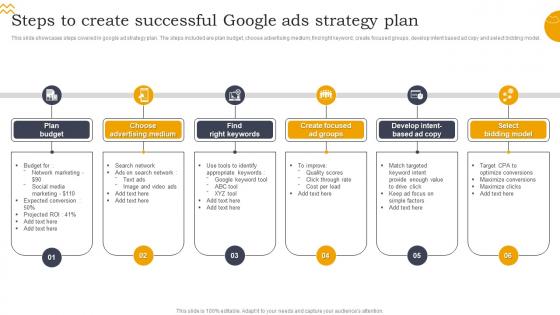
This slide showcases steps covered in google ad strategy plan. The steps included are plan budget, choose advertising medium, find right keyword, create focused groups, develop intent based ad copy and select bidding model.
People who downloaded this PowerPoint presentation also viewed the following :
Steps To Create Successful Google Ads Strategy Plan with all 6 slides:
Use our Steps To Create Successful Google Ads Strategy Plan to effectively help you save your valuable time. They are readymade to fit into any presentation structure.





FAQs for Steps To Create Successful Google
Honestly, most people mess this up by overthinking it. Get your keywords dialed in first - like actually matching what people are searching for. Your ad copy needs to hit their pain points hard, and don't even get me started on landing pages that suck at converting. Budget's probably the biggest thing though - I've watched friends blow through cash by spreading it too thin. Pick a few campaigns that work instead of trying everything. Oh, and set up conversion tracking immediately or you'll be flying blind. Ad extensions help too since they give you more space to work with.
Figure out your profit margins first - what's each customer actually worth? Then work backwards to see how much you can blow on getting them. But honestly, don't go crazy right away. Maybe start with like 10-20% of your budget instead of diving in headfirst. Different campaigns perform totally differently, so you'll want to test a few and see what converts. Oh and track everything religiously - otherwise you won't know if you're actually making money or just burning cash. Google's pretty good at taking your money either way lol. Scale up once you've got real data showing what works.
Okay so keywords are huge for Google Ads - they control when people actually see your stuff. The trick is picking what your audience types in, not what you think sounds smart. I've watched so many people bomb this by going way too broad or super narrow. Mix up broad match, phrase match, and exact match to hit the right people. Oh and negative keywords are clutch for blocking random clicks that waste money. Google's Keyword Planner helps you find that balance between decent search volume and competition that won't destroy your budget.
So A/B testing in Google Ads is where you run two ad versions at the same time to see which one crushes it. Google splits your traffic automatically and shows you the winner based on clicks, conversions, whatever you're tracking. Most people don't bother with this (huge mistake honestly). Headlines should be your first test since they make the biggest difference for click-through rates. You can also test descriptions, URLs, even landing pages. Oh and don't be impatient - let tests run long enough to get real data before you make any changes. Otherwise you'll just be guessing.
Honestly, start with conversion tracking or you're just guessing at everything. CTR tells you if people actually want to click your ads. CPC is obvious - what you're paying per click. But conversion rate? That's where the magic happens - shows if your traffic actually converts. ROAS is probably what you should obsess over most since it's your real profit measure. Quality Score affects how much you pay, so keep an eye on that too. Oh, and impression share - basically tells you if you're missing out on traffic you could be getting. The conversion tracking thing though, seriously do that first.
Okay so remarketing ads are basically targeting people who already checked out your site - warm leads vs random strangers. Way better conversion rates, like 2-3x higher usually. The smart part is you can customize what they see based on their behavior. Cart abandoners get "hey you forgot something" vibes while homepage browsers get more general stuff. Honestly it's one of my favorite strategies because why waste money on people who've never heard of you? Set up different audience buckets based on how engaged they were and match your ads accordingly.
Honestly, Google Ads is your best bet if you need quick results - you can literally show up on page one tomorrow with the right budget. The targeting options are insane too, plus you get all this data to see what's actually working. Organic SEO is solid for the long game since it's "free" traffic, but man, it takes forever to see real movement. And don't get me started on Google's algorithm updates messing things up. If I were you, I'd run both eventually, but paid ads first if you're in a hurry or testing something new.
So negative keywords are basically how you stop wasting money on random clicks. Add terms you don't want triggering your ads - like if you're selling expensive shoes, throw "free" and "cheap" on your negative list. Check your search term reports weekly (honestly, some of the stuff that triggers ads is wild). Those reports show exactly what people searched before clicking. You'll spot obvious mismatches pretty quick. Just keep adding the weird ones as negatives. Your CTR goes up, plus you stop bleeding budget on people who were never gonna buy anyway.
So Quality Score basically comes down to three things: your keywords need to match your ad copy, your landing page has to deliver what the ad promises, and everything needs to feel cohesive. I'd start by cleaning up your worst-performing keywords first - either fix them or just pause the ones that aren't working. Group your ads super specifically too, like don't just throw everything into one bucket. The whole thing's really about user experience when you think about it. Oh and honestly? Most people way overthink this stuff when Google just wants to see that you're being consistent across the board.
Honestly, just talk to your audience about what they actually care about - skip the clever stuff. Start with their biggest problem or the main benefit you're offering. I've seen so many ads try to be funny when people just want to know "what's in it for me?" Emotional hooks work great (urgency, FOMO, curiosity) but you gotta be specific - like "30% off ends Friday" instead of vague promises. Your call-to-action should be super obvious too. Oh, and test different headlines constantly - seriously, changing one word can sometimes double your clicks. It's wild how much small tweaks matter.
Every industry's totally different when it comes to ads. Healthcare and finance? Super strict - you'll need lawyers checking everything before it goes live. B2B stuff usually means longer sales cycles and pricey keywords, but retail can push for quick conversions. Legal ads are insanely competitive (and expensive as hell). Timing matters too. Tax prep blows up in spring, fitness in January - you know the drill. Oh, and definitely scope out your competitors first. Research what regulations you're dealing with and how your customers actually behave before you blow your budget on the wrong strategy.
Dude, seasonal trends will totally mess with your Google Ads if you're not ready. Competition gets insane during holidays and back-to-school - like CPCs can literally double overnight. It's kind of wild how dramatic it gets. But here's what I've learned: boost your budgets during those crazy periods because people are actually buying stuff. Pull up your old campaign data and look for patterns, then set up different campaigns for busy vs slow times. Trust me, you don't want to scramble when Black Friday hits and wonder why your ads disappeared.
Honestly, start with Google's free stuff first - Keyword Planner and Google Analytics will get you pretty far. Once you're comfortable, SEMrush is worth every penny (I'm obsessed with their keyword research). WordStream and Optmyzr are solid for automation if you're juggling multiple accounts. For bigger campaigns, Marin handles bid management really well. Oh, and Performance Planner from Google - don't sleep on that one. My advice? Don't go crazy buying tools right away. Master the basics with free options, then add paid ones when things get messy and complex.
Dude, Google Ads can be a goldmine for local businesses if you play it smart. Target your exact area and go after those "near me" searches - that's where you'll beat the big chains who try to be everywhere at once. I swear I've watched small family shops demolish major competitors just by staying neighborhood-focused. Throw your city name right in the ad copy, mention you're family-owned or do same-day delivery, whatever makes you local. Oh, and location extensions are clutch. Start small with your budget, test different stuff, then dump more money into whatever actually brings customers through the door.
Honestly, the biggest mistake is going way too broad with targeting. You'll blow your budget in like two days. Also? Most people obsess over impressions and clicks instead of actual sales - super annoying but I did it too when I started lol. Set up conversion tracking immediately or you're flying blind. Check your search terms weekly and add negative keywords religiously. Your ad copy needs to match whatever's on your landing page. Don't try targeting everyone at once either. Pick one focused campaign first, then expand. Oh and actually review performance - can't just launch and ignore it.
-
They guys always go the extra mile to meet the expectations of their customers. Almost a year has been associated with them.
-
Loved the templates on SlideTeam, I believe I have found the go to place for my presentation needs!