

Steps To Plan Google Adwords Campaign




Try Before you Buy Download Free Sample Product
 Impress Your
 Audience
 100%
100% Editable
 Save Hours
 of Time


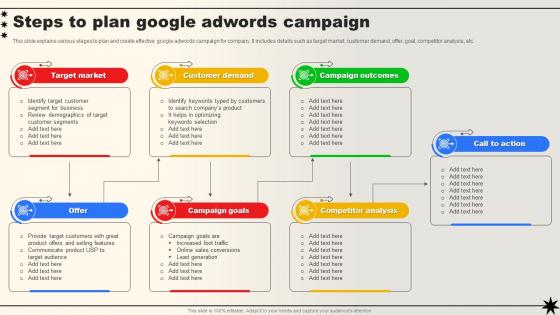
This slide explains various stages to plan and create effective google adwords campaign for company. It includes details such as target market, customer demand, offer, goal, competitor analysis, etc.
People who downloaded this PowerPoint presentation also viewed the following :
Steps To Plan Google Adwords Campaign with all 6 slides:
Use our Steps To Plan Google Adwords Campaign to effectively help you save your valuable time. They are readymade to fit into any presentation structure.





FAQs for Steps To Plan
Start with solid keyword research and make sure your ad copy actually connects with what people are searching for. Your landing pages have to match what they clicked - seriously, this is where most people screw up. Negative keywords are huge too, they'll stop you from burning money on random clicks. Oh, and set up conversion tracking right away or you're flying blind. I'd say realistic budgets matter more than fancy bidding strategies at first. Most campaigns tank because people rush through setup instead of nailing the basics. Get this stuff right, then tweak based on real data instead of just winging it.
So basically you mix demographics with interests and behaviors - age, location, what they're searching for, that kind of stuff. I'd start with your customer personas and match them to AdWords options like affinity audiences (fitness nuts, tech people) or in-market audiences who are actually shopping. The platform has way too many targeting layers tbh, gets pretty overwhelming. Start broad though, then tighten up based on what's actually working. Set up a few different audience segments and test them against each other. Oh and don't overthink it at first - you'll figure out what converts best pretty quickly.
Figure out your target CPA first - what can you actually afford based on your margins? Then flip it around and work backwards from your monthly goals. Check what keywords cost in your space using SEMrush or SpyFu (some industries are just insanely expensive, fair warning). I'd start conservative with your daily budget - maybe 20-30% of where you think you'll end up. You don't want to blow through cash while you're still figuring things out. Watch your conversion rates like a hawk those first few weeks. Once you see what's actually working, pump more money into those campaigns and kill the losers.
Dude, keyword research is literally everything for AdWords. Pick the wrong ones and you're just burning cash on random clicks that'll never convert. Your ads need to show up when people are actually ready to buy your stuff, not when they're just browsing around aimlessly. I've watched so many campaigns completely bomb because someone just winged it with keywords they thought sounded good. Don't be that person. Google's Keyword Planner is your best friend here - start there and check what your competitors are doing. Find those terms your customers actually type in when their credit card's already out.
Dude, ad extensions are honestly a game changer. They make your ads bigger on the page and give people actual useful info, so way more people click. I've seen CTRs jump 10-20% just from adding the right ones - it's crazy how simple it is. Site links and callouts are your best bet to start with since they work for basically everyone. Just don't go overboard and throw in random extensions that don't make sense. Location ones are solid too if you have a physical store or whatever. The extra space alone makes your ad stand out more than the boring text-only ones.
Focus on CTR and conversion rates first - those show if people actually care about your ads. CPA is critical too because who wants to overpay for customers? Google's Quality Score can save you money if you nail it, since better scores = cheaper clicks. ROI is the real test though, obviously. Honestly, I'd probably obsess over these numbers way too much at first, but weekly checks are solid. Oh, and definitely set up Google Analytics conversion tracking - clicks mean nothing if you can't see what happens after. Trust me on that one.
Dude, negative keywords are honestly a lifesaver for your ad spend. They stop your ads from popping up when people search for stuff you don't actually sell. So like, if you're doing premium shoes, throw "free" and "cheap" in there as negatives - why waste money on people hunting for bargains, right? Plus Google gets a better read on what you're actually offering, which usually bumps up your Quality Score. I'd start with the obvious ones first, then dig into your search terms report every week or so. That's where you'll find the weird searches you never thought of.
Here's what I'd focus on: get your headlines to match your keywords closely - seriously, this makes a huge difference for Quality Score. Write benefit-focused descriptions that actually address what's bugging your customers, plus calls-to-action that feel urgent. Test different emotional angles too - like urgency vs building trust vs value props. Always include your main keyword in at least one headline. Oh, and definitely highlight what sets you apart from competitors (this part gets overlooked a lot). I'd write 3-4 versions of each piece, then see what the data says after running them for a week or two.
Dude, track your CTR and conversion rate first - those tell you if people actually want what you're selling. Cost per conversion is huge too, like that's literally your money walking out the door if it's bad. Quality Score affects how much you pay and where your ads show up, so don't ignore it. Oh and impression share shows if you're missing out on potential clicks. Set up conversion tracking right from the start (seriously, do this first), then check everything weekly. I learned the hard way that daily checking makes you panic over nothing. Weekly gives you actual trends to work with.
Dude, A/B testing is a game changer. Instead of guessing what works, you actually compare different versions of your ads and see real data. Test headlines, descriptions, CTAs - whatever you think might move the needle. I used to just throw random copy out there and my CTR was trash. Now I test two headlines against each other, let it run for a week or so, and boom - clear winner. Honestly saved me so much headache. Start simple though, just change one thing at a time or you won't know what actually made the difference.
Don't target too broad - you'll waste money showing ads to random people who'll never buy. Set up negative keywords right away, like day one. I learned this the hard way lol. Put keywords in separate ad groups too, not one giant mess. Your Quality Score will tank otherwise. Track actual conversions, not just clicks - clicks are nice but they don't make you money. Oh and start with exact match keywords, way easier to control. Check your search terms daily the first week and keep adding negatives. Write 3 different ads minimum to see what works.
So basically, geo-targeting saves you tons of money by only showing ads to people where you actually do business. You can pick countries, cities, or even draw circles around your locations - pretty cool feature honestly. Perfect for local businesses or if your inventory changes by region. Here's the smart part: you can bid more in areas that convert better. Like if NYC customers are way more valuable than rural ones, pump up those bids. I'd start by looking at where your current customers come from first, then target those spots.
So mobile AdWords is tricky because you've got way less space to work with. Keep your ad copy short and punchy. Your landing pages better load fast too - I've seen so many campaigns tank just from crappy mobile sites. Definitely use those call and location extensions since people on phones want immediate results. Here's the thing though - mobile users convert differently than desktop, so you'll need to adjust your bids based on actual performance data. Oh, and create mobile-specific ads that are super action-focused. Trust me on this one.
Oh totally go after people who already visited your site! They're like 10x more likely to actually buy something. I'd set up different lists - cart abandoners vs people who just browsed around. Cart people get those "hey you forgot something" ads, browsers get the general product stuff. The targeting gets pretty detailed once you mess with it for a bit. Just make sure you exclude anyone who already converted (learned that one the hard way lol). Start with 30 days and see how it goes - you can always tweak it based on your usual sales timeline.
Start with Google's free stuff first - Keyword Planner for research, Performance Planner for forecasting campaigns, and auction insights to spy on competitors. Google Ads Editor is honestly a lifesaver for bulk changes (saves me like 3 hours every week, no joke). Link up Google Analytics and Search Console too for better data. Once you've maxed those out, tools like SEMrush or Ahrefs show competitor intel that Google keeps hidden. They're pricey though, so see what you're missing with the free options first. Most people don't even use half of what Google gives you.
-
Love how there are no boring templates here! The design is fresh and creative, just the way I like it. Can't wait to edit and use them for my extended projects!
-
Nothing beats the well-formatted and professionally designed templates offered. Kudos to SlideTeam for their amazing collection of PPT slides.