





 0 Comment
 Customer Reviews

The brief says "migrate the website." Simple enough on paper.
But then someone asks who owns the URL redirect list. And whether the staging environment has been tested. And what happens to organic traffic if the XML sitemap doesn't get submitted before the cutover. And suddenly the room gets very quiet.
Website migration isn't hard because the technology is complicated. It's hard because the number of things that can quietly go wrong—301 redirects missed, canonical tags broken, crawl budget wasted on old URLs—doesn't announce itself until after the launch. Until Google Search Console starts showing index coverage errors. Until rankings drop and nobody's sure why.
There's also this: migrations involve more stakeholders than most teams expect. Developers want a clean server setup. The SEO team wants backlink profile preservation. Marketing wants the new design live yesterday. And IT wants a rollback plan in writing before anyone touches production. Every one of those conversations needs a structure—a shared document, a timeline, a checklist that everyone can look at and agree on.
That's the uncomfortable part. Not the technical execution. The coordination. The gap between what each team assumes is handled and what actually is.
So the templates exist. Not because migration is new, or because teams are underprepared—most of them aren't. They exist because getting ten different people to agree on what "done" looks like requires a common format. Something that shows tasks, owners, deadlines, and status without someone having to rebuild it from scratch every time.
SlideTeam's website migration templates handle exactly that. Pre-designed frameworks covering everything from server migration steps to data migration process flows—ready to customize for your specific platform, timeline, and team. That's where SlideTeam's content-ready slides earn their place: not by replacing your process, but by giving it a shape everyone can follow.
Here are the templates that make the migration conversation easier to have.
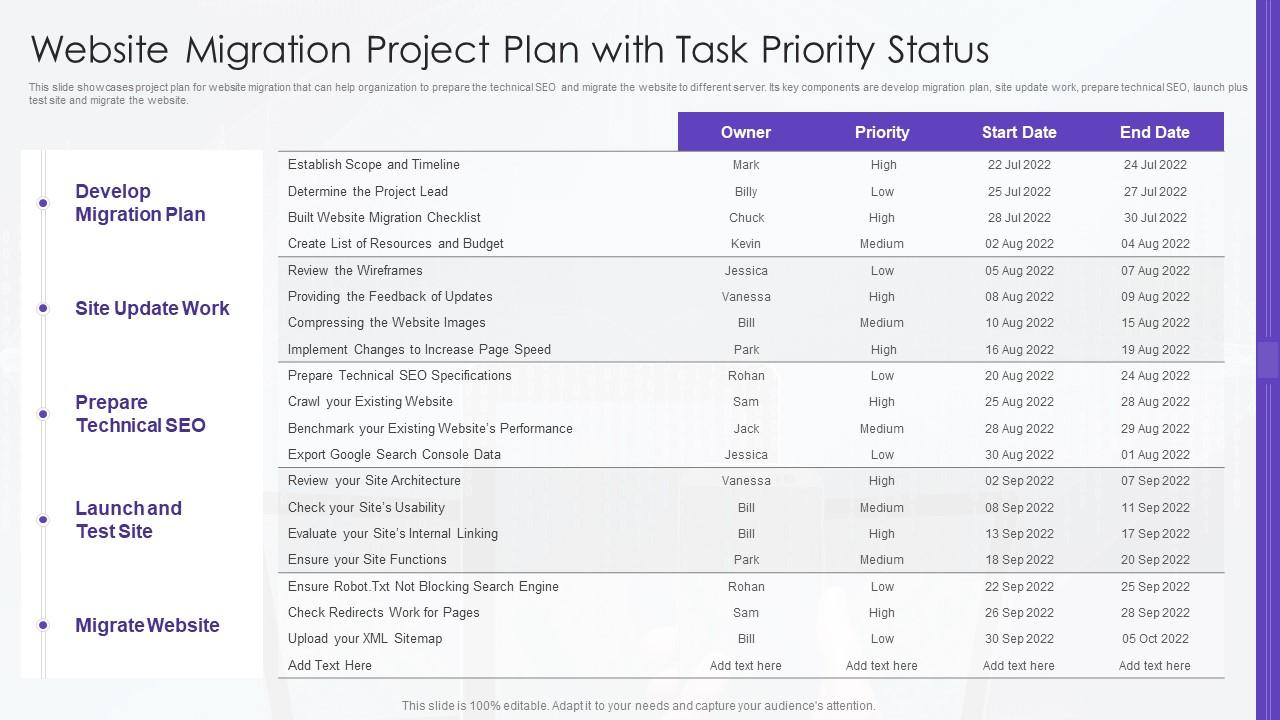
Template 1: Website Migration Project Plan with Task Priority Status
Tracking website migration tasks without a clear priority system leads to missed steps. This PPT template is built for project managers who need to organize and communicate a full migration plan at a glance. It covers key phases: developing the migration plan, executing site update work, preparing technical SEO, and launching the migrated site. Each task comes with priority and status indicators, so nothing falls through the cracks. For teams also exploring must-have website migration templates with samples and examples, this PPT preset is a solid starting point. The template is 100% editable and customizable.
Download this PowerPoint Template
Template 2: Website Data Migration Project Plan
Data migration without a structured checklist is how deadlines get missed and files get lost. This slide is designed for IT leads and project coordinators managing website data migration across formats and servers. It lays out each task with its priority level, assigned owner, and deadline — giving the whole team one clear reference point. Useful for CMS migration planning or any content migration that involves multiple handoffs. The template is 100% editable and customizable.
[product_image id=941798]
Template 3: Website Server Migration Plan Steps
Moving a website to a new server requires a clear, repeatable sequence. This template maps five critical stages: new server preparation, server assessment, data transfer from old to new, testing, and launch. Each step is visually distinct, ensuring your team never skips a phase under deadline pressure. Structured timelines help you anchor accountability across technical and operations teams. Use these slides to present server migration plans with precision during stakeholder reviews. Transform your server migration presentations today. Download this dynamic template now and drive confident, error-free go-live execution.

Download this PowerPoint Template
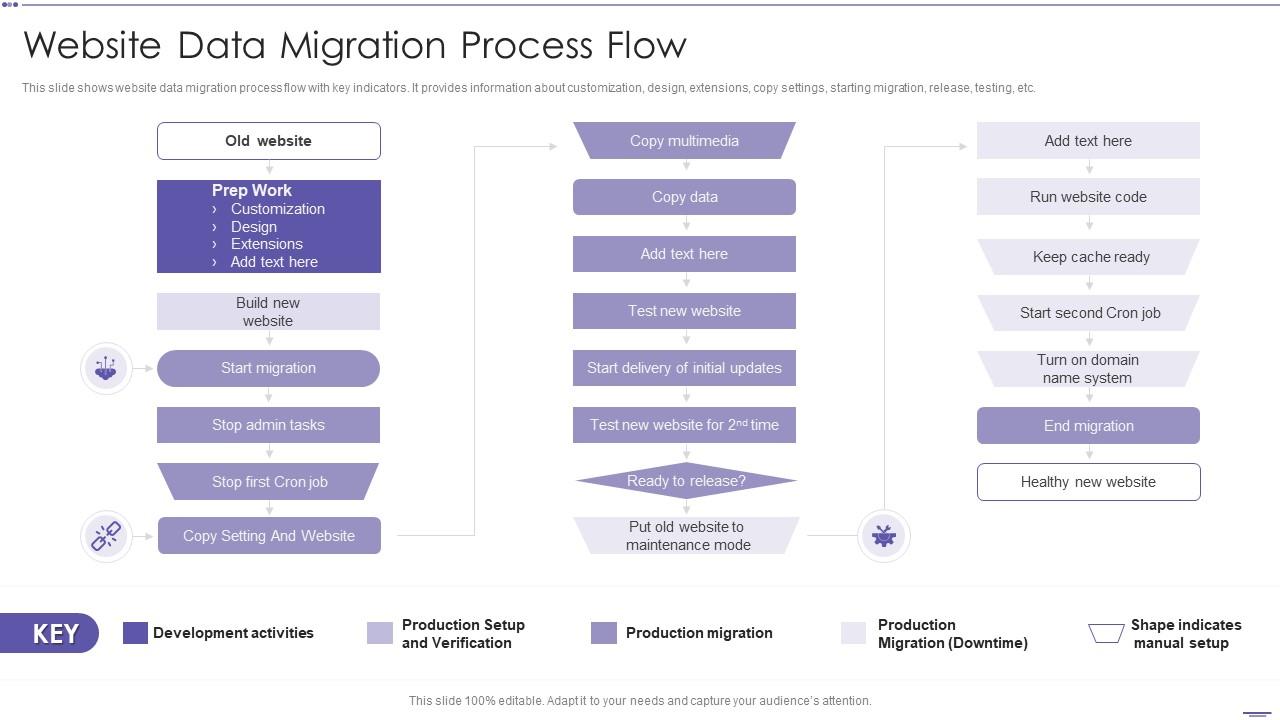
Template 4: Website Data Migration Process Flow
A clear migration process flow is what separates a smooth launch from a chaotic one. This PPT template helps developers and project leads map the full data migration lifecycle — from customization and design through extensions, copy settings, testing, and final release. It surfaces key development activities at each stage, making dependencies visible before they become blockers. Particularly useful for teams managing CMS migration or content migration with multiple parallel workstreams. The template is 100% editable and customizable.
Download this PowerPoint Template
Template 5: Website Development Process Eight Essential Steps PPT Mockup
Web development projects often stall when teams can't align on what each phase looks like. This PPT deck gives product managers and developers a visual walkthrough of eight essential website development steps. Each stage is clearly separated, so stakeholders understand the sequence before sign-off. The deck's visual structure supports page speed optimization discussions and site architecture planning conversations alike. Use it to align cross-functional teams before a major build or replatform. The template is 100% editable and customizable.
[product_image id=1757532]
Template 6: Website Launch Strategy PPT
A website launch without a documented strategy is a risk most teams can't afford. This template gives marketing leads and web managers a structured framework for planning every element of a site launch. From pre-launch checklists to post-launch monitoring, each stage is laid out in a logical, presentation-ready format. It supports discussions around organic traffic targets, meta tags review, and structured data validation. Use it in stakeholder briefings to show the launch is planned, not improvised. Transform your website launch presentations today. Download this dynamic template now and unlock a repeatable, high-confidence launch process.
[product_image id=1812637]
Template 7: Website Server Migration Plan Steps PPT Example
Server migration planning deserves more than a bullet-point email. This complete deck walks technical teams and IT managers through every stage of a server migration—from environment setup through testing and cutover. Visual layouts make complex dependencies easy to follow in leadership reviews. It supports conversations around HTTPS migration, site architecture changes, and rollback planning. Pre-built slides mean you spend time on the plan, not the formatting. Transform your server migration presentations today. Download this dynamic template now and lead every technical review with confidence.
[product_image id=1812638]
Template 8: How to Choose the Right CMS for Your Website Project PPT Structure
Choosing the wrong CMS before a migration creates problems that compound over time. This deck helps IT leads, digital managers, and platform architects present a structured CMS evaluation framework. It walks stakeholders through the key criteria — scalability, integration needs, workflow fit — without overwhelming the room. Useful for teams facing a CMS migration decision where multiple platforms are under consideration. Clear comparison layouts make the recommendation defensible, not just stated. Transform your CMS selection presentations today. Download this dynamic template now and accelerate confident platform decisions.
[product_image id=1583845]
Template 9: SEO and Security Requirements for Website Success PPT Sample
SEO and security requirements are often the last items on a website project checklist — and the first to cause post-launch problems. This PPT preset is built for SEO leads and web security teams presenting technical requirements to non-technical stakeholders. It covers the ground between an SEO audit framework and a site security baseline, making both accessible in a single deck. Particularly useful for teams preparing for a website redesign where keyword rankings and backlink profile preservation are on the line. The template is 100% editable and customizable.
[product_image id=1790014]
Master Every Website Migration with SlideTeam
SlideTeam's PowerPoint templates are the best in the industry for website migration planning and execution. These content-ready slides save hours of prep time while delivering the professional structure your team needs — from server migration steps to full data migration process flows. Use these ready-made PowerPoint slides to align stakeholders, reduce go-live risk, and preserve organic traffic. Deploy these pre-designed frameworks to ensure every migration runs on time and on plan.
FAQs on Website Migration
What are the critical pre-migration checks needed before moving a website to a new hosting platform?
Before moving to a new hosting platform, confirm three things: your DNS TTL settings are reduced, your XML sitemap is current, and a full site backup exists. Also verify that all URL structures are documented and 301 redirects are mapped. Run a crawl to capture existing page states. These checks prevent data loss and protect keyword rankings after the switch.
How does website migration impact SEO rankings, and what steps can minimize ranking drops?
Migration disrupts SEO when URLs change without proper 301 redirects, or when the XML sitemap isn't resubmitted to Google Search Console. Crawl errors and broken internal linking are the main culprits behind ranking drops. To minimize impact: map all redirects before launch, preserve meta tags, and monitor index coverage closely in the first 30 days post-migration.
What is the difference between a domain migration and a platform migration, and when should each be considered?
Domain migration means changing your website's URL — for example, rebranding or moving from HTTP to HTTPS. Platform migration means moving your site from one CMS or hosting environment to another, with the domain unchanged. Choose domain migration when rebranding or consolidating sites. Choose platform migration when your current CMS can't support business growth or technical requirements.
How can businesses ensure zero downtime during a website migration process?
Zero downtime requires a fully tested staging environment before any production cutover. Use DNS propagation management to control when traffic shifts. Schedule the cutover during your lowest-traffic window and keep the old server live as a fallback for at least 48 hours. A documented rollback plan — agreed by all teams before launch — is non-negotiable.
What role does a staging environment play in testing a website before completing migration?
A staging environment is an exact copy of your production site used for testing before go-live. It lets teams verify that 301 redirects work correctly, forms submit properly, and page speed benchmarks are met — without risking live traffic. Testing on staging catches crawl errors and broken structured data before Google ever sees the new site.
Which website elements are most commonly overlooked during migration, leading to post-launch issues?
The most commonly missed elements are canonical tags, robots.txt settings, and structured data markup. Teams also overlook image alt text, internal linking updates, and form submission endpoints. Post-launch, these gaps show up as index coverage issues or bounce rate spikes. A pre-launch audit checklist covering each of these items prevents most post-migration surprises.
How should 301 redirects be strategically implemented to preserve link equity during domain migration?
Map every old URL to its new equivalent before migration begins — one-to-one redirects preserve the most link equity. Use 301 redirects (not 302s), which signal a permanent move to search engines. Avoid redirect chains longer than two hops. After launch, verify all redirects are resolving correctly in Google Search Console to confirm backlink profile signals are transferring.
What are the key differences between migrating a static website versus a dynamic CMS-based website?
Static site migration is straightforward: move files, update DNS, done. Dynamic CMS-based migration is more complex because it involves database exports, plugin or extension compatibility, URL structure changes, and content migration across formats. CMS migrations also require testing dynamic features — search, forms, user accounts — on a staging environment before any production cutover.


