





 0 Comment
 Customer Reviews

The report's sitting in a shared folder. Has been since Tuesday.
Not because the findings are wrong. They're probably fine. But somewhere between flagging a critical vulnerability and explaining what it means for the business, someone has to stand up and say: here's what we found, here's what it costs us, and here's what we do next. That part doesn't happen automatically.
Application risk assessments generate a lot of output. Scan results. Threat models. Severity ratings. CVE IDs nobody outside the security team can parse. The actual problem isn't finding the risks—it's communicating them. To stakeholders who don't speak IT. To executives who want a number, not a methodology. To compliance officers who need the framework documented, not just the findings.
There's this specific discomfort that lives between having a completed assessment and presenting it. Security teams know what they found. They just don't always know how to make it land. How to show the business impact of an insecure API without sounding alarmist. How to explain why a medium-severity vulnerability in a legacy system matters more than a high-severity one in a sandboxed environment.
The wrong slide makes a real risk look like a technical footnote. One unclear matrix and the whole conversation shifts to format instead of action.
So the templates exist. Not because risk assessment is easy—it isn't—but because the communication gap is universal. Every security team, every IT auditor, every risk manager eventually hits the same wall: the work is done, but the presentation doesn't match it.
SlideTeam's application risk assessment templates were built for exactly this gap. Pre-designed slides that give you the structure to present vulnerability findings, risk levels, and mitigation plans without starting from scratch every time.
Here's what's available.
Template 1: Security Dashboard to Identify the Risk of Application
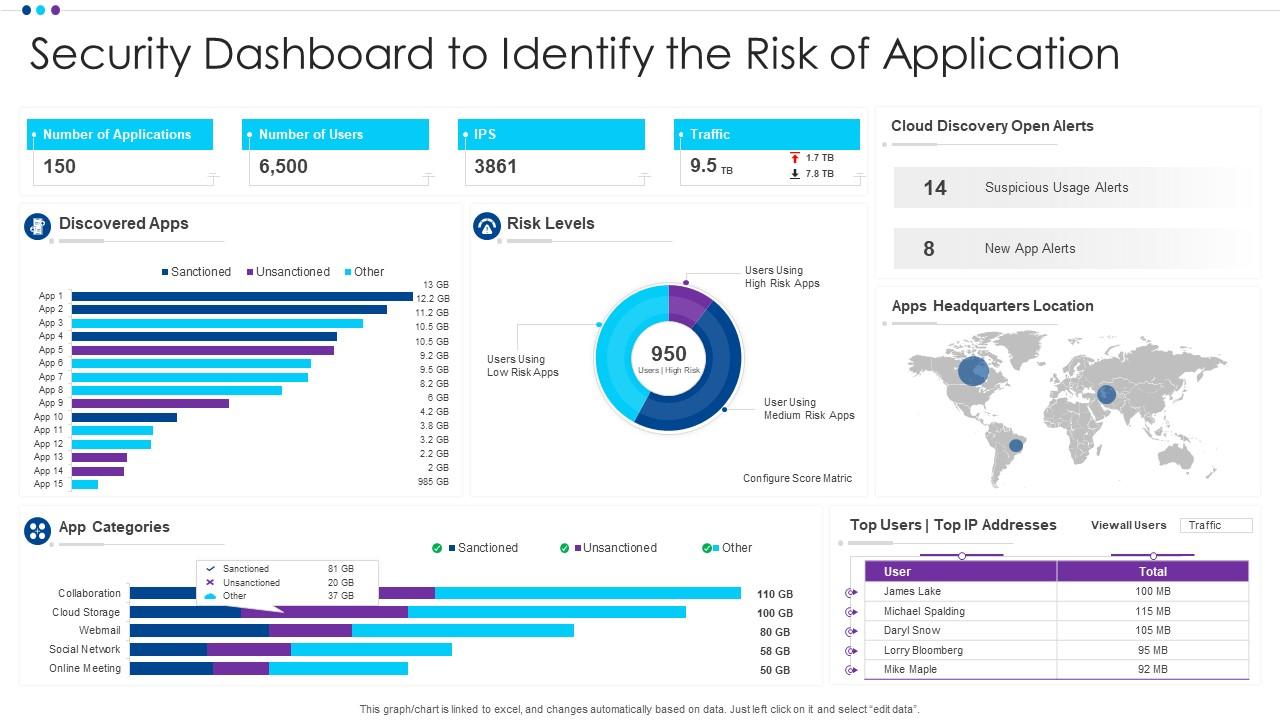
Security dashboards are only useful when they show the right risks, clearly. This PowerPoint slide is built for IT security leads who need to present app-level risk data to non-technical stakeholders. It covers app categories, discovered applications, and risk levels in one consolidated visual. Whether you're running a cyber risk assessment review or a routine security operations briefing, this deck organizes the data into something decision-makers can act on. The template is 100% editable and customizable.
Download this PowerPoint Template
Template 2: Risk Assessment Presentation Outline
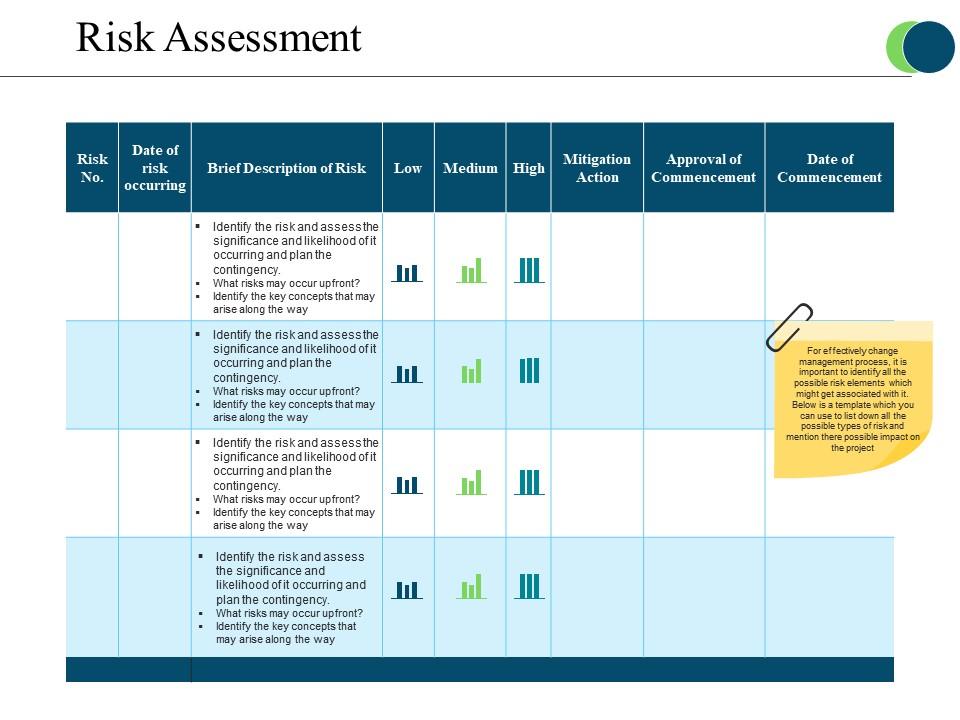
Structure your application risk assessment presentation with a clear, four-stage approval framework. This slide maps the full arc—from commencement approval through low, medium, and high risk levels to mitigation action. Each stage delivers immediate visual clarity on where risks stand. You can anchor executive briefings or compliance reviews with confidence using this pre-designed layout. Transform your risk assessment presentations with a framework that drives informed decisions. Download this dynamic template now and unlock structured risk communication.
Download this PowerPoint Template
Template 3: Application Portfolio Assessment for Modernization Success PPT Guidelines
Application portfolio modernization decisions rarely fail on analysis—they fail on how the case gets made. This PPT preset is built for enterprise architects and IT leaders mapping which applications to retire, re-platform, or rebuild. It supports portfolio-level risk and readiness reviews with structured visual layouts. Use it to walk stakeholders through modernization priorities with clarity. For teams also looking at more application risk assessment templates, this deck pairs well with a broader security assessment toolkit. The template is 100% editable and customizable.
[product_image id=1866268]
Template 4: Performance Testing Life Cycle Risk Assessment Performance Testing for Application
Performance testing without a risk assessment phase is just hoping nothing breaks under load. This slide explains the objective and approach of risk assessment within the Performance Testing Life Cycle (PTLC). It covers volume requirements, exclusions, and the core rationale behind software risk analysis at scale. Teams building or presenting performance testing frameworks gain a structured discussion tool immediately. Transform your performance testing presentations with this targeted, application-focused risk overview. Download this dynamic template now and bring clarity to your testing lifecycle.
[product_image id=1073696]
Template 5: Application Performance Metrics Key Indicators PPT Outline
Key performance indicators only drive decisions when they're presented with context and clarity. This slide deck gives application managers and product owners a structured view of performance metrics across critical dimensions. It anchors conversations around what the numbers mean for application health and risk exposure. Use it in quarterly operational reviews or incident post-mortems where clarity on application behavior matters. Transform your application performance presentations with pre-designed, insight-ready layouts. Download this dynamic template now and unlock sharper performance conversations.
[product_image id=1826005]
Template 6: Harnessing Risk Management Strategies in Application Conformity PPT
Risk mitigation only works when it connects directly to application compliance requirements. This PPT slide is built for risk managers who need to present how risk management practices align with application conformity standards. It works well for software compliance risk reviews and regulatory audit preparations. The deck handles the structural heavy lifting, letting you focus on the argument, not the formatting. The template is 100% editable and customizable.
[product_image id=1433958]
Template 7: Identifying and Assessing Business Risks PPT Example
Identifying business risks is straightforward. Presenting them in a way that prompts action is the harder part. This deck gives risk and compliance officers a visually structured format for communicating threats, severity, and response priorities. It works across boardroom risk reviews, client-facing audits, and internal governance meetings. Each layout translates complex risk data into clear, actionable narratives. Transform your business risk presentations with a design built for decision-making rooms. Download this dynamic template now and make every risk finding land with impact.
[product_image id=1506867]
Template 8: Application Governance Framework with Risk and Compliance
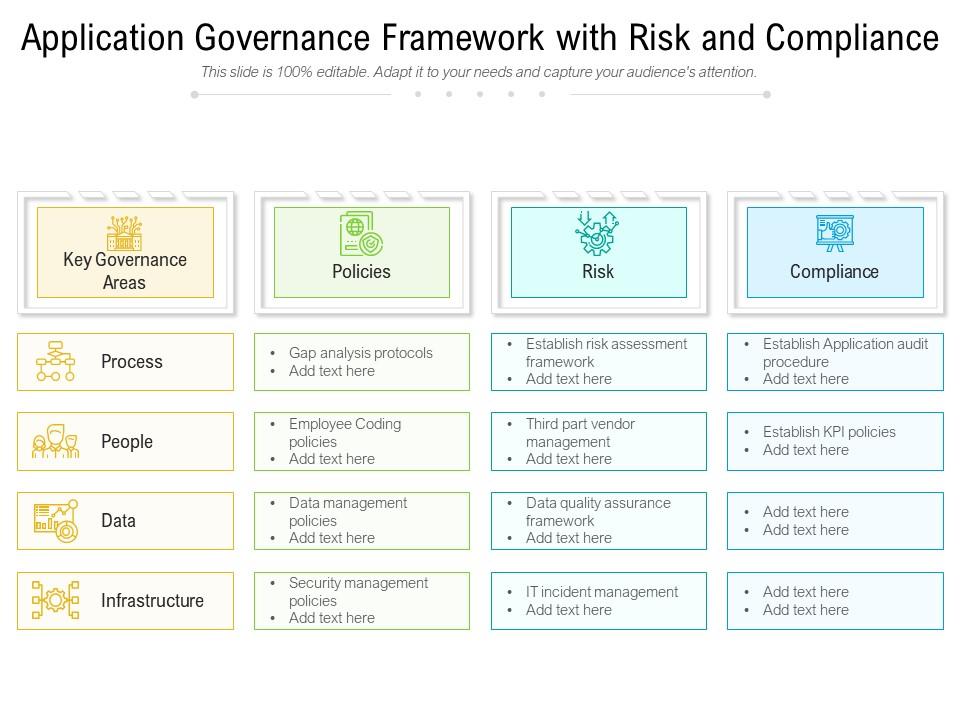
Governance frameworks only hold when process, data, and infrastructure risks are visible together. This template drives structured communication of application governance across all three dimensions. It delivers a clear visual anchor for risk and compliance discussions at the enterprise level. Teams presenting an application risk management framework to leadership or audit committees gain immediate credibility. Transform your governance presentations with a slide built for accountability. Download this dynamic template now and align your risk, compliance, and governance narratives.
Download this PowerPoint Template
Template 9: Mobile Application Security Risk Assessment
Mobile application security risks are specific, and generic frameworks don't always surface them. This slide addresses three of the most critical mobile risk categories: improper platform usage, insecure data storage, and insecure communication. It gives mobile security teams a focused tool for presenting mobile application security risk assessment findings clearly. Each risk area is structured for immediate audience comprehension—no translation required. Transform your mobile security reviews with a purpose-built, presentation-ready layout. Download this dynamic template now and present mobile risks with precision.
[product_image id=1159731]
Template 10: Steps to Conduct Application Security Assessment
Application security assessments fail when the process isn't clear to everyone involved. This slide lays out five concrete steps—identifying threat actors, defining sensitive data, and addressing process issues among them. It gives security teams and project managers a shared language for conducting and communicating application security testing. Each step is visually distinct, making the process easy to follow in live presentations. Transform your security assessment walkthroughs with a structured, step-by-step framework. Download this dynamic template now and run sharper, more credible security reviews.
[product_image id=1212570]
Template 11: ISO 31000 Risk Management Application Scenarios Mastering Risk Management
ISO 31000 gives organizations a recognized structure for risk—but applying it to real scenarios is where most teams struggle. This PPT template is built for risk managers presenting how ISO 31000 applies across organizational objective changes, internal and external transformations, and strategic decision-making. It makes the framework concrete, not theoretical. For teams also exploring software risk assessment templates, this slide complements a broader IT risk management toolkit. The template is 100% editable and customizable.
[product_image id=1195232]
Template 12: Statistical Representation of Risk Level in Application Security
Statistical risk data only moves stakeholders when it's presented with the right visual hierarchy. This slide gives security teams a structured way to show risk level distribution across the assessment phase and security policy baselines. It supports information security risk reporting where clarity on severity distribution drives resource allocation decisions. Audiences grasp risk concentration immediately—no spreadsheet interpretation required. Transform your security reporting with a statistically grounded, visually sharp layout. Download this dynamic template now and make your risk data impossible to ignore.
[product_image id=1172896]
Template 13: Process Phases for Application Security Assessment
Security assessments gain credibility when every phase is mapped and accounted for. This slide walks through five key process phases—determining threats, identifying sensitive data, and mapping application attacks among them. It gives application security teams a clear, structured format for presenting their methodology to stakeholders and auditors. Each phase is visually separated, making the full assessment process easy to communicate and defend. Transform your application security presentations with a phase-by-phase framework. Download this dynamic template now and present your assessment process with authority.
[product_image id=1172895]
Template 14: Application Risk Assessment Template PPT PowerPoint Presentation Infographics Rules
Risk assessment conversations stall when the framework isn't visible. This PPT preset is built for risk analysts and security leads who need a six-stage graphic to walk stakeholders through an application risk assessment template. It turns a complex, multi-variable process into a single, readable visual. Whether the audience is a board, an audit committee, or a development team, the structure holds. The template is 100% editable and customizable.

Download this PowerPoint Template
Template 15: Risk Assessment Process Software Application Development Data Management
Risk assessment inside software application development rarely gets its own slide—and that's the problem. This deck gives development leads and IT program managers a three-stage graphic covering risk assessment process, software application development, and data management together. It connects what developers build with how risk gets identified and governed. Use it in project kickoffs, sprint reviews, or development governance briefings. The template is 100% editable and customizable.

Download this PowerPoint Template
Elevate Your Application Risk Assessment Presentations with SlideTeam
SlideTeam's PowerPoint templates are the best in the industry for application risk assessment communication. These content-ready slides help you present vulnerability findings, risk levels, and mitigation plans with professional clarity and structure. Use these PowerPoint slides to turn complex security data into decisions stakeholders can act on immediately. Deploy these ready-made frameworks to drive faster approvals, stronger compliance reviews, and more credible security conversations.
FAQs on Application Risk Assessment
What are the core components that define a comprehensive application risk assessment framework?
A solid framework covers four areas: asset identification, threat identification, vulnerability analysis, and risk prioritization. Each area feeds the next. You identify what you're protecting, then what can go wrong, then where the gaps are, then what to fix first. Without all four, the assessment is incomplete. Most gaps happen at asset identification—teams miss undocumented applications or third-party integrations entirely.
How does application risk assessment differ between legacy systems and modern cloud-native applications?
Legacy systems carry known, well-documented vulnerabilities but change slowly—risk is often static and easier to baseline. Cloud-native applications change fast, have wider attack surfaces, and depend heavily on API security assessment and container configurations. The assessment approach shifts from periodic audits to continuous monitoring. Legacy risk is about what's broken; cloud-native risk is about what's changing.
What role does threat modeling play in the early stages of application risk assessment?
Threat modeling forces the team to define what an attacker would target before the application ships. Done early, it shapes security controls into the design rather than bolting them on later. The key output is a list of specific threats tied to specific application components. This makes the rest of the assessment—vulnerability scanning, penetration testing—more focused and less expensive.
How can organizations prioritize risks when multiple critical vulnerabilities are discovered simultaneously during an assessment?
Prioritize by business impact first, exploitability second. A critical vulnerability in a non-public internal tool ranks lower than a medium-severity flaw in a customer-facing payment flow. Use a simple two-axis matrix: business impact versus likelihood of exploitation. Fix anything that is both high-impact and easily exploitable first. Everything else goes into a tracked remediation backlog with deadlines.
What metrics should be used to quantify the potential business impact of application-level security risks?
Focus on four metrics: potential revenue loss, cost of regulatory non-compliance, customer data records at risk, and mean time to recover. Avoid vague estimates—tie each metric to a specific application function or data type. For example, quantify how many transactions per hour a compromised payment API handles. Concrete numbers make risk decisions faster and funding approvals easier.
How does the OWASP Risk Rating Methodology compare to CVSS in practical application risk assessment scenarios?
CVSS scores individual vulnerabilities on a technical scale. The OWASP Risk Rating Methodology adds business context—it factors in how detectable the attack is and what the business impact actually means for your organization. In practice, CVSS is faster for patch prioritization; OWASP works better for presenting risk to business stakeholders. Most mature security teams use both together.
What are the most overlooked risk factors when assessing third-party API integrations within enterprise applications?
The most overlooked factors are authentication scope creep, data residency assumptions, and incident response ownership. Teams verify that the API works but rarely confirm where the data goes or who is responsible if it breaches. Also commonly missed: rate limiting controls and whether the third party's own security audit cadence matches your risk tolerance. These gaps compound quickly in high-volume integrations.
How should risk assessment strategies evolve when an application transitions from monolithic to microservices architecture?
Monolithic risk is concentrated—one codebase, one deployment, one set of controls. Microservices distribute risk across dozens of services, each with its own API surface, authentication, and data flow. Assessment must shift to service-level threat modeling and inter-service communication review. Network segmentation and service identity verification become the new priority areas. Treat each service as a separate risk unit, not a component of one application.


