





 0 Comment
 Customer Reviews

The report's sitting in the inbox. Three campaigns wrapped last month. Someone's asking what actually worked.
Not in a punishing way—just the normal question every marketing team faces after a send. Which subject line moved people? Did the Wednesday batch outperform Thursday's? What happened to the click-through rate on the nurture sequence halfway through?
The problem isn't the data. The data's everywhere. It's in the ESP. It's in the CRM. It's in a spreadsheet someone exported two weeks ago and hasn't touched since. The problem is that none of it's in the same place—and when the meeting starts, you're explaining three different numbers from three different sources and hoping the story holds together.
Email campaign dashboards exist because this specific problem is universal. Every team eventually hits the moment where open rate tracking, bounce rate monitoring, and conversion data all need to live in one view. Not because it's elegant. Because the alternative is spending the first twenty minutes of every review reconciling exports instead of making decisions.
The hard part isn't understanding the metrics. Most marketers know what a click-through rate means. The hard part is building something visual enough that stakeholders get it immediately—and structured enough that you can update it without starting over every cycle. That's where most people quietly give up. They know what they need. They just don't want to build it from scratch again.
SlideTeam's pre-designed email campaign dashboard templates handle exactly that gap. Ready-made frameworks that already account for campaign performance metrics, subscriber trends, and ROI visualization—so the structure's done before you start filling in numbers.
Here are the templates worth using.
Template 1: Email Marketing Campaign Statistics Dashboard
Tracking email marketing performance across multiple campaigns is genuinely hard to present clearly. This PowerPoint slide is built for marketing analysts who need to surface monthly open rates, click rates, investment returns, and unsubscribe ratios in one view. It's the kind of deck a campaign manager reaches for before a quarterly business review. Successful deliveries, abuse reports, and campaign-level comparisons sit side by side. The template is 100% editable and customizable.

Download this PowerPoint Template
Template 2: Email Campaign Performance Evaluation Dashboard Customer Data Platform Adoption Process
Captures real-time email campaign performance data with clarity that connects audience behavior to outcomes. This pre-designed layout spotlights highest open rates, active customer counts, and average engagement per customer. Daily performance analysis gives your team a granular view—ideal for Customer Data Platform adoption reviews. Segment your campaign reporting software insights effortlessly, turning complex email engagement metrics into persuasive visuals. Present marketing ROI results with structured confidence across every stakeholder meeting. Transform your campaign performance presentations today. Download this dynamic template now and unlock deeper audience connection insights.
[product_image id=949532]
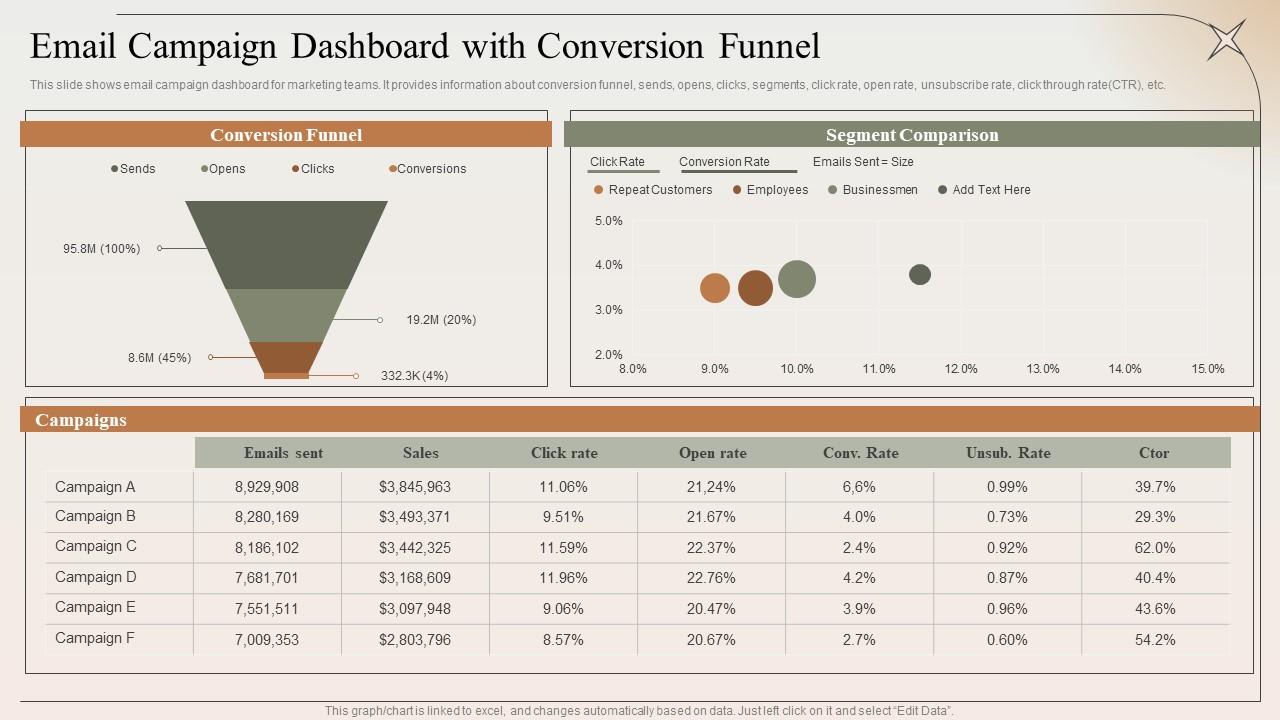
Template 3: Email Campaign Dashboard with Conversion Funnel
Conversion funnel visibility is what separates a useful email dashboard from a vanity metrics slide. This PPT preset is built for marketing teams who need sends, opens, clicks, and unsubscribe rates in a single structured view. Click-through rate and click-to-open rate sit alongside segment comparison data—useful for anyone building on prior email campaign dashboard work. The template is 100% editable and customizable.
Download this PowerPoint Template
Template 4: Email Marketing Dashboard for Campaign Success PPT Sample
Delivers a polished email marketing dashboard that captures campaign success metrics at a glance. This layout drives instant clarity on key performance indicators—from open rate trends to conversion benchmarks. Striking visual design builds credibility with stakeholders before a single number is explained. Simplify your campaign reporting process with a professional structure ready to use in minutes. Deploy this for monthly marketing reviews or quarterly performance showcases. Transform your email marketing presentations today. Download this dynamic template now and unlock campaign success visibility.
[product_image id=1821360]
Template 5: Email Marketing Dashboard to Track Campaign Success PPT Information
When campaign success metrics need a clean, trackable visual home, this deck delivers. This PPT slide is built for marketing managers presenting email KPI tracking results to leadership teams. It covers the core performance view—open rates, engagement trends, and campaign-level comparisons—without clutter. Btw, this slide works equally well for drip campaign analytics reviews and bulk email campaign manager briefings. The template is 100% editable and customizable.
[product_image id=1687461]
Template 6: Email Dashboard for Campaign Performance Tracking PPT Example
Campaign performance tracking means nothing without a dashboard that communicates the story clearly. This PPT preset suits marketing leads who present email open rate tracking and click-through rate analysis to mixed audiences. For context, it works as well in boardroom reviews as in client pitch sessions. The structured layout keeps attention on the numbers that matter, not the formatting. The template is 100% editable and customizable.
[product_image id=1843926]
Template 7: Email Marketing Campaign Nurture Strategy PPT Sample
A nurture strategy only lands if the visual does the work before the presenter speaks. This PPT slide is designed for campaign managers who need to communicate drip campaign analytics and subscriber list management progress to stakeholders. It pairs creativity with a clear structural logic—brand-aligned color schemes keep the audience focused on the message. So yeah, this deck fits teams looking to build on core email campaign templates with a nurture-specific layer. The template is 100% editable and customizable.
[product_image id=1740553]
Template 8: Email Marketing Dashboard to Track Campaign Success PPT
Elevates campaign success tracking into a presentation that commands attention from the first slide. This pre-designed framework gives marketers a structured view of email KPI tracking—from open rates to conversion benchmarks—without sacrificing visual impact. Customization across color themes ensures your brand stays consistent throughout every review. Deliver your marketing automation platform results with authority and precision to any audience. Use this for internal team reviews or executive reporting cycles. Transform your email marketing dashboard presentations today. Download this dynamic template now and unlock campaign success storytelling.
[product_image id=1686358]
Template 9: Email Marketing Dashboard Illustrating Campaign PPT
Merges visual impact with structured campaign illustration to capture stakeholder attention immediately. This content-ready layout empowers marketers to present email campaign insights across multiple performance dimensions. Clear visual hierarchy ensures audiences follow the data narrative without confusion or distraction. Flexible color themes let you adapt every slide to match your brand's reporting standards. Anchor your campaign reporting software reviews in a deck that communicates credibility. Transform your email marketing illustrations today. Download this dynamic template now and unlock audience engagement at every level.
[product_image id=1740554]
Template 10: Email Marketing Dashboard Illustrating Campaign Performance Results
Provides marketers with a structured dashboard view for tracking total subscriber growth, bounce rates, and open rate trends. This pre-designed layout translates raw campaign performance metrics into a clear visual story. Unsubscribe rate, click rate, and overall bounce rate sit together—eliminating the need to reconcile multiple data sources. You gain instant clarity on what's working across your entire email marketing effort. Use this for monthly team reviews or campaign post-mortems. Transform your email marketing performance presentations today. Download this dynamic template now and unlock data-driven campaign confidence.

Download this PowerPoint Template
Template 11: Email Campaign Analytics Measure ROI and Audience PPT Structure
ROI measurement and audience analysis belong together—and this deck makes that connection visible. This PPT template is built for marketing analysts presenting email conversion rate and campaign ROI findings to finance and leadership teams. It's the kind of slide a CMO reaches for when explaining the business case behind email spend. For context, it pairs naturally with campaign report templates for a complete performance narrative. The template is 100% editable and customizable.
[product_image id=1842319]
Template 12: Email Campaigns to Boost Engagement PPT Summary
Drives audience engagement storytelling with a deck built to showcase email campaign impact across key metrics. This pre-designed framework captures email engagement metrics and subscriber growth data in a format stakeholders understand immediately. Adaptable color themes and layouts ensure your brand voice stays consistent throughout the presentation. Simplify complex campaign data into compelling visuals that accelerate decisions. Ideal for team reviews, client updates, or quarterly marketing briefings. Transform your email engagement presentations today. Download this dynamic template now and unlock campaign impact clarity.
[product_image id=1687460]
Template 13: Email Campaign Performance KPI Dashboard PPT Mockup
KPI visibility is what makes an email campaign dashboard actionable rather than decorative. This PPT deck is designed for campaign managers who need to present email KPI tracking results—open rates, click-through rates, deliverability scores—in a format that works from boardroom to client pitch. Adding this to a business proposal gives the numbers a professional visual context that raw data exports simply can't match. The template is 100% editable and customizable.
[product_image id=1808365]
Template 14: Email Marketing Dashboard to Track Campaign Effectiveness PPT Information
Captures campaign effectiveness across every metric that matters—from open rates to conversion benchmarks—in one cohesive deck. This pre-designed layout empowers marketing teams to present email deliverability rate and engagement trends with professional authority. Visual clarity across slides ensures stakeholders grasp performance shifts without needing a data background. Adapt the color theme to align with your brand's reporting standards effortlessly. Deploy this for campaign effectiveness reviews or client-facing performance updates. Transform your email marketing tracking presentations today. Download this dynamic template now and unlock campaign effectiveness storytelling.
[product_image id=1766708]
Template 15: Communication Metrics Dashboard for Email Campaign Analysis
Communication metrics tell the real story of how email reaches and moves an audience. This slide is built for marketing leads and communications managers who need to present email distribution data and engagement statistics in one clean view. It covers the metrics that matter for e-communication reporting—sent, delivered, opened, and acted upon. So, this deck fits naturally alongside email marketing campaign proposal templates when building a full campaign narrative. The template is 100% editable and customizable.

Download this PowerPoint Template
Template 16: Email Marketing Campaigns for Beauty Salon Growth PPT Sample
Beauty salon growth depends on retention—and email campaigns are the primary tool for keeping clients engaged. This PPT template is designed for salon owners and marketing managers presenting campaign performance and customer engagement metrics to business partners or investors. It communicates campaign results with a visual polish that matches the brand identity of the beauty industry. Adapt every element to your salon's look without spending hours on design. Transform your beauty salon email campaign presentations today. Download this dynamic template now and unlock client retention storytelling.
[product_image id=1686357]
Template 17: Marketing Dashboard Visualizing Social Media and Email Metrics PPT Outline
Visualizing social media and email metrics together gives leadership a complete picture of marketing ROI. This pre-designed layout empowers marketing teams to present unified campaign performance data—email open rates alongside social engagement figures—in a single, coherent dashboard view. Stakeholders see the full marketing effort without switching between reports. Flexible design lets you tailor each slide to match your reporting cadence and brand standards. Ideal for integrated marketing reviews, CMO presentations, or agency client updates. Transform your multi-channel marketing dashboard presentations today. Download this dynamic template now and unlock integrated campaign clarity.
[product_image id=1839751]
Template 18: Email Marketing Dashboard for Campaign Effectiveness Tracking PPT Designs
Effectiveness tracking only works when the dashboard makes change visible over time. This PPT preset is built for email marketers who need to report campaign performance shifts—open rates, click rates, unsubscribe trends—to stakeholders who want the direction, not just the numbers. It pairs a clean visual structure with enough flexibility to fit any brand identity. To be clear, this deck works for both campaign-level reviews and marketing automation platform reporting cycles. The template is 100% editable and customizable.
[product_image id=1638756]
Template 19: Email Dashboard Conversion and Revenue Tracking PPT Slides
Conversion and revenue tracking are the metrics leadership actually cares about. This PPT deck is designed for marketing managers and CFOs who need to present email conversion rate and revenue attribution data in a clear, defensible format. It turns raw funnel data into a visual story that connects email spend to business outcomes. Btw, this slide works as well for drip campaign analytics reviews as for end-of-quarter executive briefings. The template is 100% editable and customizable.
[product_image id=1843925]
Template 20: Email Contact Strategy for Campaign Roadmap PPT Structure
A campaign roadmap without a clear contact strategy is just a timeline. This PPT slide is built for marketing leads who need to present a structured email contact plan—sequence logic, audience segments, and campaign touchpoints—to cross-functional teams or agency partners. It keeps the focus on the strategic flow rather than the tactical detail, which is what stakeholders actually need to see. So, this deck suits both campaign planning sessions and client-facing proposal reviews. The template is 100% editable and customizable.
[product_image id=1576001]
Win Every Campaign Review with SlideTeam
SlideTeam's PowerPoint templates are the best in the industry for email campaign dashboard presentations. These content-ready slides give your team instant structure for tracking campaign performance metrics, visualizing email KPI tracking, and communicating ROI to any audience. Use these PowerPoint slides to replace scattered exports with a single, credible visual story. Grab these pre-designed templates and turn every campaign review into a confident, data-backed decision.
FAQs on Email Campaign Dashboard
What are the most critical KPIs to include in an email campaign dashboard for e-commerce businesses?
Focus on five core KPIs: open rate, click-through rate, email conversion rate, revenue per email, and unsubscribe rate. Add cart abandonment recovery rate for e-commerce specifically. Bounce rate—split into soft and hard—rounds out the set. These seven give a complete picture of both engagement and commercial return without overloading the dashboard.
How can open rate trends be visualized effectively to identify seasonal patterns in email engagement?
Plot open rates on a monthly line chart over 12 months. Layer a secondary axis for send volume to separate engagement shifts from volume effects. Highlight key dates—holidays, sales events—directly on the chart. This makes seasonal spikes and dips readable at a glance without requiring explanation from the presenter.
What is the difference between click-to-open rate and click-through rate, and why should both appear on a dashboard?
Click-through rate measures clicks against total emails sent. Click-to-open rate measures clicks against emails opened. CTR shows reach; click-to-open rate shows content relevance among engaged readers. Both belong on the dashboard because a high open rate paired with a low click-to-open rate signals a subject line that outperforms the email body.
How should an email campaign dashboard display A/B test results to support faster decision-making?
Show A/B variants side by side with the winning metric highlighted. Include sample size and statistical confidence level—without these, the result is noise, not insight. A simple traffic-light indicator (green/amber/red) on the primary KPI speeds up reading. Limit the view to one decision per test; do not stack multiple tests on one panel.
What segmentation filters are essential for slicing email performance data by audience demographics?
Four filters cover most use cases: geography, device type, subscriber acquisition source, and engagement tier (active, lapsed, inactive). Industry and company size matter for B2B lists. These filters let teams identify which audience segments drive open rates and conversions—and which are dragging deliverability scores down.
How can bounce rate categories—soft versus hard—be represented separately on a dashboard without cluttering the layout?
Use a stacked bar or two-column layout: one bar for soft bounces, one for hard bounces, per campaign. Keep them in a small, fixed panel rather than a full-width chart. Color-code clearly—soft bounces in amber, hard in red. This separates a fixable delivery issue from a permanent list quality problem without dominating the dashboard layout.
What role does revenue attribution play in designing an advanced email campaign dashboard?
Revenue attribution connects email sends directly to purchases. Without it, the dashboard shows activity, not business impact. Include revenue per email, total attributed revenue, and ROI per campaign. This shifts email from a communications metric to a commercial one—which is the argument finance teams need to justify budget.
How should a dashboard differentiate between campaign-level and automation-level email performance metrics?
Campaign-level metrics track one-time sends: open rate, click-through rate, and conversion per blast. Automation-level metrics track sequences over time: completion rate, drop-off point, and cumulative revenue per flow. Keep them in separate dashboard panels. Mixing them obscures both—a single drip sequence can skew campaign averages significantly if combined.


