





 0 Comment
 Customer Reviews

The calendar invite's already sent. Someone from HR has a welcome email drafted. And somewhere, a manager is staring at a blank slide trying to figure out what exactly new hires are supposed to do for the next two weeks.
That's the part nobody talks about. Not whether you have a training program—most companies do, technically. But whether anyone can actually read it. Follow it. Know what comes first, what happens on day three, who they're supposed to meet on Friday.
New employee training schedules exist on paper. Sometimes on a shared drive nobody opens. Sometimes in someone's head, transmitted verbally in a hallway.
The problem isn't intent. Every company wants onboarding to go well. It's that the gap between "we have a process" and "here's the process, clearly, on one slide" is wider than it looks. New hires don't fail because the content is wrong. They fail because no one handed them a map.
And there's the thing that makes it worse: first impressions compound. A confusing first week doesn't just slow productivity—it creates doubt. Did I make the right choice? Is this how they run things here? The discomfort of not knowing what to expect isn't trivial. It sticks.
So people started making templates. Not because training is hard to design—it is, but that's separate. Because communicating a training schedule clearly, consistently, and without formatting it from scratch every time someone new joins is genuinely difficult. A new hire orientation schedule that looks professional also signals that the company is professional. That matters more than most hiring managers admit.
That's where SlideTeam's pre-designed new employee training schedule templates come in. They handle the structure—the timelines, the weekly breakdowns, the onboarding checklists, the status trackers—so you can spend time on the content, not the grid lines.
Here's what's available.
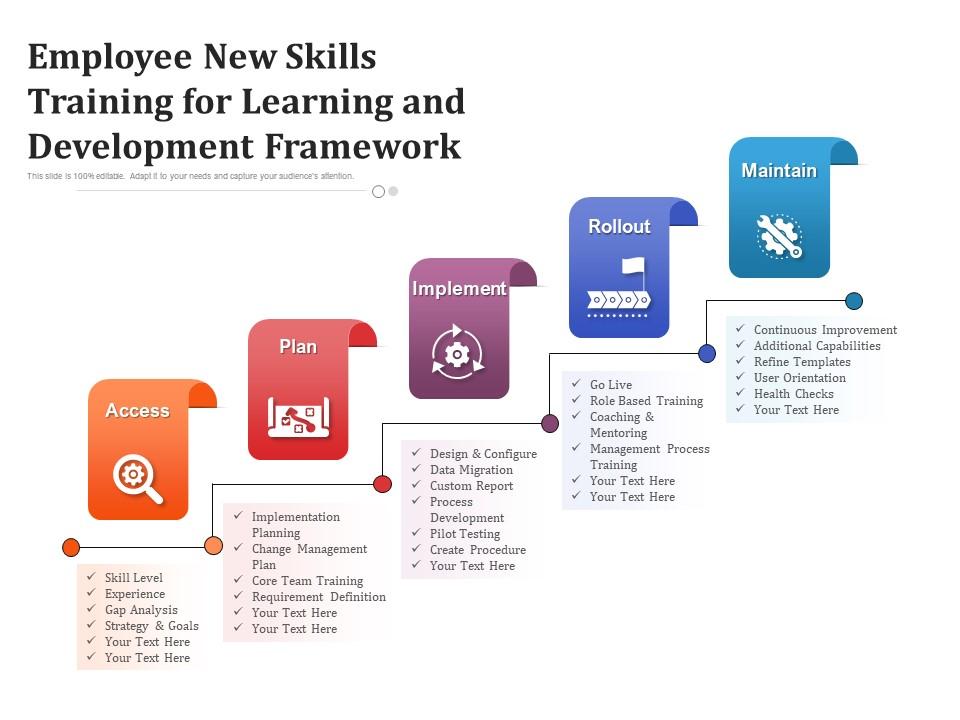
Template 1: Employee New Skills Training for Learning and Development Framework
Structured learning frameworks help organizations move new skills from intent to action. This PowerPoint slide is built for L&D leads and HR managers who need a clear, phased approach to employee skill-building. It maps a five-stage process—Access, Plan, Implement—so practitioners can walk stakeholders through a new hire training plan without losing the thread. Use it to anchor a workforce training program conversation or present a learning and development proposal. The template is 100% editable and customizable.
Download this PowerPoint Template
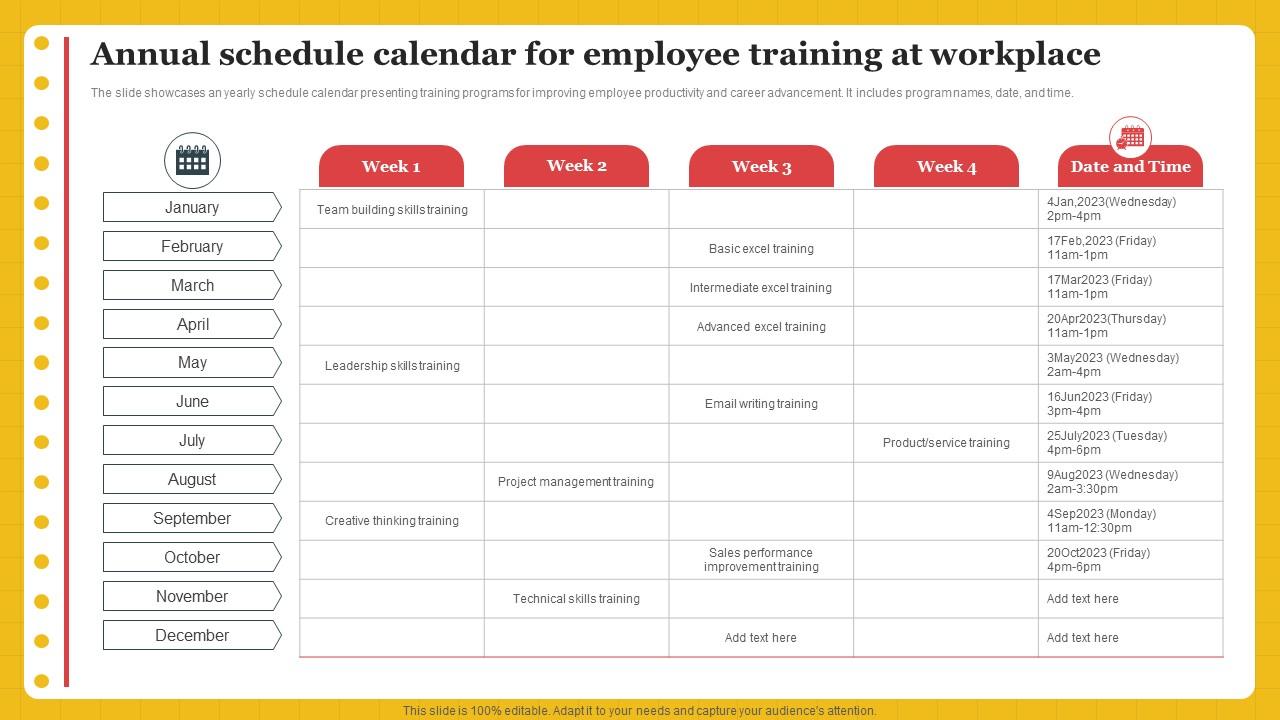
Template 2: Annual Schedule Calendar for Employee Training at Workplace
Annual training visibility is something most HR teams want but rarely present in one place. This PPT preset gives HR managers and L&D planners a full-year calendar view of employee training programs—complete with program names, dates, and times. It's built for teams running a corporate training calendar review or presenting a staff training agenda to leadership. So yeah, this slide makes a year's worth of planning readable at a glance. The template is 100% editable and customizable.
Download this PowerPoint Template
Template 3: Training Schedule for Effective Employee Skill Development PPT
Skill gaps show up fast when training plans lack visual structure. This PPT template is built for HR managers and team leads presenting an employee skill development schedule to a mixed audience. It works well in a new employee orientation session or a quarterly workforce training program review. The design makes progress and priorities easy to scan at a glance. The template is 100% editable and customizable.
[product_image id=1781367]
Template 4: Training Schedule for New Employee Orientation PPT Presentation
First impressions in onboarding often depend on how clearly the schedule is communicated. This deck is built for HR professionals running a new employee training schedule presentation for managers or department heads. It covers the core components of a new employee orientation program without cluttering the slide. Use it to align teams before a new hire's first day. The template is 100% editable and customizable.
[product_image id=1578970]
Template 5: First Week Training Schedule for Advisory Firm New Employee
The first week at a financial advisory firm covers a lot of ground—admin, client processes, technology, communication norms. This PPT slide organizes that complexity into a clean day-by-day first-week training schedule with training focus areas, topics, and status tracking. It's a practical tool for HR teams and practice managers building a structured new hire orientation schedule. For context, this level of detail is what separates a smooth start from a chaotic one. The template is 100% editable and customizable.
[product_image id=1185813]
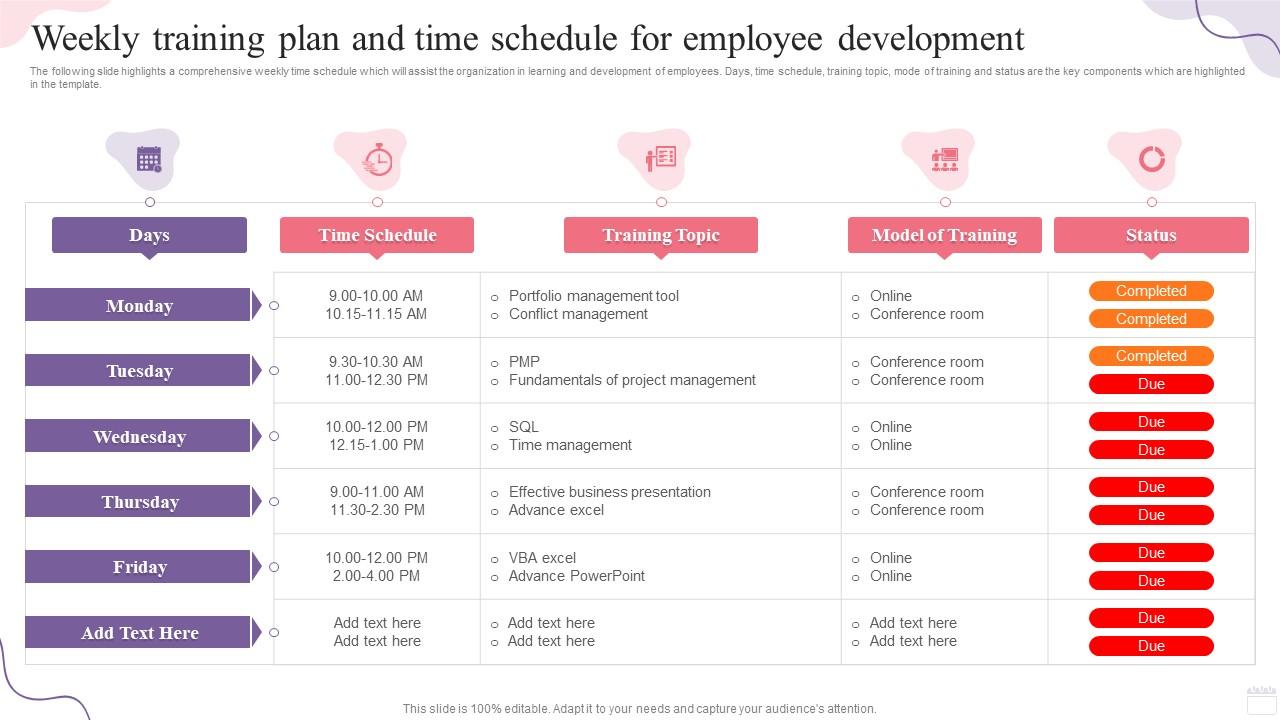
Template 6: Weekly Training Plan and Time Schedule for Employee Development
Deliver a structured employee development plan with this comprehensive weekly training schedule template. The organized layout captures days, time slots, training topics, delivery modes, and completion status in a single view. Intuitive formatting provides instant clarity on where each team member stands in the training cycle. You can build compelling staff training agendas that align L&D goals with daily operational schedules effortlessly. Transform your weekly training presentations today. Download this dynamic template now and unlock your employee development planning potential.
Download this PowerPoint Template
Template 7: Techniques for Effective New Employee Training Plan
New employees need early clarity on how the organization works—its objectives, workflow, policies, and tools. This PPT slide structures that orientation into a clean training plan covering organization objectives, workflow, policies, and technology. HR teams and department managers use this to anchor a new hire training plan conversation with measurable focus areas. It's the kind of slide that turns a good onboarding intention into an actual agenda. The template is 100% editable and customizable.
[product_image id=1161160]
Template 8: Training Schedule Calendar for Continuous Professional Growth PPT Example
Drive consistent professional growth with this visually compelling training schedule calendar template. The structured layout maps continuous development milestones across a calendar view, giving managers and HR teams immediate visibility into program timelines. Dynamic design elements capture audience attention in leadership reviews and quarterly planning sessions. You can build persuasive employee development program presentations with clear timelines and well-defined training milestones. Transform your professional growth presentations today. Download this dynamic template now and unlock your training calendar planning potential.
[product_image id=1781366]
Template 9: Activity Schedule for Employee Training and Development Program
Accelerate workforce capability with this six-stage activity schedule built for employee training and development programs. The structured framework guides audiences through Assess, Motivate, Design, Deliver, Evaluate, and Repeat—creating a clear, repeatable training cycle. Visual stage indicators deliver instant comprehension of where each phase sits in the overall program. You can build compelling training and development presentations that communicate program logic and drive stakeholder confidence. Transform your workforce training presentations today. Download this dynamic template now and unlock your employee development program potential.

Download this PowerPoint Template
Template 10: Monthly Training Schedule for Employee Development PPT Structure
Monthly training visibility drives accountability in ways a weekly view simply can't. This PPT structure gives L&D managers and HR teams a full-month employee development schedule in a clean, scannable layout. It's built for presenting a monthly training schedule to department heads or embedding it in a broader employee development plan review. The design keeps complexity manageable without losing detail. Transform your monthly training presentations today. Download this dynamic template now and unlock your employee development planning potential.
[product_image id=1489119]
Template 11: Onboarding and Training Schedule for New Hires PPT Sample
Structure a seamless new hire onboarding experience with this professionally designed training schedule template. The organized layout captures each onboarding milestone in sequence, giving HR teams and managers a shared reference point for the full process. Flexible design elements allow instant customization to match any department's specific induction requirements. You can build compelling onboarding and training presentations that align new hires with organizational expectations from day one. Transform your new hire onboarding presentations today. Download this dynamic template now and unlock your HR onboarding process potential.
[product_image id=1699502]
Template 12: Employee Training and Budget Schedule Summary PPT Guidelines
Training budgets and schedules rarely live in the same document—and that disconnect costs planning time. This deck gives HR managers and finance teams a combined view of training activities and associated budget allocations. It's useful when presenting a workforce training program for approval or summarizing annual L&D spend. The design balances simplicity with enough detail to support real decisions. The template is 100% editable and customizable.
[product_image id=1840618]
Template 13: Employee Training Plan for Onboarding New Hires PPT Example
Onboarding new hires well means having a plan that actually gets presented, not just filed. This PPT deck is built for HR professionals who need a clear, visual employee training plan for onboarding conversations with managers or department leads. It works equally well in a formal HR onboarding process review or a quick team briefing before a new hire's start date. The structure removes guesswork for everyone in the room. The template is 100% editable and customizable.
[product_image id=1776530]
Template 14: Employee Training Plan for Effective Workforce Development PPT Information
Workforce development plans need to connect individual training to broader organizational outcomes. This PPT deck helps HR leaders and L&D managers present an employee training plan for effective workforce development in a format that leadership can engage with. It's suited for quarterly reviews, annual planning sessions, or team-level capability discussions. The design keeps the focus on outcomes, not just activities. The template is 100% editable and customizable.
[product_image id=1776529]
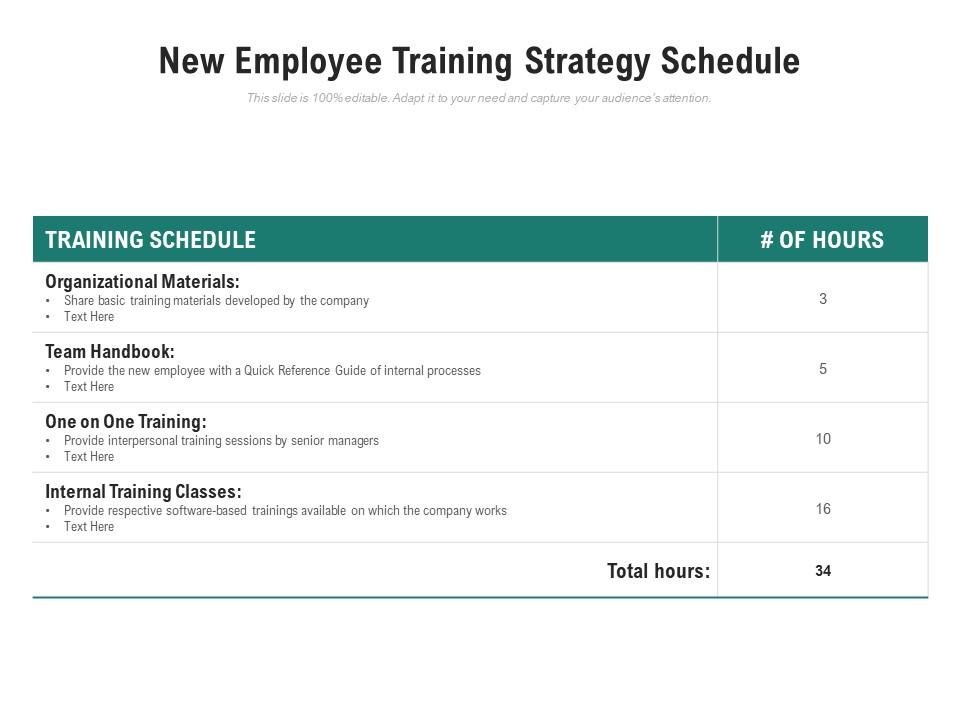
Template 15: New Employee Training Strategy Schedule
Map every critical training touchpoint with this new employee training strategy schedule template. The clear layout presents Organizational Materials, Team Handbook, One-on-One Training, and Internal Training Classes as distinct, sequenced components. Visual separation between training types delivers instant clarity on what gets covered and when. You can build compelling new staff induction plans that guide managers through a consistent, repeatable orientation process. Transform your new employee training presentations today. Download this dynamic template now and unlock your onboarding strategy potential.
Download this PowerPoint Template
Template 16: New Employee Onboarding Progress Dashboard PPT Outline
Onboarding dashboards answer the question managers ask most: where does each new hire actually stand? This PPT preset gives HR teams and people managers a real-time-style progress view across all active onboarding activities. It's built for weekly check-ins, HR reporting, or a 30-60-90 day onboarding plan review with department leads. The visual layout makes incomplete steps hard to miss. The template is 100% editable and customizable.
[product_image id=1557732]
Template 17: Training Proposal for Employee Skill Development PPT Information
Skill development proposals need to earn budget approval before training begins. This PPT deck is built for HR managers and L&D leads who need to present a structured training proposal to senior leadership or a finance committee. It covers the case for investment, scope of the program, and expected outcomes in a clean, credible format. Use it when the job training plan needs a sign-off, not just awareness. The template is 100% editable and customizable.
[product_image id=1770472]
Template 18: New Hire Checklists for Employee First Day PPT Information
Ensure every new hire's first day runs without gaps using this structured onboarding checklist template. The logical layout sequences first-day tasks into a scannable list, giving HR teams and line managers a shared, accountable reference. Customizable sections allow teams to tailor the checklist to department-specific requirements without rebuilding from scratch. You can build compelling new employee orientation checklists that eliminate confusion and create confidence from day one. Transform your new hire first-day presentations today. Download this dynamic template now and unlock your onboarding checklist potential.
[product_image id=1797241]
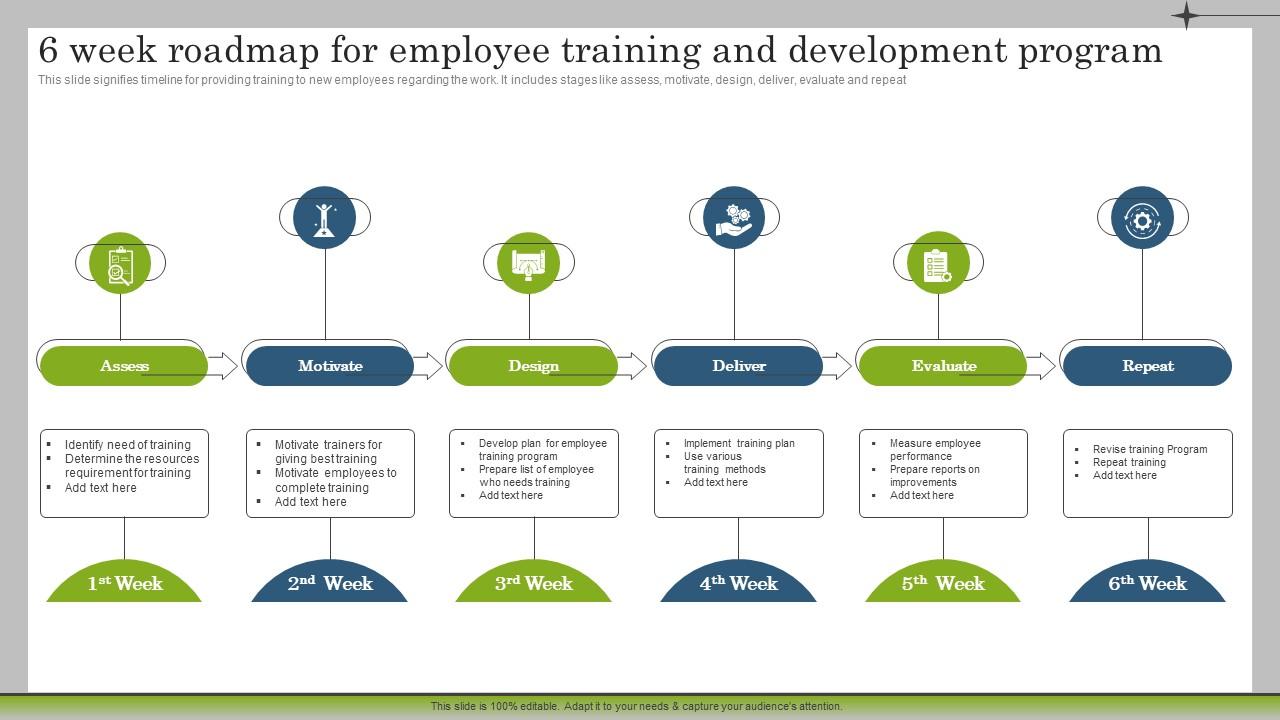
Template 19: 6 Week Roadmap for Employee Training and Development Marketing Plan to Launch New Service
Six-week training roadmaps work because they force sequencing—what gets taught first matters as much as what gets taught at all. This PPT slide maps employee training and development across six structured stages: Assess, Motivate, Design, Deliver, Evaluate, and Repeat. It's suited for HR leads or marketing operations teams launching a new service and needing staff trained in parallel. The stage-based layout makes the timeline and logic visible to any audience. Transform your training roadmap presentations today. Download this dynamic template now and unlock your six-week employee development plan potential.
Download this PowerPoint Template
Elevate Every New Hire's First Week with SlideTeam
SlideTeam's PowerPoint templates are the best in the industry for building a new employee training schedule that communicates clearly and runs smoothly. These content-ready slides cover everything from first-day checklists and weekly training plans to onboarding dashboards and six-week development roadmaps—saving HR teams hours of formatting work. Use these PowerPoint slides to present a structured, professional new hire onboarding plan that builds confidence from day one. Grab these templates and turn every orientation into a process worth repeating.
FAQs on New Employee Training Schedule
What are the essential components that every new employee training schedule should include to ensure a smooth onboarding experience?
Every new employee training schedule needs four things: a clear timeline (day one through week four), role-specific task assignments, assigned contacts or mentors for each phase, and defined checkpoints to confirm understanding. Add a company overview section, system access and tools walkthrough, and HR policy review. These six elements cover the core without overloading the new hire in the first week.
How can managers balance between information overload and insufficient training when designing a schedule for new hires?
Sequence beats volume. Give new hires what they need to do their job in week one—nothing more. Push policy handbooks and secondary tools to weeks two and three. Use short daily check-ins to spot confusion early. A 30-60-90 day onboarding plan naturally spreads the load across phases, reducing overwhelm without leaving critical gaps.
What is the ideal duration for a new employee training program across different industries?
Most industries run effective programs in two to four weeks. Roles with technical depth—engineering, finance, healthcare—often extend to 60 or 90 days. Retail and hospitality can work in five to seven days for core functions. The right duration depends on role complexity, not company size. Set a minimum for baseline competency, then extend for performance readiness.
How should a training schedule differ for remote employees compared to in-office hires?
Remote employees need more structure upfront, not less. Schedule virtual introductions in the first two days—don't leave relationship-building to chance. Ship equipment and access credentials before day one. Build explicit check-in points into the weekly training schedule. Remote onboarding also requires documented processes that in-office hires absorb informally through proximity.
What role does mentorship play in structuring an effective new employee training timeline?
Mentors reduce time-to-productivity. Assign one before the new hire starts, not after week two. Build mentor check-ins directly into the training timeline—day three, end of week one, end of week two. Mentors answer questions managers don't hear and flag confusion before it becomes disengagement. Structured mentorship shortens the ramp-up period measurably.
How can organizations incorporate role-specific training alongside general company orientation in a single schedule?
Run general orientation in the first two days—company culture, HR policies, systems access. Shift to role-specific training from day three onward. Use a parallel-track schedule: mornings for shared sessions, afternoons for department-specific work. This keeps onboarding cohesive while giving each hire the job-relevant training they actually need to perform.
What metrics should HR teams track to evaluate the effectiveness of a new employee training schedule?
Track four metrics: time-to-productivity (how quickly the new hire performs independently), training completion rate, 30-day and 90-day manager satisfaction scores, and new hire retention at six months. These give HR a clear signal on whether the schedule is working. Skip knowledge-test scores alone—they measure recall, not real job readiness.
How can presentation templates be leveraged to make training schedules more visually engaging and easier to follow?
A well-designed slide removes the need to read. Use timeline visuals for multi-week schedules, color-coding for training categories, and status columns for progress tracking. Pre-designed PowerPoint templates from SlideTeam give HR teams a ready structure—so the schedule is clear to a new hire on day one without any additional explanation needed.


