





 0 Comment
 Customer Reviews

The deck's been sent. Three slides on PPC performance, a budget table, some CTR numbers. Client opens it, scrolls for maybe forty seconds, then replies: "Can you make this easier to read?"
That's the moment nobody talks about. Not the analysis part—most paid search teams know their numbers. Click-through rates, cost per click, conversion data, return on ad spend. The numbers exist. Someone ran the campaign, pulled the export, did the math. That part's done.
The problem is the gap between having the data and making it land.
A PPC report isn't just a data dump. It's an argument. It's saying: here's what we spent, here's what happened, here's what it means, here's what we do next. And that argument needs a structure—visual, logical, and readable—or it falls apart before anyone gets to the conclusion. Clients don't fail to understand the numbers. They fail to trust them when the presentation looks like it was built in a hurry.
Which it usually was.
Most paid advertising reports get assembled at the end of the month, under deadline, by someone who's already spent the week managing bids and writing ad copy. The reporting part is the last thing on the list and the first thing that shows. Misaligned charts. Inconsistent fonts. A slide that tries to show campaign performance, quality score, and budget pacing all at once, with no clear hierarchy.
The discomfort isn't in the data. It's in figuring out how to show it without looking like you didn't think it through.
That's why PPC report templates exist. Not because marketers can't build slides—they can—but because building a good one from scratch, every month, for every client, is genuinely time-consuming. The structure is hard. The visual logic is hard. And starting from a blank slide when you already know what you need to say is its own kind of friction.
SlideTeam's pre-designed PPC report templates handle the structural part. Ready-made frameworks for campaign analysis, PPC KPI tracking, budget reviews, competitor benchmarking—built so the data goes in cleanly and the story comes out clearly.
Here's what's available.
Template 1: PPC Service Proposal PowerPoint Presentation Slides
Winning a PPC service contract starts with a proposal that looks as credible as the results you promise. This PowerPoint slide is built for paid search consultants and agency teams pitching new clients on managed PPC services. It gives your proposal a professional structure—covering scope, pricing, and expected outcomes—without starting from a blank canvas. Use it to walk prospects through your approach to ad spend analysis and campaign management clearly. The template is 100% editable and customizable.
[product_image id=250750]
Template 2: PPC Campaign Results PPT Presentation
PPC campaign results deserve a presentation that holds the room, not one that makes stakeholders squint at cluttered tables. This PPT preset is built for marketing managers and account leads who need to report campaign outcomes—click-through rates, conversions, cost per click—in a format clients can actually follow. It works equally well for monthly performance reviews and mid-campaign check-ins. The template is 100% editable and customizable.
[product_image id=1488729]
Template 3: Adwords PPC Analytics and Reporting PPT Slides
Combining AdWords PPC analytics with clear reporting, this deck drives audience engagement and informed decisions. The structured layout transforms complex PPC performance metrics into visual stories your stakeholders immediately grasp. Each slide accelerates your ability to communicate campaign ROI without sacrificing analytical depth. A flexible colour system lets you tailor every section to your brand and client requirements. Use this to present Google Ads performance reviews, ad group analysis, or monthly PPC reports with unmatched authority. Transform your paid search reporting presentations today. Download this dynamic template now and unlock deeper client engagement.
[product_image id=1799507]
Template 4: PPC Audit PowerPoint Slides at Work
A PPC audit is only as useful as the clarity with which you present its findings. This deck is built for analysts and consultants who need to walk clients or leadership through what's working, what isn't, and where budget is leaking. It covers the full audit scope—account structure, bid settings, keyword performance, and ad group analysis—in a logical, readable flow. For teams running structured PPC report reviews, this PPT template fits naturally into that cadence. The template is 100% editable and customizable.
[product_image id=1538367]
Template 5: Common PPC Issues and How to Fix Them PPT Designs
Paid search problems—wasted spend, low quality scores, poor conversion rates—are common. Explaining them clearly to a client is harder. This PPT preset is built for account managers who need to diagnose PPC issues and present fixes in plain language, without making the audience feel like the campaign has been mismanaged. It covers the real pain points: bid inefficiencies, audience targeting gaps, and ad copy misalignment. The template is 100% editable and customizable.
[product_image id=1557963]
Template 6: PPC Intelligence PowerPoint Template Bundles
Covering the full scope of PPC intelligence in one coherent presentation requires a bundle that handles breadth without losing focus. This deck is built for strategists and agency leads who need to address keyword research, competitor positioning, platform analysis, and PPC KPI tracking across a single client engagement. With twenty-three slides, it spans the intelligence cycle from data collection to actionable recommendations. It suits both new business pitches and ongoing performance reviews. The template is 100% editable and customizable.
[product_image id=1245905]
Template 7: How to Conduct Incident Investigations PPT Summary
Incident investigation reporting demands precision, clarity, and a structure that guides reviewers through findings without ambiguity. This deck captures audience attention from the first slide by pairing strong visual design with logical information flow. Each layout empowers you to present complex investigative findings with professional credibility. The flexible framework simplifies customisation for safety audits, compliance reviews, and operational incident briefings. Use this to deliver boardroom-ready investigation summaries that drive clear decisions and accountability. Transform your incident reporting presentations today. Download this dynamic template now and unlock structured investigative clarity.
[product_image id=1729176]
Template 8: Adwords and PPC Consultants Proposal PPT Information
A consultant's proposal lives or dies on how clearly it communicates value before any work begins. This PowerPoint slide is built for AdWords and PPC consultants who need to present a scoped proposal—covering services, timelines, and expected returns—to clients who are still deciding. It blends credibility with visual polish, so the pitch feels prepared rather than templated. Use it to open conversations about paid search retainers or project-based ad campaign management. The template is 100% editable and customizable.
[product_image id=1753556]
Template 9: PPC Proposal Budget Strategy and Lead Projections PPT Outline
Presenting budget strategy alongside lead projections is one of the harder conversations in paid advertising. This deck captures stakeholder attention immediately by translating PPC budget proposals into clear, defensible visual arguments. Each slide delivers precise ad spend analysis, connecting budget allocation directly to projected lead outcomes. The adaptable colour framework ensures alignment with any brand or client requirement. Use this to build compelling PPC budget presentations that earn approval from decision-makers and drive confident campaign launches. Transform your PPC budget strategy presentations today. Download this dynamic template now and unlock stakeholder confidence.
[product_image id=1869182]
Template 10: Competitor PPC Strategy Insights
Knowing what competitors are doing in paid search gives teams a real edge—but only if that intelligence is presented clearly. This deck drives strategic clarity by converting competitor PPC data into structured, decision-ready insights. It elevates bid analysis, ad copy comparison, and keyword gap findings into a format that commands attention. The customisable theme ensures every slide reflects your agency or brand identity. Use this to present PPC competitor analysis that moves leadership from observation to action. Transform your competitive intelligence presentations today. Download this dynamic template now and unlock your competitive advantage.
[product_image id=1595074]
Template 11: Checklist for PPC Ads Report Review
Reviewing a PPC ads report without a checklist is how things get missed. This slide delivers a structured review framework covering conversion settings, ad network configurations, bid strategy settings, language targeting, and network settings. Each element translates directly into fewer reporting errors and more reliable campaign analysis. The clean layout guides reviewers through every critical checkpoint before sign-off. Use this to standardise your PPC report review process across clients and campaigns with full confidence. Transform your PPC ads review process today. Download this dynamic template now and unlock systematic campaign accuracy.
[product_image id=1106933]
Template 12: Best Practices for Competitive PPC Intelligence
Competitive PPC intelligence is most useful when it's organised around what you can actually act on. This PPT template is built for digital marketers and paid search leads who need to present competitor keyword choices, ad format analysis, and platform-level comparisons in one clear view. It supports quality score analysis conversations and informs bidding decisions grounded in real market data. Use it in quarterly planning sessions or during campaign reviews where direction needs justification. The template is 100% editable and customizable.
[product_image id=1248775]
Template 13: PPC Audit Strategies for Quality Score Assessment
Quality score is one of the most misunderstood metrics in PPC—and one of the most expensive to ignore. This deck is built for analysts and account managers who need to present audit findings across device performance, keyword relevance, and account structure in a format that non-technical stakeholders can follow. It covers six audit stages, from regular review cycles to maximum ROI keyword identification, in a logical sequence. For teams tracking cost per click efficiency, this PPT preset makes the connection between audit actions and performance gains visible. The template is 100% editable and customizable.
[product_image id=1105420]
Template 14: Analysing PPC Intelligence Metrics for Quick Decision Making PPT Presentation
PPC intelligence metrics matter most when they inform fast decisions, not when they sit in a dashboard nobody opens. This PowerPoint slide is built for performance marketers and analytics leads who need to present touchpoint methods, KPIs, and channel-level data in a format that drives room-level alignment quickly. It supports conversations around conversion rate optimisation and revenue attribution across paid channels. Use it in weekly standups or monthly performance reviews where speed and clarity both count. The template is 100% editable and customizable.
[product_image id=1248773]
Template 15: Our Expertise for PPC Service PPT Slides Professional
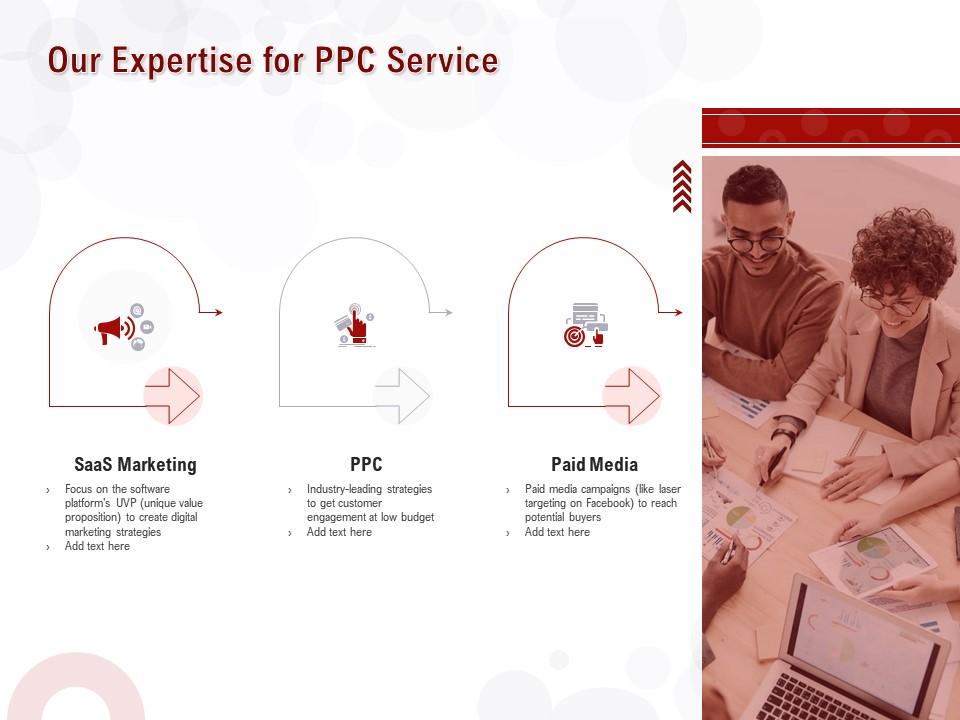
Communicating agency expertise across SaaS marketing, PPC, and paid media in a single slide set is a positioning challenge most consultants underestimate. This PPT preset is built for paid search agencies and consultants who need to present their service capabilities in a structured, three-stage format that builds credibility without overselling. It works well in new business meetings where the prospect needs to understand scope before committing to a brief. The template is 100% editable and customizable.
Download this PowerPoint Template
Template 16: Awards and Recognition for PPC Service PowerPoint Presentation Slides
Awards and recognition slides work when they're grounded in specifics, not vague claims. This PowerPoint slide is built for PPC agencies and consultants who need to present their track record—covering award periods and recognition categories—in a format that adds credibility to a proposal or credentials deck. It suits client-facing presentations where trust needs to be established early, before the campaign conversation begins. The template is 100% editable and customizable.

Download this PowerPoint Template
Template 17: PPC and Adwords Specialist Proposal Contract PPT Infographic
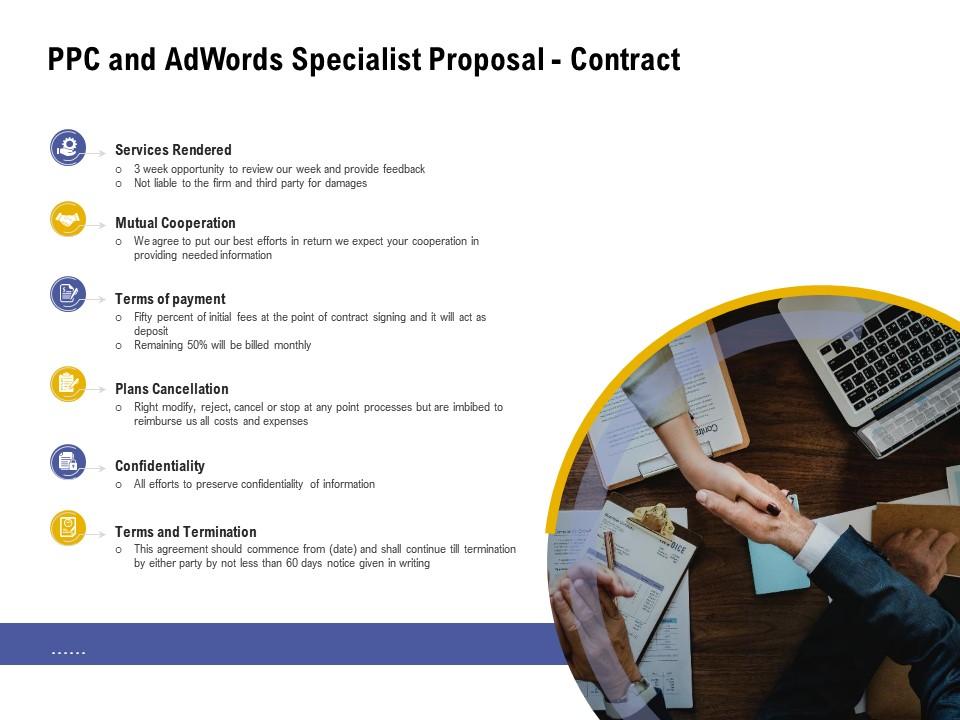
A PPC and AdWords specialist contract must cover every agreement point clearly—before work starts. This deck delivers a six-stage proposal contract structure spanning services rendered, mutual cooperation terms, payment schedules, plan cancellation clauses, and confidentiality provisions. Each section provides a professional framework that protects both agency and client. The structured layout simplifies legal clarity and accelerates agreement sign-off for paid search engagements. Use this to close PPC contracts confidently and set client relationships on solid ground. Transform your PPC contract presentations today. Download this dynamic template now and unlock faster, clearer client agreements.
Download this PowerPoint Template
Template 18: Benchmarking Steps of PPC Intelligence to Exceed Competitors PPT
Beating competitors in paid search requires knowing their moves before running your own campaigns. This PPT template is built for strategists who need to present a seven-step benchmarking process—covering competitor identification, keyword research, ad copy review, landing page analysis, and USP comparison—in one structured flow. It makes the intelligence process visible and defensible to leadership or clients who want to understand how bidding decisions are made. Use it to open planning conversations grounded in real competitive data. The template is 100% editable and customizable.
[product_image id=1248774]
Template 19: PPC Promotion Strategy Management Showing High Quality Score
Linking PPC promotion planning directly to quality score outcomes is a conversation most paid search decks don't handle well. This deck delivers a four-stage framework connecting PPC promotion strategy, paid marketing execution, and promotion plan management into one coherent visual argument. Each slide creates a clear path from planning inputs to measurable quality improvements. The structured layout empowers marketers to present paid advertising strategy with confidence and precision. Use this to align stakeholders on PPC promotion plans that drive higher quality scores and lower costs. Transform your PPC strategy presentations today. Download this dynamic template now and unlock quality-driven campaign performance.

Download this PowerPoint Template
Template 20: PPPC Statistics PowerPoint Presentation Outfit
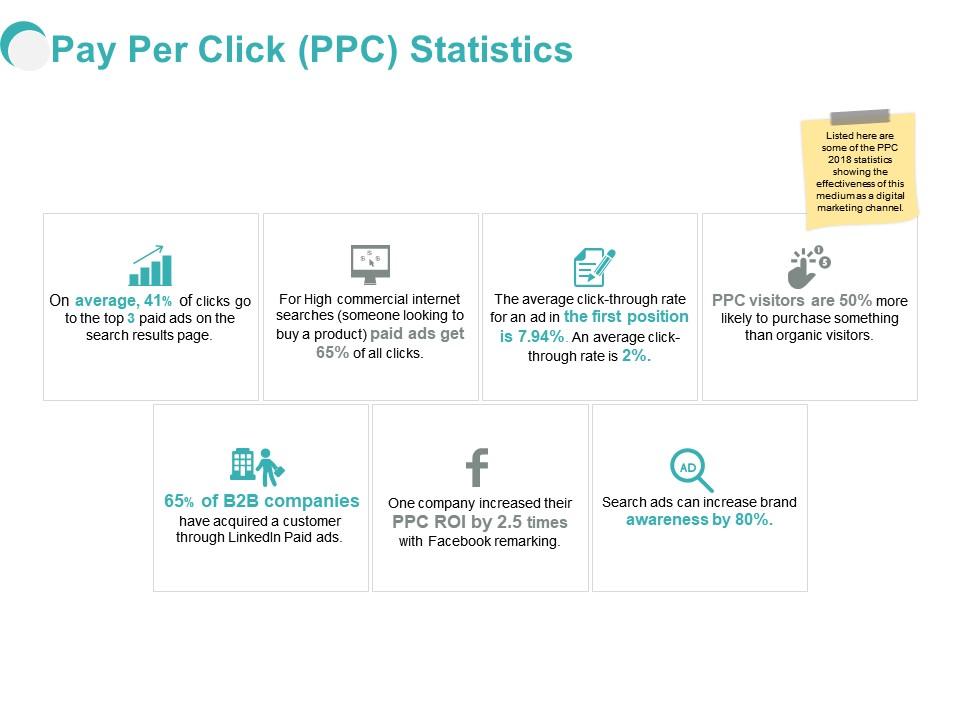
Pay-per-click statistics tell a story, but only when they're structured in a way that makes sense to the audience reading them. This PPT preset is built for business leads and marketing managers who need to present PPC performance data—across business, management, planning, and strategy dimensions—in a seven-stage format that moves from context to conclusion. It suits board-level reporting and client-facing paid advertising summaries where the numbers need to speak clearly. The template is 100% editable and customizable.
Download this PowerPoint Template
Elevate Your Ppc Reporting Game with SlideTeam
SlideTeam's PowerPoint templates are the best in the industry for PPC report creation, giving paid search teams a professional structure that saves hours every reporting cycle. These content-ready slides cover everything from PPC KPI tracking and ad spend analysis to competitor benchmarking and quality score assessment. Use these ready-made frameworks to turn raw campaign data into clear, persuasive presentations that clients and stakeholders actually trust. Deploy SlideTeam's PPC report templates today and drive better decisions from every campaign review.
FAQs on PPC Report
What key performance indicators should be included in a PPC report to effectively communicate campaign success to stakeholders?
A solid PPC report needs four core KPIs: click-through rate, cost per click, conversion rate, and return on ad spend. Add quality score and cost per acquisition for deeper context. Group metrics by campaign objective—awareness, traffic, or conversions—so stakeholders see results against intent. Avoid dumping every available metric; pick the ones that directly answer whether the campaign is working.
How can presentation templates streamline the process of creating visually compelling PPC reports for clients?
Pre-designed templates remove the blank-canvas problem. They give reports a consistent structure—campaign summary, KPI section, trend charts, recommendations—so the analyst fills in data rather than building layout from scratch. Clients receive a familiar, readable format each month. This cuts production time significantly and reduces the risk of key metrics being buried or missed under deadline pressure.
What is the ideal frequency for generating PPC reports, and how does reporting cadence impact optimization decisions?
Weekly reports work for active campaign management—catching bid issues, budget pacing, and ad fatigue early. Monthly reports suit client-facing reviews and trend analysis. Quarterly reports support strategic decisions like budget reallocation. The cadence should match the pace of decisions being made. Running weekly reports for a campaign nobody optimises weekly wastes everyone's time.
How should PPC reports differ when presented to C-suite executives versus marketing managers?
C-suite audiences need one slide: spend, revenue, and ROI. Remove jargon entirely. Marketing managers need the operational layer—keyword performance, ad group results, quality scores, and next steps. The same data, two different depths. Build your report with a one-page executive summary up front, then detailed campaign analysis behind it for the team that acts on it.
What data visualization techniques best represent click-through rate trends in a PPC performance report?
Line charts work best for showing CTR trends over time—they make directional movement immediately clear. Bar charts suit comparing CTR across ad groups or campaigns side by side. Avoid pie charts for trend data; they obscure change over time. Annotate the chart at key events—bid changes, creative swaps, seasonal shifts—so the audience understands what drove the movement, not just that it moved.
How can a PPC report template be customized to highlight quality score improvements alongside cost-per-acquisition metrics?
Place quality score and cost per acquisition in adjacent columns or a dual-axis chart so the relationship is visible. Highlight weeks where quality score improved and cost per acquisition dropped—that's the causal story clients need to see. Add a brief text annotation explaining what changed: landing page update, keyword refinement, or ad copy revision. The template layout should lead the eye from cause to effect.
What are the most common mistakes marketers make when structuring PPC reports that lead to misinterpretation of campaign data?
Three mistakes repeat most often: mixing campaign types in a single performance table, reporting raw impressions without context, and omitting the comparison period. Without a benchmark—last month, last quarter, or industry average—numbers mean nothing. A second common error is burying the recommendation at the end. Stakeholders decide early; if the action point isn't visible in the first two slides, it often gets skipped.
How do you effectively benchmark PPC performance within a report when industry-specific comparison data is limited?
Start with your own historical data as the baseline—month-over-month and quarter-over-quarter trends are always available. Layer in publicly available benchmarks by sector where they exist. When industry data is thin, benchmark against your own account's best-performing period instead. State clearly in the report what the benchmark is and why you chose it. Transparency about the comparison method is more credible than a number without context.


