

 0 Comment
 Customer Reviews

The webinar's over. Recordings are uploaded, chat logs are archived, and someone's already asked when the report is due.
That's the part nobody prepares for. You ran the session. People showed up—or didn't. Questions came in, some got answered, some didn't. Now you're supposed to turn all of that into something that makes sense on a slide. Something a VP will read in 90 seconds and walk away feeling informed.
The problem isn't finding the data. Attendance numbers are in the platform. Engagement rates, poll responses, drop-off timestamps—it's all sitting in some export file. The problem is figuring out what to do with it. Which numbers matter. Which ones just make the report look full without saying anything.
There's also the audience problem. The person running the webinar wants to know what went wrong so they can fix it next time. The executive wants to know if it was worth the budget. The marketing team wants leads. All three need the same document to tell them something different. That tension doesn't go away just because you found a good chart.
And then there's the design part. A webinar performance report that looks like it was assembled in 20 minutes—even if the data's solid—doesn't land well. People judge the packaging. A disorganized layout suggests disorganized thinking. It shouldn't work that way, but it does.
So the templates exist because this problem is common enough that someone built frameworks for it. Structures that already know where the attendance chart goes, how to show ROI without a wall of numbers, how to separate the summary from the detail so both audiences get what they came for.
SlideTeam's webinar report templates handle exactly this—pre-designed slides that give the data somewhere to live. Content-ready layouts built for the specific awkwardness of turning a live event into a professional document.
Here's what's available.
Template 1: One Page Webinar Performance Survey Report Design Presentation PPT PDF Document
Capture every critical performance metric in a single, structured page. This one-pager drives clarity by organizing webinar survey results into distinct, scannable sections. Fully editable PowerPoint shapes let you match your brand without starting from scratch. Add a feedback snapshot, an event image, or a presenter summary in minutes. Save your finished report as a PDF or PPT for instant distribution. Designed for anyone who needs a polished webinar performance report without the formatting headache. Transform your post-event documentation today. Download this one-page template now and deliver concise, professional webinar results every time.

Download this PowerPoint Template
Template 2: Interactive Webinar PPT Sample
Audience attention drops fast when slides look flat. This Interactive Webinar PPT Sample deck combines creativity with brand flexibility to keep viewers engaged. Swap color schemes, adjust layouts, and align every element to your identity effortlessly. Compatible with Microsoft PowerPoint and Google Slides, it fits your existing workflow. Download in JPG, JPEG, or PNG for flexible sharing across channels. Ideal for teams presenting webinar insights to diverse stakeholders. Transform your next webinar recap presentation today. Download this fully editable deck now and outperform every competitor in the room.
[product_image id=1399745]
Template 3: Mental Health Awareness Webinar PPT Presentation
Mental health webinar reporting demands more than raw numbers — it needs structure that makes the data readable. This PPT template is built for HR leads and wellness program managers who need to present a webinar post-event report to leadership clearly. It handles webinar attendance reports, engagement metrics, and KPI summaries in one coherent visual flow. For context, webinar ROI analysis lands better when the layout does the heavy lifting. The template is 100% editable and customizable.
[product_image id=1514598]
Template 4: Webinar Pack for Online Education Platforms PPT Summary
Online education teams rarely have time to build a clean post-event review from scratch. This PPT template gives instructional designers and program managers a structured way to present a webinar report — covering attendance, engagement, and KPIs in one coherent flow. It works well for a webinar performance report shared with stakeholders, or a webinar recap sent to sponsors after a virtual learning series. The layout keeps webinar analytics and ROI analysis readable without clutter. The template is 100% editable and customizable.
[product_image id=1618518]
Template 5: Lead Generation Webinar PPT Presentation
Lead generation webinars produce data that quickly becomes noise without a clear reporting structure. This PPT template gives marketing teams and demand-gen managers a ready frame for a webinar performance report — covering attendance, engagement, and conversion in one coherent view. It works well for a webinar ROI analysis after a product-focused virtual event, or for a webinar recap shared with sales leadership post-campaign. The slide keeps the narrative grounded in KPIs that actually drive decisions. The template is 100% editable and customizable.
[product_image id=1457339]
Template 6: Harnessing Power of Data Analytics for Webinar Success
Data analytics only drives webinar success when it's presented with visual clarity. This deck on Harnessing the Power of Data Analytics for Webinar Success delivers exactly that. Fully editable elements and color schemes let you align every chart to your brand instantly. Pre-designed layouts save time without sacrificing the depth your webinar analytics dashboard demands. Built for analysts and marketers presenting webinar funnel performance and ROI findings. Transform your data storytelling today. Download this deck now and make complex webinar metrics persuasive and clear.
[product_image id=1433969]
Template 7: Webinar Monetization Ideas and Concept Explained PPT Outline
Monetization strategy only convinces stakeholders when the numbers are presented with confidence. This Webinar Monetization PPT Outline deck gives your revenue narrative a clean, professional structure. Customize color themes and layout elements to fit your company's positioning precisely. Ready-made slides cut production time while keeping full creative control in your hands. Ideal for product and revenue teams presenting webinar ROI reports to executives. Transform your monetization presentations today. Download this deck now and turn your webinar economics into a compelling business case.
[product_image id=1404551]
Template 8: Email Marketing Webinar PPT Presentation
Email marketing webinars live or die on the strength of the post-event follow-up report. This Email Marketing Webinar PPT Presentation deck helps you present campaign performance with visual authority. Adjust color themes and slide elements to align with your brand's specific communication style. Designed for marketing teams presenting webinar engagement reports and conversion data. Transform your email campaign webinar recaps today. Download this deck now and show stakeholders exactly where results were generated.
[product_image id=1478732]
Template 9: One-Page Webinar Email Newsletter Presentation Report Infographic
A well-crafted email newsletter drives webinar registrations before the event starts. This One-Page Webinar Email Newsletter template packages presenter details, event benefits, and contact information into one sharp layout. Attendees get everything they need at a glance—no scrolling, no confusion. The single-page format makes sharing via email or internal platforms instant. Fully customizable design adapts to any brand or event theme quickly. Perfect for event coordinators managing webinar registration reports and pre-event communications. Transform your webinar promotion today. Download this template now and boost attendance with a single, compelling page.

Download this PowerPoint Template
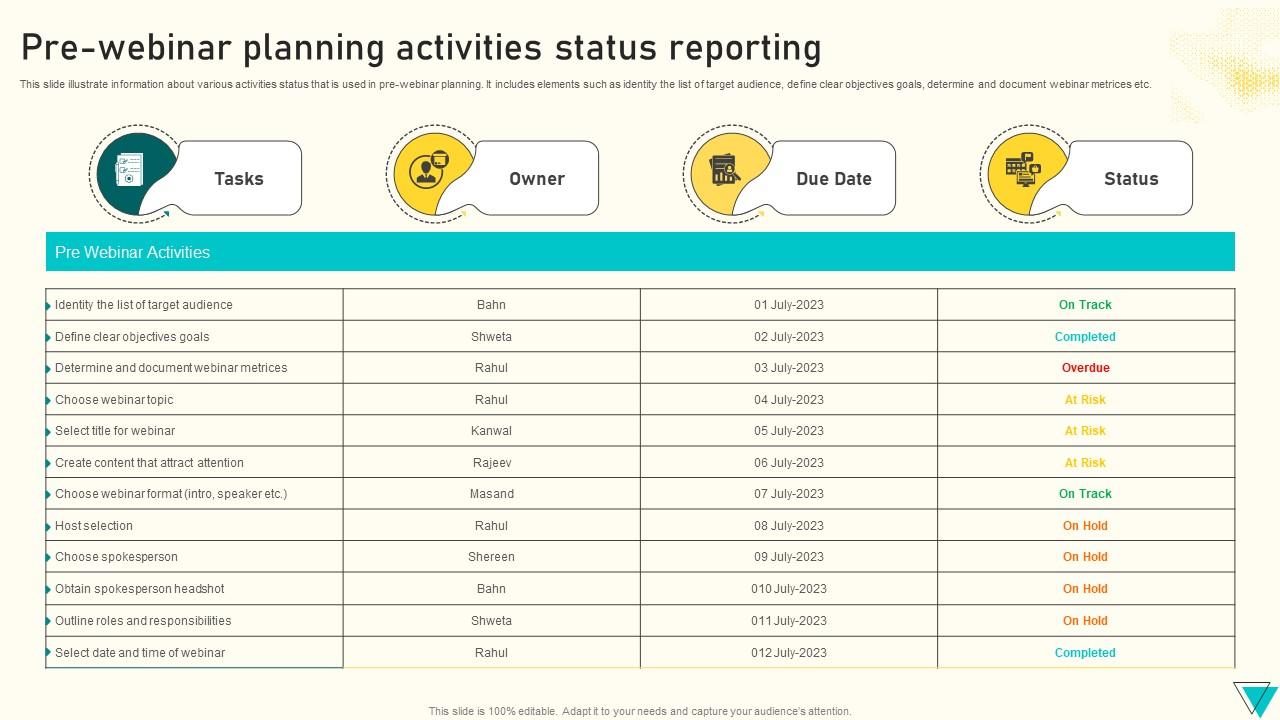
Template 10: Pre-Webinar Planning Activities Status Reporting
Pre-webinar planning falls apart when task ownership and deadlines aren't tracked visibly. This Pre Webinar Planning Activities Status Reporting deck brings every planning element into one clear view. Track tasks, owners, and due dates—including audience targeting, objectives, and webinar metrics documentation—at a glance. The immediately available PowerPoint layout requires no setup time before customization begins. Editable fields let you update statuses in real time as planning progresses. Built for event managers who need a reliable webinar KPI report framework from Day 1. Transform your pre-event planning process. Download and keep every stakeholder aligned before launch.
Download this PowerPoint Template
Template 11: Webinar for Modern Themes and Audiences PPT
Modern webinar audiences expect slides that match the quality of the content being delivered. This Webinar for Modern PPT deck grabs attention instantly with a thoughtfully structured, fully editable design. Adjust color themes to suit audience preferences without any design expertise required. Easy sharing and real-time editing keep your production timeline tight. Ideal for presenters who need a polished virtual event report framework fast. Transform your modern webinar presentations today. Download this deck now and deliver sessions that audiences remember long after the call ends.
[product_image id=1618517]
Template 12: Interactive Webinar PPT Example
Interactivity starts with slides that are built to prompt participation, not just display content. This Interactive Webinar PPT Example deck is engineered to capture audience attention from the first slide. Effortlessly adjust elements and color themes to match your session's tone and brand. Works seamlessly across formats with zero compatibility friction and allows for flexible distribution. Perfect for facilitators building webinar engagement reports backed by active participation data. Transform your interactive session design today. Download this fully editable deck now and create webinars where audiences stay engaged all the way through.
[product_image id=1404642]
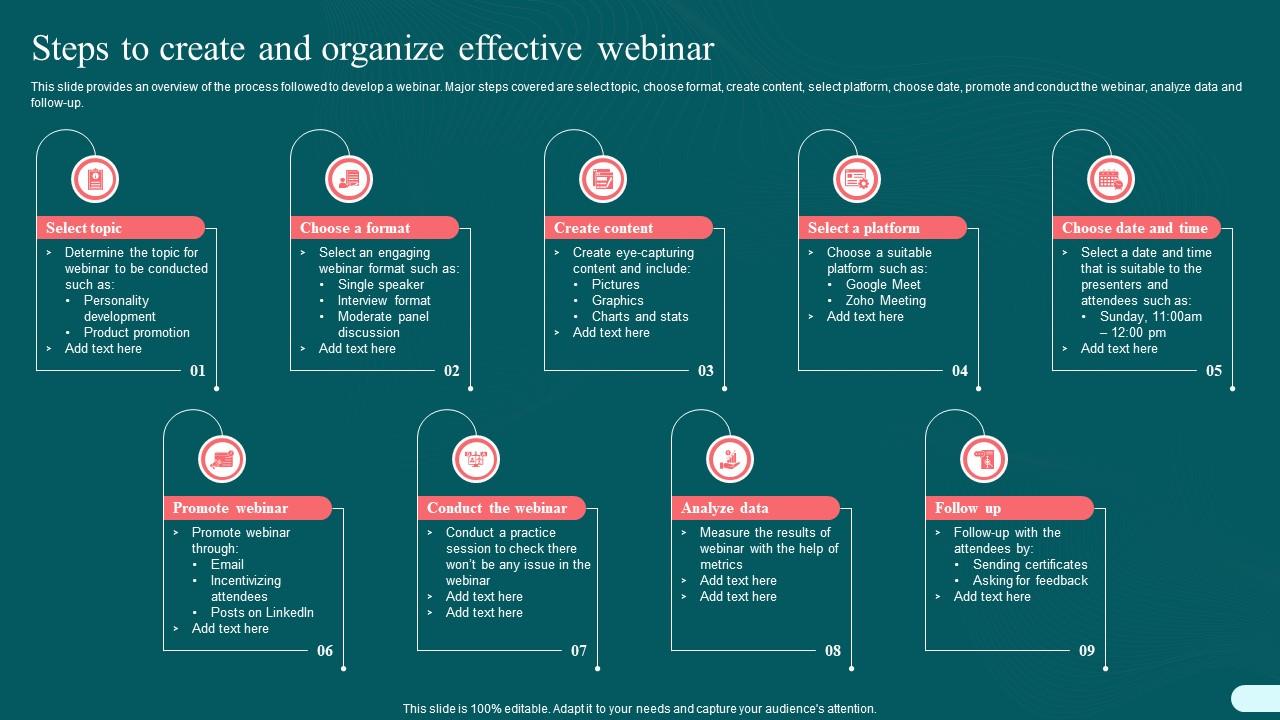
Template 13: Steps to Create and Organize Effective Webinar PPT Show Graphics Download
Building an effective webinar from scratch is simpler when every step has a visual home. This nine-stage deck covers topic selection, format choice, content creation, platform setup, promotion, delivery, data analysis, and follow-up. Each stage is mapped clearly, giving teams a shared reference from planning through webinar post-event reporting. Fully editable layouts let you personalize every element to your organization's process. Ideal for project managers and event coordinators presenting webinar workflow documentation. Transform your webinar production planning today. Download this PPT now and give your entire team a clear, actionable path from concept to completed report.
Download this PowerPoint Template
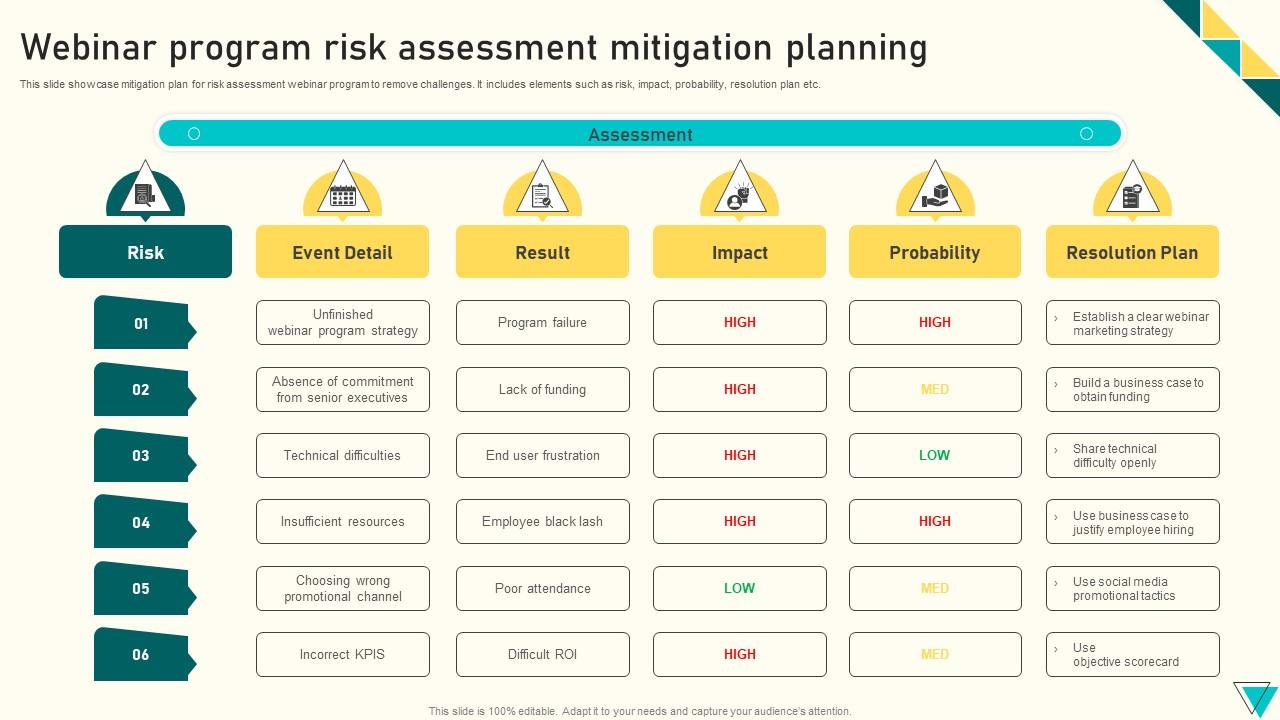
Template 14: Webinar Program Risk Assessment Mitigation Planning
Every webinar program carries risk—technical failure, low attendance, speaker no-shows. This Webinar Program Risk Assessment Mitigation Planning deck puts risk, impact, probability, and resolution plans into one structured six-stage layout. Visual clarity across each risk category makes it easy to brief stakeholders before problems occur. Fully editable design lets you tailor every field to your specific program context. Ideal for event managers and operations leads building pre-event contingency documentation. Transform your webinar risk planning today. Download this innovative PowerPoint template now and walk into every session with a mitigation plan your team can actually execute.
Download this PowerPoint Template
Template 15: Webinar Planning PPT Information
Effective webinar planning starts with a clear, two-stage framework everyone on the team can follow. This Webinar Planning PPT Information slide distills the planning process into an understandable visual layout. Fully adaptable design lets you insert your specific timelines, goals, and responsibilities without friction. Compatible with any presentation workflow and ready to customize the moment you download. Simple enough for quick briefings, structured enough for formal planning documentation. Ideal for coordinators and managers who need a clean webinar planning visual fast. Transform your event preparation process today. Download and start every webinar with a plan that holds together under pressure.

Download this PowerPoint Template
Template 16: Webinar Program Strategic Planning Framework
A webinar program without a KPI framework is just a series of events with no measurable direction. This Webinar Program Strategic Planning Framework slide connects initiatives, performance indicators, and target achievements in one structured layout. Clear visual organization makes it easy to communicate progress to both operational and executive audiences. Immediately available and conveniently customizable without requiring advanced PowerPoint skills. Ideal for program managers building webinar KPI reports and quarterly performance reviews. Transform your webinar program governance today. Download and build the performance accountability your event series needs to grow.

Download this PowerPoint Template
Template 17: Benefits of Hosting a Webinar to Businesses Explainer PPT Slides Infographic
Leadership needs to see the business case for webinars—not just attendance numbers. This seven-stage infographic slide covers lead generation improvement, engagement rate growth, conversion uplift, ROI impact, and audience reach expansion. Each benefit is presented as a distinct, visually scannable data point that executives can absorb instantly. Fully editable layout lets you update figures and callouts to match your actual webinar ROI analysis. Ideal for marketing directors building the internal business case for continued webinar investment. Transform your webinar value proposition today. Download this PPT infographic now and make the ROI argument impossible to ignore.

Download this PowerPoint Template
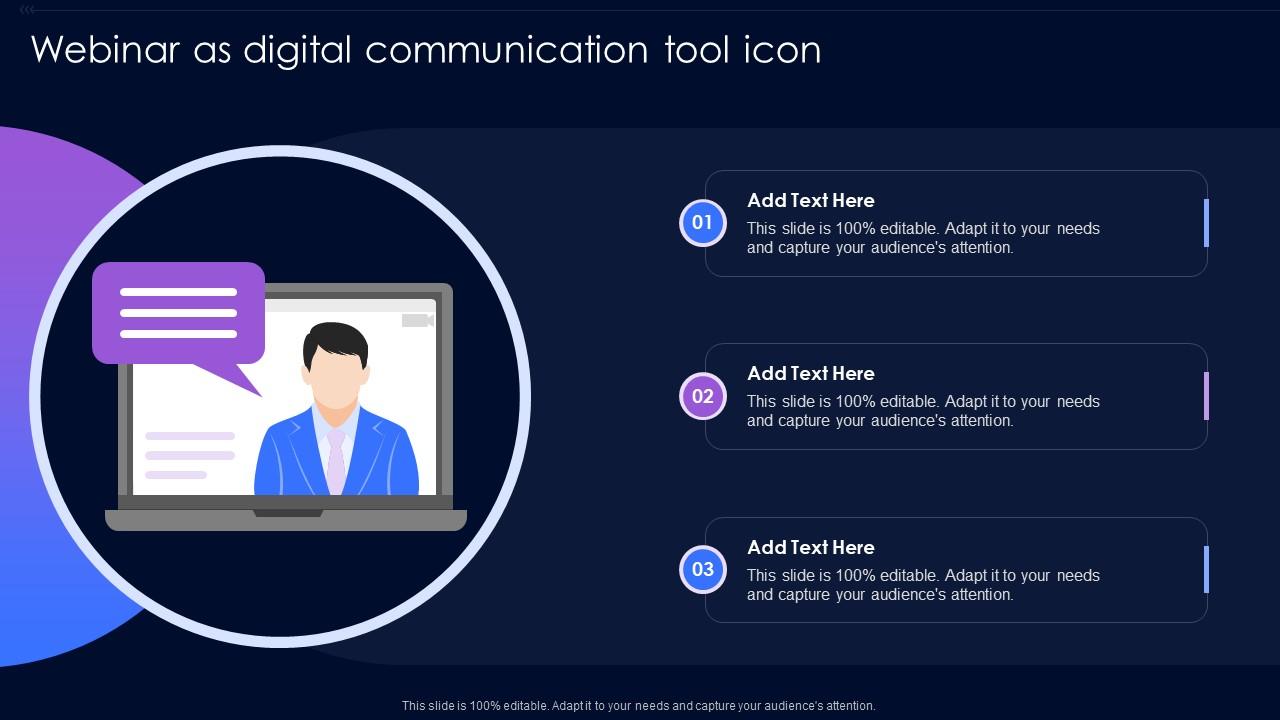
Template 18: Webinar as Digital Communication Tool Icon
Digital communication tools deserve a visual identity that reflects their strategic role. This Webinar as Digital Communication Tool Icon slide presents the concept across three clear, adaptable stages. Clean iconography communicates the tool's function without requiring lengthy written explanation. Fully customizable design lets you tailor the visual to your organization's communication framework. Simple to deploy in internal decks, training materials, or stakeholder presentations. Ideal for IT teams and communication leads framing webinars as a core digital channel. Transform your digital communication presentations today. Download this adaptable template now and give your webinar positioning the visual clarity it deserves.
Download this PowerPoint Template
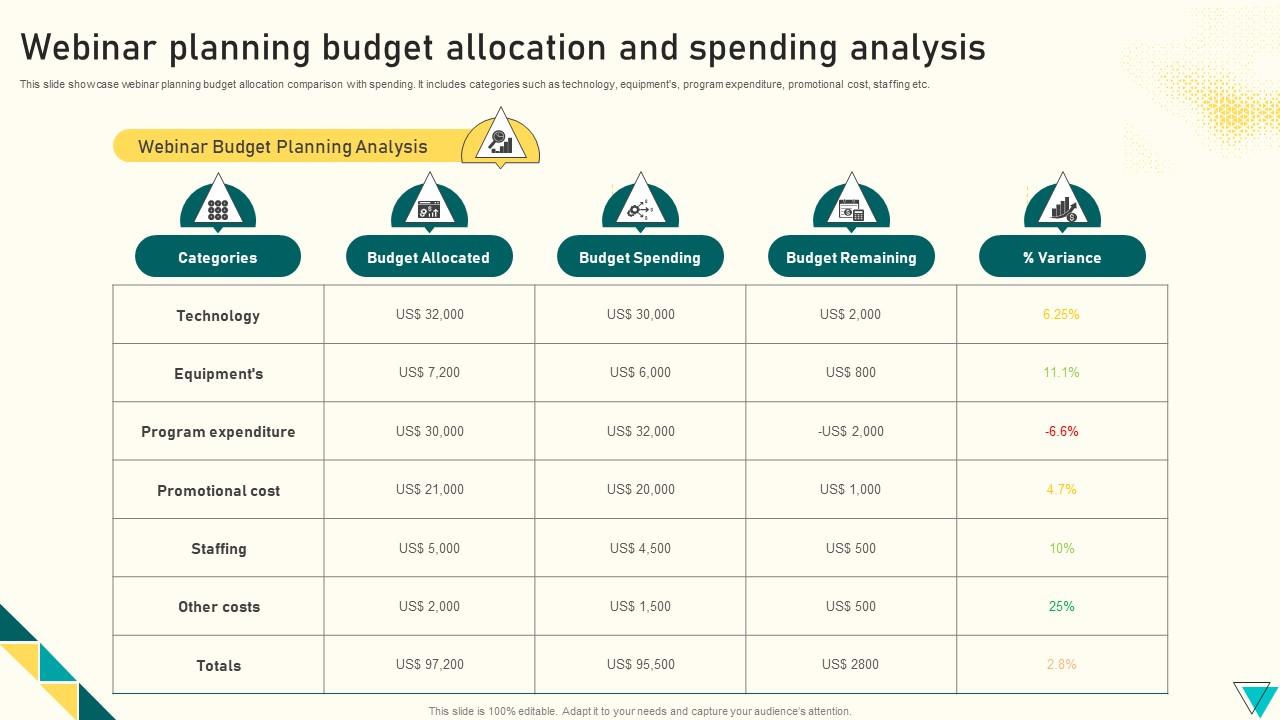
Template 19: Webinar Planning Budget Allocation and Spending Analysis
Budget conversations get messy fast without a clear allocation-versus-spending comparison. This Webinar Planning Budget Allocation and Spending Analysis slide breaks down technology, equipment, program, promotional, and staffing costs into a structured side-by-side view. Instant visual comparison makes variance reporting straightforward for finance and event teams alike. Immediately available and customizable to reflect your actual budget categories and figures. Ideal for event managers presenting webinar data reports to CFOs and budget owners. Transform your webinar financial reporting today. Download this template now and bring the numbers clarity that turns budget reviews into confident, productive conversations.
Download this PowerPoint Template
Template 20: Webinar Planning Best Practices That Boost Confidence
Confidence during a live webinar doesn't happen by accident—it comes from preparation. This Webinar Planning Best Practices That Boost Confidence slide covers four proven practices: two-way communication, timing discipline, pacing, and early room entry. Each practice is presented as a distinct, actionable stage that presenters can reference before going live. Fully adaptable design lets you tailor language and visuals to your team's specific context. Ideal for facilitators, coaches, and HR teams running presenter readiness workshops. Transform your webinar delivery preparation today. Download this template now and walk into every session with the composure your audience expects.

Download this PowerPoint Template
Elevate Every Webinar Report with SlideTeam
SlideTeam's PowerPoint templates are the best in the industry for building professional, data-rich webinar reports. These content-ready slides save hours of formatting time while ensuring your webinar metrics, attendance figures, and ROI analysis are presented with authority and clarity. Use these ready-made frameworks to satisfy both executive and operational audiences in a single, well-structured document. Deploy SlideTeam's webinar report templates today and turn every post-event debrief into a compelling performance story.
FAQs on Webinar Report
What are the essential components that make a webinar report visually compelling and data-rich?
A strong webinar report needs four things: attendance numbers, engagement rate, key takeaways, and next steps. Add a visual summary of poll results and Q&A highlights. Use charts for metrics and short text blocks for qualitative feedback. Keep each section visually distinct so readers can scan quickly without reading everything.
How can presentation templates be customized to highlight key takeaways from a webinar report effectively?
Start by replacing placeholder text with your actual event data—registration count, attendance rate, and top questions asked. Adjust color schemes to match your brand. Move sections around to lead with what your audience cares most about. Most SlideTeam templates are fully editable, so no section is locked in place.
What metrics should be prominently featured in a webinar report to demonstrate event success?
Feature attendance rate, average session duration, poll participation, and lead conversions front and center. These four metrics tell the clearest story of event performance. ROI figures and cost-per-lead are worth adding if the report goes to leadership. Drop-off rate by session segment also helps improve future planning.
How does the choice of slide layout impact the readability of attendance and engagement statistics in a webinar report?
Wider layouts with clear column separation work best for side-by-side attendance and engagement data. Avoid dense text near charts—it competes for attention. Use consistent font sizes to signal hierarchy: big numbers first, labels second, context third. White space between data blocks prevents visual fatigue in longer reports.
What visual hierarchy techniques work best when presenting speaker bios and session summaries in a webinar report template?
Place speaker bios in a consistent card format—photo, name, title, one-line credential. Keep session summaries to three bullet points maximum per session. Use a larger font for session titles and a smaller one for detail. Group related sessions together so the report reads as a structured narrative, not a list.
How can infographics within a webinar report template simplify complex audience demographic data?
Replace raw demographic tables with donut charts or horizontal bar graphs. One chart per demographic variable keeps things readable. Label percentages directly on the chart—don't force readers to cross-reference a legend. Limit each infographic to one key insight so the takeaway is immediate and unambiguous.
What are the best practices for structuring a post-webinar report to satisfy both executive and operational audiences?
Open with a one-page executive summary: total attendees, top metric, and one clear outcome. Follow with an operational section covering tasks completed, issues encountered, and follow-up actions. Use separate visual treatments for each audience layer. Executives need conclusions fast; operations teams need the detail behind them.
How should a webinar report template balance qualitative feedback with quantitative performance data?
Allocate roughly 60% of slide space to quantitative data—attendance, engagement, conversion rates. Reserve 40% for qualitative input: selected attendee quotes, survey sentiment, and facilitator observations. Place quant data first so the numbers anchor the story. Use qualitative content to explain what the numbers don't fully capture.