





 0 Comment
 Customer Reviews

In fantastic business organizations, it is common for almost all employees to know almost every one else in the company. If not closely, by name and role, at the very least.
Such a culture, and way of working, is not an accident. It is a conscious effort that the management makes to ensure everyone always has a staff snapshot in mind, and in their work stations.
A staff snapshot is more than a mere introduction, it is both a productivity tool (depending on the variable you choose as the foundation to categorize staff) and a team-bonding initiator. Once you have this, there is no need for anybody in the organization to ask questions, such as: Are you the new HR or the new supervisor or the line manager or the new individual contributor?
Keep track of your employee information using our ready-made employee profile sample templates!
Other such questions that a snapshot answers are: Do you find difficulty in recognizing the team and their roles in the company? Do you believe that the workforce in your organization is aligned with the company goals and objectives?
A staff snapshot addresses these and other such significant questions that indicate the operating mode of a business. It also summarizes key details about an organization's employees. It highlights information, such as the number of employees, roles, departments, demographics, tenure, or any other relevant workforce metrics. Use staff snapshot in presentations, reports, or dashboards to provide your audience with a concise view of the team structure and composition.
Streamline Workforce Management with Staff Snapshot Templates
SlideTeam brings to you a collection of staff snapshot PPT Templates to lay a foundation for a cohesive and goal-oriented workforce. Deploy these PPT Slides to identify leadership roles, tasks, and team processes. These presets help you optimize your resources and reorganize the team as the business evolves.
Read this blog on staff augmentation templates to learn to optimize your workforce!
Keep up with workforce trends, ensure job satisfaction, maintain headcount, streamline workforce planning, and more using our pre-designed, 100% editable and customizable layouts.
Let’s walk you through the designs below, which add a great culture to your workplace.
Let’s begin!
Template 1: Staff Feedback Snapshot Dashboard Template
Looking to foster a thriving workplace? Grab this professional PowerPoint Template to gather data on staff feedback by departments to pinpoint strengths and challenges within each team. Use this PPT Preset to monitor employee engagement, track progress and growth. It is a pre-designed Slide to transform insights into action and build a culture of transparency. Download now!

Download this Ready-made PPT Templat
Template 2: Data Visualization Dashboard Snapshot for Staff Salary
Do you get flooded with messages and emails when the salary day approaches? It is both frightening and frustrating to keep up with payroll management and constant beeping on your system. This is why, use this ready-made PowerPoint Template that puts clarity and fairness at the forefront. It is an actionable PPT Preset that clarifies job roles, team structure, and provides you with a snapshot of real-time salary data. Incorporate this Slide to identify competitive pay gaps and align compensation strategies with industry benchmarks to keep up with employee retention and workforce diversity. Download now!

Grab this pre-designed Dashboard for Staff Salary Slide
Template 3: Staff Turnover Key Performance Indicator Dashboard Snapshot Template
Wish to track and reduce employee turnover? Here is a PowerPoint Template that gives you real-time insights into turnover rates, reasons for departures, and trends across departments. This PPT Slide makes a perfect choice to identify patterns, understand employee retention challenges, and make data-driven decisions to improve workplace satisfaction. It comprises visual metrics, such as tenure analysis and exit reasons to help you stay proactive and make your organization thrive. Download now!
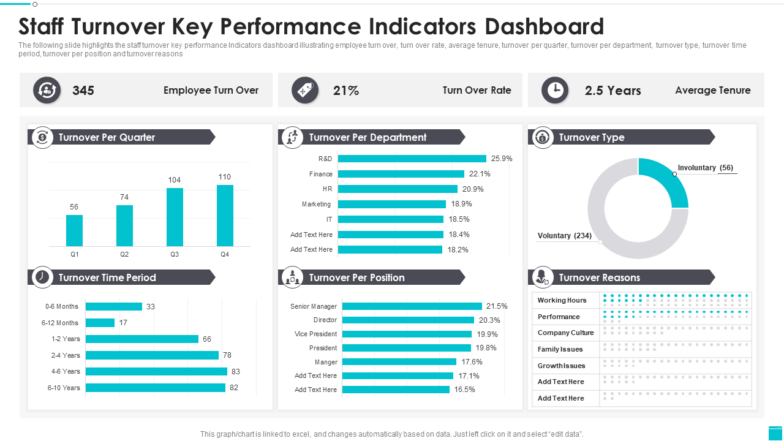
Click Here to Download this pre-designed PPT Slide
Template 4: Staff Utilization Dashboard to Measure Productivity Template
Deploy this pre-designed PowerPoint Template to keep tabs on how your team uses resources, identify under or over-utilized staff, employee workload, project allocation, productivity levels, etc. It is a ready-to-use PowerPoint Template to help you balance workload and enhance team efficiency. It also provides you with a comprehensive view on goals achieved and make data-driven adjustments to boost performance.

Grab this Staff Utilization Dashboard Template
Template 5: Staff Augmentation Timeline for Software Development Team Template
Last but not the least is this ready-made PPT Slide that helps you scale up your team’s performance and boost camaraderie. From onboarding skilled professionals to achieving project milestones, it is an actionable Template to align resources in an effective manner. Visualize timelines, track progress to meet deadlines without overloading your core team using this PPT Slide. With efficient planning and this flexible PPT Layout, ensure your goals are met on time and within budget. Download now!
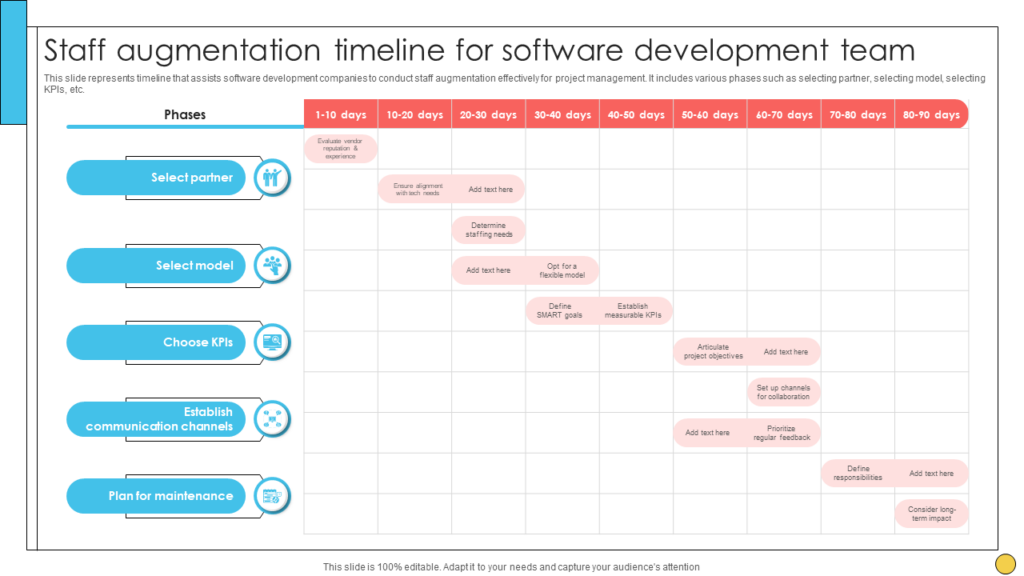
Download this Ready-made Staff Augmentation Dashboard Template
SlideTeam’s Templates to Visualize Your Team at Glance
A staff snapshot is not just an overview. It is meant to understand, manage and optimize your workforce. Therefore, grab our content-ready and custom-made PowerPoint Templates to drive smarter decisions and foster a cohesive team. Grab our well-crafted staff snapshot template to stay ahead and build a stronger, more informed workplace!
Download now!
PS: Read this blog replete with employee progress report templates to get a structured overview of your workforce’s strengths, achievements, performance, and more.


