


 0 Comment
 Customer Reviews

The job's been queued for three hours. Nobody knows why it hasn't finished.
That's the thing about batch processing—it works quietly until it doesn't. Then it becomes everyone's problem. The data pipeline stalls, the ETL window blows past midnight, and someone's pulling logs at 2 a.m. trying to figure out which step choked.
Most teams don't have a documentation problem. They have a communication problem. The engineer knows exactly what happened. Getting that into a format a VP or a client can follow—that's the part that takes another three hours.
There's also this: when batch jobs fail, the explanation matters as much as the fix. Stakeholders want to see the workflow. They want to know where it broke, what the fallback was, why the queue backed up. A verbal explanation doesn't cut it. Neither does a wall of logs.
The discomfort is real. Batch processing optimization isn't one idea—it's job scheduling, resource allocation, parallel processing techniques, error handling, throughput tuning. Putting that into a coherent presentation, from scratch, while also fixing the actual problem? That's too much to ask of one person on a deadline.
So the templates exist. Not because the concepts are hard to grasp—they're not, once you've mapped them. They exist because translating technical architecture into something an audience can follow is a different skill entirely. And most teams don't have time to build that bridge from scratch every time something breaks or needs presenting.
SlideTeam's pre-designed batch processing templates handle the structure so you don't have to. They're built for the moments when you need to show your work—not just do it. Content-ready layouts for workflows, case studies, architecture diagrams, comparisons, and more. The kind of slides you'd spend a weekend building if you started from zero.
Here's what's in the collection.
Template 1: Optimizing Batch Processing Workflows PPT Presentation
Systematic batch processing workflow communication demands structure that builds confidence fast. This deck merges clear workflow architecture with visual layouts that command room attention immediately. Color-coded stages deliver instant clarity on job sequencing and processing dependencies. You gain a polished framework for presenting automated workflow management decisions to technical and non-technical audiences alike. Every slide drives stakeholder understanding of batch job design with precision. Transform your batch processing workflow presentations today. Download this dynamic deck now and unlock your team's communication potential.
[product_image id=1504160]
Template 2: Case Studies on Successful Batch Processing Systems PPT Summary
Real-world proof moves decisions faster than any theoretical argument. This complete deck captures proven batch processing optimization case studies in structured, audience-ready layouts that command attention instantly. Striking visuals translate complex system outcomes into clear, persuasive narratives. You can present scalable data pipeline success stories that resonate with both engineers and business leaders. Build credibility through evidence, not assertion, with every slide. Transform your case study presentations today. Download this engaging deck now and unlock the power of proven results.
[product_image id=1502709]
Template 3: Batch Processing vs Real-Time Processing PPT Guidelines
Choosing between batch and real-time data processing is never a simple call. This deck frames the comparison with visual clarity that cuts through technical complexity immediately. Side-by-side layouts highlight trade-offs in data throughput, latency, and resource demands with precision. You can align stakeholder expectations around processing architecture decisions with confidence. Every slide elevates a nuanced technical debate into a focused, boardroom-ready discussion. Transform your data processing comparison presentations today. Download this visually compelling deck now and unlock sharper architectural decision-making.
[product_image id=1502646]
Template 4: Benefits of Batch Processing for Large Data Sets PPT
Articulating the business case for batch processing large data sets requires more than raw numbers. This deck translates high-volume data processing advantages into benefit-forward slides that land with any audience. Clean layouts highlight efficiency gains, cost reduction, and CPU resource management outcomes with clarity. You can present the operational case for batch architecture to leadership without losing the technical substance. Every slide builds a compelling argument grounded in real processing value. Transform your data architecture presentations today. Download this impactful deck now and unlock stakeholder buy-in.
[product_image id=1502647]
Template 5: Working of Batch Processing System
Banking operations run on batch jobs—payroll, reconciliation, end-of-day settlements all depend on sequenced processing. This PPT template maps the working of a batch processing system clearly, showing how jobs move through queues and how operators manage each batch stage. It's the kind of visual a systems architect uses to walk a compliance team through data flow. Useful for IT infrastructure reviews and workload automation discussions alike. The template is 100% editable and customizable.

Download this PowerPoint Template
Template 6: Components of Batch Processing Architecture System
Batch processing architecture is layered—and explaining each component to a mixed audience takes a clear visual structure. This deck maps data sources, data storage, batch processing engines, analytical data stores, and reporting layers into one cohesive presentation. Every component drives understanding of how large-volume data flows through a production system. You gain a ready-made framework for presenting IT infrastructure optimization plans to architecture review boards. Stakeholders see the full picture, not just isolated parts. Transform your architecture presentations today. Download this structured deck now and unlock system-wide clarity.

Download this PowerPoint Template
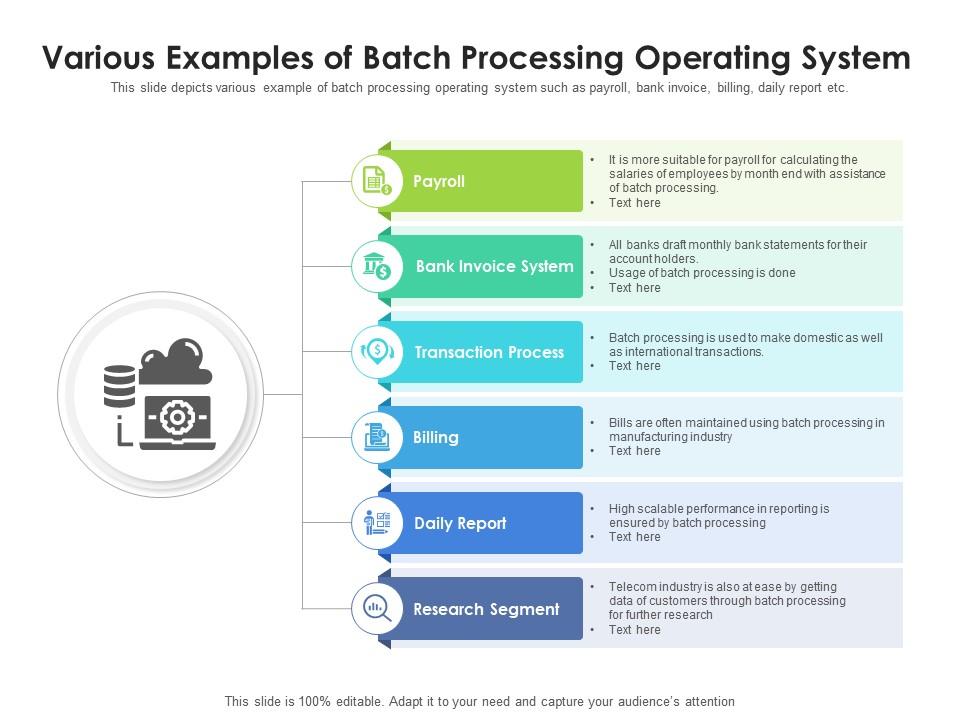
Template 7: Various Examples of Batch Processing Operating System
Batch processing shows up across more operating system contexts than most teams realize. This PPT preset walks through six concrete examples—spanning transaction processing, research workloads, and background process management—in a clear, stage-by-stage format. It's the slide a solutions architect reaches for when explaining how batch jobs fit into broader system operations. Useful for training sessions, IT reviews, or vendor presentations covering stream processing vs batch processing trade-offs. The template is 100% editable and customizable.
Download this PowerPoint Template
Elevate Every Batch Processing Presentation with SlideTeam
SlideTeam's PowerPoint templates are the best in the industry for batch processing optimization communication. These content-ready slides save hours of design work while delivering professional clarity on workflows, architecture, and trade-offs. Use these PowerPoint slides to present complex data pipeline efficiency decisions with confidence and precision. Grab these ready-made templates and drive faster stakeholder alignment across every batch processing project.
FAQs on Optimize Batch Processing
How can parallel processing techniques reduce bottlenecks in large-scale batch jobs?
Parallel processing splits a large batch job into smaller chunks that run simultaneously across multiple processors or nodes. This removes the single-thread bottleneck that slows high-volume runs. In practice, tools like Apache Spark or multi-threaded job schedulers distribute the workload. The result is faster completion and better CPU resource utilization without redesigning the entire pipeline.
What role does data partitioning play in improving batch processing efficiency?
Data partitioning divides a large dataset into smaller, independently processable segments. Each partition can be handled by a separate worker, reducing total processing time. In ETL process optimization, partitioning by date range, region, or key hash is common. It also limits the blast radius of a failure—only the affected partition needs reprocessing, not the entire job.
Which scheduling algorithms are most effective for prioritizing batch workloads in resource-constrained environments?
Priority queuing and fair-share scheduling are the two most practical approaches in constrained environments. Priority queuing runs critical jobs first; fair-share prevents any single team or job class from monopolizing resources. Most HPC cluster management and enterprise job schedulers—like IBM LSF or Slurm—combine both. Match the algorithm to your SLA requirements and resource contention patterns.
How does checkpoint-restart functionality minimize data loss during failed batch operations?
Checkpoint-restart saves the processing state at defined intervals during a batch run. If the job fails, it restarts from the last checkpoint rather than from scratch. This cuts re-processing time and limits data loss to the work done since the last save point. It's standard practice in large-scale ETL and big data processing pipelines where full reruns are too costly.
What are the trade-offs between micro-batching and traditional bulk batch processing in real-time data pipelines?
Micro-batching processes small, frequent data windows—closer to real-time but with batch-style reliability controls. Traditional bulk batching processes everything at once on a fixed schedule, which is simpler but introduces latency. Micro-batching adds complexity and slightly higher overhead per cycle. The right choice depends on how fresh the data needs to be versus how much operational complexity the team can manage.
How can memory management strategies prevent out-of-memory errors during high-volume batch runs?
The key levers are controlling data volume loaded per chunk, releasing objects explicitly after use, and tuning garbage collection settings for your runtime. Loading an entire dataset into memory at once is the most common cause of out-of-memory failures. Streaming data in fixed-size batches and profiling memory usage before production runs catches most issues early.
What metrics should be tracked to benchmark and continuously improve batch processing performance?
Track job completion time, throughput (records processed per second), error rate, and queue wait time as your baseline metrics. CPU and memory utilization tell you whether resources are sized correctly. Data throughput improvement over time shows whether optimizations are working. Review these after every significant job or infrastructure change to catch regressions before they become incidents.
How does database indexing impact the read and write speed of batch ETL processes?
Indexes speed up read queries dramatically by letting the database skip full table scans. In batch ETL, this matters most during the extract and lookup phases. However, indexes slow down bulk writes because each insert or update must also update the index. A common practice is to drop non-essential indexes before a large load and rebuild them afterward to balance read and write speed.