

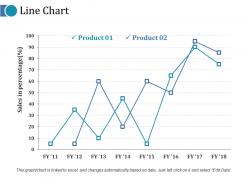
Line chart ppt outline mockup





Try Before you Buy Download Free Sample Product
 Impress Your
 Audience
 100%
100% Editable
 Save Hours
 of Time


Create equanimity with our Line Chart Ppt Outline Mockup. They will have a calming effect.
People who downloaded this PowerPoint presentation also viewed the following :
Line chart ppt outline mockup with all 5 slides:
Chart your plans on our Line Chart Ppt Outline Mockup. Signal your ideas for the days to come.
FAQs for Line chart
Effective line chart design includes clear axis labels, appropriate scale intervals, distinctive line styles for multiple data series, meaningful data point markers, and comprehensive legends. These elements streamline data interpretation by enhancing visual clarity, reducing cognitive load, and enabling quick trend identification, with many organizations finding that well-designed charts significantly improve decision-making speed and stakeholder engagement.
Line charts excel at visualizing multiple dataset trends by displaying several lines simultaneously, enabling direct comparison of patterns, growth rates, and correlations across different variables or categories. Through strategic color coding, clear legends, and consistent scaling, organizations can track performance metrics like sales versus expenses, compare regional performance, or analyze market trends, ultimately delivering comprehensive insights that enhance strategic decision-making and competitive positioning.
Best practices for line chart colors and styles include using high contrast color palettes, distinct line weights, consistent styling across datasets, accessible color choices for colorblind users, and strategic use of dashed or dotted patterns for differentiation. These design elements enhance readability by reducing visual confusion, improving data interpretation speed, and ensuring clarity across different viewing conditions, with many organizations finding that thoughtful color selection significantly improves audience comprehension and decision-making effectiveness.
Line charts excel at displaying time series data through continuous connections between data points, clearly showing trends, patterns, and changes over time that bar or pie charts cannot effectively represent. While bar charts work better for comparing discrete categories and pie charts suit proportional data at single points, line charts enable viewers to track progressions, identify seasonal variations, and forecast future trends, ultimately delivering clearer insights for time-based business analysis.
Common mistakes include overcrowding with too many data series, using inconsistent scales, choosing poor color contrasts, and omitting clear labels or legends. These errors confuse audiences and diminish message clarity, with many presenters finding that simplified designs, strategic color choices, and prominent axis labels enhance comprehension and deliver more impactful business insights.
Interactive line charts enhance audience engagement by enabling real-time data exploration, allowing viewers to hover for detailed insights, filter specific datasets, and zoom into relevant timeframes. These dynamic features transform passive presentations into collaborative experiences, with many presenters finding that audiences retain information better, ask more targeted questions, and participate actively in data-driven discussions, ultimately delivering more impactful business outcomes.
**INPUT**: What software or tools are recommended for creating professional line charts quickly? **OUTPUT**: Recommended tools include Excel, Tableau, Google Sheets, Power BI, and specialized presentation software like SlideTeam templates. These platforms streamline chart creation through intuitive interfaces, automated formatting, and customizable design options, with many professionals finding that template-based solutions significantly reduce development time while delivering polished, business-ready visualizations for stakeholder presentations. [Word count: 54 words]
Effectively labeling line chart axes requires clear, descriptive titles, consistent units, and logical intervals, while data points benefit from direct labels, legends, and contrasting colors for multiple series. Through strategic font sizing, spacing, and selective labeling of key points, organizations streamline data interpretation, enhance audience comprehension, and ultimately deliver more impactful presentations that drive informed decision-making.
Multi-line charts are more appropriate when comparing trends across related datasets, analyzing correlations between variables, or tracking performance metrics over the same time period. This approach streamlines data visualization by enabling immediate pattern recognition, trend comparison, and relationship identification, with many analysts finding that consolidated views deliver faster insights and more effective decision-making than separate charts.
Line charts integrate seamlessly with bar charts, pie charts, tables, and infographic elements to create comprehensive presentations that tell complete data stories. This strategic combination enables presenters to show trends alongside comparative data, detailed breakdowns, and contextual information, with many organizations finding that multi-visual approaches enhance audience comprehension and drive more informed decision-making.
Annotations in line charts provide contextual explanations for data points, trends, peaks, and anomalies, transforming raw data into compelling narratives that guide audience understanding. They enhance storytelling by highlighting key insights, explaining cause-and-effect relationships, and connecting data patterns to business decisions, with many organizations finding that well-placed annotations significantly improve stakeholder comprehension and strategic decision-making.
Line charts can be adapted for mobile presentations through simplified data points, larger fonts, vertical orientation optimization, touch-friendly interactive elements, and responsive scaling features. These mobile-optimized approaches streamline complex datasets by emphasizing key trends over granular details, with many presentation platforms finding that strategic simplification ultimately delivers better audience engagement and clearer insights on smaller screens.
Statistical methods for enhancing line chart accuracy include trend analysis, moving averages, regression modeling, seasonal decomposition, and outlier detection techniques. These approaches streamline data interpretation by smoothing noise, identifying underlying patterns, and minimizing distortions, with many analysts finding that combining multiple methods delivers more reliable insights and enables better forecasting accuracy.
Line charts enable trend forecasting by visually displaying historical data patterns, seasonal variations, growth rates, and cyclical behaviors that inform predictive modeling. Through statistical analysis and trend line extensions, organizations across finance, retail, and healthcare can identify emerging patterns, anticipate market shifts, and make strategic decisions, ultimately delivering competitive advantage and improved resource allocation.
When presenting line charts to non-technical audiences, prioritize clear titles, simplified axis labels, and minimal data series to avoid overwhelming viewers. Include contextual annotations that explain significant trends or data points, use consistent color schemes, and provide brief explanations of what the lines represent, ultimately ensuring accessibility while maintaining the chart's analytical value for strategic decision-making across diverse organizational roles.
-
Helpful product design for delivering presentation.
-
Enough space for editing and adding your own content.