

Cloud Migration Testing Strategy




Try Before you Buy Download Free Sample Product
 Impress Your
 Audience
 100%
100% Editable
 Save Hours
 of Time


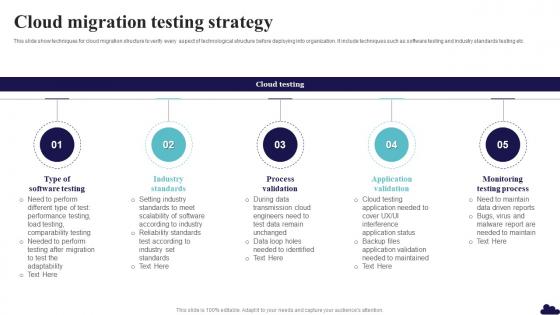
This slide show techniques for cloud migration structure to verify every aspect of technological structure before deploying into organization. It include techniques such as software testing and industry standards testing etc.
People who downloaded this PowerPoint presentation also viewed the following :
Cloud Migration Testing Strategy with all 6 slides:
Use our Cloud Migration Testing Strategy to effectively help you save your valuable time. They are readymade to fit into any presentation structure.






FAQs for Cloud
Honestly, data migration testing should be your top priority - corruption will ruin your whole day. Performance stuff gets weird in the cloud compared to on-prem, so test that hard. Security validation around access controls is huge too. Oh, and integration testing between cloud and whatever you're keeping on-premise... people always skip that part for some reason. Set up your rollback procedures before anything else though. Trust me on this. Start with systems you don't care as much about first - builds confidence and you'll figure out what actually works.
Run validation checks at each migration step - compare checksums, record counts, and sample data between source and target. Automated scripts are a lifesaver for catching discrepancies right away (trust me on this one). Start with a small subset of data first, then check that your critical fields match perfectly. Data relationships and constraints need validation too. Oh, and definitely have rollback procedures ready - test those beforehand because you don't want surprises. I always begin with non-critical datasets to get comfortable with the process. Then scale up once you've got your validation workflow down.
Dude, you NEED automation for cloud migration testing - like, it's not even optional. Manual testing will destroy you when you're moving multiple systems and testing different cloud setups. Start with regression tests, data validation, performance checks, that stuff. Honestly, I learned this the hard way on my last project. Nobody has time to manually check data integrity across thousands of records - that's soul-crushing work. Your automated tests become this safety net that catches problems early. Build the framework first, before you even touch the actual migration. Trust me on this one.
So there's three things you really need to nail down. First, performance testing - cloud stuff acts totally different than your on-prem setup, so latency and throughput will be all over the place. Then data validation testing, because I swear half the migrations I've seen mess up the data transfer somehow. Super frustrating when that happens. Also test your disaster recovery - make sure backups and failover actually work once you're moved over. Oh, and definitely try this whole process on something unimportant first before you touch any critical systems.
Run tests before you migrate, then again after - gotta establish those baselines. Test response times, throughput, all that stuff on your current system first. Cloud testing is honestly kind of a pain but you need to replicate the exact same tests there. Make sure you're using realistic traffic loads, not just light testing. Peak hours are super important since cloud can act weird compared to on-premise. Oh and document everything so you can actually compare properly later. Set up monitoring from day one too.
For cloud migration testing, start with your cloud provider's native stuff first - way less headache than jumping into third-party tools right away. Terraform and AWS Config handle infrastructure validation pretty well. Web apps? Selenium and Cypress are your friends there. Honestly, I made the mistake of trying like 6 different tools at once and it was a nightmare. CloudFormation drift detection catches config issues before they bite you. Same with Azure Resource Manager templates. Stick to 2-3 tools initially, then add more as things get messier. The tool overload is real!
Security testing can't wait until everything's moved - do it at each phase. First, scan your current systems for vulnerabilities. Then check that data encryption works during the move and once it's in the cloud. Access controls are huge here - honestly, most breaches happen because someone messed up permissions. Test your migrated stuff with pen testing and actually verify your backups work (learned this the hard way once). Don't try to test everything at the end - you'll miss too much. Set up monitoring right away so problems don't snowball.
Testing in fake environments is your biggest mistake - real cloud conditions will bite you later. Data migration? Way more complex than you think. Test your rollback plan too because something will definitely go wrong. Don't try testing everything at once, break it into chunks instead. Your test plan needs performance, security, and integration testing in realistic setups. Oh and disaster recovery - test that stuff before you're crying at 2am when everything's broken. Honestly, I've seen too many people skip the boring prep work and regret it.
Don't save UAT for the end - that's where teams mess up big time. Get a pilot group of actual users testing your core workflows while you're still doing technical testing. Way too many projects I've worked on treat user testing like some box to check at the finish line, then everyone freaks out when people hate using the new system. Build test scenarios around real daily tasks, not just "does this button work." Performance matters just as much as functionality. Oh, and set up quick feedback channels so users can actually tell you what sucks before you go live.
Start measuring response times, throughput, and how much CPU/memory you're using - that's your baseline for whether things actually got better. Error rates and uptime percentages will tell you if you broke something (which happens more than you'd think). Cost tracking is obvious since saving money is probably the whole point. Page load times matter for users, plus deployment frequency shows if your CI/CD is smooth or a mess. Oh, and definitely set up those dashboards before you migrate - comparing data afterward is way easier when you've got the same metrics running. Rollback rates are worth watching too.
Okay so definitely test compatibility stuff early and test it a lot. Map out everything first - all your dependencies, APIs, whatever's connected to what. Then test those connections in staging that's basically identical to production. Trust me, don't assume the cloud version works the same because it won't. Database compatibility is huge, plus network configs and third-party integrations. I'd set up automated test suites so you catch problems before they mess up production. Oh and staging environments are your best friend here - can't stress that enough.
Blue-green deployments are your best bet here - run tests on a parallel setup while prod stays untouched. Always have automated rollback ready because I've watched so many teams get burned when things break and they can't get back fast enough. Schedule testing during off-peak hours, obviously. Feature flags help too - roll changes to tiny user groups first instead of going all-or-nothing. Your staging needs to match production exactly or you're just fooling yourself. Plan the rollback strategy first, then worry about everything else. Phased rollouts save lives, trust me on this one.
Multi-cloud testing is honestly a nightmare - you're juggling completely different APIs and networking setups across providers. Data acts weird moving between AWS and Azure too. I'd build separate test suites for each cloud first. Then add integration tests to catch the cross-cloud stuff that'll definitely break. Automate everything with pipelines per provider, and use infrastructure-as-code so your environments don't drift apart. Oh, and test your failover between clouds constantly. That's usually where things go sideways when you actually need it.
Dude, you NEED a rollback plan - it's literally your lifeline when migration testing goes horribly wrong. Picture this: systems crash, data gets corrupted, or some random feature just breaks. Without a solid rollback process, you'll be scrambling to fix everything while everyone's panicking. Been there, not fun. Document exactly how to revert everything, then test that process in staging first. I learned this the hard way on a project last year. Set clear triggers for when you'll actually pull the plug too. Short version: have your escape route mapped out before you need it, because you probably will.
Ugh, compliance makes testing such a nightmare. You can't just check "does it work" anymore - now you're validating data residency, encryption, access controls, the whole nine yards. GDPR, HIPAA, whatever your industry throws at you, they all want their specific boxes checked. Honestly the documentation alone will make you want to scream. But here's the thing - map out those requirements from day one and bake the validation right into your test plan. Don't be like my last team who tried adding compliance testing at the end. Total disaster.
-
Great quality product.
-
SlideTeam is my one-stop solution for all the presentation needs. Their templates have beautiful designs that are worth every penny!