

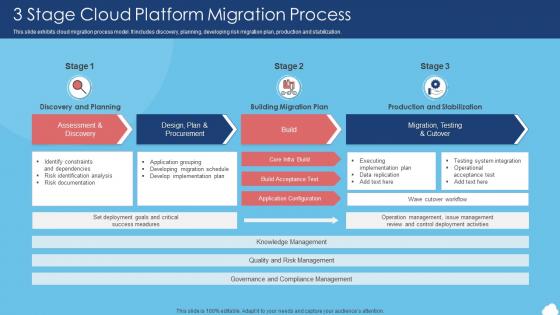
3 Stage Cloud Platform Migration Process




Try Before you Buy Download Free Sample Product
 Impress Your
 Audience
 100%
100% Editable
 Save Hours
 of Time


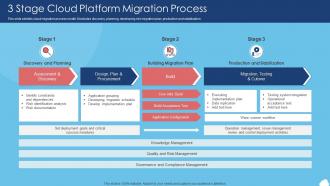
This slide exhibits cloud migration process model. It includes discovery, planning, developing risk migration plan, production and stabilization.
People who downloaded this PowerPoint presentation also viewed the following :
3 Stage Cloud Platform Migration Process with all 6 slides:
Use our 3 Stage Cloud Platform Migration Process to effectively help you save your valuable time. They are readymade to fit into any presentation structure.





FAQs for 3 Stage Cloud
Honestly, the money part is what sold me first - you're only paying for what you actually use instead of those servers just sitting there doing nothing half the time. Your team can work from literally anywhere too, which was a lifesaver during COVID (still is tbh). Security updates and backups? That's all handled for you now, so your IT people can focus on actual work instead of maintenance stuff. Oh and when you need more power during busy seasons, it happens instantly - no waiting around for new hardware. I'd probably look at which apps need that kind of flexibility first.
Honestly, most teams totally underestimate the skills gap - that's always the biggest shock. Start by figuring out what you're actually running right now. Which systems can move to cloud easily? Which ones need serious work? Some stuff might just stay on-premises anyway. Check your team's cloud knowledge too and budget for training time (or new hires). Oh, and don't forget the boring stuff like network bandwidth and security requirements. My advice? Pick one small pilot project first. Test things out before you go all-in on some massive migration plan.
Honestly, data security stuff will probably stress you out the most. Legacy systems can be total jerks when moving to cloud - I've seen that turn into weeks of headaches. Your team's gonna push back too because nobody likes their workflow getting flipped upside down. Oh, and if you're in something regulated like healthcare? Compliance paperwork becomes your new hobby. Budget way more than you think - like 20% extra time and cash. Applications that ran smooth before might crawl at first in the cloud. Do pilot runs with small stuff first, trust me on that one.
Honestly, it comes down to how much you want to manage yourself. IaaS is basically lift and shift - you're just moving your current setup to the cloud but still handling everything. Way more work but total control. PaaS is probably your best bet though - you handle the apps, they deal with all the infrastructure headaches. SaaS means scrapping what you have and going with their solution entirely. I'd start by figuring out what parts you actually need to control vs what you don't mind handing off.
Okay so data security is literally what will make or break your cloud migration. First thing - map out what you're moving and rank it by how sensitive it is. Your data needs encryption when it's moving around AND when it's just sitting there. Double-check that your cloud provider hits all your compliance boxes too. Here's the weird part though - handing control to someone else feels terrifying at first, but honestly? Most big cloud providers have way better security than whatever you're running on-premises. Just don't skip the classification step - I've seen people regret that later.
Definitely do it in phases - don't try to move everything at once or you'll hate your life. Run both systems side by side so you can bail if things go sideways. Test everything in staging first, obviously. Schedule the switch during your slowest hours and have a solid rollback plan ready. I learned this the hard way on our last migration lol. Start with the less critical stuff to get your confidence up. Oh and tell your users what's happening - they get cranky when systems randomly change without warning.
So for cloud migration stuff, definitely check out AWS Migration Hub, Azure Migrate, or Google's Migrate for Compute Engine first. CloudEndure is pretty solid for lift-and-shift moves - literally saved me on my last project when everything was going sideways. Cloudamize and Turbonomic are great for sizing things right before you move. Oh, and don't forget about Terraform or CloudFormation for the infrastructure-as-code piece. Honestly? I'd start with whatever your cloud provider offers natively since it just works better together, then add other tools if you need them.
Honestly, start with security certs - if they don't match your compliance stuff, you're dead in the water. Performance and uptime guarantees are huge too, especially for anything mission-critical. Don't just chase the cheapest option though (trust me on this one). Their support quality can make or break you when things go sideways. Geographic coverage matters if your users are spread out. Oh, and definitely check how easy it is to bail if needed - vendor lock-in sucks. I'd make a scorecard with all this weighted by what actually matters to your situation.
Before you migrate anything, resize your stuff first - lifting and shifting as-is will bite you later. Definitely run those cloud cost calculators and set billing alerts because surprise $10k bills are not fun. Once you're moved over, keep an eye on usage and kill those forgotten dev environments (seriously, they're like $50/month each just sitting there). Reserved instances work great for steady workloads. Auto-scaling handles the variable stuff. Oh, and schedule monthly cost reviews with your team - someone always finds something obvious we missed.
Dude, start by figuring out how much data you're actually moving and what your bandwidth looks like. Compress and encrypt everything - can't mess around with security. Most teams totally lowball how long transfers take (I've been there lol). For huge datasets, use stuff like AWS DataSync or Azure Data Box instead of jamming everything through your connection. Run transfers in parallel when you can. Oh and set up monitoring so you catch slowdowns early. Always validate your data didn't get corrupted during the move - that's saved my ass more than once.
So the main thing with cloud migration is you get resources that actually match what you need. No more buying a bunch of servers and praying you got it right. Busy season hits? Scale up. Things get quiet? Scale back down. Way better than the old days when we'd just overprovision everything and call it a day. You're only paying for what you use, which is pretty sweet. Most providers will automate the whole scaling thing for you too. I'd start with your most unpredictable workloads first - that's where you'll really see the difference.
Get your monitoring set up ASAP - performance metrics, cost tracking, security alerts for everything you migrated. CloudWatch, Azure Monitor, or Google Cloud Operations work great. The dashboards are honestly a mess at first, but just focus on uptime, response times, and spending. Automated alerts will save you from obsessively checking things manually (learned that the hard way). Don't forget security audits and backup checks - migration isn't done once stuff's moved over. I'd start with weekly metric reviews, then tweak from there.
Honestly, don't sleep on staff training - I've watched too many migrations turn into complete disasters because people figured the cloud stuff would just "click." It won't. Your team needs actual hands-on time with whatever platforms you're moving to, and I mean before launch day, not during the chaos after. The interfaces are clunky and the security stuff isn't obvious at all. Plus there's always that one person who breaks something spectacular on day one. Start training early and set aside like 15-20% of your budget for it. Trust me on this one.
Dude, compliance stuff can totally screw you over if you don't get it right from the start. Figure out what regulations hit your industry first - GDPR, HIPAA, whatever. Here's the annoying part though: you and your cloud provider split the compliance work, so don't think they're handling everything. Some rules are super picky about where your data lives geographically too. Honestly? Get your legal team to check the provider's certifications before moving anything important. I've seen companies have to redo entire migrations because they missed this step.
Dude, legacy apps are such a pain but you've got options. Lift and shift is the lazy approach - just move them to cloud VMs as-is. Won't get fancy cloud features but it works. Or you can refactor gradually to make them more cloud-friendly. Some apps are worth rebuilding completely if they're mission-critical. Hybrid's pretty smart too - leave the ancient stuff on-prem while you migrate the newer systems first. I'd probably start by figuring out which apps actually matter to your business vs. which ones are technical nightmares, then decide from there.
-
Loved the templates on SlideTeam, I believe I have found the go to place for my presentation needs!
-
Nice and innovative design.