

CRM Software Dashboard With Team Performance





Try Before you Buy Download Free Sample Product
 Impress Your
Audience
 100%
Editable
 Save Hours
of Time


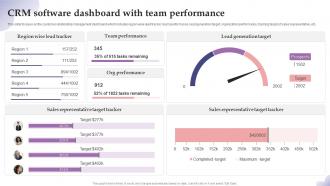
This slide focuses on the customer relationship management dashboard which includes region wise lead tracker, team performance, lead generation target, organization performance, tracking target of sales representative, etc.
People who downloaded this PowerPoint presentation also viewed the following :
CRM Software Dashboard With Team Performance with all 7 slides:
Use our CRM Software Dashboard With Team Performance to effectively help you save your valuable time. They are readymade to fit into any presentation structure.






FAQs for CRM Software Dashboard
Key components of an effective CRM dashboard include lead tracking, sales pipeline visualization, customer interaction history, performance metrics, and revenue forecasting tools. These elements streamline sales processes by providing real-time visibility into customer relationships, automating follow-up scheduling, and enabling data-driven decision making, ultimately delivering improved conversion rates and enhanced customer experiences for growing organizations.
Customization of a CRM dashboard enhances user experience by allowing personalized layouts, relevant data prioritization, and role-specific functionality that streamlines daily workflows. Through tailored widgets, custom reporting views, and personalized navigation, sales teams, managers, and support staff can access critical information faster, reduce unnecessary clicks, and focus on high-priority tasks, ultimately improving productivity and decision-making efficiency.
Businesses should prioritize metrics including lead conversion rates, customer acquisition costs, sales pipeline velocity, customer lifetime value, and churn rates on their CRM dashboards. These metrics streamline decision-making by revealing revenue trends, identifying bottlenecks, and optimizing resource allocation, with many organizations finding that focused tracking ultimately delivers improved forecasting accuracy and enhanced customer retention strategies.
Real-time data integration enhances CRM dashboard effectiveness by providing instant customer insights, eliminating data silos, and enabling immediate response to market changes. Through automated synchronization, sales teams access current lead statuses, customer interactions, and pipeline updates simultaneously, while managers make informed decisions faster, ultimately delivering improved customer experiences and competitive advantage in dynamic markets.
Visualization transforms complex CRM data into intuitive charts, graphs, heatmaps, and trend lines that enable rapid pattern recognition and decision-making. These visual elements streamline data interpretation by highlighting customer behaviors, sales trends, and performance metrics, with many sales teams finding that visual dashboards reduce analysis time while enhancing strategic insights and competitive advantage.
A CRM dashboard facilitates better sales forecasting by consolidating historical data, tracking pipeline progression, and analyzing customer behavior patterns in real-time. Through predictive analytics and automated reporting, sales teams can identify trends, assess deal probabilities, and adjust strategies proactively, with many organizations finding that centralized visibility ultimately delivers more accurate revenue projections and strategic planning capabilities.
Common mistakes include overloading dashboards with unnecessary data, failing to customize views for different user roles, using unclear visualizations, neglecting mobile optimization, and ignoring user feedback during development. These design flaws significantly reduce adoption rates and operational efficiency, with many sales teams finding that cluttered, non-intuitive dashboards actually hinder rather than enhance customer relationship management and decision-making processes.
User feedback significantly influences CRM dashboard design by identifying pain points, revealing workflow preferences, and highlighting essential metrics that drive daily operations. Through surveys, user testing, and usage analytics, organizations can streamline navigation, enhance data visualization, and optimize feature placement, ultimately delivering more intuitive interfaces that boost user adoption and operational efficiency.
CRM dashboards support customer segmentation through demographic analysis, purchase behavior tracking, engagement scoring, lifecycle stage mapping, and predictive analytics capabilities. These tools enable businesses to identify distinct customer groups, personalize marketing campaigns, and optimize resource allocation across segments, with many organizations finding that targeted approaches significantly enhance conversion rates and customer retention.
Mobile access to CRM dashboards significantly enhances sales team productivity by enabling real-time data access, instant customer updates, and seamless field-to-office communication. Sales professionals can update lead information during client meetings, access deal histories on-the-go, and respond to opportunities immediately, ultimately delivering faster response times and higher conversion rates.
Cloud-based CRM dashboards offer enhanced accessibility, automatic updates, reduced IT overhead, scalable storage, and lower upfront costs compared to on-premise solutions. These systems enable remote teams to access real-time customer data seamlessly, while organizations benefit from faster deployment, reduced maintenance requirements, and improved collaboration across departments, ultimately delivering greater operational flexibility and cost efficiency.
Dashboards help identify customer behavior trends by visualizing purchase patterns, engagement metrics, seasonal fluctuations, and lifecycle stages through interactive charts and real-time analytics. These insights enable businesses to anticipate customer needs, optimize marketing campaigns, and personalize experiences, with retail and financial services organizations finding that trend analysis ultimately drives higher retention rates and strategic competitive advantage.
Sales dashboards prioritize real-time pipeline tracking, conversion rates, individual performance metrics, and deal forecasting, while marketing dashboards focus on campaign performance, lead generation analytics, attribution modeling, and ROI measurement. These specialized interfaces streamline team workflows by delivering role-specific insights, enabling sales teams to accelerate deal closure and marketing teams to optimize campaign effectiveness, ultimately enhancing cross-departmental collaboration.
Automation can be incorporated into CRM dashboards through workflow triggers, data synchronization, automated reporting, lead scoring systems, and real-time alert notifications. These features streamline customer management by eliminating manual data entry, generating instant performance reports, and automatically routing qualified leads to sales teams, ultimately delivering faster response times and enhanced productivity across organizations.
CRM dashboard security measures include role-based access controls, data encryption, multi-factor authentication, regular security audits, and IP address restrictions. These protections streamline compliance with regulations like GDPR and HIPAA while minimizing data breach risks, with many financial services and healthcare organizations finding that layered security approaches ultimately deliver enhanced customer trust and operational confidence.
-
Excellent design and quick turnaround.
-
Very well designed and informative templates.