

Facebook Advertising Proposal Powerpoint Presentation Slides




Try Before you Buy Download Free Sample Product
 Impress Your
 Audience
 100%
100% Editable
 Save Hours
 of Time


Facebook advertising will significantly build your brand awareness by getting more visibility. Check out Our professionally crafted Facebook Advertising Proposal template. It is a comprehensive solution designed to help businesses grow their online presence. The proposal will help you reach your target audience through the worlds largest social media platform, Facebook. With over 2.7 billion monthly active users, Facebook provides a significant opportunity for businesses to expand their customer base and increase revenue. Our Facebook Advertising Proposal covers the project context along with our offerings and solutions. Additionally, a strategic marketing plan, essential categories of CTAs, pricing tiers, and the Facebook advertising process are covered in this proposal. It also highlights information related to the team, a case study, client testimonials, and terms and conditions. Learn more by downloading our 100 percentage editable and customizable template, which is also compatible with Google Slides.
People who downloaded this PowerPoint presentation also viewed the following :
Content of this Powerpoint Presentation
Slide 1: This slide introduces Facebook Advertising Proposal. Commence by stating Your Company Name.
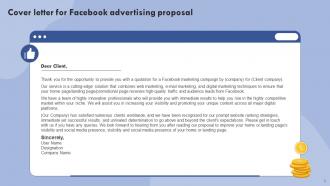
Slide 2: This slide reveals the Cover letter for Facebook advertising proposal.
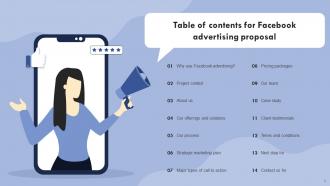
Slide 3: This slide incorporates the Table of contents of the presentation.
Slide 4: This slide covers reasons for using Facebook marketing.
Slide 5: This slide presents the Project context for Facebook advertising services proposal.
Slide 6: This is the About us slide. State your company-related information here.
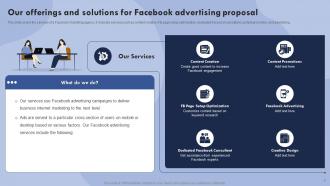
Slide 7: This slide incorporates the services of a Facebook marketing agency.
Slide 8: This slide depicts the Process for delivering Facebook advertising services.
Slide 9: This slide portrays the Strategic marketing plan for Facebook advertising.
Slide 10: This slide continues the Strategic marketing plan for Facebook advertising.
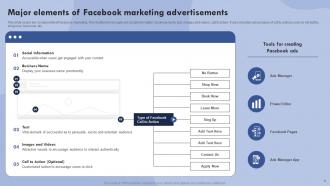
Slide 11: This slide elucidates the Major elements of Facebook marketing advertisements.
Slide 12: This slide represents the Pricing packages for Facebook advertising proposal.
Slide 13: This is Our team slide showing the information related to the team members.
Slide 14: This slide continues the team-related information.
Slide 15: This slide covers a Facebook marketing case study.
Slide 16: This slide reveals the Client testimonials for business proposal of Facebook advertising.
Slide 17: This slide portrays the Terms and conditions for Facebook adverting services proposal.
Slide 18: This slide focuses on the Next step for Facebook adverting services proposal.
Slide 19: This slide shows the Contact details of the organization.
Slide 20: This is the Icons slide containing all the Icons used in the plan.
Slide 21: This slide depicts the Additional information.
Slide 22: This slide displays the Gantt chart.
Slide 23: This slide elucidates the Timeline.
Slide 24: This slide focuses on the 30 60 90 days plan for efficient planning.
Slide 25: This slide illustrates the Roadmap of the firm.
Slide 26: This is the About us slide ofr stating the company-related information.
Slide 27: This slide shows the mission, vision, and goals of the company.
Facebook Advertising Proposal Powerpoint Presentation Slides with all 32 slides:
Use our Facebook Advertising Proposal Powerpoint Presentation Slides to effectively help you save your valuable time. They are readymade to fit into any presentation structure.














FAQs for Facebook Advertising Proposal
You need campaign objectives, target audience, budget breakdown, and creative strategy. Clear goals first - traffic, leads, or sales? Most proposals totally bomb on audience definition, so nail down demographics and interests. Show your budget split across campaigns, which ad formats you'll run, plus timeline with milestones. KPIs and success metrics are crucial too. I'd throw in some ad creative mockups - clients eat that stuff up when they can actually see what their ads will look like. Keep it visual. Oh, and don't forget the timeline piece, that always comes up in questions later.
First thing - dig into your client's current customer data. Demographics, what they're into, how they behave online. Facebook's Audience Insights is clutch for spotting stuff you'd totally miss otherwise. Your campaign goals matter too though. Brand awareness vs conversions? Completely different ballgame. I always test 2-3 audience segments against each other because honestly, what sounds good on paper can flop hard. Oh and exclude existing customers if you're going after new people - learned that one the hard way. Start wide, then tighten up based on what's actually working.
ROAS is definitely your main one - shows actual profitability which is what they really want to see. Cost per acquisition and conversion rates are must-haves too. Lifetime customer value is gold if you can get that data. Honestly, skip click-through rates unless they specifically ask. Clients don't care about clicks if nobody's buying. Include some projected numbers next to your benchmarks so they can picture the upside. Audience reach and engagement give good context but don't go overboard - maybe 4-5 total metrics max. Focus on stuff that actually moves their business forward, not just pretty numbers that look impressive.
Check out what your competitors are doing first - saves you tons of time figuring stuff out from scratch. Facebook's Ad Library is perfect for this, just search your top competitors and screenshot their ads. You'll see what creative styles actually work, which calls-to-action they're using, plus their messaging angles. Honestly, some of their landing pages might surprise you with how simple they are. Look for gaps they're missing too - that's where you can swoop in. It's basically a free roadmap to what resonates with your audience.
Honestly, I'd throw all three formats in there since they each do different things well. Single images are solid for quick, punchy stuff and usually cost less. Videos? Those are my jam when the creative doesn't suck - crazy good for engagement and telling a story. Carousels work perfectly for showing off multiple products at once. Test them against each other in month one, see what clicks with their audience. Maybe 2-3 versions of each format? Then just optimize based on whatever the numbers tell you. Sometimes audiences surprise you with what they actually respond to.
Honestly, just start with what's working - put like 40-50% into video ads since people actually watch those. Carousel ads are solid for showing off products, so maybe 30% there. I know static images seem boring now but they're cheap for testing messages, so throw 15-20% at them. Oh and Stories ads are getting crazy good results lately (plus they're cheaper), so use whatever's left there. After a week, just look at your cost-per-result and move money around. Sounds obvious but most people don't actually do it. Whatever's crushing it gets more budget, simple as that.
So the Facebook Pixel is what actually tracks conversions on their website - purchases, signups, whatever matters. Install it and Facebook's algorithm learns who's likely to convert, then shows your ads to similar people. Without it you're just guessing if your ads work (been there, not fun). It also lets you retarget website visitors and build lookalike audiences from your best customers. Oh and definitely include pixel setup in your proposal scope so they can't say you didn't mention it later.
Just bake the A/B testing right into your proposal from the start. Suggest testing 2-3 versions of your best creative concept - that's usually where you see the biggest differences anyway. Different audiences, ad creative, CTA buttons, whatever makes sense. Set aside like 20-30% of their initial budget just for the testing phase before you scale up the winners. Oh, and definitely include timelines because you need at least a week of solid data before making any calls. Here's the thing though - don't call it "experimenting with their money" (even though that's kinda what it is lol). Frame it as "optimizing their investment" and they'll eat it up. Clients love seeing you're thinking ahead like that.
Get super specific with your targeting - custom audiences and lookalikes work way better than casting a wide net. Videos crush static images every time, especially testimonials or behind-the-scenes clips (honestly, people eat that authentic stuff up). Test your headlines like crazy and don't shy away from emotional hooks. Oh, and retargeting is pure gold for conversions - hit those website visitors with social proof and create some urgency. I'd start with one format that's killing it, then roll it out to similar audiences. Way smarter than jumping around with random new approaches.
Okay so first thing - dig into your actual customer data to see where people are converting. Don't just wing it. Find those high-performing cities, then expand to similar areas within a reasonable distance from your locations. I used to think casting a wider net was always better but honestly? That just torches your budget fast. Check Facebook's location insights too - you can see where competitors are getting traction. Oh and this sounds dumb but exclude places where you can't actually deliver or service customers. You'd be shocked how many people forget that step.
Okay so the CTA is literally what makes people actually DO something instead of just scrolling past your ad. In your proposal, spell out the exact button text you want - "Shop Now," "Get Started," whatever fits. Then explain why that specific action makes sense for what you're trying to achieve. Where will you put it? How does it flow into your landing page? Honestly, I see so many campaigns fail because the CTA is an afterthought. Don't be that person. Just pick something clear and direct so users know exactly what you want them to click.
Dude, you gotta time your ad spend with when people actually buy stuff. Q4 and back-to-school are obvious goldmines. Facebook's audience insights tells you exactly when your people are most engaged - seriously, check that data instead of just winging it. Most advertisers blow their budget running the same ads all year long which is kinda dumb. Switch up your messaging too. Holiday shoppers respond to urgency, but January hits different - that's when everyone wants to better themselves. Structure your pitch around maybe 3-4 big seasonal moments and actually show the projected returns for each one.
Honestly, ad scheduling is a game changer if you do it right. Look at your conversion data first - figure out when people actually buy your stuff, not just when they're browsing. I've cut my CPCs by like 20-30% just by skipping those brutal evening hours when everyone and their mom is running ads. Start broad, then get pickier after a few weeks of real data. Don't just set it once and walk away though - that's where most people mess up. Test different time blocks but keep your budget the same so you're actually comparing apples to apples.
Definitely add a risks section - cover stuff like ad fatigue, audience burnout, and those annoying iOS changes messing with targeting. Clients actually love when you're upfront about potential problems instead of pretending everything's perfect. Talk about monitoring frequency caps and having backup creative ready. Budget flexibility is huge too since some campaigns just flop no matter what you do. Oh, and spell out your contingency plans - like how you'll pivot if performance tanks and when you'll actually tell them things need to change. Shows you're not just winging it, you know?
Definitely cover Facebook's ad policies and all that GDPR/CCPA privacy stuff first. Trademark issues too - learned that one the hard way once. Facebook's super picky now about targeting certain demographics, so spell out those limitations upfront. Make sure you clarify who owns the creative assets afterward. Liability clauses are crucial if their ads get rejected or accounts suspended - trust me on this. Budget change clauses are smart since clients always want to pivot halfway through. Honestly, just get your legal team to look it over once and you can reuse the template forever.
-
I came across many PowerPoint presentations with excellent creatives and I believe they would be beneficial to my work.
-
SlideTeam is my one-stop solution for all the presentation needs. Their templates have beautiful designs that are worth every penny!