

Digital marketing through facebook powerpoint presentation slides




Try Before you Buy Download Free Sample Product
 Impress Your
 Audience
 100%
100% Editable
 Save Hours
 of Time


All brands make efforts to reach every corner of the world, and to do the same, they take the assistance of many marketing media platforms, out of which Facebook marketing is one. Facebook marketing is the most common platform used by brands to be at the top of the list and maintain its very existence. To help you make your brand popular, we have developed this Facebook marketing proposal that does all the work for you. It incorporates various slides that help you analyze current marketing strategy performance and also talks about the problems faced with the platforms. You can also showcase the key motives for people to follow brands on social media channels. It also incorporates a slide that helps you conduct a comparative performance analysis based on different parameters. It also walks you through the steps you need to go through for setting up a Facebook page in a seamless manner. It also talks about brand recognition strategies such as creating basics, visual branding and developing market persona. This PowerPoint presentation also covers a heat map to optimize content posting time to get maximum engagement. You can also guide your audience about the process of generating a Facebook ad with this professionally curated presentation at your disposal. It also helps you set a monthly timeline to implement the Facebook strategy. Lastly, it includes a dashboard that gives the insight to track marketing KPIs such as page likes, content reach, etc. Therefore, download our ready-to-use content and fully editable digital marketing ppt now.
People who downloaded this PowerPoint presentation also viewed the following :
Content of this Powerpoint Presentation
Slide 1: This is the cover slide of the Digital Marketing through Facebook pitch deck.
Slide 2: This slide showcases the agenda for Facebook marketing which is to formulate efficient lead generation strategy utilizing economic ads & targeting capabilities offered by Facebook
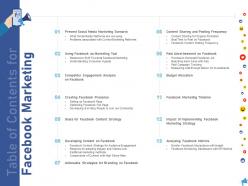
Slide 3: This is a Table of contents slide that lists out all the elements covered in the deck.
Slide 4: This slide introduces Present social media marketing scenario
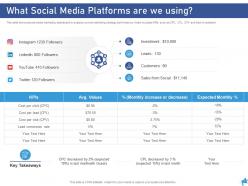
Slide 5: This slide shows social media marketing dashboard to analyse current marketing strategy performance. It also includes KPIs such as CPC, CPL, CPV and total investment
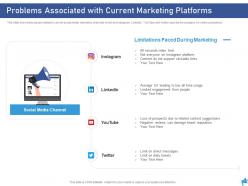
Slide 6: This slide shows key issues related to current social media marketing channels which are Instagram, LinkedIn, YouTube and twitter used by the company for online promotions
Slide 7: This slide introduces Using Facebook as Marketing Tool
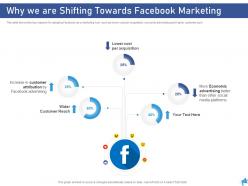
Slide 8: This slide shows the key reasons for adopting Facebook as a marketing tool, such as lower cost per acquisition, economic advertising and higher customer pool
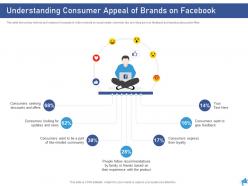
Slide 9: This slide shows key motives and reasons for people to follow brands on social media channels, like providing service feedback and seeking discounts/offers
Slide 10: This slide introduces Competitor Engagement Analysis on Facebook
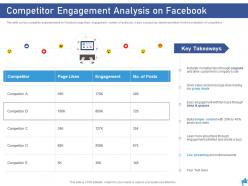
Slide 11: This slide covers competitor analysis based on Facebook page likes, engagement, number of posts etc. It also includes key takeaways taken from the evaluation of competitors
Slide 12: This slide talks about creating facebook presence
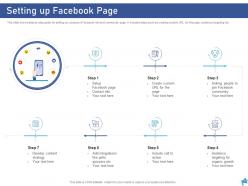
Slide 13: This slide shows step by step guide for setting up company’s Facebook fan and community page. It includes steps such as creating custom URL for the page, audience targeting etc.
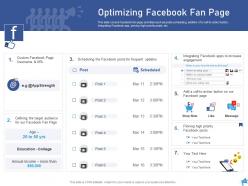
Slide 14: This slide covers Facebook fan page activities such as posts scheduling, addition of a call-to-action button, integrating Facebook app, pinning high priority posts etc.
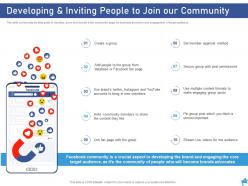
Slide 15: This slide covers step by step guide to develop, grow and nourish a fan community page for business promotion and engagement of target audience
Slide 16: This slide talks about Goals for Facebook Content Strategy
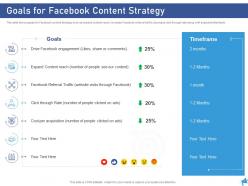
Slide 17: This slide shows goals for Facebook content strategy such as expand content reach, increase Facebook referral traffic, decrease click through rate along with expected timeframe
Slide 18: This slide talks about developing content on Facebook
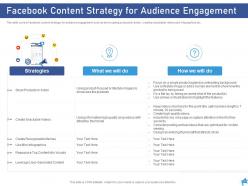
Slide 19: This slide covers Facebook content strategy for audience engagement such as showcasing products in action, creating snackable videos and infographics etc.
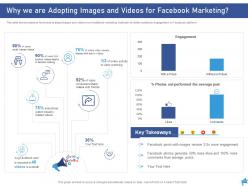
Slide 20: This slide shows reasons for brands to adopt images and videos over traditional marketing methods for better audience engagement on Facebook platform
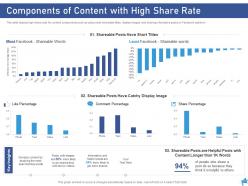
Slide 21: This slide depicts high share rate for content components such as using most shareable titles, display images and sharing informative posts on Facebook platform
Slide 22: This slide introduces Actionable Strategies for Branding on Facebook
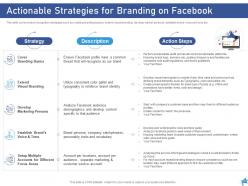
Slide 23: This slide covers brand recognition strategies such as creating branding basics, extend visual branding, develop market persona, establish brand voice and tone etc
Slide 24: This slide introduces Content Sharing and Posting Frequency
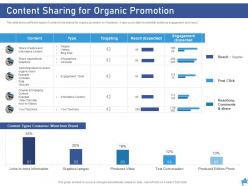
Slide 25: This slide shows different types of content to be shared for organic promotion on Facebook. It also cover data for potential audience engagement and reach.
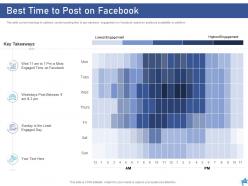
Slide 26: This slide covers heat map to optimize content posting time to get maximum engagement on Facebook based on audience availability on platform
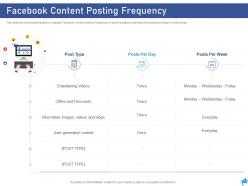
Slide 27: This slide shows scheduling table to regulate Facebook content posting frequency on brand’s page by planning the posts according to content type
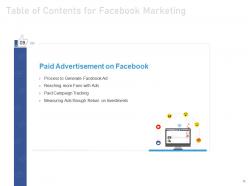
Slide 28: This slide talks about Paid Advertisement on Facebook
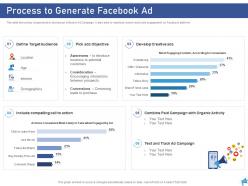
Slide 29: This slide shows key components to develop an effective Ad Campaign. It also aims to maximize brand reach and engagement on Facebook platform
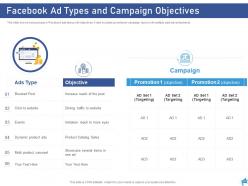
Slide 30: This slide shows various types of Facebook ads along with objectives. It also includes promotional campaign layout with multiple paid advertisements
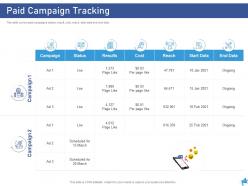
Slide 31: This slide covers paid campaigns status, result, cost, reach, start date and end date
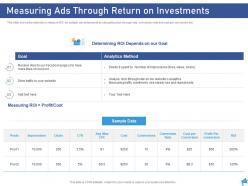
Slide 32: This slide shows the methods to measure ROI for multiple advertisements by calculating click through rate, conversion rate and cost per conversion etc.
Slide 33: This slide introuduces the concept of Budget Allocation
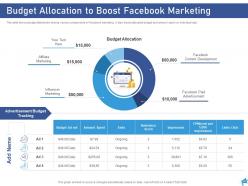
Slide 34: This slide shows budget distribution among various components of Facebook marketing. It also tracks allocated budget and amount spent on individual ads
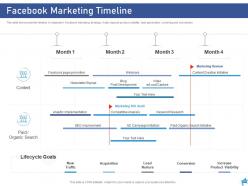
Slide 35: This slide talks about Facebook Marketing timeline.
Slide 36: This slide shows monthly timeline to implement Facebook marketing strategy. It also depicts product visibility, lead generation, nurturing and conversion
Slide 37: This slide introduces Impact of Implementing Facebook Marketing Strategy
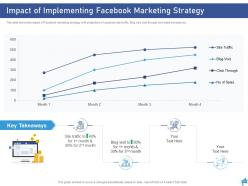
Slide 38: This slide shows the impact of Facebook marketing strategy with projections of customer site traffic, Blog visit, click through and sales increase etc.
Slide 39: This slide talks about Analyzing Facebook Metrics
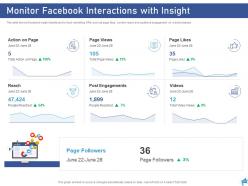
Slide 40: This slide shows Facebook insight dashboard to track marketing KPIs such as page likes, content reach and audience engagement on weekly basses
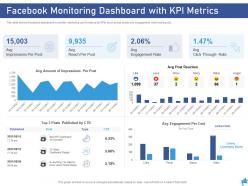
Slide 41: This slide shows Facebook dashboard to monitor marketing performance by KPIs such as top posts and engagement rate tracking etc.
Slide 42: This is an Icon Slide. Use it as per your needs.
Slide 43: This is an Additional Slide.
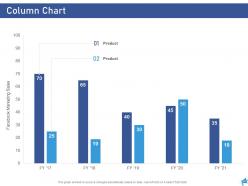
Slide 44: This is a Column Chart slide that can be used to make comparison between different products.
Slide 45: This is an About Us slide that can be used to give a brief overview of the company.
Slide 46: This is Our Mission Our Vision slide to state your mission, vision etc.
Slide 47: This is Our Team slide with name and designation to fill.
Slide 48: This is Target image slide to present product/ entity, information etc.
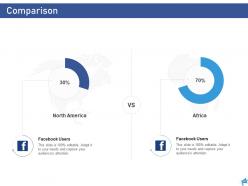
Slide 49: This is a Comparison slide that can be used to conduct a comparitive analysis between two elements.
Slide 50: This is a Venn diagram slide that can be used to depict comparison between three elements.
Slide 51: This is a Thank you slide for acknowledgment. You can share your contact details here.
Digital marketing through facebook powerpoint presentation slides with all 51 slides:
Use our Digital Marketing Through Facebook Powerpoint Presentation Slides to effectively help you save your valuable time. They are readymade to fit into any presentation structure.
FAQs for Digital marketing through facebook
First thing - your visual has to grab people instantly or they'll just keep scrolling. Go with crisp images or videos that actually show what you're selling. When writing copy, talk like you're chatting with one person about their specific problem. Honestly, ads that feel like friend recommendations crush the corporate-sounding ones every time. Headlines should be short and benefit-driven, not just listing features. One clear call-to-action button - that's it. Start with narrow audiences (you can broaden later). Oh, and make sure your landing page delivers exactly what the ad promised, otherwise you're just burning money.
Ugh, Facebook's algorithm is such a pain - it basically decides if your post is worth showing based on how much engagement you get in the first hour or two. No likes or comments right away? Your post gets buried. Plus they prioritize friends and family over business pages, so your reach is probably way worse than you realize. Try posting when your audience is actually online and create stuff that makes people want to respond. Ask questions, show behind-the-scenes content, whatever gets them talking instead of just scrolling past. The whole system's rigged against organic content honestly.
Focus on reach, engagement rate, CTR, and conversions - those are your money metrics. Reach tells you how many eyeballs hit your content. Engagement rate shows if people actually give a damn about what you're posting. CTR is where I see most people mess up tbh - bad copy kills campaigns faster than anything else. Conversions are obviously what pays the bills at the end of the day. Oh, and definitely get Facebook Pixel set up right so you can track people from click to purchase. Don't waste time obsessing over total likes and that fluff.
Don't go crazy broad with your Facebook targeting - that's a rookie mistake. Layer it instead: start with basic demographics, then pile on interests related to your product or competitors your customers probably follow. Behavioral stuff works great too. Honestly? Lookalike audiences are where it's at since they find people who actually resemble your existing customers. Test different audience sizes but don't make them tiny or Facebook's algorithm gets confused. Oh, and definitely A/B test - create one solid audience first, then make variations of it to see what hits.
Okay so A/B testing is basically how you stop wasting money on Facebook ads that suck. You make different versions - maybe swap the image or try a new headline - then Facebook shows them to similar groups. The data that comes back is actually pretty cool to watch. Only test one thing at a time though, otherwise you won't know what made the difference. Like, was it the red button or the new copy? Without testing you're just throwing stuff at the wall hoping something sticks. Honestly just start small - pick two different images for your next campaign and see what your audience actually responds to.
Check out Facebook Insights - it's actually pretty useful once you get the hang of it. The demographics part will probably shock you (mine definitely did). Turns out the people actually engaging were totally different from who I thought was following me. Engagement rates and reach matter way more than follower count, btw. Hit up the "Posts" tab to see what content your audience loves and when they're scrolling. Oh, and check when your followers are most active online. Just do more of whatever's working and stop wasting time on posts that flop.
So organic reach is basically when your posts show up naturally in feeds without spending money - but it sucks now, like maybe 2-5% of your followers actually see it. With paid reach you're boosting posts or running ads, and you can target specific people based on age, interests, whatever. Paid gets you way more views obviously, but organic hits different when people do see it - feels more real. I'd start small with some paid tests to see what works, then throw more money at the good stuff. Instagram really wants that ad revenue these days so they've basically killed organic for most people.
Honestly, Facebook Groups are where it's at for building community. Way better than just having page followers who barely engage. You get real conversations happening, can share stuff exclusively with your group, and actually build relationships that matter. Here's the thing though - Facebook's algorithm is weird but it actually works in your favor with groups. Your posts get seen way more than on business pages (which is annoying that it works that way, but whatever). Plus you get direct feedback on what people actually want. Just don't make it all about selling your products - start with a shared interest or problem instead.
Younger people love video content and memes - anything behind-the-scenes works great too. Older folks? They're more into articles and informational stuff. Honestly, authentic storytelling works for everyone though, regardless of age. I'd test different formats for each group you're going after. Quick clips hit with Gen Z, but older users prefer longer educational videos. Oh, and check your top-performing posts first - you might already have patterns there. Video generally crushes it across all ages, but the style makes all the difference. Start there and see what sticks.
Go live regularly and hype it up first - post about it in your Stories so people actually know it's happening. Live content gets way better reach than regular posts, which is nice. Don't just wing it like some brands do (it's so obvious when they do). Plan what you'll talk about but keep it chill and conversational. Actually respond to comments as they come in - that's literally the whole point. Behind-the-scenes stuff works great, or Q&As, product demos, whatever fits your vibe. I'd start with like 15-20 minutes and see what lands with your audience.
Ugh, Facebook contests are such a pain honestly. First thing - don't make people share to their timeline or tag friends, Facebook will shut that down fast. Your rules need all the boring stuff: who can enter, how to enter, what they can win, when it starts/ends. Some states make you register contests if the prize is worth over like $5k or whatever - totally depends where you are. Oh and throw in something about Facebook not sponsoring it. If you're giving away anything expensive, maybe have a lawyer peek at it? I learned that one the hard way lol.
Honestly, just pick 2-3 platforms you can actually handle well instead of trying to be everywhere at once. Keep your branding consistent but don't just copy-paste the same post everywhere - people totally notice that lazy stuff. Facebook's great for longer posts and building community. Instagram's obviously all about the visuals and stories. Twitter works for quick updates and real-time chat. LinkedIn if you need the professional angle. I'd map out how your content flows between them - maybe tease something on Twitter, show behind-the-scenes on Insta, then do the full post on Facebook. Cross-promoting is smart, just don't overdo it.
Dude, Facebook retargeting is seriously where it's at. These people already visited your site so they know who you are - conversion rates are like 2-3x better than random cold traffic. Way cheaper clicks too since you're not fighting for everyone's eyeballs. The pixel lets you get crazy specific with who you target. Someone checked out your pricing page? Hit 'em with an ad. Browsed a specific product? Perfect. Honestly wish I'd started using it sooner instead of just throwing money at cold audiences. Just make sure you get that pixel installed first so it can start collecting data.
Honestly, user-generated content is where it's at for engagement. Get your customers posting pics with your stuff using a branded hashtag, then repost the good ones (ask first though). Screenshots of positive reviews work amazing too. I'd start with your happiest customers - just reach out and ask if you can feature their posts. Contest posts where people share experiences are total goldmines. But here's the thing - you can't just post and ghost. Actually respond to the content you share or it looks weird. Trust me, this stuff feels way more authentic than anything you'll create yourself.
Okay so video content is huge right now - Reels especially. Facebook's really pushing the whole community thing too with Groups and messaging. Privacy updates have made tracking a nightmare (ugh), but that actually means organic reach matters more now. Here's what's working: people want real, personal stuff over those super polished ads that look fake. I'd start messing around with video ASAP. Maybe create a Group for your niche? It's all about building actual relationships instead of just selling at people constantly. Trust me, the authentic approach is way more effective.
-
Easily Understandable slides.