

Google Cloud Services Artificial Intelligence Service On Google Cloud Platform




Try Before you Buy Download Free Sample Product
 Impress Your
 Audience
 100%
100% Editable
 Save Hours
 of Time


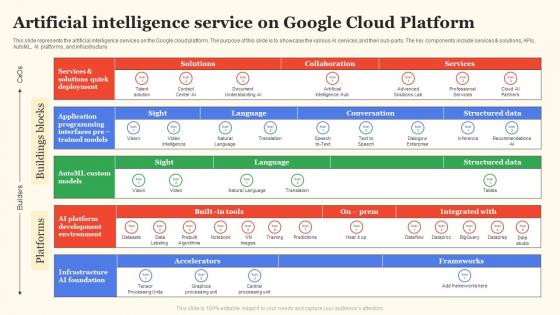
This slide represents the artificial intelligence services on the Google cloud platform.The purpose of this slide is to showcase the various AI services and their sub parts.The key components include services and solutions, APIs, AutoML, AI platforms, and infrastructure.
People who downloaded this PowerPoint presentation also viewed the following :
Google Cloud Services Artificial Intelligence Service On Google Cloud Platform with all 6 slides:
Use our Google Cloud Services Artificial Intelligence Service On Google Cloud Platform to effectively help you save your valuable time. They are readymade to fit into any presentation structure.





FAQs for Google Cloud Services Artificial Intelligence Service On
Honestly, Google's AI stuff is pretty solid - their pre-trained models like Vision API work immediately without any setup hassle. You can jump right in and start testing. AutoML is surprisingly user-friendly too, even if you're not super technical. The BigQuery integration alone makes it worth considering (data pipelines become way less painful). Everything connects smoothly since it's all in their ecosystem. Oh, and definitely try their free tier first - no point paying until you know what actually works for your project. Takes like 10 minutes to get something running.
So Google Cloud AI has some solid options for personalizing customer stuff. Their Vision API automatically tags product images, which is neat. Natural Language API reads customer feedback sentiment as it comes in. Translation has gotten scary good lately - like, actually usable now. Contact Center AI handles basic support questions around the clock. Oh, and AutoML builds custom models without needing a PhD in data science or whatever. I'd probably start with something simple like chatbots, then see what your customers are actually asking for before going crazy with it.
Google Cloud's got you covered for pretty much any ML project. Their pre-built APIs handle the usual suspects - vision, language, translation stuff. Vertex AI is where things get interesting though. You can train custom models for classification, regression, forecasting, recommendations, whatever you need really. AutoML's great if you're not super technical, but AI Platform gives you full control for the heavy-duty deep learning work. Oh, and definitely peek at their model garden first - might save you from reinventing the wheel. No point building something that already exists, right?
Yeah, Google Cloud AI has decent security - they encrypt everything in transit and at rest, plus they won't use your business data for training their general models. Access controls are pretty granular through IAM. They've got all the compliance stuff too (SOC 2, ISO 27001, GDPR). You can even set where your data lives geographically if that's a big deal for your industry. Honestly, I'd read through their AI principles doc first - sounds boring but whatever. Set up your access policies right away though. Trust me, you don't want to scramble when audit season hits.
So TensorFlow is what Google built all their AI stuff on top of. When you use Vision API or Natural Language API, you're actually using TensorFlow without realizing it. Pretty neat, right? You can also work with it directly through AI Platform - that's where you'd train your own models. The TPU hardware is crazy optimized for TensorFlow too, which is a nice bonus. Honestly, if you're just getting started, I'd mess around with AI Platform notebooks first. Way easier than setting everything up locally, and you can experiment without breaking anything.
Google Cloud AI lets small businesses automate boring tasks and dig into customer data without hiring a whole tech team. The pricing is pay-as-you-go, so you're not stuck with some massive upfront cost. Chatbots for customer service, document processing, sales predictions - honestly, the big companies don't have that much of an advantage anymore. It's crazy how much this stuff has changed lately. Start with their free tier and mess around with it. See what actually works for your business instead of trying to do everything at once. You can always scale up later when you figure out what's useful.
Honestly, Google Cloud AI beats building your own setup in most cases. You pay as you go instead of dropping crazy money upfront on hardware. Plus you won't need to hire those super expensive ML engineers - their salaries are insane these days. Google handles all the boring maintenance stuff too. That said, if you're processing massive amounts of data 24/7, your own servers might work out cheaper eventually. Just plug your numbers into Google's pricing calculator first though. It'll show you what you're actually looking at cost-wise.
So Google Cloud handles this through Pub/Sub and Dataflow - basically streaming services that push data straight into their AI APIs. You can build pipelines that process stuff as it happens. Live video analysis, social media sentiment tracking, that kind of thing. Their AutoML and pre-trained models (Vision, Speech, Translation) all work with streaming inputs, so no waiting around for batches. Dataflow auto-scales when traffic jumps too, which honestly saves a lot of headaches. Just connect your data source to Pub/Sub first, then route it through whatever AI service you need. Pretty straightforward once you get the flow down.
Dude, Google Cloud AI is killing it in healthcare right now - they're doing crazy stuff with medical imaging and patient data. Retail companies are using it for recommendations and inventory stuff. Financial services love the fraud detection features, and honestly the results are pretty insane. Oh and manufacturing too - predictive maintenance and quality control. My cousin works at a bank and says their fraud system catches things they never would've spotted before. If you're in any of these areas, definitely look at their case studies. Some of the examples will blow your mind.
Honestly, their REST APIs are pretty solid to work with - way better docs than most cloud providers. Start with service account auth, then just call whatever AI service you need from your current apps. I'd containerize everything with Cloud Run or GKE right off the bat for scaling later. Don't go crazy trying to AI-ify your whole stack though. Pick one thing first, maybe throw some NLP at your customer service tickets or something. You can always expand from there once you get the hang of it. The client libraries make integration pretty painless too.
So Google Cloud has some decent monitoring options for AI stuff. Vertex AI Model Monitoring is probably your best bet - it catches data drift and prediction issues. Cloud Monitoring handles the basic performance metrics. Oh, and there's this Experiments thing for comparing model versions that's actually useful when you're tweaking things. You can build custom dashboards too. The Explanations API is solid for figuring out why your model did something weird (super helpful for debugging). I'd start with Vertex AI's default dashboard first, then add custom alerts based on whatever matters for your project.
So AutoML is pretty cool - you just upload your data and Google does all the complicated stuff automatically. No coding required. It handles feature engineering, picks the right model, tunes everything behind the scenes. Honestly way easier than I expected when I first tried it. The interface is mostly drag-and-drop for image classification, text analysis, forecasting, whatever. Models come out production-ready too which is nice. If your data's clean and you know what you want to accomplish, definitely check out their vision or language APIs first.
Hey! So bias prevention is huge - make sure your training data covers diverse groups or you'll end up with discriminatory models. Privacy is another big one (shocking how many people skip this step). Be upfront with customers about where you're using AI. Human oversight for big decisions is non-negotiable. Google actually has solid responsible AI guidelines and audit tools you can use. Honestly, their AI principles docs are pretty helpful. Just bake ethics reviews into your process from the start - way easier than retrofitting later.
First thing - grab a Google Cloud account and turn on whatever APIs you need (Vision, Natural Language, Translation, etc). Their docs are surprisingly decent this time around. Definitely mess with the API Explorer before coding anything - saves you from debugging headaches later. Free tiers are pretty generous too, so you won't accidentally rack up charges while figuring things out. Oh, and use their client libraries instead of raw REST calls when you start your first project. Makes everything way less painful.
So Google's going all-in on multimodal AI and edge computing stuff. They're building AI agents that actually do things instead of just answering questions, which is pretty cool. Real-time processing is getting way better too. Honestly, they're finally making AI tools that regular people can use without coding - took long enough! The whole industry's shifting from those basic general models to super-specialized ones built for specific businesses. My advice? Start looking into industry-specific models now. That generic AI approach everyone's using is already becoming old news, and you don't want to be behind the curve.
-
Great combination of visuals and information. Glad I purchased your subscription.
-
Loved the templates on SlideTeam, I believe I have found the go to place for my presentation needs!