Powerpoint Templates for Complement System
Save time and engage your audience with our fully editable PowerPoint PPT Templates and Slides.
-

Complement System Activation In Innate Immunity Defense PPT Summary AT
While your presentation may contain top notch content, if it lacks visual appeal, you are not fully engaging your audience. Introducing our Complement System Activation In Innate Immunity Defense PPT Summary AT deck, designed to engage your audience. Our complete deck boasts a seamless blend of Creativity and versatility. You can effortlessly customize elements and color schemes to align with your brand identity. Save precious time with our pre designed template, compatible with Microsoft versions and Google Slides. Plus, its downloadable in multiple formats like JPG, JPEG, and PNG. Elevate your presentations and outshine your competitors effortlessly with our visually stunning 100 percent editable deck.
-

Complement System Enhances Humoral Immunity Against Pathogens PPT Information AT
Step up your game with our enchanting Complement System Enhances Humoral Immunity Against Pathogens PPT Information AT deck, guaranteed to leave a lasting impression on your audience. Crafted with a perfect balance of simplicity, and innovation, our deck empowers you to alter it to your specific needs. You can also change the color theme of the slide to mold it to your companys specific needs. Save time with our ready made design, compatible with Microsoft versions and Google Slides. Additionally, its available for download in various formats including JPG, JPEG, and PNG. Outshine your competitors with our fully editable and customized deck.
-
Enterprise Resource Planning Phases To Implement System PPT Summary AT
Step up your game with our enchanting Enterprise Resource Planning Phases To Implement System PPT Summary AT deck, guaranteed to leave a lasting impression on your audience. Crafted with a perfect balance of simplicity, and innovation, our deck empowers you to alter it to your specific needs. You can also change the color theme of the slide to mold it to your companys specific needs. Save time with our ready made design, compatible with Microsoft versions and Google Slides. Additionally, its available for download in various formats including JPG, JPEG, and PNG. Outshine your competitors with our fully editable and customized deck.
-
Enterprise resource planning erp phases to implement system
Presenting this set of slides with name Enterprise Resource Planning ERP Phases To Implement System. This is a five stage process. The stages in this process are Enterprise Resource, Planning ERP, Phases To, Implement System. This is a completely editable PowerPoint presentation and is available for immediate download. Download now and impress your audience.
-
Timeline To Implement ERP System For Effective Digital Transformation
This slide represents timeline that helps businesses to implement digital transformation using ERP system for enhancing business operations and market growth. It includes various steps such as setup, piloting, integration, etc. Introducing our premium set of slides with Timeline To Implement ERP System For Effective Digital Transformation. Ellicudate the six stages and present information using this PPT slide. This is a completely adaptable PowerPoint template design that can be used to interpret topics like Integration, Post Support, Setup. So download instantly and tailor it with your information.
-
Checklist To Implement Recommender System In Business Recommender System Integration
This slide outlines the checklist for deploying recommendation engine in business. The key approaches include analyze projects scope, identify your objective, set your budget, select best algorithm and prioritize implementation.Present the topic in a bit more detail with this Checklist To Implement Recommender System In Business Recommender System Integration. Use it as a tool for discussion and navigation on Financial Resources, Required Complete, Prioritize Implementation. This template is free to edit as deemed fit for your organization. Therefore download it now.
-
Key Steps To Implement ASRS System For Warehouse Automation
This slide represents steps that guide companies to successfully implement ASRS system to automate and improve warehouse operations. It includes various steps such as data validation, design systems, defining projects, selecting equipment, etc. Introducing our premium set of slides with Key Steps To Implement ASRS System For Warehouse Automation. Ellicudate the seven stages and present information using this PPT slide. This is a completely adaptable PowerPoint template design that can be used to interpret topics like Construction Analysis, Select Equipment, Integration Documents. So download instantly and tailor it with your information.
-
Implement Traceability System Monotone Icon In Powerpoint Pptx Png And Editable Eps Format
Make your presentation profoundly eye-catching leveraging our easily customizable Implement traceability system monotone icon in powerpoint pptx png and editable eps format. It is designed to draw the attention of your audience. Available in all editable formats, including PPTx, png, and eps, you can tweak it to deliver your message with ease.
-
Checklist To Implement Recommender System Implementation Of Recommender Systems In Business
This slide outlines the checklist for deploying recommendation engine in business. The key approaches include analyze projects scope, identify your objective, set your budget, select best algorithm and prioritize implementation. Present the topic in a bit more detail with this Checklist To Implement Recommender System Implementation Of Recommender Systems In Business. Use it as a tool for discussion and navigation on Business, Implementation, Approaches. This template is free to edit as deemed fit for your organization. Therefore download it now.
-
Implement Traceability System Colored Icon In Powerpoint Pptx Png And Editable Eps Format
Give your next presentation a sophisticated, yet modern look with this 100 percent editable Implement traceability system colored icon in powerpoint pptx png and editable eps format. Choose from a variety of customizable formats such as PPTx, png, eps. You can use these icons for your presentations, banners, templates, One-pagers that suit your business needs.
-
Organization Resource Planning Timeline To Implement Erp System
This slide represents the timeline for implementing an ERP system in the organization and tasks performed under the planning, delivery, and closing phases. Increase audience engagement and knowledge by dispensing information using Organization Resource Planning Timeline To Implement Erp System. This template helps you present information on six stages. You can also present information on Development, Business, Operational using this PPT design. This layout is completely editable so personaize it now to meet your audiences expectations.
-
Four key for success include enhancement of interpersonal skills and implement smart system
Presenting four business success key PPT slide. The four key picture template designed professionally to share the business skills which enables you to achieve the desired target. The PowerPoint business skill template is editable and compatible with Google Slide too so you can share it over the internet easily. Do modification in font size, font type, color and design of icon because the icons are customizable. As you need to explain the different skill in an easy way so you can take help of this PPT slide. The unique design four key icon helps you to grab your audience attention.
-
Realization and implement communication system tests ppt powerpoint presentation ideas guide
Presenting this set of slides with name Realization And Implement Communication System Tests Ppt Powerpoint Presentation Ideas Guide. The topics discussed in these slides are Business, Planning, Strategy, Marketing, Management. This is a completely editable PowerPoint presentation and is available for immediate download. Download now and impress your audience.
-
Timeline to implement erp system erp system it ppt themes
This slide represents the timeline for implementing an ERP system in the organization and tasks performed under the planning, delivery, and closing phases.Introducing Timeline To Implement ERP System ERP System IT Ppt Themes to increase your presentation threshold. Encompassed with six stages, this template is a great option to educate and entice your audience. Dispence information on Transitions And Planning, Infrastructure And Conceptual, Configuration Development, using this template. Grab it now to reap its full benefits.
-
Five staged star to implement elearning system
Presenting this set of slides with name Five Staged Star To Implement Elearning System. This is a five stage process. The stages in this process are Capture, Commercialization, Conceptualize, Create, Cultivate. This is a completely editable PowerPoint presentation and is available for immediate download. Download now and impress your audience.
-
Manager preparing action plan to implement ivr system at call center
Presenting our set of slides with Manager Preparing Action Plan To Implement IVR System At Call Center. This exhibits information on one stage of the process. This is an easy-to-edit and innovatively designed PowerPoint template. So download immediately and highlight information on Manager Preparing Action Plan To Implement IVR System At Call Center.
-
Implement Recommendation Systems Step By Step PPT Sample AT
Ditch the Dull templates and opt for our engaging Implement Recommendation Systems Step By Step PPT Sample AT deck to attract your audience. Our visually striking design effortlessly combines creativity with functionality, ensuring your content shines through. Compatible with Microsoft versions and Google Slides, it offers seamless integration of presentation. Save time and effort with our pre designed PPT layout, while still having the freedom to customize fonts, colors, and everything you ask for. With the ability to download in various formats like JPG, JPEG, and PNG, sharing your slides has never been easier. From boardroom meetings to client pitches, this deck can be the secret weapon to leaving a lasting impression.
-
Design And Implement Hospital Management System Powerpoint Presentation Slides
Enthrall your audience with this Design And Implement Hospital Management System Powerpoint Presentation Slides. Increase your presentation threshold by deploying this well-crafted template. It acts as a great communication tool due to its well-researched content. It also contains stylized icons, graphics, visuals etc, which make it an immediate attention-grabber. Comprising fifty four slides, this complete deck is all you need to get noticed. All the slides and their content can be altered to suit your unique business setting. Not only that, other components and graphics can also be modified to add personal touches to this prefabricated set.
-
Implement Safety Management System PPT Summary AT
While your presentation may contain top-notch content, if it lacks visual appeal, you are not fully engaging your audience. Introducing our Implement Safety Management System PPT Summary AT deck, designed to engage your audience. Our complete deck boasts a seamless blend of Creativity and versatility. You can effortlessly customize elements and color schemes to align with your brand identity. Save precious time with our pre-designed template, compatible with Microsoft versions and Google Slides. Plus, its downloadable in multiple formats like JPG, JPEG, and PNG. Elevate your presentations and outshine your competitors effortlessly with our visually stunning 100 percent editable deck.
-
Implement Warehouse Management System Today PPT Structure AT
Do not compromise on a template that erodes your messages impact. Introducing our engaging Implement Warehouse Management System Today PPT Structure AT complete deck, thoughtfully crafted to grab your audiences attention instantly. With this deck, effortlessly download and adjust elements, streamlining the customization process. Whether you are using Microsoft versions or Google Slides, it fits seamlessly into your workflow. Furthermore, it is accessible in JPG, JPEG, PNG, and PDF formats, facilitating easy sharing and editing. Not only that you also play with the color theme of your slides making it suitable as per your audiences preference.
-
Implement Entrepreneurial Operating System Tools Now PPT Example AT
While your presentation may contain top notch content, if it lacks visual appeal, you are not fully engaging your audience. Introducing our Implement Entrepreneurial Operating System Tools Now PPT Example AT deck, designed to engage your audience. Our complete deck boasts a seamless blend of Creativity and versatility. You can effortlessly customize elements and color schemes to align with your brand identity. Save precious time with our pre designed template, compatible with Microsoft versions and Google Slides. Plus, its downloadable in multiple formats like JPG, JPEG, and PNG. Elevate your presentations and outshine your competitors effortlessly with our visually stunning 100 percent editable deck.
-
Key Steps To Implement Market Intelligence System Implementation Of Market Intelligence
The following slide highlights various steps to execute market intelligence system for employees. It showcases key components such as sales representatives coaching, supplier encouragement, competitor performance monitoring, client suggestion panel, public data resources, information acquisition and feedback.Increase audience engagement and knowledge by dispensing information using Key Steps To Implement Market Intelligence System Implementation Of Market Intelligence. This template helps you present information on seven stages. You can also present information on Sales Representatives, Competitors Performance, Data Resources using this PPT design. This layout is completely editable so personaize it now to meet your audiences expectations.
-
Steps To Implement Democratized Innovation System Ppt Template
The purpose of this slide is to show how democratized innovation system is implemented in an organization. It covers various steps such as networking, pyramiding and organizing. Introducing our premium set of slides with name Steps To Implement Democratized Innovation System Ppt Template. Ellicudate the three stages and present information using this PPT slide. This is a completely adaptable PowerPoint template design that can be used to interpret topics like Networking, Pyramiding, Organizing. So download instantly and tailor it with your information.
-
Table Of Contents Design And Implement Hospital Management System
Introducing Table Of Contents Design And Implement Hospital Management System to increase your presentation threshold. Encompassed with ten stages, this template is a great option to educate and entice your audience. Dispence information on Dashboards And Metrics, Risk Management Framework, Optimizing Hospital, using this template. Grab it now to reap its full benefits.
-
Seven Step Process To Implement Quality Assurance System In Business
This slide provide insight about seven stages for implementing quality assurance in organisation to improve customer retention rate. It includes stages such as determine goals, identify success elements, determine target audience, gather customer feedback, continuous improvement, select quality management software, and result review. Presenting our set of slides with Seven Step Process To Implement Quality Assurance System In Business This exhibits information on Seven stages of the process. This is an easy to edit and innovatively designed PowerPoint template. So download immediately and highlight information on Determine Business Goals, Success Element, Determine Key Personnels, Customer Feedback.
-
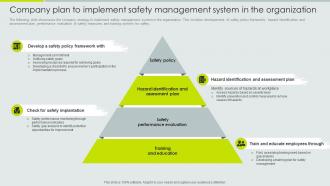
Company Plan To Implement Safety Management System Implementation Of Safety Management Workplace Injuries
The following slide showcases the company strategy to implement safety management system in the organization. This includes developement of safety policy framework, hazard identification and assessment plan, performance evaluation of safety measures and training workers for safety. Increase audience engagement and knowledge by dispensing information using Company Plan To Implement Safety Management System Implementation Of Safety Management Workplace Injuries. This template helps you present information on four stages. You can also present information on Organization, Management, Framework using this PPT design. This layout is completely editable so personaize it now to meet your audiences expectations.
-
Eight steps approach to implement integrated management system
The following slide highlights multi step approach to implement integrated management system such as training, policies and objectives, gap analysis, process implementation, internal audit, review meeting etc. Presenting our set of slides with Eight Steps Approach To Implement Integrated Management System. This exhibits information on eight stages of the process. This is an easy to edit and innovatively designed PowerPoint template. So download immediately and highlight information on Internal Audit, Review Meeting, Corrective Actions.
-
Checklist To Implement Performance Measurement System In Small Businesses
This slide presents a performance measurement system implementation checklist for small businesses to measure the efficiency and effectiveness of organizational decisions. It includes task such as planning for projects, defining organization environment, designing KPIs, etc. Introducing our Checklist To Implement Performance Measurement System In Small Businesses set of slides. The topics discussed in these slides are Implement Performance, Measurement System This is an immediately available PowerPoint presentation that can be conveniently customized. Download it and convince your audience.
-
Design And Implement Hospital Management System Table Of Contents
Introducing Design And Implement Hospital Management System Table Of Contents to increase your presentation threshold. Encompassed with one stages, this template is a great option to educate and entice your audience. Dispence information on Process Flow, Patient Billing Management, Pharmacy Management, using this template. Grab it now to reap its full benefits.
-
Ways to implement finance audit system ppt slide show
Presenting ways to implement finance audit system ppt slide show. This is a ways to implement finance audit system ppt slide show. This is a six stage process. The stages in this process are communicating results, following up, configuring parameters, establishing priority areas, determining process frequency, identifying monitoring and audit rules.
-
Tips to implement safety management system
Presenting our set of slides with Tips To Implement Safety Management System. This exhibits information on six stages of the process. This is an easy to edit and innovatively designed PowerPoint template. So download immediately and highlight information on Management, Employee.
-
How To Implement Performance Improvement Systems PPT Demonstration AT
Ditch the Dull templates and opt for our engaging How To Implement Performance Improvement Systems PPT Demonstration AT deck to attract your audience. Our visually striking design effortlessly combines creativity with functionality, ensuring your content shines through. Compatible with Microsoft versions and Google Slides, it offers seamless integration of presentation. Save time and effort with our pre-designed PPT layout, while still having the freedom to customize fonts, colors, and everything you ask for. With the ability to download in various formats like JPG, JPEG, and PNG, sharing your slides has never been easier. From boardroom meetings to client pitches, this deck can be the secret weapon to leaving a lasting impression.
-
Implement People Counting Systems Now PPT Sample AT
Ditch the Dull templates and opt for our engaging Implement People Counting Systems Now PPT Sample AT deck to attract your audience. Our visually striking design effortlessly combines creativity with functionality, ensuring your content shines through. Compatible with Microsoft versions and Google Slides, it offers seamless integration of presentation. Save time and effort with our pre-designed PPT layout, while still having the freedom to customize fonts, colors, and everything you ask for. With the ability to download in various formats like JPG, JPEG, and PNG, sharing your slides has never been easier. From boardroom meetings to client pitches, this deck can be the secret weapon to leaving a lasting impression.
-
How To Implement Poka Yoke Systems PPT PowerPoint AT
Do not compromise on a template that erodes your messages impact. Introducing our engaging How To Implement Poka Yoke Systems PPT PowerPoint AT complete deck, thoughtfully crafted to grab your audiences attention instantly. With this deck, effortlessly download and adjust elements, streamlining the customization process. Whether you are using Microsoft versions or Google Slides, it fits seamlessly into your workflow. Furthermore, it is accessible in JPG, JPEG, PNG, and PDF formats, facilitating easy sharing and editing. Not only that you also play with the color theme of your slides making it suitable as per your audiences preference.
-
Design And Implement Hospital Pharmacy Management System PPT Outline AT
Ditch the Dull templates and opt for our engaging Design And Implement Hospital Pharmacy Management System PPT Outline AT deck to attract your audience. Our visually striking design effortlessly combines creativity with functionality, ensuring your content shines through. Compatible with Microsoft versions and Google Slides, it offers seamless integration of presentation. Save time and effort with our pre-designed PPT layout, while still having the freedom to customize fonts, colors, and everything you ask for. With the ability to download in various formats like JPG, JPEG, and PNG, sharing your slides has never been easier. From boardroom meetings to client pitches, this deck can be the secret weapon to leaving a lasting impression.
-
How To Implement A Balanced Scorecard System PPT Slides AT
While your presentation may contain top-notch content, if it lacks visual appeal, you are not fully engaging your audience. Introducing our How To Implement A Balanced Scorecard System PPT Slides AT deck, designed to engage your audience. Our complete deck boasts a seamless blend of Creativity and versatility. You can effortlessly customize elements and color schemes to align with your brand identity. Save precious time with our pre-designed template, compatible with Microsoft versions and Google Slides. Plus, its downloadable in multiple formats like JPG, JPEG, and PNG. Elevate your presentations and outshine your competitors effortlessly with our visually stunning 100 percent editable deck.
-
How To Implement A Quality Management System Successfully PPT Slides AT
Step up your game with our enchanting How To Implement A Quality Management System Successfully PPT Slides AT deck, guaranteed to leave a lasting impression on your audience. Crafted with a perfect balance of simplicity, and innovation, our deck empowers you to alter it to your specific needs. You can also change the color theme of the slide to mold it to your companys specific needs. Save time with our ready-made design, compatible with Microsoft versions and Google Slides. Additionally, its available for download in various formats including JPG, JPEG, and PNG. Outshine your competitors with our fully editable and customized deck.
-
Implement Five Level Filter System Now PPT Mockup AT
Step up your game with our enchanting Implement Five Level Filter System Now PPT Mockup AT deck, guaranteed to leave a lasting impression on your audience. Crafted with a perfect balance of simplicity, and innovation, our deck empowers you to alter it to your specific needs. You can also change the color theme of the slide to mold it to your companys specific needs. Save time with our ready-made design, compatible with Microsoft versions and Google Slides. Additionally, its available for download in various formats including JPG, JPEG, and PNG. Outshine your competitors with our fully editable and customized deck.
-
Implement Seamless Leave Management System PPT Information AT
While your presentation may contain top notch content, if it lacks visual appeal, you are not fully engaging your audience. Introducing our Implement Seamless Leave Management System PPT Information AT deck, designed to engage your audience. Our complete deck boasts a seamless blend of Creativity and versatility. You can effortlessly customize elements and color schemes to align with your brand identity. Save precious time with our pre designed template, compatible with Microsoft versions and Google Slides. Plus, its downloadable in multiple formats like JPG, JPEG, and PNG. Elevate your presentations and outshine your competitors effortlessly with our visually stunning 100 percent editable deck.
-
How To Implement A Quality Management System Successfully PPT Guidelines AT
Step up your game with our enchanting How To Implement A Quality Management System Successfully PPT Guidelines AT deck, guaranteed to leave a lasting impression on your audience. Crafted with a perfect balance of simplicity, and innovation, our deck empowers you to alter it to your specific needs. You can also change the color theme of the slide to mold it to your companys specific needs. Save time with our ready-made design, compatible with Microsoft versions and Google Slides. Additionally, its available for download in various formats including JPG, JPEG, and PNG. Outshine your competitors with our fully editable and customized deck.
-
How To Implement A Safety Management System Successfully PPT Structure AT
While your presentation may contain top-notch content, if it lacks visual appeal, you are not fully engaging your audience. Introducing our How To Implement A Safety Management System Successfully PPT Structure AT deck, designed to engage your audience. Our complete deck boasts a seamless blend of Creativity and versatility. You can effortlessly customize elements and color schemes to align with your brand identity. Save precious time with our pre-designed template, compatible with Microsoft versions and Google Slides. Plus, its downloadable in multiple formats like JPG, JPEG, and PNG. Elevate your presentations and outshine your competitors effortlessly with our visually stunning 100 percent editable deck.
-
Roadmap To Implement Patient Appointment Scheduling System
This slide represents roadmap that assists doctors to effectively implement patient appointment scheduling system to enhance their experience and management. It includes steps such as developing account, setting up calendar, etc. Presenting our set of slides with Roadmap To Implement Patient Appointment Scheduling System. This exhibits information on six stages of the process. This is an easy to edit and innovatively designed PowerPoint template. So download immediately and highlight information on Develop Account, Develop Booking Page, Include Additional Features.
-
Steps To Implement 360 Degree Feedback System
The purpose of this slide is to represent process to implement 360 feedback for employees. It includes various steps such as defining eligibility criteria, incorporate HR software, inviting colleagues, gather and sharing feedback and assisting employees to develop plan. Presenting our set of slides with Steps To Implement 360 Degree Feedback System. This exhibits information on five stages of the process. This is an easy to edit and innovatively designed PowerPoint template. So download immediately and highlight information on Communicate, Evaluation, Improvements.
-
Roadmap To Implement Information Security Management System In Organization
This slide represents roadmap that helps organizations implement system for information security management systems to protect sensitive data. It includes steps such as defining scope and objectives, identifying assets, recognizing risk, etc. Introducing our premium set of slides with Roadmap To Implement Information Security Management System In Organization. Ellicudate the five stages and present information using this PPT slide. This is a completely adaptable PowerPoint template design that can be used to interpret topics like Recognize Risk, Make Improvement, Identify Mitigation Measures. So download instantly and tailor it with your information.
-
Steps To Implement Serialized Inventory Tracking System
The purpose of this slide is to help businesses implement serialized inventory tracking using RFID technology. It covers five steps of implementation that involves selecting right software, building serialization strategy, providing staff training, integrating technology, analyzing data, etc. Introducing our premium set of slides with Steps To Implement Serialized Inventory Tracking System Ellicudate the five stages and present information using this PPT slide. This is a completely adaptable PowerPoint template design that can be used to interpret topics like Right Software, Build Serialization Strategy, Provide Staff Training So download instantly and tailor it with your information.
-
Implement Redundancy And Failover Systems For System Failure Deploying Strategies PPT Example
This slide showcases the strategies to reduce system failures such as data replication, cloud services, automatic failover and training. Present the topic in a bit more detail with this Implement Redundancy And Failover Systems For System Failure Deploying Strategies PPT Example. Use it as a tool for discussion and navigation on Implement Redundancy, Failover Systems, Data Replication. This template is free to edit as deemed fit for your organization. Therefore download it now.
-
Management Information System Steps To Implement Data Warehouse
This slide represents the steps to implement a data warehouse in the organization, including enterprise strategies, phased delivery, and iterative prototyping. Introducing Management Information System Steps To Implement Data Warehouse to increase your presentation threshold. Encompassed with three stages, this template is a great option to educate and entice your audience. Dispence information on Enterprise Strategy, Phased Delivery, Iterative Prototyping, using this template. Grab it now to reap its full benefits.
-
Steps To Implement Point Of Sales System
The following slide outlines steps to implement point of sales system with purpose of tracking inventory, generate retail analytics to look after customers. It covers launch and log in, upload products, set up accounts, hardware and payments with connecting business apps. Presenting our set of slides with Steps To Implement Point Of Sales System. This exhibits information on six stages of the process. This is an easy to edit and innovatively designed PowerPoint template. So download immediately and highlight information on Set Up Hardware, Set Up Payments, Upload Products.
-
Opsonization Process Antibodies And Complement Role PPT PowerPoint AT
Do not compromise on a template that erodes your messages impact. Introducing our engaging Opsonization Process Antibodies And Complement Role PPT PowerPoint AT complete deck, thoughtfully crafted to grab your audiences attention instantly. With this deck, effortlessly download and adjust elements, streamlining the customization process. Whether you are using Microsoft versions or Google Slides, it fits seamlessly into your workflow. Furthermore, it is accessible in JPG, JPEG, PNG, and PDF formats, facilitating easy sharing and editing. Not only that you also play with the color theme of your slides making it suitable as per your audiences preference.
-
Executive Information System Steps To Implement Data Warehouse
This slide represents the steps to implement a data warehouse in the organization, including enterprise strategies, phased delivery, and iterative prototyping. Increase audience engagement and knowledge by dispensing information using Executive Information System Steps To Implement Data Warehouse. This template helps you present information on three stages. You can also present information on Enterprise Strategy, Phased Delivery, Iterative Prototyping using this PPT design. This layout is completely editable so personaize it now to meet your audiences expectations.
-
Design And Implement Hospital Pharmacy Management System Structure
This slide shows the pharmacy management system structure which includes sales management, customer service management, stock, warehouse and accounting management. Increase audience engagement and knowledge by dispensing information using Design And Implement Hospital Pharmacy Management System Structure. This template helps you present information on eight stages. You can also present information on Pharmacy Management System, Sales Management, Customer Service Mange using this PPT design. This layout is completely editable so personaize it now to meet your audiences expectations.
-
Steps To Implement Cybersecurity Asset Management System
The following slide illustrates some steps to execute cybersecurity framework for safety risk and performance management. It includes elements such as setting goals, drafting detailed profile, evaluating current position, assessing gaps, implementing plan etc. Presenting our set of slides with Steps To Implement Cybersecurity Asset Management System. This exhibits information on five stages of the process. This is an easy to edit and innovatively designed PowerPoint template. So download immediately and highlight information on Evaluate Current Position, Execute Action Plan, Asses Gap.
-
Steps To Implement Liquidity Risk Management System
This slide mentions steps to implement liquidity risk management system in organizations. It includes establishing analytical framework, managing data and integrating risk management processes.Presenting our set of slides with Steps To Implement Liquidity Risk Management System. This exhibits information on three stages of the process. This is an easy to edit and innovatively designed PowerPoint template. So download immediately and highlight information on Management Processes, Integrate Risk, Market Information.
-
Leavitt Diamond System Model To Implement Change Successfully
Following slide outlines Leavitt diamond model showing relationship among four components. Organization structure, technology, people and task are the components which are highlighted in the slide. Introducing our premium set of slides with Leavitt Diamond System Model To Implement Change Successfully. Ellicudate the one stages and present information using this PPT slide. This is a completely adaptable PowerPoint template design that can be used to interpret topics like Structure, Culture, Technology. So download instantly and tailor it with your information.
-
Design And Implement Hospital Patient Information System For Healthcare Management
This slide focuses on the patient information system for healthcare management that includes information system for patient care and management information system. Increase audience engagement and knowledge by dispensing information using Design And Implement Hospital Patient Information System For Healthcare Management. This template helps you present information on five stages. You can also present information on Hospital Information System, Clinical Information System, Online Medical Records using this PPT design. This layout is completely editable so personaize it now to meet your audiences expectations.
-
How To Implement Effective Threat Detection Systems PPT Example AT
While your presentation may contain top notch content, if it lacks visual appeal, you are not fully engaging your audience. Introducing our How To Implement Effective Threat Detection Systems PPT Example AT deck, designed to engage your audience. Our complete deck boasts a seamless blend of Creativity and versatility. You can effortlessly customize elements and color schemes to align with your brand identity. Save precious time with our pre designed template, compatible with Microsoft versions and Google Slides. Plus, its downloadable in multiple formats like JPG, JPEG, and PNG. Elevate your presentations and outshine your competitors effortlessly with our visually stunning 100 percent editable deck.
-
How To Implement Continuous Performance Management Systems PPT Demonstration AT
Step up your game with our enchanting How To Implement Continuous Performance Management Systems PPT Demonstration AT deck, guaranteed to leave a lasting impression on your audience. Crafted with a perfect balance of simplicity, and innovation, our deck empowers you to alter it to your specific needs. You can also change the color theme of the slide to mold it to your companys specific needs. Save time with our ready-made design, compatible with Microsoft versions and Google Slides. Additionally, its available for download in various formats including JPG, JPEG, and PNG. Outshine your competitors with our fully editable and customized deck.
-
How To Implement Effective Physical Security Systems PPT Guidelines AT
Ditch the Dull templates and opt for our engaging How To Implement Effective Physical Security Systems PPT Guidelines AT deck to attract your audience. Our visually striking design effortlessly combines creativity with functionality, ensuring your content shines through. Compatible with Microsoft versions and Google Slides, it offers seamless integration of presentation. Save time and effort with our pre designed PPT layout, while still having the freedom to customize fonts, colors, and everything you ask for. With the ability to download in various formats like JPG, JPEG, and PNG, sharing your slides has never been easier. From boardroom meetings to client pitches, this deck can be the secret weapon to leaving a lasting impression.
-
How To Implement A Digital Visitor Management System PPT Structure AT
Do not compromise on a template that erodes your messages impact. Introducing our engaging How To Implement A Digital Visitor Management System PPT Structure AT complete deck, thoughtfully crafted to grab your audiences attention instantly. With this deck, effortlessly download and adjust elements, streamlining the customization process. Whether you are using Microsoft versions or Google Slides, it fits seamlessly into your workflow. Furthermore, it is accessible in JPG, JPEG, PNG, and PDF formats, facilitating easy sharing and editing. Not only that you also play with the color theme of your slides making it suitable as per your audiences preference.
-
How To Implement An Effective Energy Management System PPT Slides AT
While your presentation may contain top-notch content, if it lacks visual appeal, you are not fully engaging your audience. Introducing our How To Implement An Effective Energy Management System PPT Slides AT deck, designed to engage your audience. Our complete deck boasts a seamless blend of Creativity and versatility. You can effortlessly customize elements and color schemes to align with your brand identity. Save precious time with our pre-designed template, compatible with Microsoft versions and Google Slides. Plus, its downloadable in multiple formats like JPG, JPEG, and PNG. Elevate your presentations and outshine your competitors effortlessly with our visually stunning 100 percent editable deck.