Powerpoint Templates for Who what when
Save time and engage your audience with our fully editable PowerPoint PPT Templates and Slides.
-

Who What When Where Why Questions PPT Sample AT
While your presentation may contain top-notch content, if it lacks visual appeal, you are not fully engaging your audience. Introducing our Who What When Where Why Questions PPT Sample AT deck, designed to engage your audience. Our complete deck boasts a seamless blend of Creativity and versatility. You can effortlessly customize elements and color schemes to align with your brand identity. Save precious time with our pre-designed template, compatible with Microsoft versions and Google Slides. Plus, its downloadable in multiple formats like JPG, JPEG, and PNG. Elevate your presentations and outshine your competitors effortlessly with our visually stunning 100 percent editable deck.
-

Incident Report Writing Who What When Where Why PPT Guidelines AT
Ditch the Dull templates and opt for our engaging Incident Report Writing Who What When Where Why PPT Guidelines AT deck to attract your audience. Our visually striking design effortlessly combines creativity with functionality, ensuring your content shines through. Compatible with Microsoft versions and Google Slides, it offers seamless integration of presentation. Save time and effort with our pre-designed PPT layout, while still having the freedom to customize fonts, colors, and everything you ask for. With the ability to download in various formats like JPG, JPEG, and PNG, sharing your slides has never been easier. From boardroom meetings to client pitches, this deck can be the secret weapon to leaving a lasting impression.
-
Who What When Mastering Storytelling Basics PPT Template AT
Ditch the Dull templates and opt for our engaging Who What When Mastering Storytelling Basics PPT Template AT deck to attract your audience. Our visually striking design effortlessly combines creativity with functionality, ensuring your content shines through. Compatible with Microsoft versions and Google Slides, it offers seamless integration of presentation. Save time and effort with our pre designed PPT layout, while still having the freedom to customize fonts, colors, and everything you ask for. With the ability to download in various formats like JPG, JPEG, and PNG, sharing your slides has never been easier. From boardroom meetings to client pitches, this deck can be the secret weapon to leaving a lasting impression.
-
Who What When Where Why In Linear Manner PPT Designs AT
Do not compromise on a template that erodes your messages impact. Introducing our engaging Who What When Where Why In Linear Manner PPT Designs AT complete deck, thoughtfully crafted to grab your audiences attention instantly. With this deck, effortlessly download and adjust elements, streamlining the customization process. Whether you are using Microsoft versions or Google Slides, it fits seamlessly into your workflow. Furthermore, it is accessible in JPG, JPEG, PNG, and PDF formats, facilitating easy sharing and editing. Not only that you also play with the color theme of your slides making it suitable as per your audiences preference.
-
Who What When Where Why Mastering The Ws Framework PPT PowerPoint AT
Step up your game with our enchanting Who What When Where Why Mastering The Ws Framework PPT PowerPoint AT deck, guaranteed to leave a lasting impression on your audience. Crafted with a perfect balance of simplicity, and innovation, our deck empowers you to alter it to your specific needs. You can also change the color theme of the slide to mold it to your companys specific needs. Save time with our ready-made design, compatible with Microsoft versions and Google Slides. Additionally, its available for download in various formats including JPG, JPEG, and PNG. Outshine your competitors with our fully editable and customized deck.
-
Who What When Effective Communication PPT Slides AT
Step up your game with our enchanting Who What When Effective Communication PPT Slides AT deck, guaranteed to leave a lasting impression on your audience. Crafted with a perfect balance of simplicity, and innovation, our deck empowers you to alter it to your specific needs. You can also change the color theme of the slide to mold it to your companys specific needs. Save time with our ready made design, compatible with Microsoft versions and Google Slides. Additionally, its available for download in various formats including JPG, JPEG, and PNG. Outshine your competitors with our fully editable and customized deck.
-
Who What When Foundation Of Great Reporting PPT Structure AT
Do not compromise on a template that erodes your messages impact. Introducing our engaging Who What When Foundation Of Great Reporting PPT Structure AT complete deck, thoughtfully crafted to grab your audiences attention instantly. With this deck, effortlessly download and adjust elements, streamlining the customization process. Whether you are using Microsoft versions or Google Slides, it fits seamlessly into your workflow. Furthermore, it is accessible in JPG, JPEG, PNG, and PDF formats, facilitating easy sharing and editing. Not only that you also play with the color theme of your slides making it suitable as per your audiences preference.
-
Identifying Root Causes Using Who What When Where Why How PPT Demonstration AT
Ditch the Dull templates and opt for our engaging Identifying Root Causes Using Who What When Where Why How PPT Demonstration AT deck to attract your audience. Our visually striking design effortlessly combines creativity with functionality, ensuring your content shines through. Compatible with Microsoft versions and Google Slides, it offers seamless integration of presentation. Save time and effort with our pre designed PPT layout, while still having the freedom to customize fonts, colors, and everything you ask for. With the ability to download in various formats like JPG, JPEG, and PNG, sharing your slides has never been easier. From boardroom meetings to client pitches, this deck can be the secret weapon to leaving a lasting impression.
-
Who What When Simplify Your Message Now PPT Guidelines AT
Do not compromise on a template that erodes your messages impact. Introducing our engaging Who What When Simplify Your Message Now PPT Guidelines AT complete deck, thoughtfully crafted to grab your audiences attention instantly. With this deck, effortlessly download and adjust elements, streamlining the customization process. Whether you are using Microsoft versions or Google Slides, it fits seamlessly into your workflow. Furthermore, it is accessible in JPG, JPEG, PNG, and PDF formats, facilitating easy sharing and editing. Not only that you also play with the color theme of your slides making it suitable as per your audiences preference.
-
Who What When Where Why Having Five Gears PPT Graphics AT
Step up your game with our enchanting Who What When Where Why Having Five Gears PPT Graphics AT deck, guaranteed to leave a lasting impression on your audience. Crafted with a perfect balance of simplicity, and innovation, our deck empowers you to alter it to your specific needs. You can also change the color theme of the slide to mold it to your companys specific needs. Save time with our ready-made design, compatible with Microsoft versions and Google Slides. Additionally, its available for download in various formats including JPG, JPEG, and PNG. Outshine your competitors with our fully editable and customized deck.
-
Who What When Unlocking Information Fast PPT Example AT
Step up your game with our enchanting Who What When Unlocking Information Fast PPT Example AT deck, guaranteed to leave a lasting impression on your audience. Crafted with a perfect balance of simplicity, and innovation, our deck empowers you to alter it to your specific needs. You can also change the color theme of the slide to mold it to your companys specific needs. Save time with our ready made design, compatible with Microsoft versions and Google Slides. Additionally, its available for download in various formats including JPG, JPEG, and PNG. Outshine your competitors with our fully editable and customized deck.
-
Action Items Who What And When Explained PPT Demonstration AT
Do not compromise on a template that erodes your messages impact. Introducing our engaging Action Items Who What And When Explained PPT Demonstration AT complete deck, thoughtfully crafted to grab your audiences attention instantly. With this deck, effortlessly download and adjust elements, streamlining the customization process. Whether you are using Microsoft versions or Google Slides, it fits seamlessly into your workflow. Furthermore, it is accessible in JPG, JPEG, PNG, and PDF formats, facilitating easy sharing and editing. Not only that you also play with the color theme of your slides making it suitable as per your audiences preference.
-
Who What When Key To Clarity PPT Information AT
Ditch the Dull templates and opt for our engaging Who What When Key To Clarity PPT Information AT deck to attract your audience. Our visually striking design effortlessly combines creativity with functionality, ensuring your content shines through. Compatible with Microsoft versions and Google Slides, it offers seamless integration of presentation. Save time and effort with our pre designed PPT layout, while still having the freedom to customize fonts, colors, and everything you ask for. With the ability to download in various formats like JPG, JPEG, and PNG, sharing your slides has never been easier. From boardroom meetings to client pitches, this deck can be the secret weapon to leaving a lasting impression.
-
Who What When Build Stronger Business Cases PPT Template AT
Ditch the Dull templates and opt for our engaging Who What When Build Stronger Business Cases PPT Template AT deck to attract your audience. Our visually striking design effortlessly combines creativity with functionality, ensuring your content shines through. Compatible with Microsoft versions and Google Slides, it offers seamless integration of presentation. Save time and effort with our pre designed PPT layout, while still having the freedom to customize fonts, colors, and everything you ask for. With the ability to download in various formats like JPG, JPEG, and PNG, sharing your slides has never been easier. From boardroom meetings to client pitches, this deck can be the secret weapon to leaving a lasting impression.
-
Writing Action Items The Who What When Method PPT Structure AT
Step up your game with our enchanting Writing Action Items The Who What When Method PPT Structure AT deck, guaranteed to leave a lasting impression on your audience. Crafted with a perfect balance of simplicity, and innovation, our deck empowers you to alter it to your specific needs. You can also change the color theme of the slide to mold it to your companys specific needs. Save time with our ready made design, compatible with Microsoft versions and Google Slides. Additionally, its available for download in various formats including JPG, JPEG, and PNG. Outshine your competitors with our fully editable and customized deck.
-
Who what when where why bubbles
Presenting this set of slides with name - Who What When Where Why Bubbles. This is a three stage process. The stages in this process are Who What When Where Why, Five Ws, Questions.
-
Who what when where why hanging bubbles
Presenting this set of slides with name - Who What When Where Why Hanging Bubbles. This is a seven stage process. The stages in this process are Who What When Where Why, Five Ws, Questions.
-
Who what when where why book on shelf
Presenting this set of slides with name - Who What When Where Why Book On Shelf. This is a seven stage process. The stages in this process are Who What When Where Why, Five Ws, Questions.
-
Who what when where why stars
Presenting this set of slides with name - Who What When Where Why Stars. This is a one stage process. The stages in this process are Who What When Where Why, Five Ws, Questions.
-
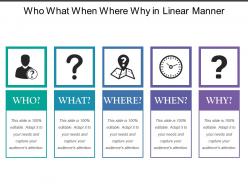
Who what when where why in linear manner
SlideTeam present to you its who what when where why in linear manner PPT slideshow. The slideshow is fully customizable which allows you to change the font size, font style and font color of the text used. You can also modify the orientation, color and the size of the features used in the pre-designed slides. You can save this PowerPoint in PDF or JPG format. You can view it in widescreen display ratio of 16:9 or standard size display ratio of 4:3 after downloading it.
-
Who what when where why showing question mark
Presenting this set of slides with name - Who What When Where Why Showing Question Mark. This is a five stage process. The stages in this process are Who What When Where Why, Five Ws, Questions.
-
Upselling depicting who what when where and how
Presenting this set of slides with name - Upselling Depicting Who What When Where And How. This is a four stage process. The stages in this process are Upselling, Sales, Selling.
-
Who what when where why silhouette
Presenting this set of slides with name - Who What When Where Why Silhouette. This is a five stage process. The stages in this process are Who What When Where Why, Five Ws, Questions.
-
Who what when where why sign boards 2
Presenting this set of slides with name - Who What When Where Why Sign Boards 2. This is a five stage process. The stages in this process are Who What When Where Why, Five Ws, Questions.
-
Who what when where why sign boards
Presenting this set of slides with name - Who What When Where Why Sign Boards. This is a five stage process. The stages in this process are Who What When Where Why, Five Ws, Questions.
-
Who what when where why having five gears
Presenting this set of slides with name - Who What When Where Why Having Five Gears. This is a five stage process. The stages in this process are Who What When Where Why, Five Ws, Questions.
-
3 key question of who what when
Presenting this set of slides with name 3 Key Question Of Who What When. The topics discussed in these slide is 3 Key Question Of Who What When. This is a completely editable PowerPoint presentation and is available for immediate download. Download now and impress your audience.
-
Business problem solving question of who what when
Presenting this set of slides with name Business Problem Solving Question Of Who What When. This is a three stage process. The stages in this process are Customer, Competitors, Suppliers, Strategy Corporate, Marketing, Product, Annual Plan. This is a completely editable PowerPoint presentation and is available for immediate download. Download now and impress your audience.
-
Project description illustrating who what when
Presenting this set of slides with name Project Description Illustrating Who What When. This is a three stage process. The stages in this process are Project Description Illustrating Who What When. This is a completely editable PowerPoint presentation and is available for immediate download. Download now and impress your audience.
-
Defining the problem statement who where what when why and how good ppt example
Presenting defining the problem statement who where what when why and how good ppt example. This is a defining the problem statement who where what when why and how good ppt example. This is a six stage process. The stages in this process are the problem, problem and solution, problem statement risk mitigation strategies.
-
3d man standing beside questions who what how when future ppt graphics icons
We are proud to present our 3d man standing beside questions who what how when future ppt graphics icons. This Diagram pinpoints the critical points and areas in your process and set the timelines for their completion. Create captivating presentations to deliver comparative and weighted arguments
-
3d man thinking who what where when why how question mark ppt graphics icons
We are proud to present our 3d man thinking who what where when why how question mark ppt graphics icons. This PPT slide shows ideas to get the different elements of your Business to mesh and coalesce into a focused team driven by a common goal to achieve the common aim with Excellence.
-
Template with several colorful arrow street signs with common questions who what where when why how
Boost your presentation and its significance with this neatly presented Template With Several Colorful Arrow Street Signs With Common Questions Who What Where When Why How. This is a sharp professional presentation design that adheres to the standards of user friendliness and utility. It includes built in sections laden with content to help you portray important information with ease. Its versatility and flexibility is something that can help you take your presentation off the charts. Also an assortment of customizations that this layout responds to is noteworthy. Since it is a user friendly template it is suitable for any setting whether it is business academic or personal. With pre loaded graphics images content etc. it is very simple to use and include in your operations. Also presenting complex information and data in an easy to interpret format is one of the most notable features of this design that can be altered to fit your needs. Use it on multiple occasions as once downloaded this template can be saved for future portrayal.
-
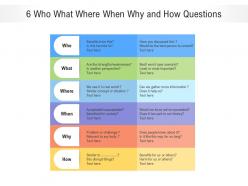
6 who what where when why and how questions
Presenting this set of slides with name 6 Who What Where When Why And How Questions. The topics discussed in these slides are Benefits, Strengths, Weaknesses, Information, History. This is a completely editable PowerPoint presentation and is available for immediate download. Download now and impress your audience.
-
Tactical Planning Showing What Who When And How PPT Template AT
Ditch the Dull templates and opt for our engaging Tactical Planning Showing What Who When And How PPT Template AT deck to attract your audience. Our visually striking design effortlessly combines creativity with functionality, ensuring your content shines through. Compatible with Microsoft versions and Google Slides, it offers seamless integration of presentation. Save time and effort with our pre designed PPT layout, while still having the freedom to customize fonts, colors, and everything you ask for. With the ability to download in various formats like JPG, JPEG, and PNG, sharing your slides has never been easier. From boardroom meetings to client pitches, this deck can be the secret weapon to leaving a lasting impression.
-
Tactical planning showing what who when and how
Presenting this set of slides with name - Tactical Planning Showing What Who When And How. This is a four stage process. The stages in this process are Tactical Planning, Tactical Strategy, Tactical Goals.
-
Brainstorming who what where why when how
Brainstorming Who What Where Why When How PPT template comes with brilliant graphics for depicting the net results of your idea-sharing session. The images of people with light-bulb are tastefully designed to put your ideas in the best light possible. All elements of this slide layout are completely editable as per the user’s need. The PowerPoint theme is also available in a widescreen format to ensure quality even on the projector. This template is usable on MS PowerPoint as well as Google Slides.
-
3d man with questions which when what who ppt graphics icons powerpoint
We are proud to present our 3d man with questions which when what who ppt graphics icons powerpoint. The above template has the theme of 3d illustration of human character confused about decision. Interlink your thoughts with this template. Your message will stand out loud and clear. Give your thoughts the durability they deserve.
-
Question mark include what who where when how and why in one image
Presenting this set of slides with name - Question Mark Include What Who Where When How And Why In One Image. This is a seven stage process. The stages in this process are Question Mark, Asking Question, Query Mark.
-
Operating rhythm defining who how when what and why text boxes
Presenting this set of slides with name - Operating Rhythm Defining Who How When What And Why Text Boxes. This is a five stage process. The stages in this process are Operating Rhythm, Six Sigma, Business Rhythm.
-
0914 what who how when action plan image graphic stock photo
We are proud to present our 0914 what who how when action plan image graphic stock photo. This image is in .jpg format and is available in size 1280x720. This business image has been crafted with graphic of spelling cubes. We have written all question words on these cubes and making action plan. Use this image in your business and educational presentations and get good remarks from your viewers.