

Lead Generation Dashboard For Tracking Conversion Rates Customer Lead Management Process




Try Before you Buy Download Free Sample Product
 Impress Your
 Audience
 100%
100% Editable
 Save Hours
 of Time


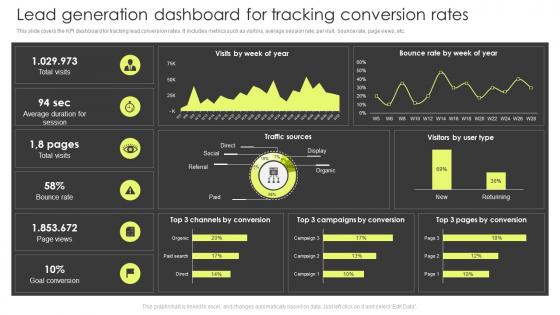
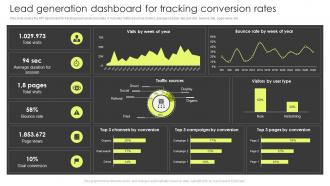
This slide covers the KPI dashboard for tracking lead conversion rates. It includes metrics such as visitors, average session rate, per visit, bounce rate, page views, etc.
People who downloaded this PowerPoint presentation also viewed the following :
Lead Generation Dashboard For Tracking Conversion Rates Customer Lead Management Process with all 7 slides:
Use our Lead Generation Dashboard For Tracking Conversion Rates Customer Lead Management Process to effectively help you save your valuable time. They are readymade to fit into any presentation structure.





FAQs for Lead Generation Dashboard For Tracking Conversion Rates Customer
Track your lead volume, conversion rates at each funnel stage, and cost per lead - those are the big ones. Lead quality scores matter too, obviously. I'm obsessed with checking lead source performance because some channels are straight-up cash drains and you gotta spot that fast. Time-to-conversion tells you a lot, plus whether your sales team actually accepts the leads you're sending them. That last part stings when the numbers are bad, but it's crucial data. Oh, and monthly recurring revenue from those leads ties everything together. Honestly though? Don't go overboard with metrics or you'll drown in spreadsheets instead of fixing what's broken.
So basically your sales team gets to see what's actually happening with leads in real time. No more guessing games. You can spot which prospects are engaged vs the ones just wasting everyone's time. Plus you'll know exactly where people drop off in your funnel - super helpful for fixing bottlenecks. Honestly, I've seen teams double their close rates just from focusing on warm leads instead of cold calling random people. The trick is tracking stuff that actually moves the needle for YOUR process, not whatever metrics look impressive on paper.
Okay so first thing - grab a CRM like HubSpot or Salesforce since you'll need somewhere to actually track your leads. Google Analytics is obvious for web traffic, plus Facebook Ads Manager if you're running campaigns there. Mailchimp or whatever email tool you use should connect too for engagement stuff. Zapier's pretty clutch when things don't connect naturally - saves you tons of headaches. Oh and don't sleep on call tracking software, that's where some of your best leads probably come from. Live chat tools like Intercom are solid for catching people while they're browsing. Start simple though - CRM plus one traffic source, then add more.
Look, staring at spreadsheets all day will make you go cross-eyed. Charts and graphs actually show you what's happening - like which channels bring in decent leads or when your conversion rates tank. I swear it's so much easier to spot patterns visually than scrolling through endless rows of data. Quick dashboards let you see bottlenecks in your funnel right away. Plus you can figure out what's actually working vs. what's just burning budget. Start with your top 3-4 metrics first (don't go crazy), then add more later.
Oh man, the worst thing you can do is cram like 20 different metrics on one screen. Nobody looks at that mess. Honestly, I'd rather have no dashboard than one with garbage data that's not even updating right. Stick to maybe 5-7 things that actually matter for revenue - conversion rates, cost per lead, stuff like that. Skip the vanity metrics like total page views unless they're genuinely helping you make decisions. Start basic first. You can always add more later, but most people never do because simple works better anyway.
Honestly? Go with 30-minute updates to start - you can always tweak from there. Your sales team needs fresh data, especially for hot leads that need quick follow-up. Daily refreshes are way too slow nowadays (you'll just lose leads to competitors who move faster). If you're running paid ads, hourly updates help catch problems before they eat your budget. Real-time sounds cool but it's probably overkill unless you're dealing with crazy high volume. Oh, and definitely set up alerts for your high-value prospects - way better than constantly checking the dashboard.
Personas totally change which metrics you should watch. Like if you're going after busy executives, track their engagement with quick content formats and check job titles in your lead data. Different people convert through different channels - makes sense when you think about it. I'd segment your dashboard by persona so you can actually see what's working for each group. Set up separate funnels for each one. Track their specific behaviors too. Way better than just throwing random data at the wall, you know? This way you're measuring stuff that'll actually help close deals with the right people.
Just create separate sections for each variant showing your key metrics side-by-side. I'd track conversion rates, lead quality, and cost-per-lead for both versions. Set up alerts when one's clearly winning, but make sure you're looking at confidence intervals too - otherwise you might jump the gun on bad data. Sample sizes matter way more than people think. Test one thing at a time or your dashboard turns into a mess. Honestly? This is when you start catching patterns that would've flown under the radar before. The insights can be pretty wild once you get everything set up right.
Start with lead source - that's where you'll see the biggest differences. After that, add in stuff like engagement levels, company size, maybe how they found you. Geographic breakdown is clutch if you've got different sales territories (learned that one the hard way). Don't go crazy with segments though. Pick 3-4 that actually match how your sales team operates. Short sentences work better than long ones here. You can get more detailed later, but honestly? Most dashboards I see have way too many filters that nobody uses. Focus on segments that help people make actual decisions.
Track click-through rates from your social posts to landing pages - that's where the real magic happens. Also watch lead conversion rates by platform and cost-per-lead for paid campaigns. Follower growth and engagement matter too, but honestly? Engagement beats follower count every time. Set up separate widgets for each platform so you can see which ones actually drive results. Oh, and make sure it all updates in real-time. There's nothing worse than making strategy decisions based on yesterday's data when something's tanking right now.
Conversion rate is huge - that's what shows if your leads actually buy anything. I mean, tons of leads don't matter if they're garbage (trust me on this one). Cost per lead is another big one to track. When that drops but quality stays good, you're crushing it. Lead sources are weird though - some will always perform way better than others for no obvious reason. Oh and lead scoring trends! Higher quality leads should be going up over time. Those four metrics will show you what's broken pretty fast.
Honestly, lead scoring basically becomes the backbone of how you set up your whole dashboard. I'd throw the score ranges right up front - color coding works great for spotting hot leads fast. Whatever scoring criteria you pick will dictate which metrics deserve the best spots on screen. You definitely want filtering by score thresholds though, because nobody has time to scroll through tons of junk leads. Oh, and set up alerts for high scores so your sales people can jump on them right away. Trust me, speed matters way more than you'd think.
Start with the metrics that actually matter - conversion rates, lead quality, pipeline velocity. Put those front and center. I've watched too many people cram every chart imaginable onto one screen and it's just chaos. Nobody can find anything. Keep your drill-downs simple with basic filters for dates, sources, lead status. Different teams need different views too - sales guys don't care about the same stuff marketing does, obviously. Oh, and here's what works: ask each group for their top 3 KPIs first. Build from there instead of guessing what they want.
Look, tracking where your leads come from is huge - you'll actually see which channels work vs which ones just eat your budget. Maybe Google ads crush it while Facebook totally flops, or something that used to perform well suddenly dies. Without this data you're just blindly throwing cash around hoping it works lol. The dashboard shows your real ROI pretty clearly. I'd start with your top 3 sources and put more money there while you figure out why the others suck. Trust me, it makes budget decisions way less stressful.
Dude, automated reporting will literally save your sanity. No more pulling data manually every week - just set it up once and reports go out automatically to whoever needs them. The real-time alerts are clutch too. Conversion rates tank? You'll know right away instead of finding out days later. Honestly, I should've set this up way sooner at my last job. Your dashboard actually becomes useful instead of just... sitting there looking pretty. Start with the weekly summary reports first - those hit different when they just show up in people's inboxes without you lifting a finger.
-
Thank you for showering me with discounts every time I was reluctant to make the purchase.
-
Impressive templates. Designing a presentation is fun now!