


SEO Audit Training Module On Search Engine Optimisation Edu Ppt





Try Before you Buy Download Free Sample Product
 Impress Your
 Audience
 100%
100% Editable
 Save Hours
 of Time


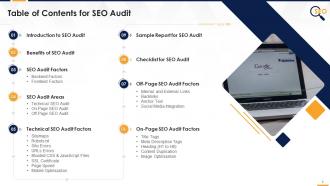
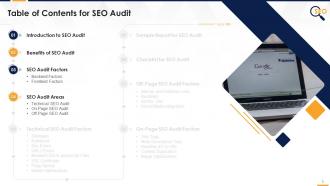
This training module deals in detail with the SEO audit. It covers the importance of conducting website SEO audits and multiple backend and frontend factors. It covers the key SEO audit areas, i.e., Technical SEO, On-Page SEO, Off-Page SEO., with common mistakes and associated corrective actions and the tools to use for audit. Then in-depth, it covers the audit factors for Technical SEO audit such as Sitemaps, Robots.txt, Site Errors, URLs Errors, Bloated CSS and JavaScript files, SSL certificate, Page Speed, and Mobile Optimization. The PPT deck also includes On-page SEO audit parameters such as Title Tags, Meta Description Tags, Heading H1 to H6, Content Duplication, and Image Optimization. Further, it covers Off-page SEO audit factors such as Internal and External Links, Backlinks, Anchor Text, and Social Media Integration. The PowerPoint deck also contains the customizable and impeccably designed audit checklists and sample audit reports for quick reference.
People who downloaded this PowerPoint presentation also viewed the following :
Content of this Powerpoint Presentation
Slide 4
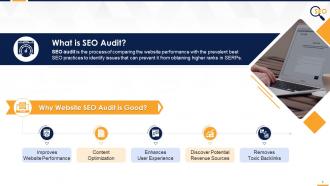
This slide provides information regarding the SEO audit. It also covers details of its importance in improving website performance, content optimization, enhancing user experience, discovering potential revenue sources, and removing toxic backlinks.
Instructor's Notes:
The major benefits of performing an SEO audit are:
- Improves Website Performance: Conducting an SEO audit will identify any issues that the website faces, such as security concerns or issues with sitemaps, so that they can be resolved to improve the website performance
- Content Optimization: SEO audit will showcase if the existing content (Keywords, Text, Anchor texts, etc.) is bringing the relevant traffic to the website or not? If not, then what prospective actions must be taken to optimize the content
- Enhances User Experience: SEO audit will point out the website's technical issues, such as broken links, slow loading speed, etc., which then can be fixed to make it more user-friendly for an enhanced user experience
- Discover Potential Revenue Sources: SEO audit helps understand what competitors are doing and eventually unearth the lucrative opportunities to partner with prospective influencers or potential affiliates for increased business website visibility
- Removes Toxic Backlinks: SEO audit helps find and remove the toxic backlinks that attract penalties from search engines impacting website ranking in SERPs
Slide 5
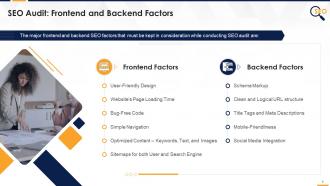
This slide provides an overview of frontend factors that must be taken into account for SEO audit, such as user-friendly design, website’s page loading time, bug-free code, simple navigation, optimized content – keywords, text, images, and sitemaps for both user and search engine.
Slide 6
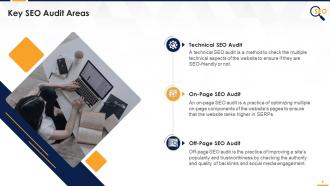
This slide provides information regarding Technical SEO Audit, On-Page SEO Audit, and Off-Page SEO Audit.
Slide 8
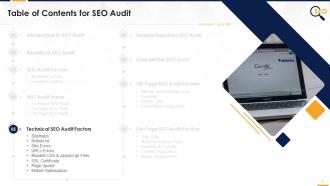
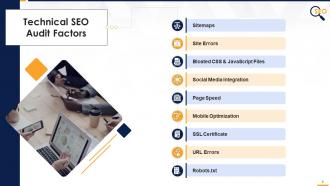
This slide provides an overview of multiple factors in technical SEO audit such as URLs, minifying CSS & JavaScript files, mobile optimization, sitemaps, robots.txt, image optimization, single domain, HTML errors / W3C validation, SSL certificate, and crawl errors.
Slide 9
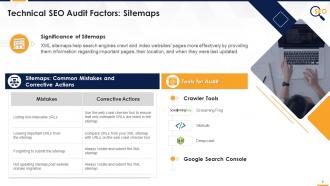
This slide provides information regarding the important XML sitemap checks for SEO audit. It also includes details of common mistakes, corresponding corrective actions, and the best tools to conduct the sitemaps audit.
Slide 10
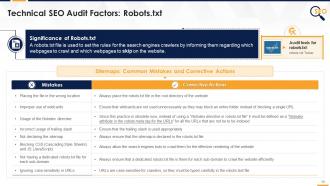
The purpose of this slide is to provide information regarding the approaches to conduct the SEO (Search Engine Optimization) audit of robots.txt file. It also tabulates the common mistakes, corresponding corrective actions, along with the best software to conduct the robots.txt file inspection.
Instructor's Notes:
- Correct way to place robots.txt file in the root directory of the website:
- Incorrect way – https://www.website.com/assets/robots.txt
- Correct way – https://www.website.com/robots.txt
- Proper way to use wildcards:
- Disallow: /xyz* - (* represents that any URL with “/xyz” present in it will be blocked)
- Disallow: *.file_type$ - (Any URL ending with .file_type extension should be blocked)
- Correct way to use a trailing slash: Let’s say we want to block the crawling of “/xyz” in the URL
- Incorrect way - Disallow: /xyz/ (As it will block the “/xyz/” folder in the URL not the”/xyz” as required
- Correct way - Disallow: /xyz
- The code snippet to use in the page code of the URLs that are required to be blocked from indexing: <meta name=”robots” content=”noindex”/>
- The command to declare the sitemap in the robots.txt file: https://www.website.com/sitemap.xml
- Let’s say we want to block the URL https://www.website.com/xyz
- Incorrect way - Disallow: /Xyz
- Correct way - Disallow: /xyz
Slide 11
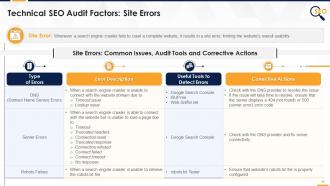
This slide provides an information regarding the major site errors in SEO such as DNS (domain name server) & server errors and robots failure. It also includes details of issues, useful tools to detect issues, and corrective actions.
Instructor's Notes:
- Server errors are different from DNS errors as in server errors, search engine crawler is successfully able to lookup the website but cannot connect due to server issues
Slide 12
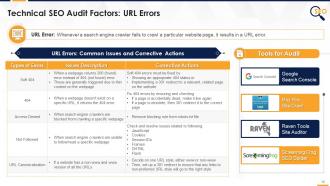
This slide provides information regarding the major URL errors in SEO such as soft 404, 404, access denied, not followed, and non-www and www versions of URLs. It also provides details of audit tools to detect them and corrective actions to deploy to resolve them.
Slide 13
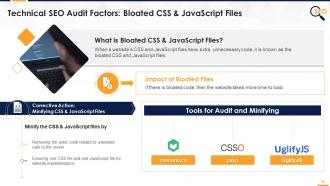
The purpose of this slide is to provide an overview of Bloated CSS & JavaScript Files and their impact on SEO. It also contains information regarding the corrective action, such as removing extra code, along with the details of the tools that can be used.
Slide 14
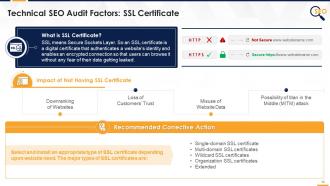
The purpose of this slide is to introduce the SSL certificate and its adverse impact if one doesn’t install it. It also includes information about the multiple SLL certificates such as single-domain SSL certificate, multi-domain SSL certificate, wildcard SSL certificate, organization SSL certificate, and extended.
Instructor's Notes:
The major types of SSL certificates are:
- Single-domain SSL certificate: If the website is hosted on a single domain, this type of certificate is good enough
- Multi-domain SSL certificates: If a website is hosted on multiple domains, install this type of certificate as it covers both subdomains and entirely new websites
- Wildcard SSL certificates: This type of certificate covers subdomains on a single root domain but not new websites
- Organization SSL certificates: It is like a single-domain SSL certificate but requires details of the organization for which the website has been installed
- Extended: This type of certificate not only validates domain ownership but also verifies the organization details filled
Slide 15
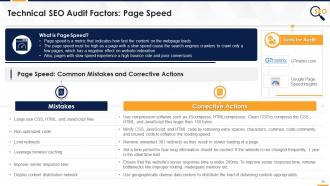
This slide provides an information regarding the page speed and major tools to audit it. It also includes details of major mistakes that result in slow page speed and corrective actions to improve it.
Slide 16
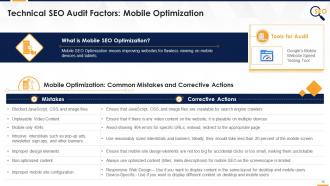
This slide tabulates the major mobile optimization mistakes in SEO audit and tools to identify them. It also contains information regarding the corrective actions to resolve them.
Slide 18
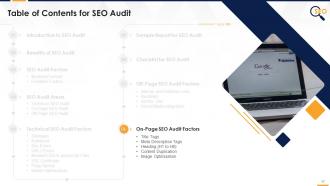
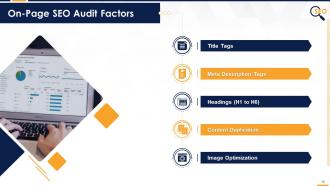
This slide provides an overview of multiple on-page SEO audit factors such as title tags, meta description tags, headings (H1 to H6), content duplication, and image optimization.
Slide 19
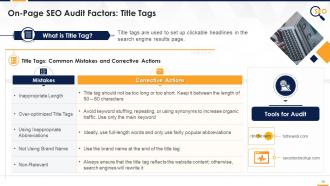
This slide provides information regarding the common mistakes identified in On-Page SEO audit. It also contains details of multiple audit tools and corrective actions to rectify those mistakes.
Slide 20
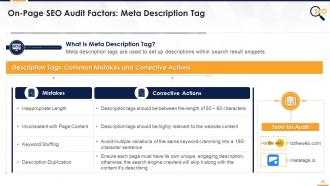
This slide indicates the common meta description tag mistakes in the On-Page SEO audit. It also contains details of audit tools and corrective actions.
Slide 21
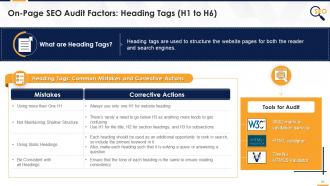
This slide indicates the common heading tags issues in On-Page SEO audit. It also contains details of audit tools and corrective actions.
Slide 22
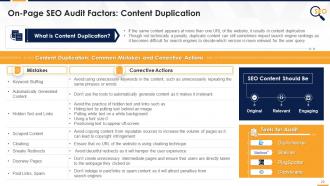
This slide provides information regarding the content duplication issues and associated corrective actions in On-Page SEO audit. It also contains details of features of high-quality SEO content.
Slide 23
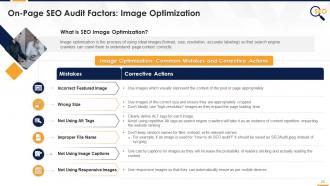
This slide provides information regarding the common image optimization mistakes in On-Page SEO audit and their corrective actions.
Slide 25
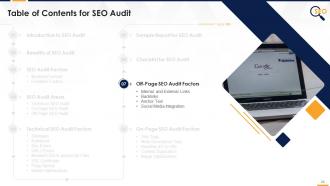
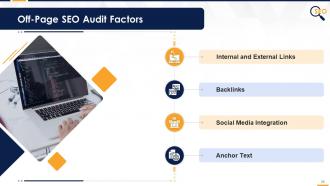
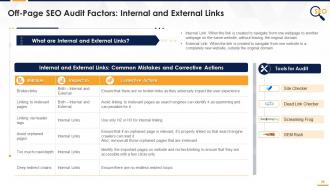
This slide provides an overview of multiple off-page SEO audit factors such as internal and external links, backlinks, anchor text, and social media integration.
Slide 26
This slide provides information regarding the common internal and external links mistakes in off-page SEO audit. It also contains details of corrective actions and tools for audit.
Slide 27
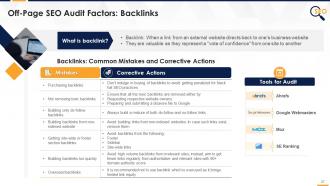
This slide provides information regarding the major backlinking mistakes in off-page SEO audit. It also tabulates the multiple corrective actions along with the tools for audit.
Slide 28
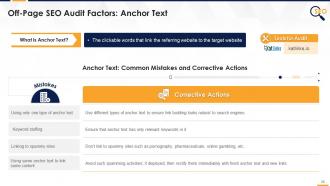
The purpose of this slide is to highlight the anchor text mistakes in off-page SEO audit along with corrective actions and tools for audit.
Slide 29
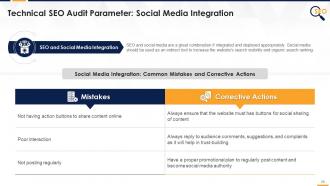
This slide tabulates the typical social media integration mistakes done in SEO. It also provides information regarding the associated corrective actions.
Slide 31
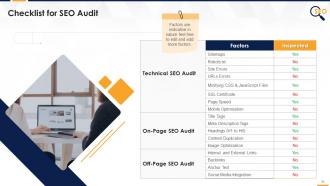
This slide showcases a comprehensive checklist to conduct an SEO audit. It includes details of multiple factors associated with Technical, On-Page, and Off-Page SEO Audit.
Slide 32
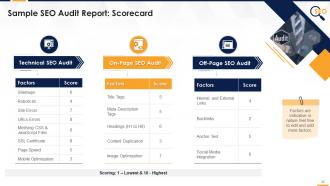
This slide highlights the sample scorecard for the preparation of the SEO audit report.
Slide 34
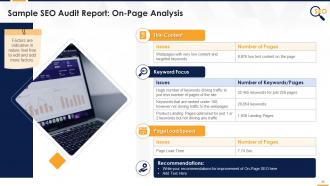
This slide highlights the findings of On-page SEO audit findings of major factors such as thin content, keyword focus, and page load speed.
Slide 35
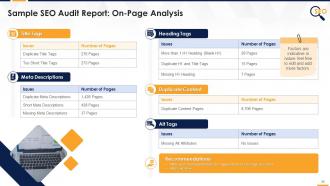
This slide tabulates the findings of on-page SEO analysis factors such as title tags, heading tags, meta descriptions, duplicate content, and alt tags.
Slide 36
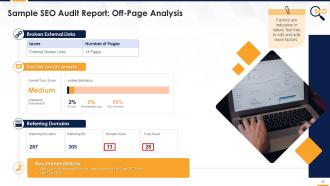
This slide showcases the findings of an off-page SEO audit covering major factors such as broken external links, backlink toxicity analysis, and referring domains.
Slides 47 to 62
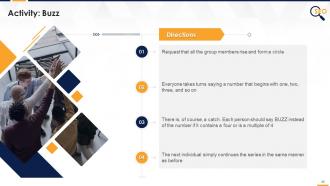
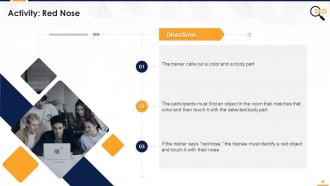
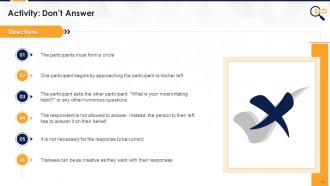
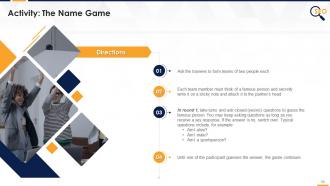
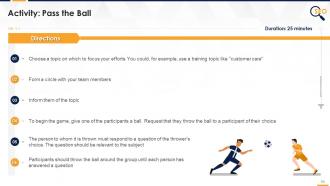
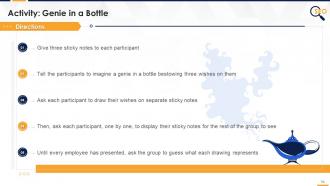
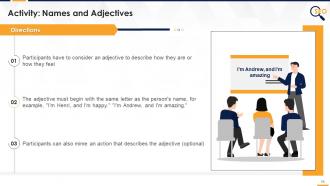
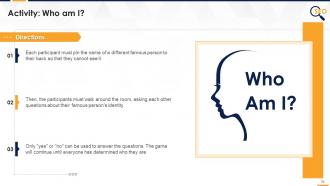
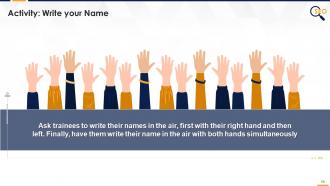
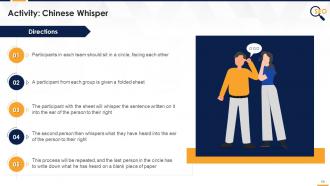
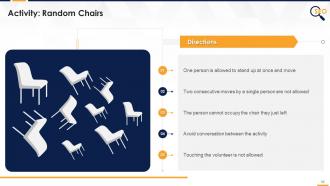
These slides include multiple energizer activities to break the monotony of training sessions and actively engage trainees. The energizer activities are as follows:
- Buzz
- Red Nose
- Don’t Answer
- Who are You?
- The Name Game
- Pass the Ball
- Genie in a Bottle
- Names and Adjectives
- Who am I?
- Are We Together?
- Write your Name
- Chinese Whisper
- Random Chairs
Slide 64
This slide highlights the cover letter for the training proposal. It includes details regarding what the company providing corporate training can accomplish for the client.
Slide 67
The purpose of this slide is to showcase the multiple types of courses offered by the training company.
Slide 69
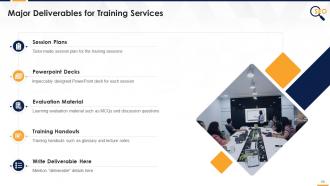
This slide indicates the major deliverables that the corporate training firm will provide to the client. The key deliverables highlighted are session plans, PowerPoint deck, evaluation material, and training handouts.
Slide 71
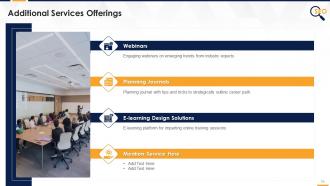
This slide represents the multiple additional services offered by the training firm to the client, such as webinars, planning journals, and e-learning design solutions.
Slide 73
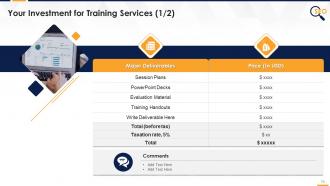
This slide tabulates the major deliverables offered by the training company to the client along with their associated costs.
Slide 74
The purpose of this slide is to highlight the multiple additional services offered by the training firm along with their cost details.
Slide 76
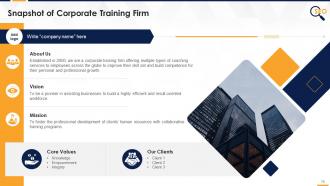
This slide provides an overview of the corporate training firm's vision and mission statements, core values, and key clients.
Slide 78
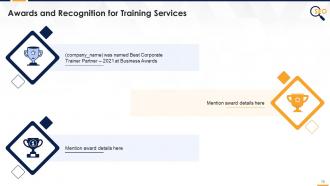
This slide highlights the major awards and recognition won by the training firm for their exceptional service to clients.
Slide 80
The slide provides information regarding the team members that would be providing the training services to the client. It includes details of the trainer and their respective designations.
Slide 81
The slide provides information regarding the team members that would be providing the training services to the client. It includes details of the employees names and their respective designations.
Slide 83
This slide provides information pertaining to testimonials given by satisfied clients of the training firm.
Slide 84
This slide highlights the testimonials from multiple satisfied clients of the training firm providing information regarding congratulatory messages, client name, and company details.
Slide 86
This slide showcases the case study for the training proposal. It includes information regarding the problem faced by the client and solutions offered by the training firm. It also covers details of the results and client testimonial.
Slide 88
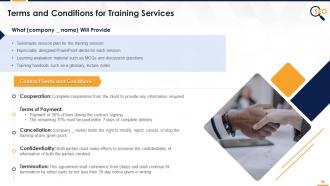
This slide provides information regarding the contract terms and conditions of the training proposal. It also includes details of deliverables that the training company will provide to the client.
Slide 90
The purpose of this slide is to provide the contact information of the corporate training firm. It includes the firm’s official address, contact number, and email address.
Slide 91
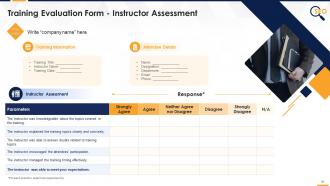
This slide highlights the training evaluation form for instructor assessment. It also includes sections to fill details of training information and attendee details.
Slide 92
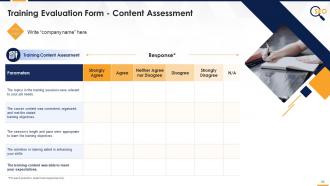
This slide showcases the questions for the assessment of the training content by the attendees.
Slide 93
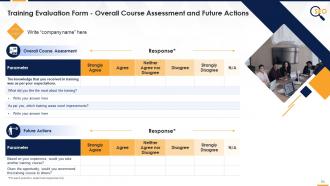
The slide indicates the evaluation form for course assessment. It also includes questions pertaining to the future actions of the attendees.
SEO Audit Training Module On Search Engine Optimisation Edu Ppt with all 98 slides:
Use our Training Module On Search Engine Optimization SEO Audit Edu Ppt to effectively help you save your valuable time. They are readymade to fit into any presentation structure.

































FAQs for SEO Audit Training Module On Search Engine
So for an SEO audit, you've got five main things to check: technical stuff, content quality, keywords, backlinks, and user experience. I'd honestly start with the technical boring stuff first - crawl errors, site speed, mobile issues. That foundation matters more than people think. Then look at whether your content actually answers what people are searching for and if you're targeting decent keywords. Oh and definitely check your backlinks aren't sketchy. I know it sounds like a lot but just do one section at a time. Grab Screaming Frog or whatever tool you prefer for the technical crawl, then work through everything else systematically. Way less overwhelming that way.
Honestly, just grab Screaming Frog first - that thing is like magic for finding broken links, missing meta stuff, and duplicate content. I use it constantly. Then hit up PageSpeed Insights to see how slow your site actually is (spoiler: probably slower than you think). Google Search Console is clutch too since it shows you what Google's seeing when they crawl around. Mobile testing matters a ton now, but seriously don't try doing everything at once or you'll drown in data.
Start with Google Search Console and Analytics since they're free and show you exactly what Google thinks of your site. Screaming Frog is what everyone uses for technical crawling - free version caps at 500 URLs though. For keywords and spying on competitors, you'll want SEMrush or Ahrefs. Yeah, they're expensive but honestly worth every penny. PageSpeed Insights is decent for performance stuff, but GTmetrix gives you way more detail. Oh, and don't blow your budget right away - master the free tools first, then upgrade when you actually need the fancy features.
Start by checking where you rank for your main keywords right now. Google Search Console will show you what's actually bringing in traffic - honestly, the results might shock you compared to what you think is working. Track any drops or gains over time, then look at search volume and competition for each term. Your click-through rates matter too. If they're low, your title tags probably suck. I just throw everything into a basic spreadsheet and update it monthly. Makes it way easier to spot what needs fixing first instead of guessing.
Dude, site speed can make or break your SEO. Google literally uses it as a ranking factor, plus slow sites annoy users (and we all bounce when pages take forever). Check your Core Web Vitals first - that's the stuff Google actually measures like loading times and layout shifts. I always use PageSpeed Insights or GTmetrix to find what's slowing things down. Oh, and slow sites waste your crawl budget too since Google's bots won't stick around waiting. Start with your highest-traffic pages - that's where you'll see results fastest. Seriously though, I've watched sites tank just from speed issues.
Broken Link Checker is free and works great for this - just paste in your URL. Screaming Frog and Ahrefs are more thorough if you want to get fancy about it. They'll crawl your whole site and show you all the 404s and redirect mess. Start with fixing broken links on your most important pages first. Internal ones are easy - just redirect to something relevant or delete the link entirely. External links are more annoying since you have to hunt for new URLs or just remove them. Honestly, I kind of enjoy this process? It's weirdly therapeutic, like organizing your bookmarks but actually useful for SEO.
First thing I'd do? Fix your title tags and meta descriptions - easiest wins right there. Your H1s need to be unique on each page, and make sure H2s through H6s actually flow logically. URLs are another quick fix if they're stuffed with keywords or way too long. Internal linking is honestly where most people drop the ball, but it works so well for SEO. Oh, and don't skip image alt text - takes two seconds but Google loves it. Page speed's huge too. My take: just make a checklist and knock things out one by one instead of bouncing around everywhere.
Grab SEMrush or Ahrefs and check out your client's top 5 competitors. See what keywords they're crushing that your client isn't even touching. Their content gaps are gold mines honestly. Don't forget backlink profiles either - that's where the real insights hide. I always end up scrolling through their social feeds for way too long, but whatever. Site speed and mobile stuff matters too, plus schema markup if they're being fancy about it. Throw everything into a spreadsheet - rankings, content ideas, domain scores. Makes it way easier to spot the quick wins.
Start with PageSpeed Insights - seriously, slow mobile sites kill everything. Make sure your site's actually responsive (not some ancient separate mobile version). Buttons need to be big enough for fat fingers, and definitely test your forms on real phones. That's usually where people bail out. Oh, and check Search Console to see if mobile-first indexing is doing its thing. Honestly though? Just browse your own site on your phone during the audit. You'll spot annoying stuff that all those fancy tools completely miss. Sometimes the best insights come from actually using the damn thing yourself.
So Google's really pushing user experience stuff now - it affects your SEO big time. Core Web Vitals are the main thing to watch: how fast pages load, if they're responsive, and whether stuff jumps around while loading. Poor scores will hurt your rankings for sure. Bounce rate and time on page help too, but honestly bounce rate's kinda weird sometimes depending on your site type. When I'm auditing sites, these UX issues usually point to technical problems - like huge image files or code that blocks rendering. Start with Core Web Vitals though. They're actually measurable and Google's been pretty upfront about caring about them.
Honestly, most people get way too caught up in keyword density - that's like 2010 SEO thinking. What really matters is balancing technical fixes with actual content quality and what users actually want. Mobile optimization and site speed checks are huge though, don't sleep on those. Oh, and here's something that drives me crazy - people create these massive audit lists that nobody knows what to do with. Prioritize by what'll actually move the needle for your business first. User experience issues that kill conversions? Fix those immediately. Then you can geek out on the technical stuff later.
So when you're checking backlinks, there are three main things I'd look at. Domain authority matters - use Ahrefs or SEMrush to find high-authority sites in your space. Those are like gold honestly. Also check your anchor text spread. Too many exact matches actually look sketchy to Google. Then look at link velocity and hunt down any spammy garbage that needs disavowing. Oh and don't get caught up just counting links - I've seen sites with 50 quality links outrank ones with 500 crappy ones. Start by pulling your profile and sort by domain authority first.
Start with organic traffic, keyword rankings, and click-through rates - those are your bread and butter. Google's obsessed with Core Web Vitals and page speed now, so watch those closely. Backlink growth matters too, obviously. Bounce rates and dwell time will tell you if people actually like what you're putting out there, which honestly might be more important than rankings sometimes. Set up monthly reports in Search Console and Analytics so you're not scrambling to find data later. Oh, and don't go crazy tracking everything - pick maybe 5-7 metrics max and actually look at them regularly.
Your SEO audit is basically gonna be half about content quality. Poor content shows up everywhere - high bounce rates, terrible dwell time, keywords that don't rank. Google's scary good at catching thin content now too. Quality content does the reverse obviously. Here's the thing though - content issues mess with your internal linking and conversions during audits. Always check if your technical problems connect to content performance when you're reviewing results. Half the time fixing content actually boosts your technical scores. It's all linked together more than people think.
Focus on what actually moves the needle - traffic drops, revenue hits, stuff they can act on. Start with an exec summary because honestly? That's all most people read anyway. Break down technical problems, content issues, competitor stuff with clear priorities attached. Don't forget timelines and what resources you'll need for each fix. ROI estimates help too when you can swing it. The roadmap at the end should be dead simple - numbered list works great for getting budget approved. Oh, and make sure everything ties back to business impact or they'll just file it away and forget about it.
-
Unique and attractive product design.
-
Visually stunning presentation, love the content.