

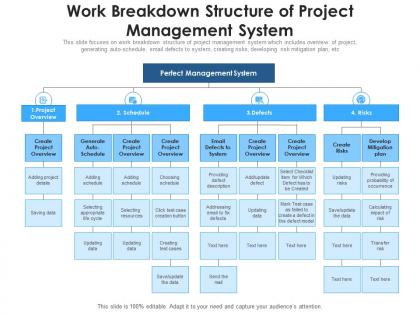
Work breakdown structure of project management system




Try Before you Buy Download Free Sample Product
 Impress Your
 Audience
 100%
100% Editable
 Save Hours
 of Time


This slide focuses on work breakdown structure of project management system which includes overview of project, generating auto-schedule, email defects to system, creating risks, developing risk mitigation plan, etc
People who downloaded this PowerPoint presentation also viewed the following :
Work breakdown structure of project management system with all 2 slides:
Use our Work Breakdown Structure Of Project Management System to effectively help you save your valuable time. They are readymade to fit into any presentation structure.
FAQs for Work breakdown structure of
Think of it like Russian dolls - you've got your main project at the top, then break it into big chunks or phases. Keep going until you hit actual tasks your team can handle. I usually aim for stuff that's 8-80 hours, but honestly some people go way overboard with tiny details. Each piece needs someone responsible for it and a clear outcome you can point to. The deeper you go, the more specific it gets. Short tasks are easier to track - nobody wants to guess if that 3-month monster task is really "70% done." Just make sure you don't create busywork by breaking things down too much.
So basically you take your huge project and chop it into smaller chunks that don't make you want to hide under your desk. Break down the big deliverables first, then keep going until each piece feels doable. Honestly, it's like having a roadmap - you'll actually know where you're going instead of just winging it. Your team gets clear responsibilities, you can estimate costs way better, and problems show up early instead of blindsiding you later. I learned this the hard way on my last project... anyway, just keep breaking things down until they feel manageable.
Oh man, the classic mistake is diving way too deep into tiny details right off the bat. Start big picture first! Also, people constantly mix up what they're delivering versus how they'll do it - totally different things. I've seen so many teams just assign work packages to people's names, which is completely backwards. Don't forget the boring stuff like testing and documentation either. Stick to that 8-80 hour sweet spot for each package. And honestly? Make sure everything actually adds up to your full scope - missing pieces will bite you later. Break it down gradually, not all at once.
Honestly, just think about how work actually gets done in your field. IT projects? Break it down by phases - requirements, dev work, testing, deployment. Maybe split development into front-end and back-end stuff. Construction is completely different though - you're looking at foundation, framing, electrical, all that physical work. The trick is matching how your team naturally divides things up. What deliverables actually make sense to track? I'd start by checking out similar projects in your industry first - see how they structured everything. Way easier than starting from scratch.
Honestly, think of your WBS as the foundation for all your budget stuff. Break your project into those smaller chunks first - you'll get way better estimates for time, people, and materials on each piece. Way better than guessing on some massive project blob, trust me. You can also catch those annoying resource conflicts early (like when everyone needs the same expert). Oh, and tracking your actual spending becomes so much easier when everything's broken down like that. Definitely do your WBS before you even open that budget spreadsheet - saves you headaches later.
Okay so a WBS stops all that "wait, I thought you were doing this" chaos. Everyone knows exactly what they own. Big projects feel way less scary when you chop them into smaller pieces - honestly, staring at something huge just makes people freeze up. Your team will actually collaborate better too since they can see how their work connects to everyone else's stuff. I'd start by figuring out your main deliverables first. Then just assign someone to each chunk and you're good to go.
So there's two ways to break down your WBS. Deliverable-based focuses on the actual stuff you're making - reports, software pieces, whatever. Phase-based is more about timeline stages like planning, execution, etc. I'd definitely go with deliverable-based. Way more concrete. When you're phase-based, work packages get weirdly vague and don't tie to real outputs. Your stakeholders don't really care about "phase 2" - they want to know when they'll actually see the thing they asked for. Makes tracking progress easier too since you can point to tangible results. Only exception might be if your project is super process-heavy, but even then... deliverable usually wins.
Honestly, just treat risk stuff like any other task in your WBS. Create separate work packages for risk identification, assessment, and mitigation - basically make them visible instead of hoping you'll remember later. Build buffer time into your estimates too. For your biggest risks (maybe top 3-5), create contingency work packages so you're not scrambling if things go sideways. I learned this the hard way on a project last year... anyway, the trick is making risk management actual work items, not something you tack on at the end. Short version: plan for the problems before they bite you.
For WBS stuff, I usually just grab whatever the team's already using first. Microsoft Project and Smartsheet are solid if you want the fancy built-in features. Monday.com's pretty intuitive too. Honestly though? Sometimes I'll sketch it out on paper or use MindMeister before getting all digital about it. Asana and Wrike work great for collaboration - way better than emailing spreadsheets back and forth. Even Excel does the job for smaller projects. Don't overthink it at the start. You can always upgrade later if you need Gantt charts and all that.
Dude, visual stuff is huge for WBS charts. Color coding different teams or priorities makes everything click instantly - way better than boring black text everywhere. Stakeholders actually pay attention instead of glazing over. Use icons to show what's a task vs deliverable, and those connecting lines really help show the hierarchy. Dependencies are easier to spot with charts than bullet points too. Honestly, I learned this the hard way after watching executives scroll their phones during my first presentation lol. Just start with basic colors and clean spacing. You'll notice people get it so much faster.
Honestly, a WBS is like having a universal translator for your project. No more meetings where everyone's confused about what we're actually doing. When stakeholders start arguing about timelines or who's responsible for what, you just point to the specific work package - boom, discussion over. The visual breakdown is clutch because non-tech people can finally see how their stuff connects to everything else. You can zoom in or out depending on who you're talking to. I swear, once you start using it as your main reference doc, those painful "wait, what are we even building?" conversations basically disappear. Makes everything so much clearer.
Your WBS isn't set in stone - it needs to change as your project does. Check it every week or two to see if you need new work packages or if some should be merged. Version control will save your sanity (seriously, nothing's worse than outdated copies everywhere). Get input from the right people when making changes, and write down why you changed things. Otherwise you'll forget later and wonder what you were thinking. The key part though? Tell your team right away when you update it. An outdated WBS just creates chaos.
Honestly, don't stress about updating your WBS on some rigid timeline - that's a recipe for busywork. I'd say tackle it when scope actually changes or you hit those big project milestones. Early on during planning? Yeah, maybe weekly tweaks as things get clearer. But once you're in execution mode, way less frequent unless - and this always happens - scope creep sneaks in. New requirements, budget shifts, major deliverable changes? Those are your real triggers. My old PM used to obsess over tiny updates that didn't even affect anyone's work packages. Don't be that person. Keep it alive but practical.
Yeah, totally! WBS works great with agile - you just gotta be smart about it. Don't try mapping out every tiny detail upfront (learned that the hard way). Start broad with your epics and features, then break stuff down into stories and tasks as you go. Each sprint gives you more info, so update your WBS then. Honestly, the teams that struggle most are the ones obsessing over perfect planning from day one. Keep it flexible and treat it like a living doc that grows with your project. Works way better than the rigid approach most people try first.
Dude, skip the WBS and you're asking for trouble. Your estimates will be garbage since you don't know what you're actually building. Team members end up confused about who's doing what - I've literally watched people just sit there not knowing their next move. Change requests become impossible to handle properly because you can't figure out what they'll actually impact. Oh, and good luck explaining progress to stakeholders when you can't break down the work clearly. Honestly? Just bite the bullet and create one upfront. Yeah it's boring but way better than the chaos later.
-
Awesome presentation, really professional and easy to edit.
-
Really like the color and design of the presentation.
-
Great product with highly impressive and engaging designs.
-
Unique research projects to present in meeting.