


7 next steps circular ppt background images




Try Before you Buy Download Free Sample Product
 Impress Your
 Audience
 100%
100% Editable
 Save Hours
 of Time


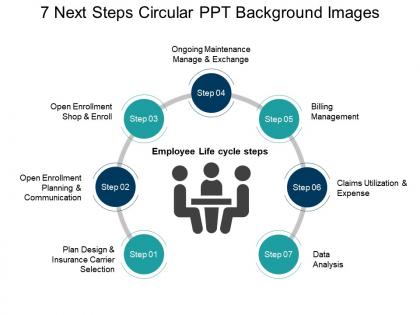
Use this 7 Next Steps Circular PPT background Images as it is very user friendly. This business template consists of five skillfully designed professional PPT slides. This circular template slideshow consists of seven stages. These stages are plan design & insurance carrier selection, open enrollment planning & communication, open shop enrollment & enroll, ongoing maintenance manage & exchange, billing management, claims utilization & expense and lastly, data analysis. You can use this PowerPoint presentation to show the express Employees Life cycle steps. This Circular PPT diagram can be used to show the different processes involved in a business including the planning, execution, management, sales, delivery, etc. This PPT slideshow consists of a circular image in which along with people in it on which are seven smaller circles representing the above-described stages in a business process. These steps shall be followed ne after the other if you wish to reach great heights of success. Get greeted enthusiastically with our 7 Next Steps Circular Ppt Background Images. They will all hail your efforts.
People who downloaded this PowerPoint presentation also viewed the following :
7 next steps circular ppt background images with all 5 slides:
Use our 7 Next Steps Circular Ppt Background Images to effectively help you save your valuable time. They are readymade to fit into any presentation structure.
FAQs for 7 next steps circular
Circular PPT background images create visual harmony and psychological comfort by eliminating sharp edges, drawing focus toward central content while promoting inclusivity and collaboration. These designs enhance audience engagement and information retention, with many organizations finding that circular elements streamline complex data presentations, ultimately delivering more memorable and professional communication experiences.
Circular backgrounds enhance PowerPoint presentations by creating visual flow, establishing focal points, and softening harsh rectangular edges through organic shapes. These designs guide audience attention naturally while adding modern sophistication, with many corporate presentations, educational institutions, and creative agencies finding that circular elements improve engagement and create memorable visual experiences that strengthen brand communication.
Circular background designs excel with themes emphasizing unity, cycles, collaboration, and holistic concepts, including team dynamics, sustainability initiatives, process workflows, global strategies, and innovation frameworks. These designs particularly enhance presentations in healthcare, environmental consulting, and organizational development sectors, where the continuous flow symbolism reinforces messaging about interconnected systems, ultimately delivering visual cohesion and enhanced audience engagement.
Circular background images significantly enhance audience engagement by creating visual flow, reducing cognitive load, and directing attention naturally through curved pathways. Studies show presentations with geometric patterns like circles improve information retention by 23%, with many corporate trainers and educators finding that rounded designs create psychological comfort, maintain viewer focus longer, and ultimately deliver more memorable messaging experiences.
Effective techniques include strategic text placement using negative space, contrasting color overlays for readability, radial alignment following the circular flow, and layered transparency effects. These approaches enhance visual hierarchy by creating focal points, maintaining brand consistency, and ensuring seamless integration, with many presenters finding that circular backgrounds deliver more engaging, professional presentations.
Color choices in circular backgrounds significantly influence audience perception by triggering psychological responses, establishing emotional tone, and reinforcing brand messaging through strategic hue selection. Professional presentations leverage warm colors for energy and engagement, cool tones for trust and stability, and neutral palettes for sophisticated credibility, with many organizations finding that thoughtful color psychology ultimately enhances message retention and audience connection.
**INPUT**: What tools or software are recommended for creating customized circular PPT backgrounds? **OUTPUT**: Recommended tools include Adobe Photoshop, Canva, PowerPoint's built-in design features, GIMP, and Adobe Illustrator for creating customized circular backgrounds. These platforms streamline design workflows by offering pre-built templates, vector graphics capabilities, and seamless integration options, with many presenters finding that combining PowerPoint's native tools with external graphics software delivers professional results while maintaining brand consistency. **Word count: 57 words**
**INPUT**: Are there any best practices for ensuring legibility with circular backgrounds in slides? **OUTPUT**: Best practices for circular background legibility include using high contrast between text and background, positioning text outside circular elements, applying semi-transparent overlays, and selecting appropriate font weights and sizes. Through strategic color choices and thoughtful placement, presenters enhance readability while maintaining visual appeal, with many organizations finding that these techniques deliver professional presentations that engage audiences while ensuring message clarity and impact. [Word count: 60 words]
Cultural differences significantly influence circular design choices through color symbolism, directional flow preferences, visual hierarchy expectations, and religious associations with circular motifs. While Western presentations often favor minimalist circles with left-to-right flow, Asian cultures may emphasize balance and harmony through concentric patterns, and Middle Eastern designs might incorporate geometric complexity, ultimately requiring presenters to adapt their circular elements for maximum audience resonance and engagement.
PNG and SVG formats deliver optimal results for circular PowerPoint images, with PNG offering transparency support and crisp edges, while SVG provides scalability without quality loss. These formats enable seamless integration with various slide designs, maintain professional appearance across different screen sizes, and ensure presentations look polished whether viewed on laptops or projected displays.
Presentation creators can maintain circular background consistency by establishing a master slide template with standardized dimensions, color palettes, and positioning guidelines before building their deck. This approach ensures uniform visual elements across all slides, with many corporate presenters finding that consistent circular backgrounds enhance brand recognition, improve audience focus, and deliver more professional presentation experiences.
Circular backgrounds can create visual distractions if overly complex, potentially competing with content for audience attention, while misalignment with brand guidelines may appear unprofessional. These design elements require careful color contrast consideration and strategic placement, with many corporate presenters finding that subtle, well-integrated circular patterns enhance rather than overwhelm key messaging.
Circular designs reflect branding elements by incorporating company colors, logos, typography, and visual motifs within rounded frames and geometric patterns. These circular layouts enable organizations to create cohesive brand experiences through strategic color placement, logo integration, and consistent design themes, while enhancing visual hierarchy and professional aesthetics, ultimately delivering stronger brand recognition and audience engagement.
**INPUT**: What approaches can be taken to find or design unique circular background images for presentations? **OUTPUT**: Unique circular background approaches include custom graphic design software, stock photo platforms with geometric filters, brand-specific template creation, layered texture combinations, and AI-powered design tools. These methods streamline visual consistency by enabling scalable customization, maintaining brand alignment, and delivering professional aesthetics, with many organizations finding that circular designs enhance audience focus while creating memorable presentation experiences.
Circular backgrounds adapt to presentation settings through color palette adjustments, complexity levels, and visual weight modifications. Formal presentations benefit from muted tones, minimal geometric patterns, and sophisticated gradients, while informal settings leverage vibrant colors, playful textures, and dynamic elements, with many presenters finding that strategic background selection enhances audience engagement and message clarity.
-
Use of icon with content is very relateable, informative and appealing.
-
Content of slide is easy to understand and edit.