


7 productivity improvement ppt example




Try Before you Buy Download Free Sample Product
 Impress Your
 Audience
 100%
100% Editable
 Save Hours
 of Time


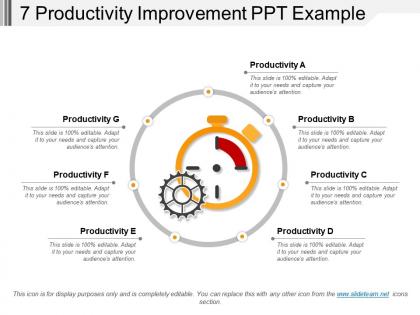
Achieve better results through productivity with these 7 productivity improvement PPT examples. This presentation layout of employee productivity management allows you to showcase a series of individual steps such as to measure the required tasks, maintain two-way communications, collect performance data and analyze results in order to enhance productivity. With the help of this team productivity presentation slide, you can equip the team with the right kind of tools so that they can improve and create value for the organization. Our increase in productivity in the workplace PowerPoint template allows you to upskill the team with training because proper training can lead to greater efficiency and refined processes. Try this improve the work efficiency template can be used by small business owners and managers to provide an overview of productivity challenges and identify appropriate programs to solve these problems. This slide is useful in keeping the employees focused and tells them specifically what impact this assignment will have on the business with the efforts. Initiate action to curb inflation with our 7 Productivity Improvement Ppt Example. Advise folks on how to cater for it.
People who downloaded this PowerPoint presentation also viewed the following :
7 productivity improvement ppt example with all 5 slides:
Each of your listeners will be drawn to your logic. Our 7 Productivity Improvement Ppt Example have a magnetic effect.
FAQs for 7 productivity
Okay so you need three main things for this presentation. First, show them the current numbers - like where you're actually starting from. Then lay out what you want to do about it with real deadlines and who's doing what. Finally, give them some kind of ROI or impact projections. Skip the corporate buzzword BS though - nobody cares about "synergy" anymore. They want actual data and steps they can follow. Oh and definitely throw in some quick wins! Leadership gets way more excited when they see stuff happening right away, even if the big changes take longer. Wrap it up with how you'll track everything going forward.
Dude, visuals are seriously clutch for training stuff. Your brain just soaks up info way better when you're not staring at walls of text - honestly, I've fallen asleep in those meetings myself. Charts and diagrams make complicated processes actually make sense. People remember things longer when you hit different learning styles at once. Try using flowcharts or those before/after screenshots to show improvements. Way more engaging than bullet points. Plus it makes abstract concepts feel real instead of just theoretical nonsense floating around in someone's head.
Think of data like a detective for your workflow - it'll show you exactly where things get stuck and what's wasting time. Track stuff like how long tasks actually take, where your resources go, maybe error rates. Honestly, you'll probably be shocked by what patterns show up. Don't go crazy measuring everything though - that's overwhelming and kinda pointless. Just pick 2-3 problem areas you already suspect are messy. Let the numbers tell you what's really happening instead of just guessing. Way better than flying blind, trust me.
Honestly, you've gotta make it about what's in it for *them*. Show how these changes will actually make their jobs easier or less annoying - nobody wants another "do more with less" situation. Get them involved in spotting the problems and brainstorming fixes. When people help design the solution, they actually want it to work. I'd start by just asking what's driving them nuts right now in their day-to-day stuff. Then celebrate the small wins as you go. Regular check-ins help too, but don't make them feel like micromanaging.
Dude, the classic mistake is going full steam ahead and changing everything at once. You'll burn out your whole team that way. Pick one or two things max to start with. Also, people hate being told what to do without knowing why - so actually explain your reasoning behind the new stuff. I see so many managers skip this step and wonder why everyone's grumpy. Oh, and don't just copy whatever Facebook or some big company is doing. Their problems aren't your problems, you know? Plus give changes like 2-3 weeks before you judge if they're working. Everything looks messy at first.
Dude, template choice is everything for productivity pitches. Go with something clean and data-focused - you want your numbers to pop, not get lost in weird design stuff. I've literally watched executives get annoyed by flashy animations when they just wanted to see the ROI. Before/after comparisons need to be crystal clear. Keep colors minimal and fonts consistent. Your audience should focus on the productivity gains, not wonder what you were thinking with that font choice (speaking from experience lol). The data should tell the story. That's it.
Track output per hour and task completion times first - those are your baseline numbers. Quality stuff matters just as much though, like error rates and how happy customers actually are. Don't forget employee engagement because miserable teams crash and burn eventually. Honestly, I'd avoid the trap of measuring everything under the sun. Pick maybe 3-4 metrics that actually matter for what you're trying to achieve. Speed means nothing if you're just creating more headaches down the line, right?
Honestly, ditch those boring presentation slides where everyone just stares at you. Get people actually doing stuff - breakout rooms, live polls, or those collaborative boards where everyone can throw in ideas. Miro's pretty solid for that, or just have different team members present sections. The energy totally shifts when people aren't just sitting there half-asleep (guilty as charged lol). Short sentences work. Mix in some longer ones that actually flow naturally when you're explaining concepts. Try adding just one interactive thing to your next meeting and watch how much more engaged everyone gets. Makes such a difference.
Ditch the boring lecture format and actually demo the tools live - show them how to build their perfect workspace right there. People love gamification too. I've watched grown adults get weirdly competitive over inbox zero challenges lol. The "day in the life" storytelling approach works way better than bullet points. Or try that dramatic before/after thing where you show a total mess, then boom - clean system. Honestly, just pick one of these and test it out. You'll probably be surprised how much more engaged people get when it's not just talking at them.
Figure out what each group actually gives a shit about. Executives? Show them ROI and cost savings - pure bottom line stuff. Middle managers are drowning in logistics, so give them timelines and what resources they'll need. Frontline people just want to know if this makes their day better or worse (spoiler: always lead with better). Oh and use their actual language - don't talk strategy to someone who's worried about staffing next Tuesday. I always think about what's stressing each person out, then build my pitch around solving that specific headache.
Look for case studies with solid numbers that people can actually relate to. Toyota's lean manufacturing cut waste by 30% through continuous improvement - total classic example. Amazon's warehouse automation? 50% productivity boost plus way fewer errors. But honestly, my favorite is 3M's "15% time" policy where employees spend part of their week on personal projects. Post-it Notes came from that, and it's made them billions. People eat up that story because who would've thought giving workers more free time pays off? Microsoft tried 4-day weeks in Japan and got 40% higher productivity. Match whatever industry your audience is in, and always lead with the numbers.
So time management and productivity are basically joined at the hip - better time management = getting more done without the stress. What really works is showing people actual proof instead of just theory though. Like, I started time-blocking a few months ago and my output literally doubled (okay maybe not literally, but close). Track your wins for a week and share those numbers with your team. People believe results way more than explanations. The Pomodoro thing works too if you're into that. Bottom line: focus on high-impact stuff instead of just looking busy all day.
Honestly? Most people forget what they agreed to like 5 minutes after your presentation ends. So send that follow-up email within 24 hours - list who's doing what and by when. Set up regular check-ins too, because hoping people remember is basically wishful thinking. A shared doc or project board works great for tracking stuff transparently. Oh, and those automated deadline reminders? Total lifesaver. Just don't make it feel like you're micromanaging everyone. Actually, here's a pro tip: kick off your next presentation by going through what actually happened from the last meeting. It'll keep people honest.
Dude, try throwing in some live polls or real-time collaboration stuff during your presentations. Mentimeter's pretty solid for getting people to actually participate instead of just staring at their phones. I've found that showing screen recordings of productivity apps beats talking about them any day. Charts work way better than just rattling off numbers too - like actual before/after metrics that people can see. Honestly, traditional slide decks are kind of a snooze fest. When you have people vote on their biggest productivity challenges or demo time-tracking tools live, they actually pay attention. Maybe just pick one interactive thing to test next time?
Dude, your office setup literally shapes how people work together. I've seen it happen - when spaces make people feel valued, productivity just flows naturally. You want collaboration? Ditch the cubicle maze for some open areas. Need focus time too though, so carve out quiet spots. Here's something weird: colors actually matter more than you'd think. Beige walls are basically motivation killers. If innovation's your thing, create flexible spaces where teams can mess around with ideas. Natural light and decent chairs aren't luxuries - they're investments in people not hating their day. Figure out what vibe you're going for first, then look around and see if your space actually supports it.
-
Appreciate the research and its presentable format.
-
Content of slide is easy to understand and edit.